

Planning a trip used to mean spreadsheets, screenshots, and a group chat with 300 unread messages. Learning how to use Tripmojo AI changes that completely. Tripmojo is an agentic travel app. It turns your scattered bookings into one shared, self-updating trip plan. Its AI travel agent, Mojo, handles the boring admin for you, from check-in to expense splitting.
Tripmojo launched on Product Hunt on November 20, 2026, where it finished at number 2 for the day. It is free to download on iOS and Android. In this beginner-friendly guide, you will learn exactly how to use Tripmojo AI. You will create your free account, connect Gmail so Mojo builds your itinerary automatically, plan with your group, let Mojo check you in, track flights live, and split trip costs without a single spreadsheet. You do not need any technical skills, and you do not need a credit card to start.
Step 1: What Tripmojo AI Is (and Why Travelers Love It)
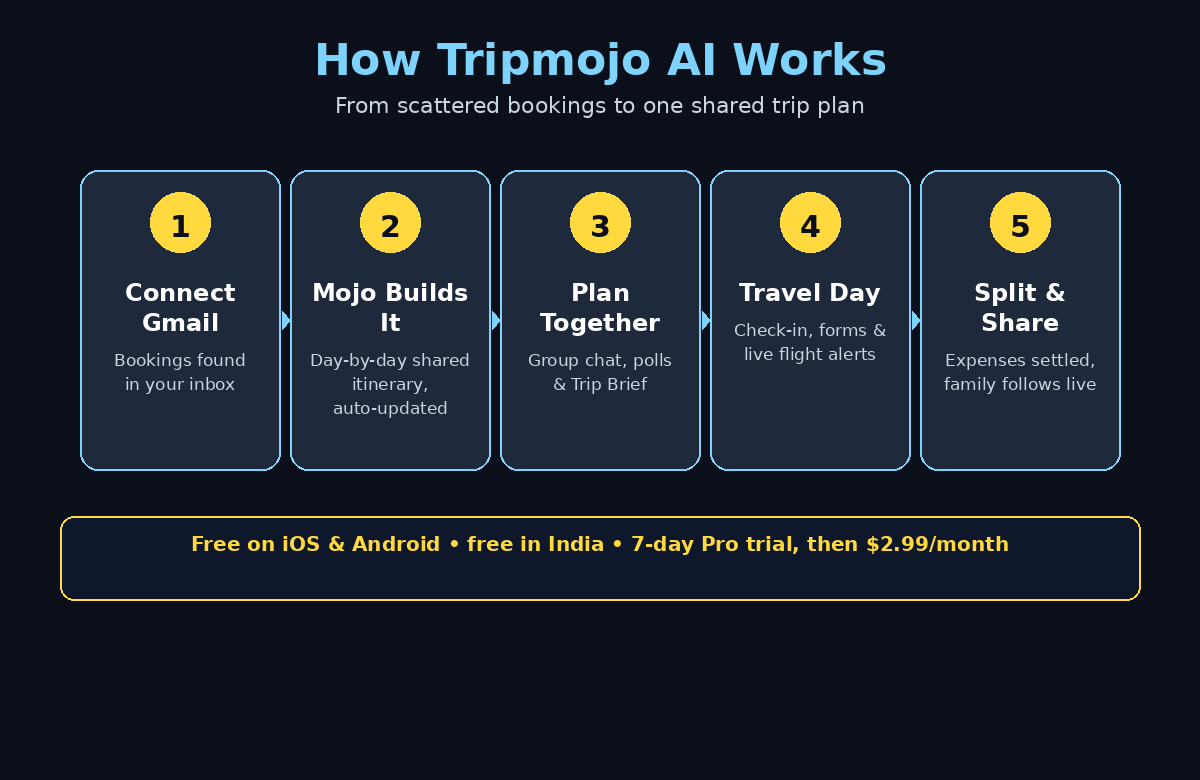
If you are learning how to use Tripmojo AI, start with the core idea. Tripmojo is not another app where you type your itinerary by hand. It is an agentic travel app, which means the AI does not just answer questions — it takes actions for you. Connect your Gmail once. Tripmojo then finds every booking email — flights from any airline, hotels from Booking.com, Airbnb or Trip.com, trains, and activities from Klook, Viator or GetYourGuide. It builds a clean, day-by-day itinerary that keeps itself up to date as new confirmations arrive.
That idea sits inside a much bigger shift. Agentic AI is software that works on your behalf instead of waiting for instructions, and travel is one of the clearest places to see it working. If you want to understand the wider trend behind tools like this, Agentic Affairs covers how agentic systems are changing everyday work. Tripmojo is simply that idea applied to your next holiday.
Here is what makes Tripmojo different from a normal trip planner:
- Your itinerary builds itself. Booking emails become a live trip plan automatically. No copying confirmation numbers into a document.
- Mojo is your AI travel agent. It answers travel questions, fills arrival forms, tries to check you in, saves your boarding pass, and flags delays before the airport screens do.
- Everyone sees the same plan. One shared link puts your whole group on the same page, with a group chat where Mojo tracks what was decided and what is still open.
- It works on travel day, not just before it. Live flight alerts, airport guides, lounge info, and an offline document wallet travel with you.
- Money is built in. A travel expense tracker splits costs in any currency, so nobody owes anyone a mystery amount after the trip.
How to Use Tripmojo AI for Free
Tripmojo is developed by Candle Studios LLC and is free on iOS and Android. It is completely free in India, while elsewhere new members start with a 7-day free trial and then pay $2.99 per month for Tripmojo Pro. Members who joined before subscriptions launched keep free access. For most beginners, the free download is more than enough to plan a full trip and see whether Mojo earns its place on your home screen.
Step 2: Download Tripmojo AI and Create Your Free Account
Getting started with Tripmojo takes about three minutes. The app is available for iPhone and Android, so use whichever phone you travel with.
- Download the app. Search for “Tripmojo” in the App Store or Google Play, or visit the official website and follow the download links from there. The app is free to install.
- Create your account. Open the app and sign up with your email address. There is no credit card asked for at sign-up, and the free trial of Pro starts only when you choose it — you can explore the free features first.
- Allow notifications. This step matters more than it looks. Flight delay alerts, gate changes, and group chat updates only help you if they reach you, so let Tripmojo send notifications when it asks.
- Set your home airport and currency. Tripmojo uses these to show flight times, prices, and expense splits in a format that makes sense to you. You can change them later in settings.
One honest note for beginners: Tripmojo is brand new — it launched on Product Hunt on November 20, 2026. Early apps change fast, so treat the official site and the app itself as the source of truth for pricing and features, and expect small rough edges in the first weeks. That is also the best time to learn it, because the free tier lets you practice on a real trip without paying anything.
Step 3: Connect Gmail So Mojo Builds Your Itinerary Automatically
This is the step that makes learning how to use Tripmojo AI feel like magic. It takes less than a minute. When you connect Gmail, Mojo reads your booking confirmations and turns them into a trip.
- Open your first trip and tap Connect Gmail. Tripmojo asks for read-only access to your inbox. It uses that access only to find travel bookings and, during a trip, card transaction alerts and receipts that help log your spending.
- Watch your itinerary build itself. The AI reads each booking email with a language model. There are no rigid templates, so it understands flights from small airlines and hotels from local operators just as well as the big names. It pulls out airports, local times, check-in dates, and confirmation codes, then places everything on a day-by-day timeline.
- Check for duplicates automatically. Every booking gets a hard identity key. For flights, it is the flight number plus departure date. For hotels, it is the property plus check-in date. So the same booking arriving twice does not create two entries.
- Stay in control. When a new email arrives, the model compares it with your existing trips. It decides whether the email is a new booking, a change to one you already have, or a cancellation. Your plan updates itself, and your group is notified.
How to Use Tripmojo AI Gmail Sync Safely
If connecting your inbox feels like a big step, remember that you can disconnect it at any time, and Tripmojo also works without it — Step 4 shows you how. But the Gmail connection is what turns Tripmojo from a nice planner into a genuinely agentic tool: the plan maintains itself while you get on with your life. The same principle applies far beyond travel. A digital agency like D365A uses AI automation in the same way, turning scattered client requests into one clear, self-updating plan instead of chasing details across five inboxes.
Step 4: Add Bookings Without Gmail — Forward Emails and Screenshots
Prefer not to link your inbox? No problem. If you want to learn how to use Tripmojo AI without connecting Gmail, there are three easy ways to add bookings by hand, and each one takes seconds.
- Forward any booking email. Send the confirmation to the forwarding address Tripmojo gives you, and it is added to your trip in seconds. This is the easiest option if you booked with a different email address.
- Drop in a screenshot. Got a confirmation buried in a WhatsApp group or a PDF? Take a screenshot and add it to the trip. The AI reads the details — flight number, dates, confirmation code — and fills in the itinerary for you.
- Add it manually. Type the flight number or hotel name yourself. Tripmojo fills in the rest from its travel data, and you can adjust anything that looks wrong.
This flexibility matters on group trips, where bookings arrive from everywhere: one friend books on Booking.com, another on Airbnb, someone else forwards a train ticket from a local operator. Instead of hunting through emails, PDFs, and screenshots for confirmation numbers, everything lands in one place. A good habit is to forward or screenshot each booking the moment you make it — thirty seconds now saves a frantic search at the airport later.
Step 5: Plan Together in the Tripmojo AI Group Chat With Mojo
Group trips usually fall apart in the group chat. Three hundred unread messages, five opinions about hotels, and nobody remembers what was actually agreed. This is where knowing how to use Tripmojo AI pays off most, because every trip gets its own group chat — with Mojo inside it.
- Invite your group from contacts or WhatsApp. Share one link and everyone is in. They see the same flights, the same hotels, and the same schedule, whether the dates are fixed or still being decided.
- Let Mojo track decisions. Mojo keeps a Trip Brief that records what the group decided and what is still open or pending. You do not have to read 300 messages to find out which hotel everyone picked.
- Settle open questions with polls. When the group cannot decide between two hotels or three restaurants, run a poll in the chat and let the votes settle it. Mojo records the result in the Trip Brief.
- Compare stays side by side. Mojo compares stays and activities and lays out a clear pick, so the group debates facts instead of feelings.
- Ask Mojo anything. Ask about your trip, a city, a booking, or what to do next. Mojo answers with cards you can act on. Add a place straight to your trip, or tap a follow-up question to go deeper.
- Turn a Reel into a plan. Saw a place in an Instagram Reel? Mojo turns it into a place on your map, so inspiration becomes part of the itinerary instead of a lost link.
How to Use Tripmojo AI Polls and the Trip Brief
You can also share photos, voice notes, locations, and stickers in the group chat, or message any co-traveler one-to-one. The point is simple: the plan, the chat, and the decisions live in one place, so the trip stops being admin work and starts being a holiday again.
Step 6: Compare Stays, Activities and Transfers Before You Book
Once your dates and flights are in place, the next step in learning how to use Tripmojo AI is comparing stays. Tripmojo helps you fill the gaps: where to stay, what to do, and how to get from the airport to your hotel.
- Search stays on a list or a map. Browse hotels and rentals, save your favorites, and compare up to three options side by side — price, location, reviews, and amenities in one view.
- Get nearby ideas wherever you land. Plan road trips, city stops, nights, and things to do. See your whole route on a map and open any stop in Google Maps. Mojo suggests nearby food and activities with live opening hours.
- Check the practical details. Mojo looks up opening hours, visa rules, and local tips on official sites. So you are not guessing whether a museum is open on Monday, or whether you need a form before you land.
- Book an airport transfer timed to your flight. Arrange a transfer that adjusts to your actual arrival time, and follow it live on the Home screen when you land.
- Stay flexible. When a booking changes, the shared plan updates automatically and everyone is notified. No more re-explaining the trip across five group chats.
A practical tip: compare stays before you commit, but do not over-plan every hour. The best trips leave room for the unexpected. Use Tripmojo to lock in the big pieces — flights, hotel, transfers — and let Mojo’s daily suggestions fill the rest as you go.
Step 7: Let Mojo Handle Check-In and Arrival Forms
Travel admin is easy to forget until the last minute at the airport. When you learn how to use Tripmojo AI for check-in, this is the step where Mojo earns its keep, because it handles the busywork while you pack.
- Switch on automatic check-in. On supported airlines, Mojo tries to check you in for you and saves the boarding pass to your trip. It uses the seat and meal preferences you set — a window seat, a vegetarian meal — so you do not have to remember them at midnight before an early flight.
- Add your frequent flyer number once. If the field is blank, Mojo prompts you to add it with one tap, so your miles are never left behind.
- Let Mojo fill arrival forms. Before you land, Mojo fills in arrival forms such as India’s Air Suvidha or the Singapore Arrival Card, using the details already in your trip. That is one less queue at immigration.
- Land online with an eSIM. Tripmojo offers eSIM data plans you can activate before arrival, so your phone works the moment you land instead of after a hunt for airport Wi-Fi.
Not every airline supports automatic check-in, and rules change, so always double-check your boarding pass the night before you fly. But for the airlines Mojo supports, this step alone can save you the most stressful hour of any trip — the one spent refreshing an airline website at 2 a.m.
Step 8: Track Flights Live With Tripmojo AI and Share With Family
On travel day, Tripmojo switches from planner to live companion. Learning how to use Tripmojo AI flight alerts is simple: every flight on your itinerary is tracked in real time, and the alerts arrive before the airport screens update.
- Get smart flight alerts. Tripmojo sends real-time alerts for flight delays, gate changes, terminal updates, and baggage belt information. When a flight changes, everyone’s shared plan updates automatically, so the whole group stays on the same page.
- Know when to leave. Mojo tells you when to head for the airport based on your flight, the terminal, and live conditions — no more guessing whether two hours is enough.
- Share one link with family back home. The people at home can watch your trip unfold in real time — including live flight status, take-off, landing, and any changes — with no app and no account needed. They stop worrying, and you stop messaging mid-journey.
- Follow everything on the Home screen. Your next flight, your transfer, your hotel check-in, and today’s plan sit in one view, so you always know what happens next.
The family link is one of Tripmojo’s most thoughtful features. Parents and partners do not want another app — they want to know you landed safely. One link does that, without a single “have you landed yet?” message.
Step 9: Split Trip Expenses in Any Currency
Nothing ruins a good trip faster than a money argument afterwards. One of the most useful parts of learning how to use Tripmojo AI is the built-in expense tracker: it sits inside the itinerary, so splitting costs happens as you go instead of in a painful spreadsheet a month later.
- Log who paid, in any currency. One person paid for dinner in euros, another booked the taxi in dirhams — Tripmojo tracks it all and converts it fairly.
- See who owes what at a glance. The running balance shows exactly who owes whom, so there are no surprises and no awkward conversations.
- Settle up in a tap. When the trip ends, settle the balances with one tap instead of chasing five friends for bank transfers.
- Let receipts log themselves. During a trip, card transaction alerts and app receipts can be logged automatically, so small expenses do not slip through the cracks.
A good habit is to log each expense the moment it happens — it takes five seconds in the app and saves an hour of detective work later. Agree with your group before the trip whether you split everything equally or track who owes what per item. Tripmojo handles both. But the conversation is easier before the first dinner than after the last one.
Step 10: Use Tripmojo AI Airport Guides, Lounges and the Offline Wallet
The final step in learning how to use Tripmojo AI covers the travel-day tools that most planners forget. That means the airport itself, and the documents you need inside it.
- Check your airport before you arrive. Find your terminal, see gate-to-gate walking times, and check live security wait times, so you know whether you have time for coffee or need to run.
- Browse shops, dining, and lounges. See what is open in your terminal and how to get into lounges, including where to buy a pass if you do not have one through a card or membership.
- Keep documents in the offline wallet. Passports, boarding passes, and visas for the whole family sit in an offline document wallet, and you can add boarding passes to Apple Wallet too. When airport Wi-Fi fails — and it will, at the worst moment — your documents still open.
- Use smart trip insights. Tripmojo gives you destination briefings: which apps to download, money and ATM advice, tipping rules, and the local customs that catch travelers out.
- Keep your loyalty points in one place. Connect Gmail and Tripmojo syncs your loyalty point balances automatically, so you know what you have before you book, not after.
How to Use Tripmojo AI on Travel Day
Put together, these ten steps turn Tripmojo from a download into a travel system. Bookings build the plan, Mojo runs the admin, the group stays aligned, and travel day runs itself. The more trips you put through it, the more it feels like a travel agent who already knows your preferences — because it does.
| Feature | Tripmojo AI | Manual planning | Basic itinerary app |
|---|---|---|---|
| Builds itinerary from bookings | Automatic from Gmail, forwards or screenshots | You type everything by hand | Mostly manual entry |
| AI travel agent (Mojo) | Answers, compares, checks you in, fills forms | None | None or chatbot only |
| Group planning | Shared plan + group chat + Trip Brief + polls | Scattered group chats | Shared view, no decisions tracking |
| Live flight alerts | Delays, gates, terminal, baggage belt in real time | You check the airport screens | Basic alerts only |
| Expense splitting | Built in, any currency, settle in a tap | Spreadsheet after the trip | Usually a separate app |
| Airport guides and lounges | Terminals, security waits, lounges, walking times | Google searches at the airport | Rarely included |
| Price | Free download; Pro $2.99/month after 7-day trial (free in India) | Free, but hours of your time | Often paid or limited free tier |
Frequently Asked Questions About Tripmojo AI
Is Tripmojo AI really free?
Yes, Tripmojo is free to download on iOS and Android, and it is completely free in India. Outside India, new members get a 7-day free trial of Tripmojo Pro, which then costs $2.99 per month. Members who joined before subscriptions launched keep free access. The free download covers the core features: itinerary building, group planning, flight alerts, and expense splitting. So you can plan a full trip before deciding whether Pro is worth it.
Do I have to connect my Gmail to use Tripmojo?
No. Connecting Gmail is the fastest way to use Tripmojo AI, because Mojo builds your itinerary from booking emails automatically, but it is optional. You can forward booking emails to Tripmojo, add screenshots of confirmations, or enter bookings manually. Your plan works the same way once the bookings are in — Gmail just saves you the typing.
How does Mojo check me in for a flight?
When you switch on automatic check-in, Mojo attempts web check-in on supported airlines using the preferences you set, such as your seat choice, meal preference, and frequent flyer number. It then saves the boarding pass to your trip and to your wallet. Not every airline supports this, so always confirm your boarding pass the night before you fly.
Can my family follow my trip without installing the app?
Yes. Share the family follow link from your trip. Anyone can watch your journey unfold in real time — live flight status, take-off, landing, and changes — with no app and no account needed. It is designed for parents and partners who just want to know you arrived safely.
Does Tripmojo work for group trips?
Group trips are Tripmojo’s strongest feature. One shared link puts everyone on the same plan, the built-in group chat keeps decisions in a Trip Brief, polls settle disagreements, and expense splitting tracks who paid and who owes in any currency. It was built for the exact chaos of planning with friends and family.
Is my booking data safe with Tripmojo?
Tripmojo connects to Gmail with read-only access and uses it only to find travel bookings and, during trips, receipts that help log spending. The AI reads booking emails through a language model. It extracts details like airports, times, and confirmation codes. Every booking is matched to your existing trips before it is added. You can disconnect Gmail at any time, and the app also works fully with forwarded emails and screenshots if you prefer not to connect your inbox.
Final Thoughts: How to Use Tripmojo AI on Your Next Trip
Learning how to use Tripmojo AI is really about unlearning the old way of planning trips. You do not need another spreadsheet, another folder of screenshots, or another group chat that nobody reads. Connect your bookings once, invite your group, and let Mojo do the admin — the check-ins, the forms, the flight alerts, the expense math — while you enjoy the trip itself.
Tripmojo is young, and it launched on Product Hunt only on November 20, 2026, so expect it to keep improving fast. But even today, the core loop works: scattered bookings become one shared plan, decisions get tracked instead of lost, and travel day runs on live information instead of guesswork. If you travel with friends or family even twice a year, that is worth the three minutes it takes to set up. Download it free, connect your bookings, and let Mojo handle the homework — your next trip starts with a plan that builds itself.
Explore More Free AI Tools
Want more free AI tools that save you time? Try our AI Title Generator, Meta Description Generator, AI Rewriter, and Keyword Density Checker — free tools from AIToolSteps that help you write, plan, and publish faster.