

Anthropic launched Claude Fable 5.2 on November 9, 2026, and it is the company’s most autonomous AI model yet. Where most chatbots answer one question at a time, Fable 5.2 is built to take a big job — build an app, research a market, refactor a codebase — and keep working on it for hours with very little direction. It is also 20 percent cheaper than the model it replaces, Fable 5.1, at 8 dollars per million input tokens and 40 dollars per million output tokens.
This guide shows you how to use Claude Fable 5.2 from zero: what it is, how it differs from Opus 5.5 and Mythos 5.2, how to access it on a paid Claude plan or through the API, how to write your first prompts, how to run a long task without losing control, and how to keep the bill small. You do not need coding experience to follow along — every step is written for a complete beginner.
Step 1: Understand What Claude Fable 5.2 Is
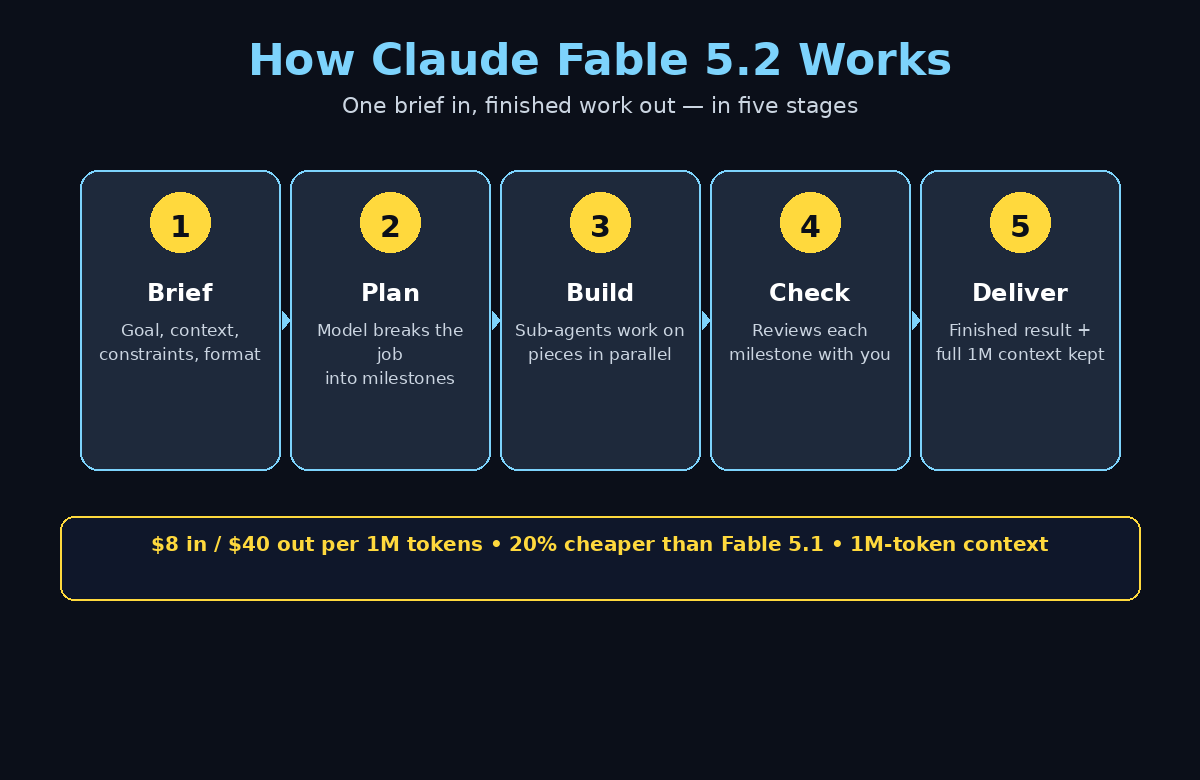
Claude Fable 5.2 is Anthropic’s long-horizon model. “Long-horizon” means it is designed for work that takes many steps and a long time: instead of answering in one shot, it plans the job, breaks it into pieces, runs sub-agents to handle the pieces in parallel, checks its own work, and comes back with a finished result. Anthropic’s launch material describes Fable 5.2 coordinating more than 1,000 sub-agents on large software builds.
Three facts define the model:
- 1 million tokens of context. It can hold roughly 750,000 words at once — whole codebases, long reports, or dozens of documents — and produce up to 128,000 tokens of output in a single run.
- 20 percent cheaper than Fable 5.1. Input fell from 10 to 8 dollars per million tokens, and output from 50 to 40 dollars. Anthropic also says output is up to 30 percent faster.
- Stronger on long coding jobs. On Anthropic’s own FrontierCode 2.0 test, which measures how often proposed code changes would be accepted into real open-source projects, Fable 5.2 scored 49.1 percent against 32.4 percent for Fable 5.1.
Fable 5.2 has a twin called Claude Mythos 5.2. They are the same underlying model — the difference is the safeguards. Fable 5.2 ships with cybersecurity and biology safeguards and is open to everyone on paid plans and the API. Mythos 5.2 has looser safeguards and is only available to organisations approved through Anthropic’s Cyber and Life Sciences Verification Programs. As a beginner, Fable 5.2 is the model you will use.
Step 2: Pick the Right Claude Model for Your Task
Fable 5.2 is powerful, but it is not the right model for everything. Anthropic itself recommends starting with Claude Opus 5.5 for most coding and knowledge tasks, calling Opus 5.5 its strongest daily driver. Use this simple rule:
- Quick questions, drafting, and everyday chat: use Sonnet or Haiku. They are faster and cheaper, and they handle short jobs perfectly.
- A normal coding or writing task that takes an hour or less: use Opus 5.5. It is Anthropic’s recommended starting point and it is strong across the board.
- A big, multi-hour job with many moving parts: use Fable 5.2. That is where its long-horizon planning and sub-agent coordination pay off — building a complete app, migrating a codebase, or researching a topic from fifty sources.
- Security or life-sciences research: that is Mythos 5.2 territory, and it is restricted to verified organisations.
Choosing the cheaper, faster model for small jobs is the single easiest way to keep your AI bill low. Fable 5.2 earns its price only when the job is genuinely long and complex.
Step 3: Get Access to Claude Fable 5.2
There is no free tier for Fable 5.2 itself. You can access it in two ways, and both need a paid route:
Option A: the Claude app. Open claude.ai or the Claude desktop or mobile app and sign in. On a Pro or Max plan, open the model picker at the top of the chat and select Claude Fable 5.2. If you are on the free plan, you can still learn the Claude interface first and upgrade when you have a real long-horizon job — that way you do not pay for a model you are not ready to use. Note that a short promotional window gave Pro users a week of Fable access capped at half their weekly allowance; that promotion ended on November 16, 2026, so do not expect free Fable access on Pro anymore.
Option B: the Anthropic API. Go to console.anthropic.com, create an account, add billing, and generate an API key. The model ID is claude-fable-5-2. Fable 5.2 is also available on Amazon Bedrock, Google Cloud, and Microsoft Foundry under the same model ID. The API route is best if you want to build Fable 5.2 into your own app or automation, or if you want precise control over costs. One condition to know: both Fable 5.2 and Mythos 5.2 require 30-day data retention, and Anthropic commits to keeping the model available until at least November 9, 2027.
Step 4: How to Use Claude Fable 5.2 for Your First Prompt
Open a new chat in Claude, pick Fable 5.2 from the model picker, and write a clear brief. Learning how to use Claude Fable 5.2 well starts with the brief: long-horizon models do their best work when the brief has four parts: the goal, the context, the constraints, and the output format. A vague prompt gets a vague result; a specific brief gets a finished job.
Try a first prompt like this:
“Build me a simple personal budget tracker as a single HTML file. It should let me add income and expenses, show a monthly total, and save everything in the browser. Use plain JavaScript, no frameworks. Before you start, list the features you will build and the order you will build them in, then build the file.”
Notice what this prompt does: it states the goal, lists the requirements, sets a constraint (plain JavaScript, no frameworks), and asks for a plan before the work starts. That plan-first habit matters with Fable 5.2, because the model will run for a long time on your brief — a good plan at the start saves you from a wrong result at the end.
Step 5: Run a Long, Multi-Step Task the Fable Way
The real power of Claude Fable 5.2 shows up when you hand it a job that would take you a full day. Here is the workflow that works best:
- Break the job into milestones in your brief. Instead of “build my website”, write “build a 5-page website for my bakery: home, menu, about, gallery, contact. Milestone 1: structure and copy. Milestone 2: styling. Milestone 3: contact form. Report back after each milestone.”
- Let it work, then review each milestone. Check the result after each stage instead of waiting for the very end. Small corrections early are cheap; a wrong direction discovered at the end is expensive.
- Use Claude Code for repository work. If your task lives in a real codebase, Claude Code runs Fable 5.2 against your files directly, so the model can read, edit, test, and fix code in place.
- Keep a human in the loop on anything that costs money or goes public. Fable 5.2 is autonomous, not unsupervised. Review code before you deploy it, and review text before you publish it.
If you run a small business and want this kind of AI workflow set up properly across your team, a digital agency can help you design it — but for learning, start with one personal project and get comfortable with the milestone habit first. Teams that want to go deeper into agent-style work can also follow practical coverage of agentic AI to see how multi-agent workflows are used in real businesses.
Step 6: How to Use Claude Fable 5.2 Through the API
If you are comfortable with a little code, the API gives you the most control. Here is a minimal request that sends one message to Fable 5.2:
curl https://api.anthropic.com/v1/messages \
  -H "x-api-key: YOUR_API_KEY" \
  -H "anthropic-version: 2023-06-01" \
  -H "content-type: application/json" \
  -d '{
    "model": "claude-fable-5-2",
    "max_tokens": 4096,
    "messages": [{"role": "user", "content": "Summarise the history of electric vehicles in 5 bullet points."}]
  }'
Replace YOUR_API_KEY with your real key, and keep that key private — never paste it into a public chat, a shared document, or a client-side web page. Set max_tokens to cap how long the reply can be, which also caps what the reply costs. For a first API test, keep max_tokens small, like 1024, and use a short prompt so the test costs a few cents at most.
Step 7: Keep Your Costs Under Control
Fable 5.2 is a premium model, so cost control is part of using it well. The price list is simple: 8 dollars per million input tokens and 40 dollars per million output tokens, with prompt-cache reads at just 0.20 dollars per million tokens and the Batch API at 4 dollars in and 20 dollars out. A fast mode is available at 16 dollars in and 80 dollars out when you need maximum speed.
Do the maths on a typical task. Sending 100,000 input tokens (about 75,000 words of context) costs about 0.80 dollars, and receiving 20,000 output tokens (about 15,000 words) costs about 0.80 dollars. A solid hour-long coding job often lands between 2 and 5 dollars. That is cheap for a finished app — but long autonomous runs can climb fast if you are not watching: one public test that asked Fable 5.2 to build a game level reportedly ran to thousands of dollars in API usage, so always set a budget.
Five habits keep the bill small:
- Reuse context with prompt caching. Send the same large document once and cache it, instead of re-sending it in every message.
- Use the Batch API for non-urgent jobs. It costs half price if you can wait for the result.
- Ask for short outputs first. Get a plan or an outline, approve it, and only then ask for the full build.
- Pick Opus 5.5 or Haiku for short jobs. Do not pay Fable prices for a five-minute task.
- Set a spending limit in the API console. A hard cap means a runaway task stops itself instead of surprising you.
Step 8: Use Claude Fable 5.2 for Research and Writing
Fable 5.2 is not only a coding model. Its 1-million-token context makes it a strong research partner: upload a pile of sources — PDFs, reports, web pages, spreadsheets — and ask it to synthesise them into one structured answer.
A good research brief looks like this: “Here are 12 sources about the electric scooter market. Read all of them, then write a 1,000-word briefing with three sections: market size, top five brands, and risks for a new seller. Cite the source for every number.” The citation instruction matters — it forces the model to ground its claims in your files instead of guessing.
For writing, use Fable 5.2 for long structured documents: a business plan, a course outline, a product requirements document, or a 30-page report. Give it your sources and a clear outline, let it draft section by section, and edit each section before moving on. The model writes clean, organised drafts — but you are still the editor. Check every number, every quote, and every claim against the source before you publish anything.
Step 9: Know the Limits Before You Rely on It
Every model has edges, and Fable 5.2 is no exception:
- It is not free. There is no free tier for Fable 5.2. Budget for paid Claude plans or API usage before you build a workflow around it.
- It can be expensive on huge jobs. Long autonomous runs burn tokens fast. Set limits and review milestones.
- It has safeguards. Fable 5.2 will refuse cybersecurity and biology misuse — that is the point of the Fable and Mythos split. If your work is in those fields, Mythos 5.2 exists for verified organisations.
- It can still be wrong. Benchmarks are Anthropic’s own launch numbers, and independent testing takes weeks. The model can misunderstand a brief, invent a detail, or choose a worse approach than a human expert would. Verify important outputs.
- Data retention applies. API use of Fable 5.2 requires 30-day data retention, so do not send highly sensitive data you are not comfortable having retained for a month.
Knowing these limits up front is what separates a beginner who gets burned from one who gets real value.
Step 10: A Simple First-Week Plan With Claude Fable 5.2
Do not try to master the model in one sitting. Follow this one-week plan instead:
- Day 1–2: Learn the Claude interface on the free plan with Sonnet or Haiku. Practise writing clear four-part briefs.
- Day 3: Upgrade or add API credits, then run one small Fable 5.2 task — a single-file web page or a short research summary. Check the cost in the console afterwards.
- Day 4–5: Run one real project end to end with milestones: a small app, a report, or a content plan. Review each milestone before the next one starts.
- Day 6: Try the API with the curl example above, and set up prompt caching on a document you reuse often.
- Day 7: Review your week’s spend, note which jobs were worth Fable prices and which were not, and write down your personal rule for when to pick Fable 5.2 over Opus 5.5.
After one week you will know exactly when Fable 5.2 earns its price — and when the cheaper models do the job just as well.
Claude Fable 5.2 vs Other Claude Models
Fable 5.2 sits at the top of Anthropic’s lineup for long, autonomous work, but the rest of the family still has its place. Here is the comparison that matters for a beginner.
| Model | Best for | Price per 1M tokens (input / output) | Who can use it |
|---|---|---|---|
| Claude Fable 5.2 | Long autonomous coding, research, and agent work | $8 / $40 | Paid Claude plans + API |
| Claude Fable 5.1 | Previous long-horizon model | $10 / $50 | Paid Claude plans + API |
| Claude Mythos 5.2 | Same model as Fable 5.2, security and life-sciences work | $8 / $40 | Verified organisations only |
| Claude Opus 5.5 | Daily driver — most coding and knowledge tasks | Paid plans + API | Paid Claude plans + API |
The takeaway is simple: Opus 5.5 is Anthropic’s recommended starting point for most work, and Fable 5.2 is the specialist you call in when the job is long, complex, and worth the premium. Independent benchmark trackers scored Fable 5.2 slightly ahead of Opus 5.5 overall, but that edge only matters on the long-horizon jobs Fable was built for.
Frequently Asked Questions About Claude Fable 5.2
Is Claude Fable 5.2 free?
No. Fable 5.2 has no free tier — it is available on paid Claude plans (Pro and Max) and through the Anthropic API at 8 dollars per million input tokens and 40 dollars per million output tokens. You can learn the Claude interface for free on the free plan, and Fable 5.2 is 20 percent cheaper than the Fable 5.1 model it replaces, which makes it the cheapest long-horizon Claude model so far.
What is the difference between Claude Fable 5.2 and Mythos 5.2?
They are the same underlying model with different safeguards. Fable 5.2 has cybersecurity and biology safeguards and is open to everyone on paid plans and the API. Mythos 5.2 has looser safeguards and is only available to organisations approved through Anthropic’s Cyber and Life Sciences Verification Programs. Both cost the same: 8 dollars in and 40 dollars out per million tokens.
How do I start using Claude Fable 5.2?
In the Claude app, pick Fable 5.2 from the model picker on a Pro or Max plan. Through the API, use the model ID claude-fable-5-2 with your Anthropic API key — it is also available on Amazon Bedrock, Google Cloud, and Microsoft Foundry. The model launched on November 9, 2026, and Anthropic commits to keeping it available until at least November 9, 2027.
Is Claude Fable 5.2 better than Claude Opus 5.5?
It depends on the job. Anthropic recommends starting with Opus 5.5 for most coding and knowledge tasks. Fable 5.2 leads on long, autonomous benchmarks — 49.1 percent against 32.4 percent for Fable 5.1 on FrontierCode 2.0 — and independent trackers scored it slightly ahead of Opus 5.5 overall. For short tasks, Opus 5.5 is the better pick; for multi-hour autonomous work, Fable 5.2 is the specialist.
How much does Claude Fable 5.2 cost in practice?
At 8 dollars per million input tokens and 40 dollars per million output tokens, a typical hour-long coding job costs roughly 2 to 5 dollars. Prompt-cache reads cost just 0.20 dollars per million tokens, and the Batch API halves the price to 4 dollars in and 20 dollars out. Set a spending limit in the API console so a long autonomous run cannot surprise you.
What is the context window of Claude Fable 5.2?
Fable 5.2 has a 1-million-token context window — about 750,000 words — with up to 128,000 tokens of output per run. Its knowledge cutoff is June 2026. The huge context is what lets it hold whole codebases or dozens of research sources in mind while it works.
Final Thoughts
Claude Fable 5.2 is the most capable long-horizon model Anthropic has shipped: cheaper than its predecessor, faster, stronger on autonomous coding, and able to hold a million tokens of context while it works. For a beginner, the honest way to use Claude Fable 5.2 is to start small — learn the interface on the free plan, run one small paid task, watch the cost, and only then hand it a big multi-hour job with clear milestones.
Used that way, Fable 5.2 is not just a fancier chatbot. It is the first Claude model that can genuinely take a whole job off your desk and bring back finished work. Pick one real project this week, write it a proper four-part brief, and see what it brings back.
Explore More Free AI Tools
Claude Fable 5.2 is one of many AI tools that make everyday work easier. Explore more on AIToolSteps — including the AI Title Generator, Meta Description Generator, AI Rewriter and Keyword Density Checker — all free, all built for beginners.