

Microsoft just dropped a specialist AI model that beats OpenAI’s flagship on a real-world security test — at less than 2% of the cost. It is called MAI Cyber 2 Flash, and if you write code, run a website, or look after any business systems, this guide will show you exactly what it does, how to get access to it, and how to use it the moment it reaches you.
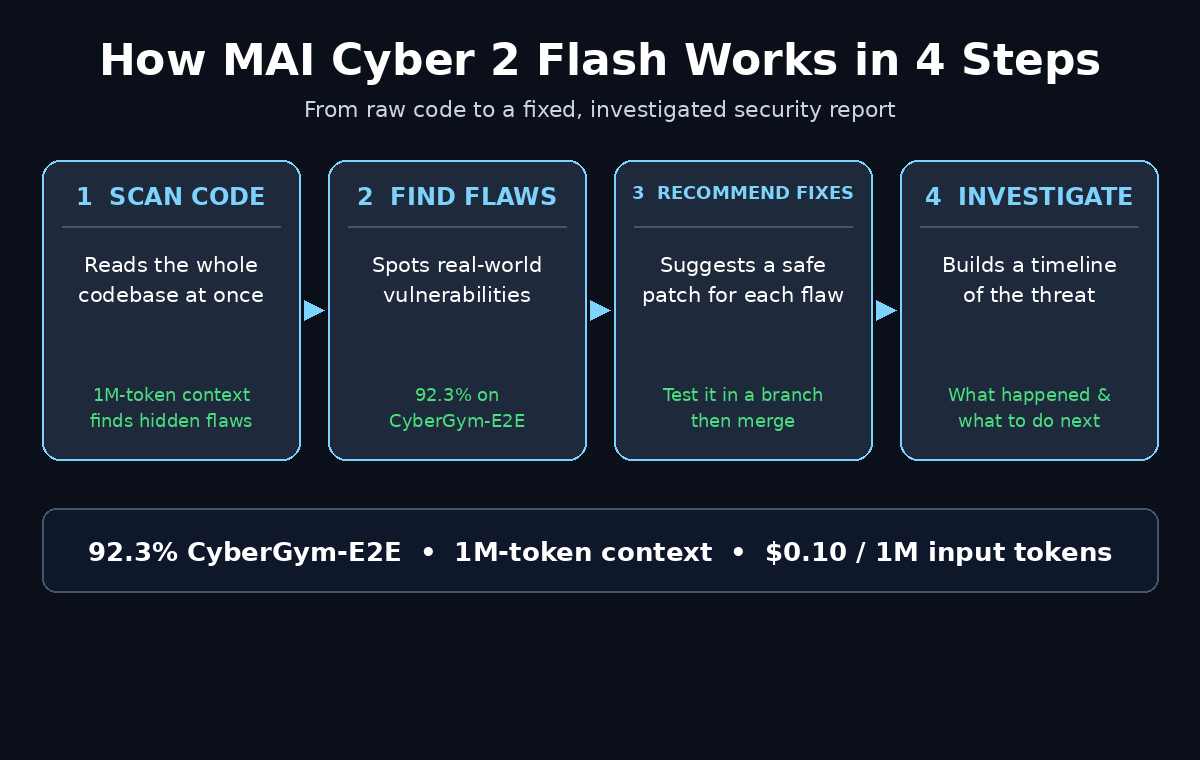
Announced at Microsoft Ignite on November 17, 2026, MAI Cyber 2 Flash is a cybersecurity model from Microsoft AI (MAI) built for three jobs: finding vulnerabilities in code, recommending fixes, and investigating threats. It scored 92.3% on CyberGym-E2E, a benchmark that measures real-world vulnerability discovery, beating GPT-6 Astra’s 91.5% while using half the reasoning budget. And it does this with a one-million-token context window — four times larger than its predecessor, MAI Cyber 1.1 Flash — so it can hold an entire codebase in memory during a long, multi-step investigation.
Here is the honest part up front: MAI Cyber 2 Flash is not a chatbot you can sign up for today. Microsoft is bringing it exclusively to its own security products, starting with Codename MDASH, where it will automatically replace the current model in the MAI profile for eligible customers from mid-December 2026. This guide explains how to prepare now, how to get access, and how to use the workflow step by step — plus what you can use today while you wait.
Step 1: Understand What MAI Cyber 2 Flash Actually Is
MAI Cyber 2 Flash is a specialist model, not a general-purpose chatbot. Microsoft trained it on decades of its own proprietary security data — the same data behind Microsoft Defender and its threat-intelligence teams — so it understands vulnerabilities the way a senior security analyst does.
Its three core jobs are:
- Vulnerability discovery: scanning code to find security flaws before attackers do.
- Fix recommendations: suggesting concrete, safe patches for the flaws it finds.
- Threat investigation: tracing suspicious activity through logs and systems to explain what happened.
Microsoft says the model runs up to 90% of security tasks on its own, while larger models handle only the hardest cases. That is the whole point of a “Flash” model: fast, cheap, and good enough for the everyday work, with the heavy models kept in reserve.
Step 2: Learn Why the 1M-Token Context Window Matters
A context window is how much text a model can hold in its working memory at once. Most chatbots forget the beginning of a long conversation. MAI Cyber 2 Flash can hold one million tokens — roughly 750,000 words, or several hundred thousand lines of code.
For security work, that changes everything:
- It can read your whole codebase at once instead of one file at a time, so it spots flaws that only appear when two distant parts of the code interact.
- It can follow a multi-step attack chain through logs, config files, and code without losing the thread.
- It can compare a new vulnerability report against your entire dependency tree to see what is actually affected.
This is four times the context of MAI Cyber 1.1 Flash, and it is the main reason the model can handle long, complex investigations that used to need a human analyst working for hours.
Step 3: Check the Benchmarks and the Price
Before you trust any AI tool with your security, look at the numbers. Here is what Microsoft reported at Ignite:
- CyberGym-E2E: 92.3% task success, versus 91.5% for GPT-6 Astra.
- WebExploitBench: 40.4% — a benchmark for web exploitation tasks.
- Cost per task: $0.45 in Microsoft’s offline evaluation, versus $34.38 for GPT-6 Astra — less than 2% of the cost.
- List price: $0.10 per million input tokens, $0.01 for cached input, and $0.50 per million output tokens.
One fair caveat: Microsoft excluded 92 of the benchmark’s 905 tasks because they overlapped with projects and vulnerability reports in its training data, leaving 813 tasks — and the comparisons are Microsoft’s own. Even with that caveat, a model that matches a frontier model at under 2% of the cost is a big deal for small teams and solo developers who could never afford GPT-6 Astra for routine scanning.
Step 4: Know Where You Will Actually Use It — Codename MDASH
MAI Cyber 2 Flash is coming exclusively to Microsoft security products. There is no public API and no standalone app to download. The first place it lands is Codename MDASH, Microsoft’s security scanning platform, where it replaces the existing model in the MAI profile for eligible customers starting in mid-December 2026.
What that means in practice:
- If your organisation already uses Microsoft security products, check whether your plan includes Codename MDASH access.
- If you are eligible, the model arrives automatically — no separate purchase or install.
- If you are not a Microsoft security customer yet, the practical route is through Microsoft Defender or the Microsoft security suite, which is where the model will surface for most users.
For a small business or a freelancer, the simplest preparation is to make sure your Microsoft account and security products are up to date, so the rollout reaches you without a delay. A digital agency that manages Microsoft environments for clients can also check eligibility and plan the rollout for you.
Step 5: Prepare Your Codebase Before the Rollout
The model is only as useful as the code you give it. Use the weeks before mid-December to get your projects ready:
- Put everything in version control. If your code is not in Git yet, move it there now — the model works best when it can see the full history of a file, not just the latest version.
- List your dependencies. Write down every library and package your project uses, with versions. The model can then check each one against known vulnerabilities.
- Clean up dead code. Old, unused files create noise. Remove them so scans focus on code that actually runs.
- Note your sensitive areas. Mark the files that handle logins, payments, and personal data — these are the first places the model should look.
This preparation takes an afternoon, and it makes every future scan faster and more accurate, whatever tool you use.
Step 6: Run Your First Vulnerability Scan
Once MAI Cyber 2 Flash is live in your Microsoft security product, your first scan is simple:
- Open the security dashboard in Codename MDASH or your Microsoft security product and select the project or repository to scan.
- Start a full scan. Because the 1M-token context can hold the whole codebase, choose the full-project scan rather than a single-file check for your first run.
- Wait for the findings list. The model returns each suspected vulnerability with the exact file and line, what the flaw is, and how serious it is.
- Sort by severity. Fix critical and high-severity items first — these are the flaws an attacker would exploit today.
Do not panic at a long findings list. A first scan always finds more than you expect, including low-risk items that have sat in the code for years. Work through the list in severity order and you will make real progress in a single afternoon.
Step 7: Apply the Fix Recommendations Safely
Finding a flaw is only half the job. MAI Cyber 2 Flash also recommends a fix for each one. Use them like this:
- Read the explanation first. The model explains why the code is vulnerable — understanding the cause stops you from repeating the mistake.
- Apply the fix in a test branch, never directly on your live code. Run your tests, then review the change yourself before merging.
- Re-scan after fixing. Run the scan again on the patched code to confirm the flaw is gone and the fix did not introduce a new one.
- Keep a fix log. A simple note of what was found, what you changed, and when, becomes proof of good security practice for clients and auditors.
For teams without a dedicated security person, this guided fix loop is the real value of the model: it turns a scary findings list into a plain to-do list. If the fixes touch customer-facing systems, AI automation services can help you build the scan-and-fix routine into your normal release process so nothing slips through.
Step 8: Use It to Investigate a Threat
The third job of MAI Cyber 2 Flash is threat investigation — figuring out what happened when something looks wrong. Here is a beginner-friendly workflow:
- Collect the evidence: the alert, the relevant logs, and the time window when the suspicious activity happened.
- Ask the model to build a timeline of events in plain language: what happened first, what happened next, and which systems were touched.
- Ask what the attacker was after — data theft, a foothold for later, or a test of your defences.
- Ask for the next three actions to contain the incident, in order of urgency.
Because the model can hold a million tokens of logs and code at once, it can connect events that look unrelated in isolation — a failed login here, a strange file change there — and show you the full picture. Always verify its conclusions against your own logs before acting on them, especially for anything that locks users out or takes a system offline.
Step 9: Compare MAI Cyber 2 Flash With the Alternatives
How does it stack up against the tools you may already know? This table gives a quick beginner-level comparison:
| Tool / Model | Best For | Context Window | Cost per 1M Input Tokens | How You Get It |
|---|---|---|---|---|
| MAI Cyber 2 Flash | Vulnerability discovery, fix advice, threat investigation | 1M tokens | $0.10 | Microsoft security products (MDASH), from mid-Dec 2026 |
| GPT-6 Astra | Frontier general reasoning, including security tasks | Large | Much higher (about 50x per task) | OpenAI API / ChatGPT plans |
| GitHub Copilot | Code writing with security suggestions as you type | Varies | Subscription | GitHub Copilot plans |
| Microsoft Defender | Everyday device and cloud threat protection | Not applicable | Subscription | Microsoft 365 / Defender plans |
The honest summary: MAI Cyber 2 Flash is the specialist. GPT-6 Astra is the generalist that can do security among many other things, at a much higher price. GitHub Copilot and Defender are the tools you can use today while you wait for the MDASH rollout.
Step 10: Use Free Alternatives While You Wait for Access
Mid-December is only a few weeks away, but do not leave your code unscanned until then. These free options cover the same ground today:
- GitHub Copilot Autofix and code scanning: free for many open-source projects, and it flags common vulnerabilities as you write.
- Microsoft Defender free tier: basic device and identity protection while you set up the full suite.
- Dependabot alerts on GitHub: free, automatic alerts when a dependency you use has a known vulnerability.
- OWASP ZAP: a free, open-source web application scanner that finds the classic flaws in any site you run.
Run one of these today, fix what it finds, and you will already be in a stronger position when MAI Cyber 2 Flash arrives — and its first scan will have far less to complain about.
Step 11: Build a Weekly Security Habit Around the Model
A security model only helps if you use it regularly. Set up a simple weekly routine:
- Monday: run a full scan on any code changed in the past week.
- Tuesday: fix the critical and high-severity findings, in a test branch first.
- Wednesday: re-scan the patched code and update your fix log.
- Monthly: review dependency alerts and update any library with a known vulnerability.
Thirty minutes a week is enough for a small project, and it is the difference between a site that gets quietly compromised and one that stays clean. The model’s low cost is what makes this routine affordable — at $0.10 per million input tokens, a weekly full-codebase scan costs pennies, not the tens of dollars a frontier model would charge.
Step 12: Avoid the Common Beginner Mistakes
New users make the same few mistakes with security AI. Avoid them:
- Do not trust the model blindly. It can miss flaws and it can flag safe code. Always review findings before changing production code.
- Do not paste secrets into any AI tool. Never include real passwords, API keys, or customer data in a scan prompt or a code sample.
- Do not scan only the new code. Old code is where most vulnerabilities hide — scan the whole project.
- Do not ignore low-severity findings forever. They are low risk today, but attackers chain small flaws together into big ones.
- Do not assume one scan means you are secure. New vulnerabilities are disclosed every day. Scanning is a habit, not a one-time event.
Frequently Asked Questions
Is MAI Cyber 2 Flash free to use?
There is no standalone free plan. It comes exclusively through Microsoft security products, starting with Codename MDASH for eligible customers from mid-December 2026. The model’s list price is very low — $0.10 per million input tokens and $0.50 per million output tokens — but you access it through a Microsoft security subscription, not as a separate signup.
How is MAI Cyber 2 Flash different from MAI Cyber 1.1 Flash?
The new model has a one-million-token context window, four times larger than its predecessor, and much stronger benchmark results — 92.3% on CyberGym-E2E. It also costs less per output token. Microsoft is replacing the old model with the new one inside MDASH automatically.
Can beginners use MAI Cyber 2 Flash without security experience?
Yes. The model explains each finding in plain language and recommends a specific fix, so you do not need to be a security expert to act on its results. You do need basic familiarity with your own codebase and with testing changes before they go live.
Does MAI Cyber 2 Flash replace a human security expert?
No. It handles the routine 90% of scanning and investigation work, but the hardest cases still go to larger models and human analysts. Treat it as a very fast junior analyst: excellent at finding and explaining problems, with a human making the final call.
When will MAI Cyber 2 Flash be available?
Microsoft announced it on November 17, 2026, at Ignite. Eligible Codename MDASH customers are scheduled to receive it automatically in their MAI profile starting in mid-December 2026. Wider availability inside other Microsoft security products has not been dated yet.
Is my code safe when scanned by MAI Cyber 2 Flash?
Scanning happens inside Microsoft’s own security products, under your existing Microsoft data agreements. Even so, follow the golden rule: never include real passwords, API keys, or customer personal data in code you send to any AI tool. Use test data wherever possible.
Final Thoughts
MAI Cyber 2 Flash is not another chatbot — it is a specialist that does one job, security, at frontier quality for a fraction of the price. A 92.3% score on real-world vulnerability discovery, a million-token memory that can hold your whole codebase, and a price that makes weekly scanning affordable for anyone, not just big companies.
The catch is access: it arrives through Microsoft security products, not a public signup, and the first rollout lands in mid-December 2026. That gives you a few weeks to prepare — clean up your code, list your dependencies, run a free scan today — so that when the model arrives, your first scan is fast, focused, and useful.
Start small, scan weekly, fix in severity order, and let the model handle the routine work while you keep the final say. That is how a beginner turns a brand-new AI model into a real security habit.
Explore More Free AI Tools
Want to keep exploring? Try the free tools on AIToolSteps: the AI Title Generator for headlines that get clicks, the Meta Description Generator for search snippets, the AI Rewriter to polish your drafts, and the Keyword Density Checker to keep your SEO on track.