

Picture a small team where every member has an AI helper that never sleeps: one finds new customers while you sleep, another drafts your social posts before breakfast, and a third turns a messy pile of research into a clean brief. That is the promise of Frevana AI. It is a platform where you build and run AI agent apps that grow your business — and with its new Multiplayer launch, your whole team can now work in the same AI workspace, side by side with those agents. In this beginner-friendly guide, you will learn how to use Frevana AI step by step, from your first ready-made app to a shared workspace your teammates actually enjoy using.
Frevana AI climbed to number two on the Product Hunt leaderboard in mid-November 2026, backed by a16z, Craft Ventures, and OpenAI. The timing is no accident. Businesses everywhere are discovering that a chatbot you have to prompt over and over is only half the story. An agent app is different: you describe a job once, and it keeps doing that job — finding leads, creating content, or automating busywork — until you tell it to stop. Frevana packages that power into ready-to-use apps anyone can run, no coding required.
Whether you run a one-person shop, a small marketing team, or a growing startup, this guide will show you exactly how to use Frevana AI without any technical background. Let us start with what the tool actually is.
Step 1: Understand What Frevana AI Actually Does
Before you click anything, it helps to understand the three ideas behind Frevana AI. First, there is the agent app — a ready-to-use AI program built for one business job, such as finding customers, creating content, or doing research. Second, there is the workspace — the shared room where your team and your agents work together. Third, there is Multiplayer — the new layer that lets humans and agents collaborate in that room, share what works, and build on each other’s work.
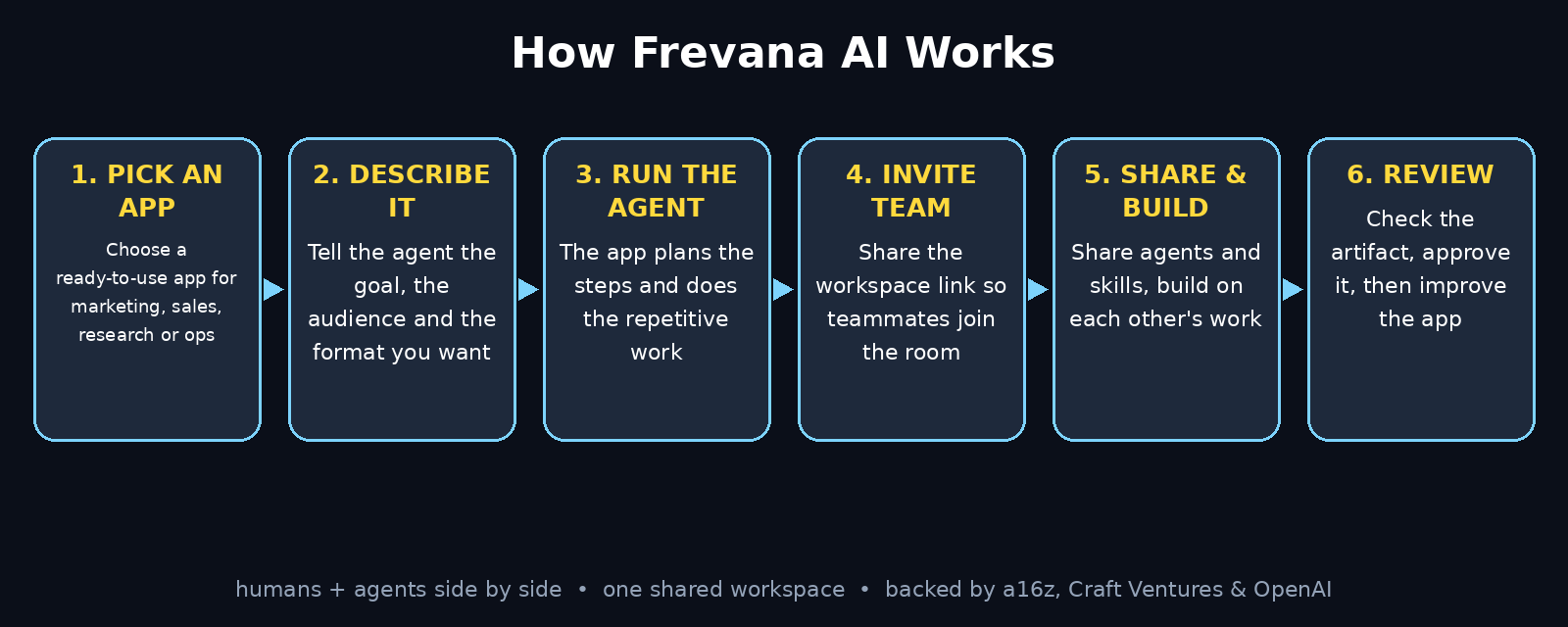
Unlike a plain chatbot, however, an agent app does not wait for your next prompt. You give it a goal — for example, “find 20 small e-commerce brands that might need our service” — and it plans the steps, uses tools, and returns finished work. You stay in charge of the goal and the final say, while the agent handles the repetitive middle.
Think of it like hiring a very fast junior assistant who never gets tired. The assistant still needs clear instructions, and you still check the work — but the hours it saves are real. Learning how to use Frevana AI is really about learning to delegate that way: one clear job, one clear output, and a quick review before anything goes out.
Step 2: Why Agent Apps Beat Chatting With a Chatbot
Chatbots are brilliant for one-off questions. They fall apart when a job repeats every day. Every morning you would have to re-explain the context, re-paste the same instructions, and re-check the same format. An agent app remembers the job. You set it up once, and it runs the same way every time, with the same quality bar.
There are three practical advantages beginners notice first. The first is consistency: a content app produces every post in your brand voice, not a different voice each day. The second is memory: the app keeps your goals, your audience, and your past results in one place. The third is teamwork: with Multiplayer, the app your colleague built becomes your app too, so good workflows spread across the team instead of living in one person’s chat history.
This is also why learning how to use Frevana AI pays off so quickly for small businesses. If you run a small digital agency, for example, every client brings the same repeating jobs: research, outreach, reporting, content. An agent app turns each repeating job into a reusable tool, and Multiplayer lets the whole agency share it. The result is not more software — it is more hours back in your week.
Step 3: Create Your Frevana Account and Open the Workspace
Getting started takes only a few minutes. Head to frevana.com and create your account with your work email. The sign-up is designed for beginners: no credit card maze, no server setup, no code. Once you are in, Frevana drops you into your workspace — the home base where your agent apps live.
First, take five minutes to look around before you run anything:
- Browse the ready-to-use apps — Frevana ships with apps for marketing, sales, research, and operations, so you can start with a proven workflow instead of a blank page.
- Check your workspace settings — give the workspace your business name, so teammates instantly know they are in the right room.
- Note where results land — every app run saves its output in the workspace, so you can find last week’s research without digging through chat logs.
- Skim the getting-started tips — the short in-app guidance explains the few terms you need, such as apps, runs, and artifacts, in plain language.
A calm first five minutes saves a confused first hour. When you know where apps live and where results go, the rest of this guide moves fast.
Step 4: Pick a Ready-to-Use App for Your First Job
Your first run should use a ready-to-use app, not a custom build. Frevana offers apps across the four areas most small teams care about: marketing (content, campaigns, social posts), sales (finding customers, outreach lists), research (market scans, competitor summaries), and operations (busywork, reports, organisation).
When you are learning how to use Frevana AI, choose the job that hurts most right now. A good first job has three traits: it repeats weekly, it takes you more than an hour, and its output is easy to judge. “Draft five social posts about our new service” is a great first job. “Redesign our whole brand strategy” is not — it is too vague to judge, and a beginner will not know whether the output is good.
Open the app and read its description carefully. Each ready-to-use app tells you what it needs from you — usually a short description of your business, your audience, and the goal — and what it will hand back. If an app asks for something you do not have yet, pick a simpler one. Your first win should arrive in minutes, not after a day of preparation.
Step 5: Run Your First Agent App
Running an app is where learning how to use Frevana AI clicks into place. Open the app you chose, and fill in its inputs in plain language. Be specific about the goal, the audience, and the format you want. “Find 20 independent coffee shops in Lahore that sell beans online, and list each shop’s name, website, and Instagram handle in a table” will beat “find coffee shops” every single time.
Here is what a typical first run looks like:
- Describe the job — one or two sentences: what you want, who it is for, and what good looks like.
- Add your context — paste your website address, a short description of your product, or a sample of your tone. Context is what turns generic output into yours.
- Press run and watch — the app shows its progress as it works through the steps, so you can see what it is doing instead of staring at a spinner.
- Review the artifact — the finished result appears as an artifact in your workspace: a document, a list, or a draft you can open, edit, and share.
- Save what works — if the run was good, keep the artifact. It becomes the starting point for next week’s run, and later, for your teammates.
For example, do not expect perfection on run one — expect a solid first draft that saves you an hour instead. Edit it, note what to change in the instructions, and run it again. The second run is usually dramatically better — and that quick loop is the whole skill.
Step 6: Invite Your Team With a Link
This is where Frevana Multiplayer changes the game. Instead of your agent apps living only in your account, you can invite teammates into the same workspace with a simple link. No complicated admin console, no per-person setup marathon — share the link, and your team joins the room where the agents already work.
To invite your team, open the workspace sharing option and copy the invite link. Send it to the people who will actually use the apps — your marketer, your salesperson, your assistant — and tell each of them which app to try first. A link with no direction gets ignored; a link plus “try the content app and draft next week’s posts” gets used the same day.
As a result, when a teammate joins, they see the same workspace, the same apps, and the same artifacts you do. They can run an app themselves, open your past results, and pick up exactly where you left off. That shared visibility is the point: the workspace becomes the team’s memory, not just yours. If you follow the world of agentic AI closely, you will recognise this as the shift everyone is talking about — agents moving from personal assistants to team members.
Step 7: Share Agents and Skills Across the Team
Once your team is in the room, the real multiplier kicks in: sharing. In Frevana Multiplayer, a workflow that works for one person becomes everyone’s workflow. The outreach list builder you tuned for three weeks, the research app you taught your brand voice — any teammate can reuse them without rebuilding anything.
Sharing is the habit that turns one person’s first experiments with how to use Frevana AI into a library the whole team trusts. Make it stick with three simple rules:
- Name apps by their job — “Weekly LinkedIn drafts” is findable; “My agent” is not. Clear names are how a shared library stays usable.
- Write one line of instructions on each shared app — what it is for, what input it needs, and what good output looks like. Future-you will thank present-you.
- Share the wins in the workspace — when an app produces a great result, say so where the team can see it. Shared wins teach the team faster than any training doc.
The goal is a library, not a pile. Five shared apps the whole team trusts beat fifty half-finished experiments nobody can find. Review the shared apps once a month, retire the ones nobody runs, and polish the ones everyone depends on.
Step 8: Build Your Own Agent App Without Coding
Ready-to-use apps cover the common jobs. Your business also has uncommon ones — and that is where building your own app comes in. In Frevana, you build an app by describing it, not by coding it. Start from a job you already do by hand, and write down the steps exactly as you would explain them to a new hire.
A good custom app description has four parts. First, the trigger: when does this job start — every Monday, when a new lead arrives, when a campaign ends? Second, the inputs: what does the app need — a website, a spreadsheet, a short brief? Third, the steps: the order of work, written as numbered actions. Fourth, the output: the exact format you want back — a table, a one-page brief, five post drafts.
Finally, build the smallest version first. A one-step app that drafts a weekly report beats a ten-step monster that never finishes. Run it, fix the weakest step, and add one capability at a time. Within a week you will have an app that does a real job, built from a paragraph of plain English — no code, no developer, no waiting.
Step 9: Work in the Same Room, on the Same Artifact
Multiplayer’s most underrated feature is the shared artifact. In most tools, one person writes a draft, exports it, and emails it — and three versions appear by lunchtime. In Frevana, the team and the agents work on the same artifact in the same room. You open the result, your teammate adds a note, the agent revises a section, and everyone sees the same current version.
Use this the way good teams use a shared document:
- One artifact per job — the campaign brief lives in one place. Duplicates are where confusion breeds.
- Comment before you rewrite — if a teammate’s run missed the mark, leave a short note on what to change instead of silently redoing it. The note teaches the next run.
- Let agents pick up where humans stop — draft the outline yourself, let the agent fill in the research, then take back the final edit. The handoff, in either direction, is the workflow.
- Freeze the final version — when an artifact is approved, mark it clearly so nobody keeps editing the version that already went out.
Teams that learn how to use Frevana AI this way stop losing work between tools. The workspace holds the job, the artifact holds the result, and the history shows who — human or agent — did what.
Step 10: Review, Approve, and Keep Improving
Agent apps are powerful, which is exactly why the review step matters. Nothing an agent produces should reach a customer without a human glance. Therefore, build a short review habit into every workflow: read the output, check the facts, fix the tone, and only then publish or send.
Here are the five mistakes beginners make most with Frevana AI, and the fix for each:
- The job description is too vague. “Do some marketing” produces generic work. Write the goal, the audience, and the format, and quality jumps immediately.
- Nobody checks the output. Agents can hallucinate a price, a date, or a claim. A two-minute fact check before publishing prevents an embarrassing correction later.
- Everyone builds their own copy. Five versions of the same app is five times the maintenance. Share one good app instead of cloning it.
- The team never learns the wins. If only one person knows the content app works, the team keeps doing it by hand. Announce good results in the workspace.
- Apps are never retired. A stale app with old instructions quietly produces outdated work. Review your library monthly and delete or refresh what no longer fits.
Keep a simple weekly rhythm: Monday, run the scheduled apps; Wednesday, review what they produced; Friday, improve one app’s instructions. That loop — run, review, improve — is how a beginner’s workspace becomes a team’s advantage in a month.
Frevana AI vs Chatbots vs Hiring Help vs DIY Automation
| Feature | Frevana AI | Chatbot (ChatGPT-style) | Hiring a Freelancer | DIY Automation (Zapier-style) |
|---|---|---|---|---|
| Repeats a job on its own | Yes — agent apps run the job | No — needs a new prompt every time | Yes, if you manage them | Yes, for fixed rules only |
| Team shares the workflow | Yes — Multiplayer workspace | No — chats stay personal | Yes, through the person | Partly — shared accounts |
| Handles judgement calls | Yes — agents reason about the goal | Yes, one answer at a time | Yes — human judgement | No — only if/then rules |
| Coding needed | No | No | No | Often, for advanced flows |
| Cost model | Workspace apps, usage-based | Subscription per user | Per hour or per project | Per task / per month |
| Best for | Teams automating repeat business jobs | Quick one-off questions | Specialist creative work | Simple fixed triggers |
On the other hand, if you only need an answer once, a chatbot is faster. If the job is a fixed trigger — “when X happens, do Y” — a classic automation tool is enough. But when a job repeats, needs judgement, and belongs to a team, Frevana AI is the strongest choice of the four: the app remembers the job, the workspace shares it, and the agent does the repetitive middle while your team keeps the decisions.
Frequently Asked Questions
Is Frevana AI free?
You can get started with Frevana’s ready-to-use apps and explore the workspace without a big upfront commitment — the platform is built to let beginners try agent apps before scaling up. Check the pricing page on frevana.com for the current plan limits before running large team workflows, since plans change as the product grows.
Do I need coding skills to use Frevana AI?
No. You run ready-to-use apps by filling in plain-language inputs, and you build your own apps by describing the job in words. There is nothing to install and no code to write — if you can explain a task to a colleague, you can build it in Frevana.
What is Frevana Multiplayer?
Multiplayer is Frevana’s team layer, launched in November 2026. It turns Frevana into a shared AI workspace: you invite teammates with a link, share agents and skills across the team, and work together — humans and agents side by side — on the same artifacts in the same room.
How is Frevana AI different from ChatGPT?
ChatGPT answers one question at a time and forgets the job when the chat ends. Frevana turns a job into a reusable agent app that runs the whole workflow, remembers your goals and context, and can be shared with your team so everyone benefits from the same setup.
Can my team use the same agent apps I build?
Yes — that is the point of Multiplayer. Apps, skills, and artifacts live in the shared workspace, so a teammate can run your app, open your past results, and build on your work without starting from scratch.
Is my business data safe in Frevana AI?
Frevana is backed by a16z, Craft Ventures, and OpenAI, and it is built for business use — but the same rules as any business tool apply. Share only the data an app genuinely needs, review outputs before they reach customers, and check Frevana’s current privacy and security pages for the details that matter to your business.
Final Thoughts
Learning how to use Frevana AI is really about learning a new way to run a small team: describe a repeating job once, let an agent app do the repetitive middle, and keep your people on the decisions that matter. First, run one ready-to-use app twice, then invite one teammate into the workspace. From there, the habit that compounds is sharing — one good app, used by the whole team, beats ten clever prompts that only you know about.
If your week is full of jobs you have done a hundred times — finding customers, drafting posts, summarising research — this is the tool that hands those hours back. Open frevana.com today, run your first agent app, and judge it by a simple test: did it save you an hour without you having to explain the job twice? When the answer is yes, you have found your team’s new favourite colleague.
Explore More Free AI Tools
Want more free AI tools like Frevana AI? Try our AI Title Generator, Meta Description Generator, AI Rewriter, and Keyword Density Checker — all free on AIToolSteps, no sign-up needed. And if you are turning these AI workflows into a real business, a good digital agency partner can help you scale what your agent apps started.