

Have you ever opened an app, known exactly what you wanted to do, and still had no idea where to click? That frustrating moment is exactly what Aven App Agent AI was built to fix. Aven App Agent AI is a new AI assistant that lives inside your own web or mobile app, answers your users’ questions in plain language, and then walks them to the right button with a guided, step-by-step walkthrough.
Aven App Agent AI launched on Product Hunt on November 13, 2026, earning 88 upvotes and 15 comments and placing #12 on the daily leaderboard. It is one of the freshest AI tools of the month, and it solves a problem every app owner knows well: help pages are ignored, support tickets pile up, and new users quietly give up. In this beginner-friendly guide, you will learn what Aven App Agent AI is, how it works, and how to set up your very first guided walkthrough — no advanced coding skills required.
What Is Aven App Agent AI?
Aven App Agent AI is an AI in-app assistant for product guidance. Instead of sending users away to a help center or a long video tutorial, it answers questions right where the user is working — inside the app itself.
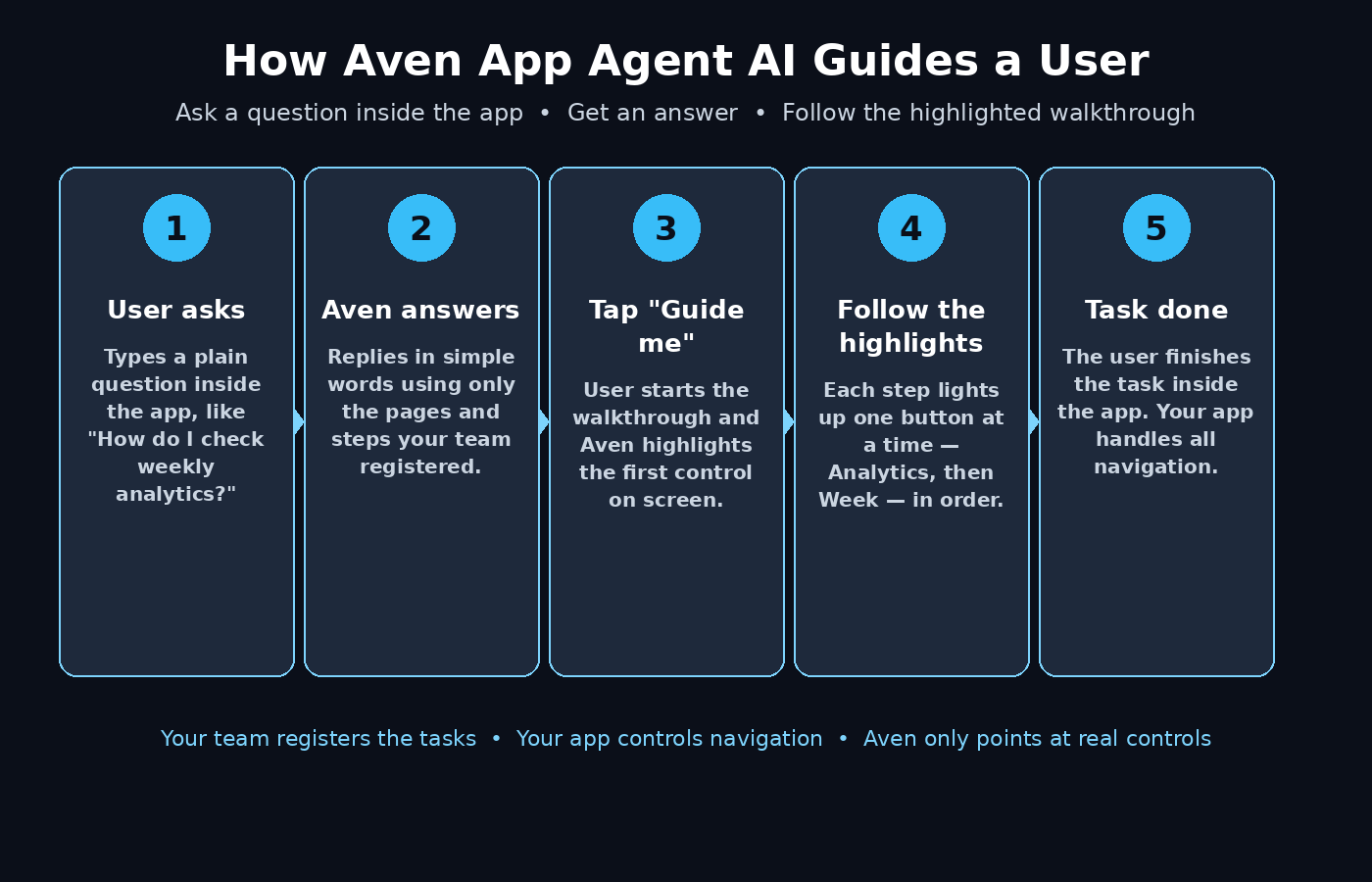
Here is the simple idea behind it. A user types a question such as “How do I check my weekly analytics?” Aven answers the question in plain words, and then offers a “Guide me” button. When the user taps it, Aven highlights the exact controls on screen — first “Analytics”, then “Week” — and walks the user through each step until the task is done.
Three things make Aven different from a normal chatbot:
- It guides, it does not just chat. Aven points at real buttons and fields inside your app, so the user follows along instead of reading and guessing.
- Your team stays in control. Your team defines the screens, steps, and workflows Aven is allowed to guide people through. Aven never invents a flow your app does not support.
- Your app handles navigation. Aven identifies the registered pages and UI targets, and your host application keeps control of navigation and interface behavior. The AI assists; your app stays in charge.
Aven works for web and mobile apps, and the makers recorded three web demos so you can see it in action before you install anything: Dolibarr, an ERP and CRM workspace; Memos, a note-taking app; and TodoMVC, a simple task list. There is also a demo in Pauze, where a user asks how to check weekly analytics and follows the highlighted walkthrough.
Why Aven App Agent AI Matters for Beginners
Most beginners judge an app in the first five minutes. If they cannot find the feature they need, they leave — and they rarely come back. Traditional onboarding tries to fix this with tooltips, long help articles, and onboarding checklists, but those tools have a weakness: they guess what the user wants. Aven flips that around. The user asks, and the guide appears on demand.
For small teams and solo builders, this is a big deal. You do not need a support team to answer the same five questions every day. You do not need to record a new video every time your interface changes. You register the tasks your users actually ask about, and Aven turns each one into a guided walkthrough that works every time.
Aven also fits the bigger shift happening across software in 2026. Apps are becoming agentic — they do not just wait for clicks, they help users finish jobs. If you run a digital agency or build products for clients, tools like this are becoming part of the standard toolkit, and teams that learn them early have a real advantage. That is why many builders pair a tool like Aven with the wider AI services offered by a digital agency such as D365A, which helps teams put practical AI into real products instead of leaving it as a demo.
Step 1: Understand What Aven App Agent Does
Before you install anything, spend ten minutes understanding the model. Aven is not a general chatbot that answers any question from the internet. It is a focused guide that only knows what your team registers.
The flow always works the same way:
- A user asks a question inside your app.
- Aven answers using the pages, elements, and workflows your team explicitly registered.
- The user taps “Guide me” and Aven highlights each control in order.
- Your app navigates and the user completes the task.
This developer-declared context is the heart of the tool. Aven cannot hallucinate a button that does not exist, because it can only point at targets your team registered. That design keeps answers accurate and keeps your users safe from misleading guidance.
Step 2: Visit the Official Site and Watch the Demos
Start at the official Aven App Agent website and the Product Hunt launch page. Watch the three recorded web demos — Dolibarr, Memos, and TodoMVC — and the Pauze demo where a user checks weekly analytics.
Pay attention to three details in each demo:
- How the question is asked. The user writes a normal sentence, not a keyword or a command.
- How the answer looks. Aven answers briefly, then offers the guided walkthrough as the next step.
- How the highlights move. Each step lights up one control at a time, so the user never has to guess what to click next.
These demos are your best teacher. They show you exactly what a good Aven setup feels like from the user’s side, and they will shape how you register your own tasks later.
Step 3: Choose Your SDK and Platform
Aven App Agent is built for the apps you already have. The official site instructs you to choose an SDK, register a real product task, and verify that the target becomes available before guiding a user. In practice, that means you pick the SDK that matches your stack — web or mobile — and add Aven to your app the same way you would add any other software library.
Keep this step simple on your first run:
- Web apps: use the web SDK and start with one screen, such as your dashboard or settings page.
- Mobile apps: use the mobile SDK and start with the single most common task, such as creating a first item or checking a report.
- Do not try to cover everything. One working guided task beats twenty half-finished ones.
If you are not a developer, this is the step where you loop one in for an hour. The integration is small — the real work is deciding which tasks to register, and that is a product decision anyone on your team can make.
Step 4: Register Your First Real Product Task
Aven only guides users through tasks your team registers, so this step decides everything. Pick a task that real users ask about often. Good first tasks are short, common, and valuable: check weekly analytics, create a first project, invite a teammate, export a report, or change a billing setting.
Register the task with these pieces:
- The task name, written the way a user would say it, such as “Check my weekly analytics”.
- The pages involved, so Aven knows where the task starts and ends.
- The UI targets, the exact buttons, fields, and menu items the user must touch.
- The order of steps, one action at a time, in the sequence a real user follows.
Verify the target becomes available before you guide anyone to it. The official guidance is explicit about this: register the task, then confirm the target actually appears. A broken guide is worse than no guide at all.
Step 5: Define the Pages and UI Targets Aven Can Guide To
Now define the pages, elements, and workflows Aven is allowed to use. This is your safety net. Aven will only point at what you register, so be deliberate and specific.
A good rule is to register the smallest set that completes the task. For the weekly analytics example, that might be the dashboard page, the “Analytics” menu item, and the “Week” filter. Nothing more. If a page or button is not registered, Aven will not guide users to it — and that is a feature, not a limitation.
Name your targets clearly. When a teammate reads the list six months later, they should understand exactly which control each target is. Vague names cause confusion; clear names keep your guides working as your app grows.
Step 6: Let Your App Handle Navigation
One of the smartest design choices in Aven is that your host application stays in control of navigation and UI behavior. Aven identifies the target; your app moves the user there. That means your existing routing, permissions, and state all keep working exactly as they do today.
For beginners, the practical lesson is simple: do not fight your app’s structure. Build your Aven guides around the screens and flows you already have. If a task needs three screens, register all three and let your app handle the movement between them. The user sees a smooth walkthrough; under the hood, your app is doing what it has always done.
Step 7: Test the “Guide Me” Walkthrough as a Real User
Before you show Aven to anyone, test it the way a real user would. Open your app, ask the question in plain words, tap “Guide me”, and follow every highlighted step to the end.
Check these five things during your test:
- Does the answer match the question? Aven should answer the task the user actually asked about.
- Does each highlight land on the right control? Every step should light up exactly one correct button or field.
- Can you finish the task? The walkthrough should end with the task done, not with a dead end.
- Is the language simple? A beginner should understand every word without a dictionary.
- Does it feel fast? A guide that takes longer than doing the task alone will not be used twice.
If any step fails, fix the registration for that step — do not add more guides to hide the problem. One polished walkthrough teaches you more than ten rough ones.
Step 8: Write Questions the Way Users Actually Ask Them
Aven’s answers are only as good as the questions it understands, and users never ask questions the way a manual writes them. They write things like “where do I see my sales this week?”, “how do I add someone to my team?”, or “why can’t I export this?”.
Collect real questions from your support inbox, your chat logs, and your own team. Then make sure each one maps to a registered task. When a question has no matching task, you have found your next guide to build. This is also where good content habits pay off: the same clear, plain-language writing that makes a great help article makes a great Aven answer.
If you want to see how AI agents are being used across real products and teams, the coverage at Agentic Affairs is a useful place to keep up with the agentic AI trend while you build.
Step 9: Measure Where Users Get Stuck and Improve the Guides
Launch is not the finish line; it is the starting point. Watch which questions users ask most, which walkthroughs they finish, and where they drop off. A step with a high drop-off rate usually means one of three things: the highlight is pointing at the wrong control, the step is unclear, or the task itself is confusing in your app.
Treat Aven guides like living documentation. Every time your interface changes, check the guides that touch it. Every time support gets the same question twice, consider registering a new task. Small, regular updates keep Aven accurate — and accuracy is the whole reason users trust it.
Step 10: Roll Out to Your Team and Keep Guides Fresh
Once your first task works end to end, roll Aven out in stages. Start with your own team, then a small group of friendly users, then everyone. At each stage, collect the exact questions people ask and the exact words they use, and feed those back into your registered tasks.
Set a simple routine: once a month, review your top ten questions and your top five guides. Retire guides for features you removed, update guides for screens you redesigned, and add guides for the questions that keep coming up. An assistant that stays current is an assistant users keep using.
Aven App Agent AI vs Other Ways to Help Users
| Method | Learns from user questions | Guides inside the app | Needs a support team | Updates when UI changes |
|---|---|---|---|---|
| Aven App Agent AI | Yes | Yes, step by step | No | Update the registration |
| Static help articles | No | No, user reads elsewhere | Sometimes | Rewrite the article |
| Video tutorials | No | No, user watches and copies | No | Re-record the video |
| General chatbot | Yes | No, text answers only | Sometimes | Retrain or re-prompt |
| In-app tooltips | No | Yes, but fixed hints | No | Rebuild the tooltip |
Frequently Asked Questions
Is Aven App Agent AI free to try?
Aven App Agent launched on Product Hunt on November 13, 2026, and the launch listing shows a price of 0 USD, which suggests a free starting point for trying it. Pricing can change as a product grows, so check the official Aven App Agent website for the current plan before you build on it.
Does Aven App Agent AI work on web and mobile apps?
Yes. Aven is built to work inside the applications you build, and the official site describes choosing an SDK, which covers web and mobile setups. The recorded demos show web apps, including Dolibarr, Memos, and TodoMVC, so web teams can see it working before they install anything.
Do I need to be a developer to use Aven App Agent AI?
You need a developer for the SDK installation step, but the important work — choosing tasks, writing questions, and defining steps — is product work that anyone can do. If you can write a clear help article, you can design a good Aven guide.
How is Aven App Agent AI different from a normal chatbot?
A normal chatbot answers in text and leaves the user to find the button. Aven answers and then guides: it highlights the exact controls in order and walks the user through the task inside the app. It also only guides through workflows your team explicitly registers, so it cannot invent steps your app does not support.
Can Aven App Agent AI change my app’s navigation?
No. Your host application stays in control of navigation and UI behavior. Aven identifies the registered pages and UI targets, and your app handles the actual navigation. Your existing screens, permissions, and flows stay exactly as they are.
What should my first Aven task be?
Pick the single task your users ask about most — usually checking a report, creating a first item, or inviting a teammate. Register it, verify the target appears, test the full walkthrough as a real user, and only then add a second task.
Final Thoughts
Aven App Agent AI is a small idea with a big payoff: stop making users hunt for features, and start guiding them to the finish line. It launched on November 13, 2026, it already shows working demos in real apps, and its developer-declared model keeps it accurate in a way open-ended chatbots cannot match.
Start small. Watch the demos, pick one SDK, register one real task, and test the walkthrough as a user. When that first guide works, add the next most-asked question. Within a few weeks, you will have a self-service layer inside your app that answers questions and finishes tasks while your team focuses on building.
If you want to go deeper into practical AI tools, browse the rest of our AI how-to guides on aitoolsteps.com — every guide follows the same beginner-friendly, step-by-step style, so you can keep learning one tool at a time.
Explore More Free AI Tools
Try these free tools on aitoolsteps.com to make your content and workflow even better:
- AI Title Generator — https://aitoolsteps.com/
- Meta Description Generator — https://aitoolsteps.com/
- AI Rewriter — https://aitoolsteps.com/
- Keyword Density Checker — https://aitoolsteps.com/