

Building a website used to mean two separate jobs. First you got an AI to write the code, then you fought with hosting, domains, deployment settings, and build errors to get it online. Most beginners never finished the second job. Spacefast AI was built to close that gap. It is a new way to ship websites and apps with the AI you already use. Connect ChatGPT, Claude, Codex, Cursor, or your favorite agent, and publish your project with a simple request. The AI builds it. Spacefast runs it and ships it.
Spacefast launched on Product Hunt on November 12, 2026, and finished as the number 5 Product of the Day with 183 upvotes and 25 comments. It comes from Automattic, the company behind WordPress.com, so the team behind it has spent two decades making publishing easy for non-technical people. It is free to start, with no extra AI subscription — you bring the AI plan you already pay for. In this beginner-friendly guide, you will learn how to use Spacefast AI from your first connection to your first live website, even if you have never deployed anything before.
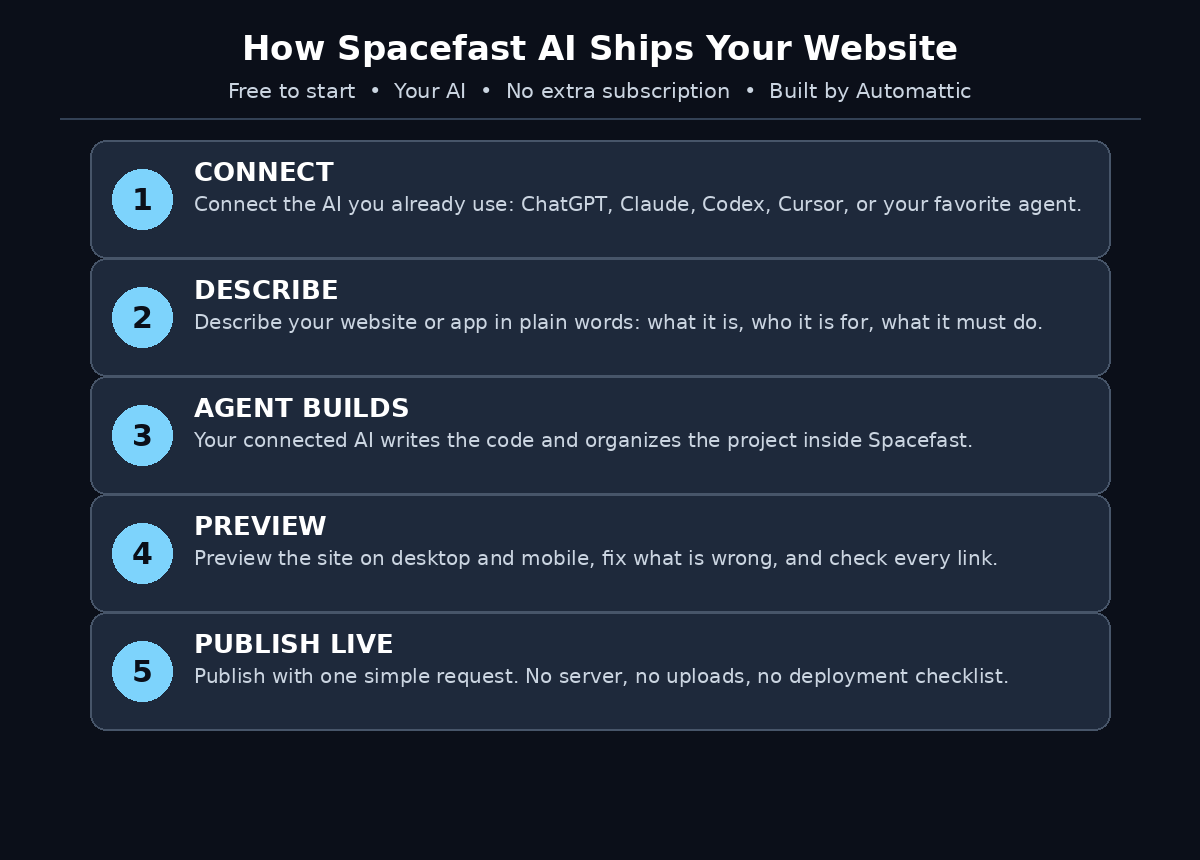
Step 1: Understand What Spacefast AI Actually Does
Spacefast AI gives your AI agents a place to build, run, and ship. Think of it as the missing half of AI coding. Tools like ChatGPT, Claude, Codex, and Cursor are good at writing code, but code sitting on your computer is not a website. Somebody still has to put it on a server, connect a domain, and keep it running. Spacefast is that somebody. It is the home where your agent’s work becomes a live website or app that anyone can open in a browser.
The key idea is that Spacefast does not sell you another AI. It works with the AI you already use. If you already pay for ChatGPT or Claude, or you already use Codex or Cursor every day, Spacefast plugs into that setup instead of asking you to buy a new subscription. That is why it can be free to start: the intelligence comes from your existing plan, and Spacefast provides the place where the work runs and ships.
- It ships what your AI builds: your agent writes the website or app, and Spacefast publishes it live.
- It works with your AI: connect ChatGPT, Claude, Codex, Cursor, or your favorite agent.
- It is free to start: no extra AI subscription is needed on top of the plan you already have.
- It comes from Automattic: the company behind WordPress.com, with decades of publishing experience.
Step 2: See How Spacefast Is Different From Normal Hosting
Traditional hosting gives you an empty server and a long checklist. You pick a plan, install software, upload files, configure a domain, fix the build when it fails, and set up security updates. Every step assumes you know what you are doing. Beginners usually get stuck somewhere in the middle, and the project dies as a folder on a laptop.
Spacefast flips the order. You start with a plain-language request, not a server. You describe the website or app you want, your connected AI builds it, and Spacefast handles the running and the shipping. There is no server checklist because there is no server to manage. The difference is the same one between renting an empty kitchen and ordering a finished meal: one gives you the tools, the other gives you the result.
That does not make traditional hosting useless. If you need full control over every setting, a normal host still wins. But if your goal is to get an idea online quickly — a landing page, a small tool, a demo for a client — Spacefast removes the whole deployment layer that used to stand in the way. For a digital agency that ships small client sites every week, that difference is measured in hours saved on every single project.
Step 3: Set Up Your Spacefast Account
Getting started takes minutes. Create your Spacefast account from its official website, using the same email you use for your AI tools so everything stays easy to find later. Because Spacefast is brand new — it launched on November 12, 2026 — expect the sign-up flow and the dashboard to change a little in its first weeks. That is normal for a fresh launch, and it is worth checking the official pages for the newest steps if anything looks different from this guide.
- Use your main email: the one tied to your AI subscriptions, so connections and billing stay in one place.
- Start on the free tier: Spacefast is free to start, so learn the workflow before you pay for anything.
- Check the official docs first: a product this new updates fast, and the docs are the freshest source of truth.
- Keep your login safe: turn on two-factor authentication if it is offered, and never share your password.
Step 4: Connect the AI You Already Use
This is the step that makes Spacefast work. Instead of giving you a built-in model, Spacefast connects to the AI agent you already use — ChatGPT, Claude, Codex, Cursor, or your favorite agent. Open the connections settings, pick your agent, and sign in with the account you already have. The agent you connect is the one that will build your projects.
- Pick your strongest agent: use the AI you already know best, the one whose coding style you trust.
- Use the plan you already pay for: Spacefast adds no extra AI subscription, so your existing plan covers the work.
- Connect one agent first: learn the flow with a single connection before adding more.
- Check what it can access: read the permissions the connection asks for, and grant only what the work actually needs.
Connecting your own AI is the same bring-your-own-model pattern that is spreading across the whole AI tools world. Coverage of agentic affairs keeps making the same point: the agents are getting good enough that the bottleneck is no longer the model, it is where the agent’s work goes. Spacefast answers that question by giving the agent a place to run and ship.
Step 5: Describe Your Website or App in Plain Words
Your first project should be small and easy to check. A one-page landing page, a simple personal site, or a tiny tool with one clear job. Do not start with a full web app on day one. A small first project teaches you how Spacefast and your agent talk to each other, and how to tell whether the result is right.
Write your request the way you would explain it to a capable colleague. Say what the finished site should be, who it is for, and what it must do. “Build a one-page landing page for a homemade jam business, warm colors, with a hero section, three product cards, and a contact form” will always beat “make me a website”. The first version tells the agent the purpose, the style, and the sections. The second version makes it guess, and guessing is where agents waste your time.
- Start with the outcome: name the finished thing — a landing page, a portfolio, a small tool.
- Add the details that matter: audience, colors, sections, and anything that must be included.
- Keep the first version simple: you can add features after the first version is live.
- Say what not to do: “do not add a payment form” or “do not use stock photos” saves a round of fixes.
Step 6: Let Your Agent Build It
Once you send the request, your connected agent gets to work inside Spacefast. It writes the code, organizes the files, and prepares the project for publishing. This is the part that feels like magic the first time: you typed a paragraph, and a real website is taking shape. Watch the first build from start to finish so you understand what the agent does and where it can go wrong.
Do not walk away from the first build. If the agent misunderstands your request, you want to catch it early, correct the instruction, and run it again. A wrong color scheme caught in the first minute costs nothing. The same mistake caught after publishing costs a rebuild. Read what the agent produces the way you would read a colleague’s draft: check the headings, the text, the links, and the layout before you call it done.
Step 7: Preview, Fix, and Publish With One Request
Before anything goes live, preview it. Open the preview Spacefast gives you, click through every section, and test it on your phone as well as your computer. A page that looks perfect on a laptop can break on a small screen, and mobile visitors are usually the majority. Fix what you find by describing the fix in plain words, the same way you described the original request.
When the preview looks right, publish it with a simple request. That is the whole point of Spacefast: publishing is a sentence, not a checklist. There is no file upload, no server setting, and no deployment command to memorize. You ask, and the site goes live. Save the live link somewhere safe, and open it in a fresh browser window to confirm the public version matches your preview.
- Test on mobile first: most visitors will arrive on a phone, so check the small screen before the big one.
- Click every link and button: a dead link on a live site looks worse than a missing feature.
- Read the text out loud: AI-written copy can sound polished and still say something wrong.
- Publish, then verify: open the live URL yourself and confirm it loads for a visitor, not just for you.
Step 8: Update Your Site the Same Way You Built It
A website is never really finished, and Spacefast treats updates the same way as the first build. To change something, describe the change in plain words: “add a testimonials section with three quotes” or “change the hero headline to mention free delivery”. Your agent makes the change, you preview it, and you publish again with a simple request.
Keep a small habit for every update: change one thing at a time. If you ask for five changes at once and something breaks, you will not know which change caused it. One change, one preview, one publish. It feels slower, but it is faster than untangling a broken update. After a few rounds, you will have a rhythm: describe, preview, publish, verify.
Step 9: Share Your Site and Learn From Visitors
A live site nobody visits is a draft with a URL. Share your first Spacefast site with a few real people and watch what they do. Ask them to find something specific on the page, and notice where they hesitate. Their confusion is your to-do list: a button they could not find, a headline they did not understand, a form they abandoned halfway.
Share it in the places where your audience already is — a social post, a message to a small group, or a link in your email signature. Do not buy ads for a first version. Real feedback from a handful of visitors is worth more than a thousand paid clicks on a page you have not tested yet. Fix what they stumble on, publish the fix, and share it again.
Step 10: Spacefast AI vs Traditional Hosting — Which One Fits You?
Spacefast and traditional hosting solve the same problem from opposite ends. Traditional hosting gives you control: your server, your settings, your rules. Spacefast gives you speed: your words become a live site without the deployment layer in between. Neither is wrong. They fit different people and different projects.
| Feature | Spacefast AI | Traditional Hosting |
|---|---|---|
| How you start | Describe the site in plain words | Pick a plan and configure a server |
| AI included | Works with the AI you already use | None — you bring your own tools |
| Publishing | One simple request | Upload files and configure deployment |
| Cost to start | Free to start, no extra AI subscription | Hosting plan from day one |
| Control | Less direct control over the server | Full control over every setting |
| Best for | Shipping ideas fast with your own AI | Projects that need custom server setup |
The honest answer is that many people will use both. Spacefast is the fastest way to get an idea live and test whether anyone wants it. Traditional hosting is where a proven project goes when it needs custom setup, special software, or full control. Start on Spacefast, learn what your visitors actually want, and move only if a real need forces you to.
Frequently Asked Questions About Spacefast AI
Is Spacefast AI really free?
Spacefast is free to start, with no extra AI subscription. The intelligence comes from the AI you already use — your ChatGPT, Claude, Codex, or Cursor plan — so you are not paying for a second model. As with any new product, check the official pricing page for the current limits of the free tier before you build something large.
Which AI agents work with Spacefast AI?
Spacefast connects to the AI you already use, including ChatGPT, Claude, Codex, and Cursor, plus your favorite agent. You sign in with the account you already have, and that agent builds your projects inside Spacefast. Use the agent you already know best for your first project.
Do I need to know how to code to use Spacefast AI?
No. That is the whole point. You describe the website or app in plain words, your connected AI writes the code, and Spacefast runs it and ships it. You still need good judgment — clear instructions, careful previews, and a habit of checking the result — but you do not need to write code or manage a server.
Who makes Spacefast AI?
Spacefast is built by Automattic, the company behind WordPress.com. That matters because Automattic has spent two decades making publishing easy for people who are not engineers. Spacefast applies the same idea to AI-built websites and apps: describe it, and it goes live.
When did Spacefast AI launch?
Spacefast launched on Product Hunt on November 12, 2026, where it earned 183 upvotes and 25 comments and finished as the number 5 Product of the Day. It was hunted by Justin Jincaid. Because it is a very new product, expect frequent updates in its first weeks — keep it updated and check the official pages for new features.
Can Spacefast AI build apps as well as websites?
Yes. Spacefast is described as a new way to ship websites and apps with the AI you already use. Start with a simple website for your first project, learn the describe-preview-publish rhythm, and then try a small app with one clear job. Keep the first app simple — one feature done well beats five features done badly.
Final Thoughts
Spacefast AI removes the hardest part of building with AI: the gap between “the code is written” and “the site is live”. If you already pay for an AI plan, it turns that plan into a shipping machine — describe the website or app, let your agent build it, preview it, and publish it with a simple request. No server checklist, no deployment commands, no extra AI subscription.
Start small. Connect the AI you already trust, describe a one-page site in plain words, watch the first build, and check the preview on your phone before you publish. After one live site, you will know exactly what Spacefast is for: getting ideas out of your head and onto the internet while they are still fresh. Describe your first site today, and see how fast an idea can go live.
Explore More Free AI Tools
Spacefast AI is one of many free AI tools that can take real work off your plate. If you liked this guide, try the free tools on AIToolSteps: the AI Title Generator for headlines that get clicked, the Meta Description Generator for search snippets that earn the click, the AI Rewriter for polishing rough drafts, and the Keyword Density Checker for keeping your content on topic. Each one is free, each one takes less than a minute, and each one pairs well with Spacefast — draft your site copy with the agent, then polish it with the right tool before you publish.