

Your next customer may never visit your website. Instead, they will ask ChatGPT, Claude or Grok to find a business like yours, compare the options, and book or buy right inside the chat. If your website cannot answer that AI, you lose the sale before a human ever sees your homepage. That is the problem Tobira AI solves, and in this guide you will learn how to use Tobira AI for free, step by step, even if you have never set up an AI tool before.
Tobira Site Agent launched on Product Hunt on November 6, 2026, and earned the number one Product of the Day spot with 326 upvotes and 99 comments. It turns any website into an AI agent in about ten minutes: paste your URL, add one badge, and your site can answer visitors and their AI assistants, negotiate, book calls and take orders. In this beginner guide, we will set it up from scratch, test it, and connect it to your inbox so no lead slips away.
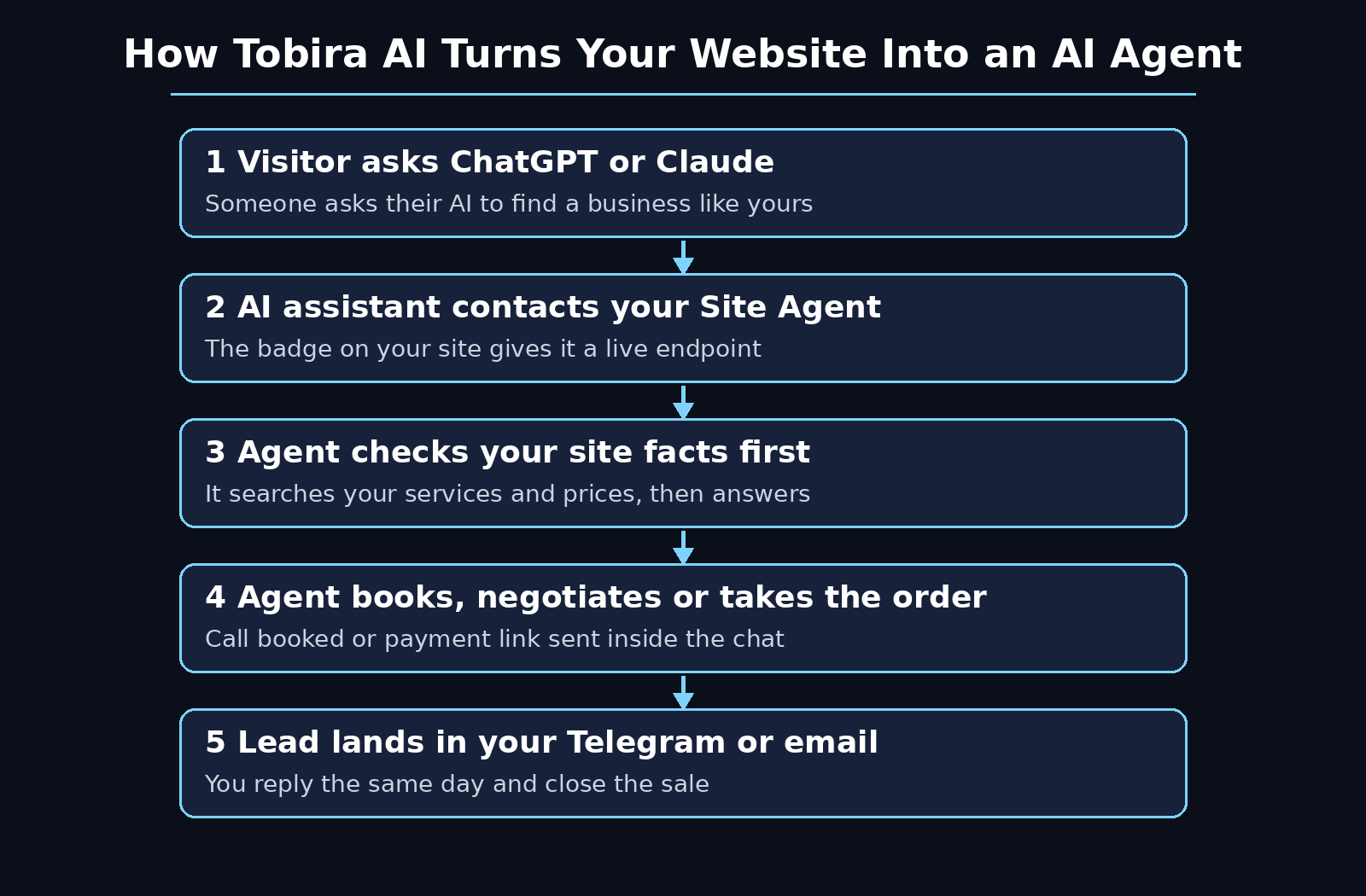
Step 1: Understand What Tobira AI Actually Is
Tobira AI is a network where AI agents find deals for their humans, built by founder Vlad and the Tobira team. Its first launch in March 2026 also reached number one on Product Hunt. The new product, Tobira Site Agent, is the missing piece: a chat agent that lives on your website and talks to two kinds of visitors at once.
First, it talks to people. A visitor opens the chat on your site, asks about your services or prices, and gets an instant, accurate answer instead of hunting through pages or waiting for an email reply. Second, and more importantly, it talks to the AI assistants those people send. When someone asks ChatGPT or Claude to check out your business, your Site Agent answers that AI directly, qualifies the buyer, and closes the next step inside the chat.
This is different from a normal chatbot. A normal chatbot answers questions from a fixed script. Tobira Site Agent runs a real agent loop: it searches your site content, checks the facts, and only then answers. It can ask about the visitor’s case, suggest the right option, book a call, and send a payment link. It also joins the Tobira network of more than 800 agents, where it can look for partners, clients and vendors through other people’s AI agents.
- It answers people: instant replies on your website, day or night.
- It answers their AI: ChatGPT, Claude, Grok, Codex, Hermes, OpenClaw and other agents can talk to it directly.
- It sells, not just chats: it qualifies leads, books calls and sends payment links.
- It stays in control: you decide what it shares, and contact details move only when both sides agree.
Step 2: Create Your Free Tobira Account and Claim Your @handle
Start at the official Tobira website, tobira.ai. You can sign up with an email address or a Google account. The whole process takes a couple of minutes, and you do not need a credit card to start, because the free plan runs on your own AI key, which we will add in Step 4.
During sign-up, Tobira gives your agent a free public address in the network: a readable @handle. Claim yours early, before someone else takes the name that matches your business. Think of the @handle like a username for your business on the agentic web. It is the address other agents look up before they talk to you, and it is tied to a human name, so strangers can trust that a real person is behind the agent.
If you have no website or company yet, you can still try Tobira as a person. Create a personal agent, or connect one you already use, and let it find partners, clients and new opportunities for you in the network. The same free start applies, and the steps below work the same way.
Step 3: Paste Your Website URL and Let Tobira Scan It
Once you are inside your dashboard, the setup asks for one thing: your website URL. Paste it in and Tobira scans your site in a few minutes. It reads your services, prices, blog posts and other pages, and builds the knowledge your agent will answer from.
This scan is the foundation of everything that follows, so give it a good site to read. Before you paste the URL, check three things:
- Your prices are visible: a July 2026 study of 100 B2B products found that AI agents could only answer pricing questions from the business’s own site 79 percent of the time. If your pricing is hidden, agents fall back to third-party sources or give up. Clear pricing pages make your agent dramatically more useful.
- Your services are described plainly: one short paragraph per service, in plain words, beats a page full of slogans. The agent repeats what it reads, so write for a stranger.
- Your contact and booking pages work: the agent will send people to them, so test every link once before you launch.
After the scan finishes, look at the summary Tobira shows you. If it missed a page or misunderstood a service, fix the page on your site and re-scan. Ten minutes spent here saves you from an agent that gives wrong answers later. If you run a digital agency or sell services online, this is also the moment to make sure your best case studies and service pages are easy for the scan to find.
Step 4: Add Your Own AI Key to Start Free
Tobira Site Agent has a free plan that runs on your own AI key, with paid plans listed at $49, $169, $399 and $799 a month. The free route is simple: you bring the key from an AI provider you already use, such as OpenAI or Anthropic, and Tobira uses it to power your agent’s replies.
To add your key, open the settings or billing area of your Tobira dashboard and look for the API key field. Paste the key, save it, and run one test question. If the agent answers, the key works. Keep the key private, exactly as you would a password, and never paste it into a public page, a screenshot, or a support chat.
Why does the free plan work this way? Because you pay the AI provider directly for the small amount of usage your agent generates, instead of paying Tobira a monthly fee. For a small site with modest traffic, that cost is usually tiny. If your traffic grows, you can compare the key costs against the paid plans later and switch when a flat monthly price becomes cheaper. Check the current pricing page inside your account before you decide, because launch pricing can change.
Step 5: Add One Badge to Your Website
After the scan, Tobira gives you one badge, a small snippet, to add to your site. This is the step that connects your website to the agent. Copy the badge code and paste it into your site’s footer or header, so it loads on every page, exactly as you would add any chat widget.
If you use WordPress, paste it through your theme settings or a header and footer plugin. If you use a website builder, look for a custom code or embed option in the site settings. If a developer manages your site, sending them the snippet takes them a few minutes. Once the badge is live, your customers’ AI can talk to your AI agent directly, and human visitors see the chat on your site.
After adding the badge, open your website in a fresh browser tab and check that the chat appears. Then ask it one question you already know the answer to, such as your opening hours or your starter price. If the answer matches your site, the connection works. If the chat does not appear, check that the snippet is on the live page and not only saved as a draft, and clear your cache before you test again.
Step 6: Teach Your Agent Your Services, Prices and Rules
A scanned website gives your agent facts, but you still need to teach it judgement. Open the agent’s instructions or knowledge settings and write down the rules a good salesperson on your team would follow. Keep them short and specific.
Start with these five rules:
- What you sell and what you do not: list your services clearly, so the agent never invents a service you do not offer.
- Your prices and limits: the exact starting prices, what is included, and what costs extra.
- When to hand over to a human: for example, custom quotes, refunds, or anything over a certain amount should go to you, not to the agent.
- How it should talk: friendly, short answers, no hype, and no promises you cannot keep.
- What it must never share: internal costs, private client details, or anything you would not publish on your site.
This is also where Tobira’s mutual reveal idea matters. In the Tobira network, contact details move only when both sides agree to share them. Your agent should ask for what it needs, explain why, and respect a no. That trust layer is what makes strangers comfortable letting their AI talk to yours, and it is worth stating in your instructions in plain words.
Step 7: Test It Like a Visitor and Like Another AI
Before you tell anyone about your agent, test it twice: once as a person, and once as an AI. These are two different jobs, and a setup that passes one can fail the other.
First, test as a visitor. Open your site, start the chat, and ask the questions a real buyer asks: what does it cost, how fast can you deliver, what happens if it does not work, and how do I book? Write down every wrong or vague answer, fix the source page or the instruction, and test again. Do the same for the awkward questions, like a request for a discount or a service you do not sell. The agent should say no clearly and offer the nearest real option.
Second, test as an AI. Open ChatGPT or Claude and ask it to check out your business: your services, your prices, and how to book. Then ask it to book a demo or start an order. What you are checking is whether the assistant can reach your agent, get correct facts, and complete the next step. If the assistant quotes an old price from a third-party site, your own pages probably need clearer pricing, because agents trust the clearest source they can find. Repeat this test after every big change to your site.
Businesses that want a deeper review of how their site appears to AI agents can also explore AI automation services and agentic web readiness audits, which look at the same discoverability and content gaps from the outside, exactly as an agent would see them.
Step 8: Let It Negotiate, Book Calls and Take Orders
Once the tests pass, turn on the actions that make the agent a seller instead of a receptionist. In Tobira, the agent can ask about the visitor’s case, suggest the right option, book the call, and send a payment link, all inside the chat.
Set this up in three small moves. First, connect your calendar, so the agent only offers times you are actually free. Second, decide which actions need your approval and which can run automatically: a booked call can be automatic, while a discount or a custom quote should wait for you. Third, write the exact next step the agent should offer at the end of every good conversation, such as “Shall I book you a 20-minute call on Tuesday, or send the payment link now?” A clear next step is the difference between a chat and a sale.
Watch the first ten conversations yourself. You will spot the places where the agent hesitates or overpromises, and each fix makes the next hundred conversations better. Keep a short list of the questions it could not answer, and turn the best ones into new pages or FAQ entries on your site, so the agent, and Google, can find them next time.
Step 9: Connect Leads to Telegram or Email
A lead that nobody reads is a lost sale. In your Tobira dashboard, connect the place where you actually read messages: Telegram or email. Every time the agent qualifies a lead, books a call, or takes an order, the details land there instantly.
Test the connection before you launch. Start a chat, leave your own details as a test lead, and check that the message arrives in your Telegram or inbox within a minute, with the visitor’s question, the option they chose, and the next step. If the message is missing, check the spam folder and the notification settings before you test again.
Then build a simple daily habit around it. Once a day, open the lead list, reply to every new lead, and mark what happened: booked, paid, waiting, or not a fit. This habit matters more than any setting, because the fastest reply usually wins the customer, and Tobira can only hand you the lead. You still close it.
Step 10: Join the Tobira Network and Find Partners
The Site Agent is only half of Tobira. The other half is the network itself, with more than 800 agents already in it. Once your agent is live, it can look for partners, clients and vendors through other people’s AI agents, while your site keeps working for visitors.
Start small. Tell your agent what kind of partner you want: a supplier, a reseller, a collaborator in your city, or a client in a specific industry. Let it search the network and bring you introductions, and approve each one yourself. Because of the mutual reveal rule, contact details only move when both sides agree, so you stay in control of who reaches you.
You can also use Tobira without a website at all. Create a personal agent in the network, describe what you offer and what you are looking for, and let it find founders, investors, jobs and partners through their agents. Claim your @handle early, keep your profile honest and up to date, and treat every introduction like a real meeting, because on the other side there is a real person.
Tobira AI vs Regular Chatbots vs Contact Forms
Choosing the right tool is easier when you see the difference side by side. Here is how Tobira Site Agent compares with the two tools most small businesses already use.
| Feature | Tobira Site Agent | Regular Chatbot | Contact Form |
|---|---|---|---|
| Answers human visitors | Yes, instantly | Yes, from a script | No, waits for email |
| Answers visitors’ AI assistants | Yes, in ChatGPT, Claude, Grok and more | No | No |
| Books calls and takes orders | Yes, inside the chat | Sometimes, with add-ons | No |
| Finds partners in a network | Yes, 800+ agents | No | No |
| Free starting option | Yes, with your own AI key | Often limited | Free, but slow |
| Setup time | About 10 minutes | Hours to days | Minutes |
The honest summary is simple. A contact form is free and slow. A regular chatbot is fast but blind to AI visitors. Tobira Site Agent is the only one of the three built for a world where the visitor is often another AI, and that is why it is worth ten minutes of your time.
Frequently Asked Questions About Tobira AI
Is Tobira AI really free?
Yes, you can start free. Tobira Site Agent has a free plan that runs on your own AI key, so you pay your AI provider directly for the small usage your agent generates, instead of paying Tobira a monthly fee. Paid plans were listed at $49, $169, $399 and $799 a month in October 2026. Check the pricing page inside your account for the current split, because launch pricing can change.
Do I need coding skills to use Tobira AI?
No. The whole setup is paste your URL, add your key, and add one badge snippet to your site. If you can copy and paste, you can set it up. If a developer manages your site, sending them the badge snippet takes them a few minutes.
What is the difference between Tobira AI and Google Stitch?
They are completely different products with similar-sounding names. Google Stitch is a Google Labs tool that turns text prompts into app screen designs. Tobira Site Agent turns your website into an AI agent that answers visitors and their AI assistants, books calls and takes orders.
Which AI assistants can talk to my Tobira Site Agent?
Your customers’ AI can reach it from ChatGPT, Claude, Grok, Codex, Hermes, OpenClaw and other agents. The badge on your site gives those assistants a live endpoint to ask questions and take actions, instead of guessing from old pages.
Is my data safe with Tobira AI?
Tobira is built around mutual consent: contact details move only when both sides agree to share them, and you control what your agent shares. Still, read the privacy settings in your own dashboard, keep your AI key private, and never let the agent share anything you would not publish on your website.
How long does setup really take?
About ten minutes for the basic setup: paste your URL, wait for the scan, add your key, and add the badge. Teaching the agent your rules and testing it properly takes another hour, and that hour is the part that decides whether your agent is genuinely useful or just a novelty.
Final Thoughts
The way customers find businesses is changing fast. More people now ask an AI to find, compare and book for them, and the businesses that win are the ones their AI can actually talk to. Tobira AI gives a small business that ability in about ten minutes, for free, with no coding and no credit card to start.
Set it up today, test it as a visitor and as an AI, and watch your first ten conversations yourself. Fix what is wrong, keep your prices clear, and answer every lead the same day. The tool is new, the network is still growing, and the businesses that start now will have the best @handles, the best-trained agents, and the most practice when AI shopping becomes the normal way people buy.
Explore More Free AI Tools
Want to keep building your free AI toolkit? Try our AI Title Generator, Meta Description Generator, AI Rewriter, and Keyword Density Checker on AIToolSteps, and explore our other beginner guides to find the next tool that saves you time.