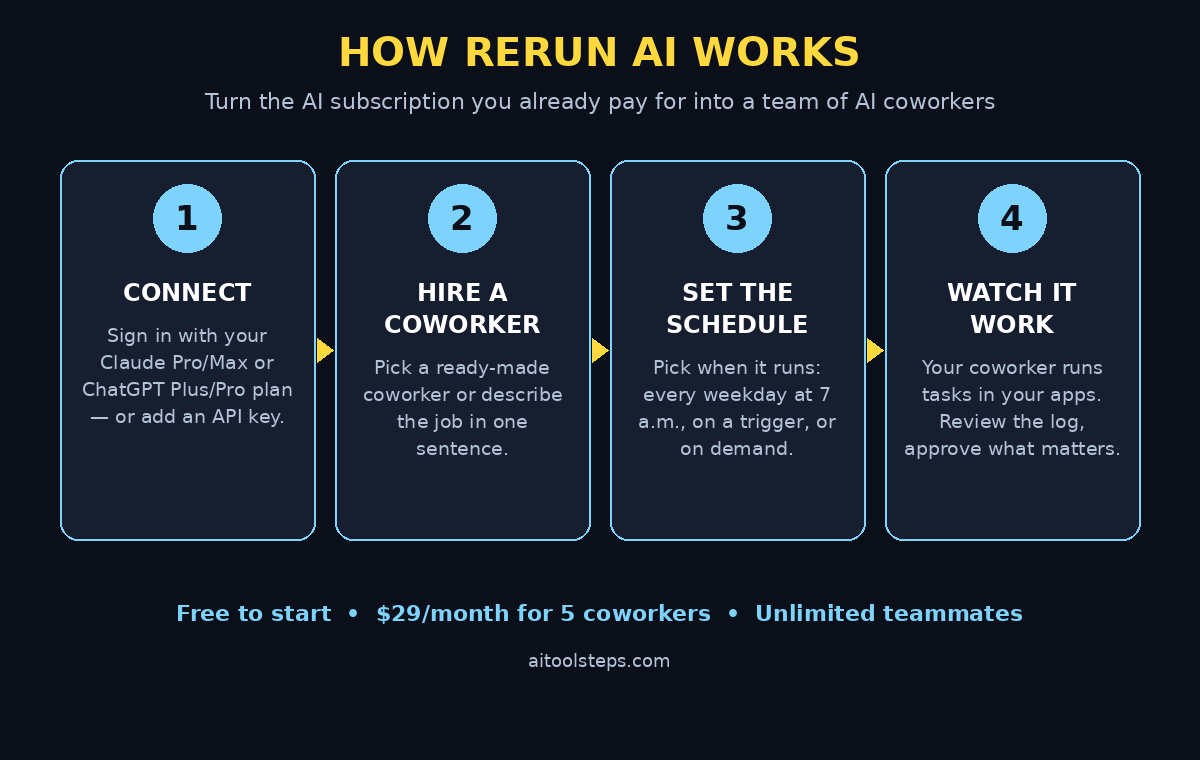

What if the ChatGPT or Claude subscription you already pay for could do actual work for you — not just answer questions in a chat window, but chase unpaid invoices, reply to customer emails, update spreadsheets, and run the same boring task every morning at 7 a.m. without you opening anything? That is exactly what Rerun AI promises. Launched on Product Hunt on November 5, 2026, Rerun turns your existing AI subscription into a team of AI coworkers that work on their own computers, inside your own apps, on a schedule you set.
In this beginner-friendly guide, you will learn how to use Rerun AI step by step: how to create your free account, connect your ChatGPT or Claude plan, hire your first AI coworker, connect your apps, organize work into Boxes, and set schedules and triggers so the work happens while you sleep. No coding is required, and you can start for free.
Step 1: Understand What Rerun AI Actually Does
Before you click anything, it helps to understand the idea behind Rerun AI. Most people use ChatGPT or Claude like a very smart search box: you type a question, you get an answer, and the conversation ends. Rerun changes that relationship. It gives each AI coworker its own private computer, its own access to your apps, and a job description — then the coworker does the steps of the job itself, on its own, at the time you choose.
Think of the difference this way: a chatbot waits for you. A Rerun coworker starts work at 7 a.m. on a weekday, opens your invoicing app, finds the unpaid invoices, and sends polite chase emails — all before you have had your coffee. The company describes it as three simple things, done once: connect the apps your business already uses, hire a coworker and tell it its job, then say when it should run. It takes it from there.
Each coworker runs on your own private machine inside Rerun, walled off from every other customer. Your data stays in that machine, and Rerun says it does not train models on your content. That privacy design matters, because a coworker that touches your email and invoices needs to be trustworthy, not just clever.
Beginners often ask whether Rerun replaces ChatGPT or Claude. It does not. It sits on top of them. You bring your own Claude Pro or Max plan, or your ChatGPT Plus or Pro plan, and Rerun uses that subscription to power your coworkers. You can also use your own API keys from Anthropic, OpenAI, or Google Gemini, or the Rerun credits included with your plan.
Step 2: Create Your Free Rerun Account
Getting started takes only a few minutes, and the first steps are free:
- Visit the Rerun website. Go to rerun.build in your browser and look for the sign-up or “start for free” option on the homepage.
- Create your workspace. Sign up with your email address and choose a name for your workspace. This workspace is where all your coworkers, Boxes, and tasks will live.
- Confirm your email. Check your inbox for a confirmation message and verify your address so your workspace is fully activated.
- Take the quick tour. Rerun shows you the three steps to start: plug in your subscription, set up your coworkers, and run your business with coworkers. Follow the prompts and do not skip the tour — it shows you where Boxes, schedules, and the coworker library live.
There is no credit card required to explore the free starting option, and you can invite your whole team into the workspace for free, with no additional per-person fees. That is unusual for business software, and it makes Rerun a genuinely low-risk tool to try with a small team.
Step 3: Connect Your ChatGPT or Claude Subscription
This is the step that makes Rerun different from most AI tools — and the step beginners should do carefully.
Inside your workspace, open the settings for models or subscriptions. You will see options to sign in with your Claude account (Claude Pro or Max) or your ChatGPT account (ChatGPT Plus or Pro). Choose the subscription you already pay for and sign in through the official login page. Rerun connects to your account so your coworkers can use the model you already have.
If you prefer pay-as-you-go billing instead, you can add an API key from Anthropic for Claude models, OpenAI for GPT models, or Google for Gemini models. With API keys, you are billed per token by the provider. Rerun also includes its own credits with paid plans, which can pay for the models it hosts and for the requests your coworkers make.
One practical tip: start with the subscription you already use every day. If you are a Claude Pro user, connect Claude. If you live in ChatGPT, connect ChatGPT. You can always add a second model later, and each coworker can run on the model that suits its job best. Check the usage indicator in your workspace — Rerun shows how much of your connected session you have used and when it resets — so you never get a surprise in the middle of a busy week.
Step 4: Hire Your First AI Coworker
Now comes the fun part. In Rerun, a “coworker” is an AI employee with a name, a job, and its own computer. You have two ways to create one:
- Pick a ready-made coworker. Rerun offers pre-built coworkers for common jobs — chasing invoices, answering support emails, doing research, drafting social posts, or keeping a CRM tidy. Pick the one closest to your need and answer its setup questions.
- Describe the job in your own words. Type a single sentence describing what you want done, for example: “Every weekday at 7 a.m., check for unpaid invoices older than 14 days and send a polite reminder email to each customer.” Rerun builds a coworker around that description.
When you set up a coworker, be specific about its job. A vague instruction like “handle my emails” will produce vague results. A clear instruction — “Reply to customer support emails within two hours, in a friendly tone, and escalate any refund request over $100 to me” — gives the coworker rules it can actually follow. Think of it the way you would brief a new human employee on their first day: the clearer the brief, the better the first week goes.
Give your coworker a name, too. It sounds like a small thing, but when you have five coworkers — one for finance, one for sales, one for marketing, one for admin, and one for research — names make the workspace easy to read at a glance. Many small businesses start with just one coworker, prove the idea, and then hire more.
Step 5: Connect the Apps Your Coworker Needs
A coworker can only do real work if it can reach your real apps. In the coworker’s setup screen, connect the tools it needs for its job: your email, your calendar, your invoicing or accounting app, your CRM, your spreadsheets, or your messaging tools. Connect only the apps that are relevant to that coworker’s job — your finance coworker needs the invoicing app, not your social media accounts.
Each coworker gets its own computer and its own sessions inside your apps, so its logins stay separate from yours and from your other coworkers. This is also a safety feature: if one coworker’s task goes wrong, it does not spill into another coworker’s work.
For tasks that need a human decision — sending a payment, replying to an angry customer, or posting something public — set approval rules. Rerun lets you require a human sign-off before certain actions happen, so the coworker drafts the email but you press send, or it prepares the payment but you approve it. Start strict with approvals and loosen them only after the coworker has earned your trust over a few weeks. If your business already works with a digital agency for marketing or automation, Rerun’s app connections can sit alongside that work — your coworker handles the repetitive internal tasks while your agency focuses on strategy and creative work.
Step 6: Organize Your Work Into Boxes
Rerun organizes work into “Boxes” — one Box per department, per client, or per project. A typical small business might have four Boxes: Marketing, Sales, Finance, and Admin. A freelancer might have one Box per client. A growing team might add a Box for each new project.
Boxes keep things tidy in two important ways. First, each Box has its own coworkers, apps, and tasks, so your finance coworker never accidentally touches your marketing campaigns. Second, Boxes make it easy to see what is happening: open the Finance Box and you can see every invoice chase, every payment reminder, and every report your finance coworker has handled.
To create a Box, click to add a new one, give it a clear name, and then hire or move coworkers into it. Keep the structure simple at first. You can always split a busy Box into two later — for example, splitting a Marketing Box into “Content” and “Social Media” once the workload grows. The same principle applies to the AI automation services many businesses now use: start with one clear area, prove the value, and then expand to the next area instead of automating everything at once.
Step 7: Set Schedules and Triggers
A coworker that only works when you ask it to is just a chatbot with extra steps. The real power of Rerun is scheduling. In each coworker’s settings, choose when it runs:
- On a schedule: every morning, every weekday at 7 a.m., every Monday, or once a month. The invoice-chasing example runs every weekday at 7 a.m.
- On a trigger: when something happens — a new email arrives, a form is submitted, a payment fails, or an app sends a signal. The coworker wakes up and handles it.
- On demand: whenever you ask it to, for one-off tasks like “research these five competitors and write a one-page summary.”
Start with one scheduled task and watch it run for a week before adding more. Check the coworker’s activity log each morning to see what it did, what it skipped, and where it asked for help. This daily five-minute review is the single best habit for a Rerun beginner — it catches small misunderstandings before they become expensive mistakes, and it teaches you how to write better instructions.
Step 8: Watch Your Coworker Work and Review Its Output
Rerun is built around a simple promise: build your coworkers, watch them work, and keep your eyes on everything. That watching part is your job, especially in the first month.
Every coworker keeps a record of what it did: which emails it sent, which invoices it chased, which files it updated, and which decisions it escalated to you. Read that record. If a coworker sent a reminder to the wrong customer, fix the instruction that caused it — usually a missing filter, like “only invoices older than 14 days” or “only customers in the Finance Box.” If it drafted a great email but used the wrong tone, add a tone rule to its job description.
Most beginners are surprised by how quickly a coworker improves once its instructions get specific. Treat the first two weeks as training: review everything, correct generously, and keep a short note of the rules you add. By week three, most coworkers run their scheduled jobs with only occasional check-ins from you.
Step 9: Invite Your Team for Free
One of Rerun’s most generous features is that you can invite your whole team into the workspace for free, with no additional per-person fees. Billing is never per person: the paid plan is $29 a month for five coworkers, their private machine, and as many teammates as you want in the workspace. The only things that grow with you are how many coworkers you run — five more at a time — and your Rerun credit.
To invite teammates, open the Members section, enter their email addresses, and send the invites. Each teammate can see the coworkers and Boxes you share with them, follow the activity logs, and approve tasks that need a human decision. For a small business, this means the owner, the bookkeeper, and the sales lead can all watch the same finance coworker work, instead of one person being the only one who knows what the AI is doing.
If you run a small agency or a freelance practice, this also changes how you talk to clients. Instead of saying “I will chase those invoices,” you can show a client the Finance Box and the schedule, and the work becomes visible and predictable.
Step 10: Scale Up — More Coworkers, More Boxes
Once your first coworker runs reliably for two or three weeks, it is time to scale. The usual pattern is: add a second coworker for the next most repetitive job, then a third. Common second hires include a research coworker that prepares a morning brief, a sales coworker that follows up on stale leads, and a support coworker that drafts replies to common questions.
Rerun also has a marketplace of experts who build and install coworkers for a living — if a job is too complex to set up yourself, you can browse and hire one of them. And if you get stuck, the two people who build Rerun answer questions in the Discord community for free.
A few scaling rules keep things safe: add one coworker at a time, give each one a narrow job, keep approval rules on anything that sends money or messages to customers, and review the activity logs weekly even when everything looks fine. The goal is not to automate everything — it is to automate the repetitive work so your human team can spend its time on the work that actually needs a human.
Rerun AI vs Other Ways to Get Work Done
How does Rerun compare with the alternatives most beginners consider? The table below gives a quick, honest comparison.
| Option | Cost | Works on a schedule | Uses your own apps | Best for |
|---|---|---|---|---|
| Rerun AI | Free to start; $29/mo for 5 coworkers | Yes — schedules and triggers | Yes — its own computer and app sessions | Repetitive business tasks, done automatically |
| ChatGPT or Claude alone | Subscription you already pay | No — waits for you to ask | No — chat only, no app actions | One-off questions and drafting |
| Hiring a freelancer | Hourly or per project | Only during their working hours | Yes — with shared logins | Skilled work that needs judgment |
| Hiring an employee | Salary + benefits | Yes — full working day | Yes | Complex, high-trust work |
| Simple automation (Zapier-style) | Monthly plan, per-task pricing | Yes — triggers and schedules | Yes — app to app | Fixed, simple if-this-then-that flows |
Rerun sits in the middle: cheaper and more flexible than a hire, more capable than a chatbot, and smarter than a fixed automation rule, because a coworker can read an email, decide what it means, and choose the right next step instead of following one rigid path.
Frequently Asked Questions About Rerun AI
Is Rerun AI really free to start?
Yes. Rerun is free to start — the setup follows three simple steps: connect your Claude or ChatGPT account (or an API key, or the included Rerun credit), pick a ready-made coworker or describe the job, and choose when it runs. The paid plan is $29 a month for five coworkers, their private machine, and unlimited teammates.
Do I need a ChatGPT or Claude subscription to use Rerun?
You need some way to power the models: your Claude Pro or Max subscription, your ChatGPT Plus or Pro subscription, your own API keys from Anthropic, OpenAI, or Google Gemini, or the Rerun credits included with your plan. If you already pay for ChatGPT or Claude, connecting that subscription is the cheapest way to start.
Is my business data safe with Rerun AI?
Rerun gives each workspace its own private machine, walled off from every other customer, and says it does not train models on your content — and that the model providers it calls are contractually barred from training on it too. As with any tool that touches email and invoices, connect only the apps a coworker needs and keep approval rules on sensitive actions.
What kind of tasks can a Rerun coworker do?
Any repetitive task that happens inside your apps: chasing unpaid invoices, replying to routine emails, updating spreadsheets and CRMs, researching competitors, drafting social posts, preparing morning briefs, and following up on leads. If a task follows a pattern and happens more than once a week, it is a good candidate for a coworker.
Can Rerun AI replace my employees?
No — and that is not what it is for. Rerun coworkers handle repetitive, rules-based work so your human team can focus on judgment, relationships, and creative work. Think of a coworker as a tireless junior assistant, not a replacement for an experienced colleague.
How is Rerun different from Perplexity Teammates or other AI agents?
Several tools launched in the same week offer persistent AI agents, including Perplexity Teammates for Max subscribers. Rerun’s distinctive idea is that it runs on the ChatGPT or Claude subscription you already pay for, with no per-person fees, and each coworker gets its own private computer with its own app sessions. The right choice depends on which subscriptions you already have and which apps your work lives in.
Final Thoughts
Rerun AI is one of the most practical AI launches of November 2026, because it solves a problem every small business feels: the subscription you already pay for is smart, but it only works when you are talking to it. Rerun turns that same subscription into coworkers that start work at 7 a.m., chase the invoices, answer the routine emails, and keep the spreadsheets tidy — while you do the work that actually needs you.
Start small: create a free workspace, connect the subscription you already have, hire one coworker for your single most repetitive task, and watch it for two weeks. If it works, add a second one. That is the whole method — and it is how a one-person business starts to feel like a team.
Explore More Free AI Tools
Want more free tools like Rerun? Try the AI Title Generator, Meta Description Generator, AI Rewriter, and Keyword Density Checker on AIToolSteps — free tools that help you write, polish, and optimize your content in minutes.