

Job interviews are stressful enough without having to practise alone in front of a mirror. CoPilot Interview AI changes that: it is a free AI interview assistant that runs realistic mock interviews, scores your spoken answers out of 10, and can even listen in during a real interview and suggest answers in real time. The free plan costs $0 forever, with no credit card required, and gives you 15 minutes of live help every day.
In this beginner guide, you will learn exactly how to use CoPilot Interview AI from your first free demo to your first scored mock interview: how to try it without signing up, how to install the desktop app, how to set up your resume and target role, how to read your scores, and how to use live help the right way — without crossing any rules. No interview coaching experience is needed, and you can start practising in under ten minutes.
Step 1: Understand What CoPilot Interview AI Actually Is
CoPilot Interview AI is a desktop app and web demo that acts like a personal interview coach. Instead of reading generic tips, you speak your answers out loud and the AI reacts the way a real interviewer would — asking follow-up questions, listening for structure, and then telling you exactly what worked and what to improve.
It has two main modes:
- AI mock interviews: paste a job description and your resume, pick the question mix, and an AI interviewer reads each question aloud, listens to your spoken answer, and scores it out of 10 with a model answer.
- Live interview help: during a real video interview, the app listens to the interviewer’s voice through your computer audio and to your voice through your microphone, then suggests answers on screen in real time.
The free plan includes 15 minutes of live help every day, in sessions of up to 15 minutes, using free AI models. That is enough for a short screening call or for one focused mock interview a day. The app works with Zoom, Microsoft Teams, Google Meet, Webex and other apps that play audio through your computer.
One honest note before you start: live help is only appropriate where it is allowed. Some employers, schools and assessments forbid outside help during an interview, so always follow your employer’s rules and the rules of any test you take. The mock interview mode, on the other hand, is pure practice — and that is where most of your improvement will come from.
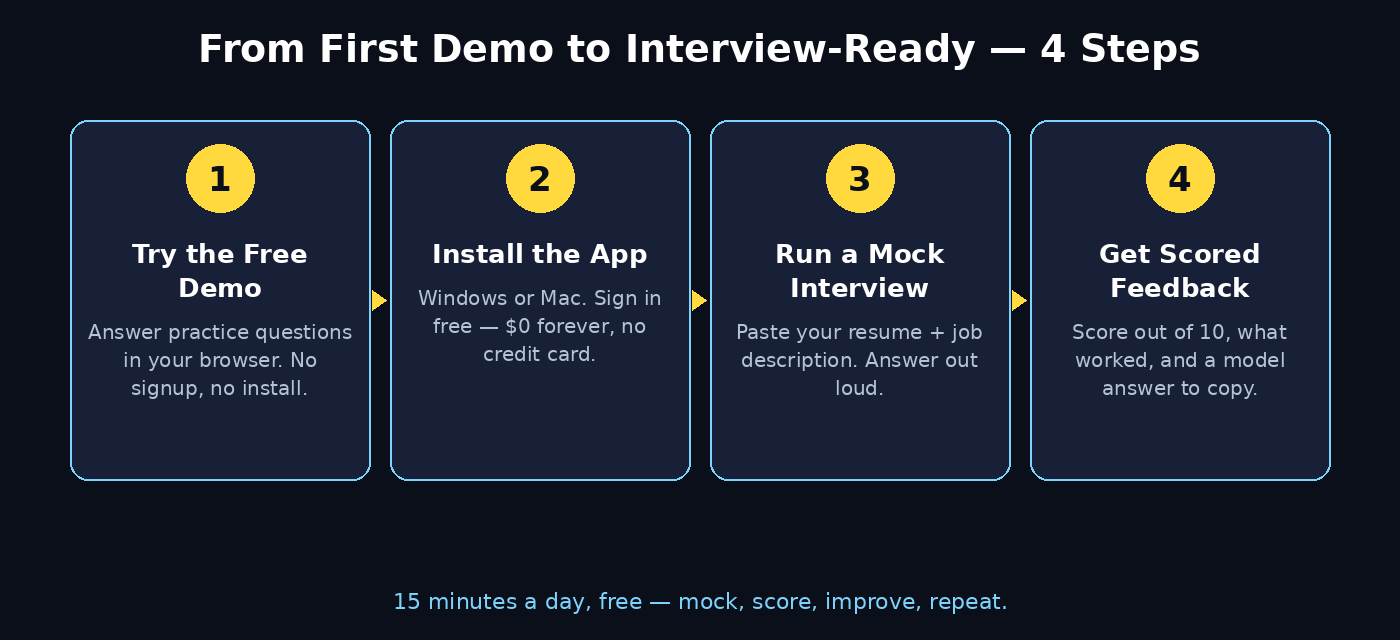
Step 2: Try the Free In-Browser Demo First (No Signup)
You do not need to install anything to see whether CoPilot Interview AI suits you. There is an in-browser demo that runs practice questions with no signup at all.
- Open your browser and go to the CoPilot Interview website, then look for the Try demo link (copilotinterview.com/try).
- Allow microphone access when your browser asks — the demo needs to hear your spoken answers to score them.
- Answer the practice questions out loud, at a normal speaking pace, the way you would in a real interview.
- Read the score and feedback after each answer. Notice how specific it is: it points to the exact part of your answer that was strong or weak, instead of giving a vague “good job”.
If the demo feels useful, move on to the desktop app. The demo is a taster; the full app adds your resume, job descriptions, longer sessions and live help during real calls.
Step 3: Download and Install the Desktop App
The full CoPilot Interview AI experience lives in a desktop app, which runs as a separate window beside your video-call app. Installation takes about two minutes.
- Windows 10 and 11: download the installer directly from the official site, or get it from the Microsoft Store.
- macOS 12 and later: download the Mac app from the official site and drag it into Applications.
- Android: a beta phone companion is available if you want to practise on the go.
- Linux: there is no Linux build, and it is not a browser extension — you need Windows or Mac for the desktop app.
Sign up with an email address. There is no credit card step for the free plan — it is $0 forever. Once installed, open the app and run the quick audio check: speak a sentence and confirm the app hears both your microphone and your computer’s audio. This check matters, because live help depends on hearing the interviewer’s voice through your speakers or headphones.
Step 4: Set Up Your Profile, Resume and Target Role
Generic interview practice gives generic results. CoPilot Interview AI gets much sharper when it knows the exact job you want, so spend five minutes on setup before your first mock interview.
- Upload your resume: paste your resume text or upload the file so the AI can ask about your real experience instead of inventing questions.
- Paste the job description: copy the full posting for the role you are targeting. The AI pulls out the skills, tools and responsibilities the interviewer is most likely to probe.
- Pick your role type: choose whether the job is customer service, sales, engineering, marketing, data, design or something else, so the question style matches.
- Set your experience level: fresher, junior, mid-level or senior — the difficulty and the follow-up questions change with it.
If you are applying to several different roles, save a separate profile for each one. A customer-support interview and a software-engineer interview test completely different skills, and practising with the wrong job description teaches you the wrong answers. Teams that hire at volume sometimes work with a digital agency to run structured interview prep for new staff — the same idea applies to you: match the practice to the actual job.
Step 5: Run Your First AI Mock Interview
Now the fun part. A mock interview in CoPilot Interview AI works like this:
- Choose your question mix: pick from behavioral questions (“Tell me about a time you solved a difficult problem”), technical questions, system design questions or coding questions, depending on the role.
- Start the session: the AI interviewer reads the first question aloud. Take a breath, then answer out loud — do not type your answer. Speaking is the skill you are training.
- Answer in full sentences: aim for 60 to 90 seconds per answer. Short one-line answers score badly, and so do five-minute monologues.
- Expect follow-ups: if your answer mentions a project, the AI may ask “What was your exact role in that project?” — just like a human interviewer would.
- Finish the set: a typical mock interview runs 5 to 8 questions. Treat it seriously: sit upright, smile when you speak, and do not pause the session to look up answers.
Your first mock interview will feel awkward, and that is normal. The awkwardness is the point — you are burning it off in practice instead of in front of a hiring manager. Do one mock interview a day for a week and you will hear your own answers getting tighter and more confident.
Step 6: Understand Your Score and Fix Weak Answers
After each answer, CoPilot Interview AI scores you out of 10 and breaks the score down into what worked, what to improve, and a model answer you can learn from. Here is how to use that feedback properly:
- Read “what worked” first: keep doing those things. Many candidates fix weaknesses while accidentally dropping their strengths.
- Fix one thing per session: if the feedback says your answers lack examples, focus only on adding a concrete example to every answer in the next session. Trying to fix five things at once fixes none of them.
- Study the model answer: compare its structure with yours. Most strong answers follow a simple shape — situation, action, result — and the model answer shows you that shape using your own experience.
- Re-answer the same question: after reading the feedback, answer the same question again immediately. Your second attempt is usually 2 to 3 points higher, and that jump is where the learning sticks.
- Watch the trend, not one score: a single 6 out of 10 means little. Five sessions trending from 5 to 7 to 8 means you are genuinely improving.
Pay special attention to filler words. The AI notices “um”, “like” and “you know” — and so do interviewers. Slowing down by just 10 percent usually cuts fillers in half.
Step 7: Use Live Help During a Real Interview (the Right Way)
Live help is CoPilot Interview AI’s most powerful feature — and the one that needs the most care. During a real video interview, the app listens to the interviewer’s questions and shows suggested answers on your screen.
- Check the rules first: if the employer, the job posting or the interview instructions forbid outside help, do not use live help. Use the mock interview mode to prepare instead.
- Set up before the call: open the app, pick the right job profile, and test that it hears your computer audio. Do this ten minutes before the interview, not during it.
- Glance, do not read: the suggestions are prompts, not a script. Read a key phrase, then answer in your own words. Reading a full paragraph aloud sounds robotic and interviewers notice instantly.
- Keep your eyes natural: place the app window close to your camera so a quick glance does not look like you are staring away.
- Remember the 15-minute limit: the free plan gives 15 minutes of live help per day, in sessions of up to 15 minutes. That covers a screening call; for a full hour-long interview you would need a paid option, or you can rely on the preparation you did in mock interviews.
Used honestly, live help is like having notes on the desk — a safety net, not a replacement for knowing your own experience. The candidates who get the most from it are the ones who barely need it, because their mock interview practice already made the answers automatic.
Step 8: Build a Daily Practice Routine in 15 Minutes
Consistency beats cramming. Fifteen focused minutes a day for two weeks will change how you interview far more than a single three-hour session the night before. Here is a simple routine:
- Minutes 0–2: pick one question type to practise today — for example, behavioral questions only.
- Minutes 2–10: run a short mock interview of 4 to 5 questions and answer every one out loud.
- Minutes 10–13: read your scores and pick the single weakest answer.
- Minutes 13–15: re-answer that one question using the model answer’s structure.
Rotate the question type each day: behavioral on Monday, technical on Tuesday, a tricky “tell me about yourself” opener on Wednesday, and so on. If you are preparing for a specific company, paste its actual job description in and practise with its real requirements — that is the closest thing to a rehearsal. And if your job search involves learning new tools, the team behind AI automation services often notes the same rule we follow here: short daily practice with real feedback beats occasional long sessions every time.
Step 9: Prepare for Different Interview Types
Not all interviews test the same thing, and CoPilot Interview AI lets you practise each type separately. Here is what to focus on for each:
- Behavioral interviews: use the STAR shape — Situation, Task, Action, Result. Have three or four stories ready from your real experience and practise telling each one in under 90 seconds.
- Technical interviews: explain your thinking out loud while you answer. Interviewers score your reasoning as much as your final answer, and silence while you think reads as being stuck.
- System design interviews: start with the requirements and the scale, sketch the big pieces first, then go deeper. The AI will push you with “what happens if this part fails?” — practise answering that.
- Coding interviews: talk through your approach before you write anything, and test your solution with an example. The AI scores how clearly you communicate, not just whether the code works.
- Screening calls: these are short and fast. Practise a crisp 30-second self-introduction and a clear answer to “why this role?” — those two questions decide whether you get to the next round.
Step 10: Track Progress and Know When You Are Ready
After a week of daily practice, look at your scores as a whole. You are ready for the real interview when three things are true:
- Your average score is 7 or higher across the question types the role actually uses.
- You can answer “Tell me about yourself” and “Why should we hire you?” smoothly, without notes, in under 90 seconds each.
- You have at least one strong story for the five most common behavioral questions, and you have re-answered each one after feedback at least once.
If your scores stall at the same level for three sessions, change something: switch to a different question type, paste in a new job description, or practise the questions you keep avoiding. Stalling usually means you are practising what you are already good at. The uncomfortable questions are the ones that move your score.
CoPilot Interview AI vs Other Ways to Practise
How does CoPilot Interview AI compare with the other ways people prepare for interviews?
| Method | Cost | Spoken practice | Personal feedback | Live help |
|---|---|---|---|---|
| CoPilot Interview AI (free plan) | $0 forever | Yes | Yes — scored out of 10 | Yes — 15 min/day |
| General AI chatbot | Free | Mostly typed | Generic tips | No |
| Practising with a friend | Free | Yes | Honest but untrained | No |
| Professional interview coach | $50–$200 per hour | Yes | Expert, tailored | No |
| Watching interview tip videos | Free | No | None | No |
The free plan’s combination — spoken practice, a score for every answer, and a few minutes of live help — is hard to beat at $0. A human coach still gives deeper feedback on body language and presence, but for most candidates CoPilot Interview AI covers 80 percent of the preparation for zero cost.
Common Mistakes Beginners Make
- Typing answers instead of speaking them: interviews are spoken. If you only ever type, your first spoken answer in the real interview will be rough.
- Memorising model answers word for word: memorised answers sound stiff. Learn the structure, then speak in your own words.
- Skipping the audio check: if the app cannot hear your computer audio, live help hears nothing. Test it before every real call.
- Using live help where it is banned: getting caught using unauthorised help can end your candidacy on the spot. When in doubt, prepare with mocks instead.
- Practising only easy questions: if you keep dodging salary, weakness and failure questions, those are exactly the ones the interviewer will ask.
- Ignoring the score trend: one good session does not mean you are ready, and one bad session does not mean you are not. Judge yourself on a week of scores.
Frequently Asked Questions
Is CoPilot Interview AI really free?
Yes. The free plan is $0 forever with no credit card required. It includes 15 minutes of live help every day, in sessions of up to 15 minutes, plus AI mock interviews using free AI models. Paid options exist for longer live sessions, but the free plan is enough for daily practice and short screening calls.
Is using live help during an interview cheating?
It depends on the rules of that interview. If the employer or the assessment forbids outside help, using it is cheating and can end your candidacy. If no rule forbids it, it is like having notes on the desk. Always check the interview instructions first, and when in doubt, use the mock interview mode to prepare instead.
Does CoPilot Interview AI work on Linux?
No. There is no Linux build and it is not a browser extension. The desktop app runs on Windows 10 and 11 and on macOS 12 and later, and there is a beta Android companion. You can still try the free in-browser demo on any system.
Can I use it on my phone?
Partly. There is a beta Android companion for practising on the go, and calls on your mobile phone are silent to the desktop app, because it only hears audio your computer plays. For live help during a real interview, join the video call from your computer.
Which interview types does it support?
Behavioral, technical, system design and coding questions, with mock interviews you can mix to match the role. You paste in a job description and your resume, and the AI builds questions around the actual job you want.
Does it record my interviews?
The app listens to your computer audio and microphone during live help so it can suggest answers. Check the app’s privacy settings and the interview’s rules before using live help, and remember that some employers record interviews themselves — never assume a call is private.
Final Thoughts
CoPilot Interview AI will not get you the job by itself — only you can do that, by knowing your experience and telling your stories clearly. What it does is remove the guesswork from preparation: you practise out loud, you get a score and a model answer for every response, and you walk into the real interview having already answered the hard questions a dozen times.
Start with the free no-signup demo today, run one mock interview a day for a week, and watch your scores climb. By the time the real interview arrives, the questions will feel familiar — because you have already answered them.
Explore More Free AI Tools
Want to keep building your interview and career toolkit? Try these free tools from AI Tool Steps: the AI Title Generator, the Meta Description Generator, the AI Rewriter, and the Keyword Density Checker — all free on aitoolsteps.com.