

Picking a restaurant should be the easy part of going out. Instead, it usually looks like this: twenty open tabs, three friends texting different ideas, one person who is vegan, one who hates spicy food, and a reservation page that says the only free table is at 10:45 pm. By the time you agree on a place, nobody is hungry anymore. Zest AI was built to end that exact mess. This Zest AI for beginners guide shows you how to use it in minutes. It is a personal AI restaurant concierge that lives inside your text messages. You text it what you want, and it finds the restaurant, checks whether a table is free, and books it for you.
Zest launched on October 31, 2026, and its idea is refreshingly simple: no app to download, no account to set up, no map to scroll. You just send a text, the same way you would message a friend who knows every good restaurant in town. Tell it the cuisine, the neighbourhood, who is coming, and any dietary needs, and Zest replies with a short list of places that actually fit. Then it checks live availability and books through OpenTable, Resy, or SevenRooms, so you never have to open a separate booking app.
In this Zest AI for beginners guide, you will learn exactly how to use Zest AI step by step: how to start your first conversation, how to describe what you want so the picks are good, how to check availability, book a table, share the plan with your group, and teach Zest your taste so every future recommendation gets better. No technical skills needed — if you can send a text message, you can use Zest AI.
What Is Zest AI? (Zest AI for Beginners Guide)
Zest AI is a personal AI restaurant concierge that works entirely through text messages. Think of it as a knowledgeable friend who has eaten everywhere in your city, remembers what you like, and can also make the booking. You do not install anything. You do not create a profile or fill in forms. You open your messaging app and start texting.
Here is what makes Zest different from a search engine or a review app. A search engine gives you a list of hundreds of restaurants and leaves the deciding to you. Zest narrows it down. It asks about the occasion, the cuisine, the budget, the neighbourhood, and dietary needs, then returns a short list of places that match all of it at once. It also remembers your past preferences, so the second time you text, it already knows you prefer quiet tables, vegetarian-friendly menus, or places that stay open late.
When you pick a place, Zest checks real availability and books the table through OpenTable, Resy, or SevenRooms. That booking step is what turns it from a recommendation tool into a concierge. You never leave the chat to finish the job. This is the same kind of agentic booking that AI automation services are bringing to everyday tasks: the AI does not just suggest, it completes the task for you.
Who Should Use Zest AI?
Zest AI is built for anyone who eats out and hates the planning part. These are the people who will get the most from it:
- Busy professionals who need a good lunch spot near the office without spending twenty minutes researching.
- Groups of friends who can never agree on a place, because Zest settles the debate with a short list everyone can vote on.
- Couples planning date night who want something special without scrolling through endless reviews.
- People with dietary needs — vegetarian, vegan, halal, gluten-free — who are tired of checking every menu themselves.
- Visitors and newcomers in a city who want local picks, not tourist traps.
- Small business owners and teams who book client dinners regularly and want the booking handled in one text.
If you run a restaurant, a cafe, or a small hospitality business, Zest is also worth watching. Guests who book through an AI concierge arrive with clearer expectations, and a digital agency can help your restaurant show up well in exactly these kinds of AI recommendations. For everyone else, the rule is simple: if you have ever lost an evening to deciding where to eat, Zest AI for beginners starts with one text message.
Zest AI Pricing: What Is Free?
Zest works through text messages, so there is nothing to buy and nothing to install before your first request. You text Zest, you get recommendations, and you book. That zero-setup start is the whole point of the product.
Because Zest only launched on October 31, 2026, its pricing details are still settling. At launch, the concierge experience itself — texting, recommendations, and booking — is the core offer, and the booking runs through the restaurant’s existing OpenTable, Resy, or SevenRooms systems, which do not charge diners for a reservation. Before you rely on any price, check Zest’s official website for the latest pricing page, because launch offers and limits can change quickly in the first weeks.
The smart beginner move is to try it on a low-stakes meal first: a casual lunch or a weeknight dinner. See how good the picks are, check how fast the booking confirms, and then decide whether Zest becomes your default way to eat out.
Step 1: Text Zest to Get Started
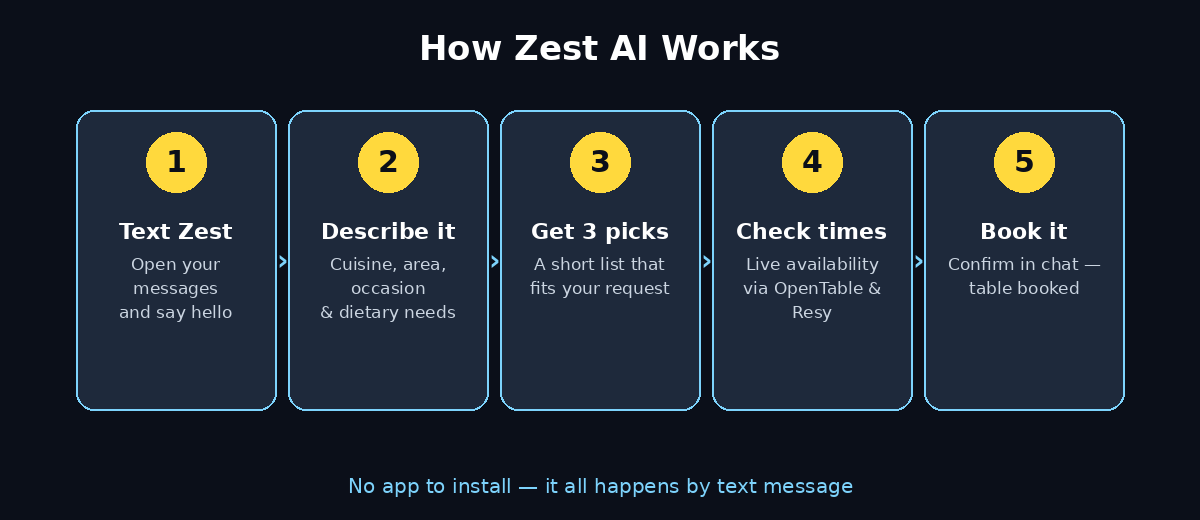
Getting started with Zest AI for beginners takes less than a minute, because there is no app and no sign-up form. Open the messaging app on your phone and start a conversation with Zest. The first message can be as simple as a hello, or you can jump straight in with what you want.
Try something like: “Hi Zest, I need a dinner spot for two tonight near downtown.” That single message already gives Zest the four things it needs most: how many people, which meal, when, and roughly where. Zest will reply with a question or two if anything important is missing, such as the cuisine you have in mind or a budget.
Beginner tip: save Zest as a contact in your phone after the first chat. Next time you want to eat out, it is one tap away, and your conversation history is right there, which helps Zest remember what you liked.
Step 2: Describe What You Want
For Zest AI for beginners, the quality of the recommendations depends on how clearly you describe what you want. A vague message gets generic picks. A specific message gets a short list that feels hand-picked. Give Zest these five details whenever you can:
- Cuisine or craving: “Italian,” “spicy Thai,” or simply “something comforting.”
- Neighbourhood or area: the part of town you want to eat in, or how far you are willing to travel.
- Occasion: date night, birthday, business dinner, quick lunch, or a group celebration.
- Dietary needs: vegetarian, vegan, halal, gluten-free, nut allergy, or anything else the group needs.
- Budget or vibe: “cheap and cheerful,” “mid-range,” “somewhere fancy,” or “quiet enough to talk.”
You do not need to send all of this in one perfect message. Zest is a conversation. Start with the two or three details that matter most, and answer its follow-up questions as they come. For example, if you say “vegan-friendly Thai near the university for four people,” Zest already has enough to work with, and it will only ask about the time and budget if it needs them.
Step 3: Review Your Personalised Shortlist (Zest AI for Beginners)
Zest AI for beginners starts here: Zest replies with a short list of restaurants that match your request — usually two or three options, not fifty. Each pick comes with a reason: why it fits your cuisine, your budget, your dietary needs, and your occasion. That reasoning is what makes the list useful. You can see immediately why a place was chosen instead of guessing from star ratings.
Read the shortlist and reply with what you think. You can say “the second one looks good,” or “something cheaper,” or “the first one, but is there outdoor seating?” Zest adjusts and offers new options. This back-and-forth is the real advantage over a search results page: you refine the list by talking, the same way you would with a friend who knows the city.
If none of the picks feel right, say so plainly. “None of these — I want something more casual” is a perfectly good message. Zest will try a different angle instead of showing you the same list again.
Step 4: Check Live Availability
Once you have a favourite, ask Zest to check availability. Learning to check availability is a key Zest AI for beginners skill, and it takes seconds. This is the step where Zest stops being a recommendation app and becomes a concierge. It checks the restaurant’s live booking system and tells you which times are actually free tonight, instead of leaving you to discover a full dining room after you have already decided.
Be specific about the time. “Tonight at 7:30” is better than “tonight.” If your first choice of time is taken, Zest will usually offer the nearest alternatives, such as 7:00 or 8:15, so you can decide on the spot. If the restaurant is fully booked, say so and Zest can check your second-choice restaurant without you starting the whole conversation again.
Beginner tip: for Friday and Saturday nights, text Zest earlier in the day. The best tables go first, and an early text gives you more times to choose from.
Step 5: Book Your Table with Zest AI for Beginners
When you have a time you like, just confirm it. Booking is the easiest Zest AI for beginners step, because Zest does the work. Tell Zest “book the 7:30 table for two” and it completes the reservation through OpenTable, Resy, or SevenRooms, depending on which system the restaurant uses. You do not open another app, create another account, or re-enter your details.
Zest will send you a confirmation with the restaurant name, address, time, and party size. Save that message or take a screenshot, so you have the details handy when you arrive. If the restaurant needs a phone number or a name for the booking, Zest will ask for it in the chat before confirming.
This hands-off booking is the clearest example of where AI concierges are heading: you describe the outcome you want in plain words, and the agent handles the clicks, the forms, and the confirmation. If your business books a lot of client meals, this is the same kind of time saving that AI automation services deliver across scheduling and admin work.
Step 6: Share the Plan With Your Group
One of the most common restaurant problems is not choosing the place — it is telling everyone else. Zest makes this easy because the whole plan already lives in a chat message you can forward.
- Forward the confirmation: send Zest’s confirmation message to your group chat so everyone has the restaurant, time, and address.
- Share the shortlist first: if the group still needs to vote, forward Zest’s two or three options and let people react before you book.
- Ask Zest about the group: mention the group size and any dietary needs up front, so the picks work for everyone, not just for you.
- Keep one decision-maker: let one person handle the Zest chat and the booking, while the rest of the group just votes. Too many people texting Zest about the same dinner creates confusion.
For larger groups, mention the headcount early. A table for eight is a different problem from a table for two, and restaurants handle big parties differently. Zest will factor that in before it recommends anything.
Step 7: Teach Zest Your Taste — Zest AI for Beginners
Zest gets better the more you use it, because it remembers your past preferences. Teaching Zest your taste is the Zest AI for beginners habit that pays off the most over time. After a meal, tell Zest what you thought. A simple “loved the ramen place, the quiet corner table was perfect” teaches it more than any settings menu ever could.
Over time, Zest builds a picture of your taste: the cuisines you return to, the price range you are comfortable with, the neighbourhoods you prefer, and the places you would never go back to. That memory is what turns a generic recommendation into a personal one. Your fifth dinner with Zest should feel noticeably better matched than your first.
You can also correct it directly. If Zest keeps suggesting sushi and you are tired of it, say “less sushi for a while.” If you discover a new favourite cuisine, tell it. The concierge only learns what you actually say, so honest feedback is the fastest way to improve your results.
Step 8: Plan a Special Occasion
Zest is most valuable when the meal actually matters — a birthday, an anniversary, a first date, or a dinner with an important client. For these meals, give Zest the occasion right at the start, because the occasion changes everything about the recommendation.
For a birthday, mention the group size, whether you need a cake-friendly restaurant, and whether you want a lively or quiet room. For a date, mention the vibe you want — romantic, casual, or somewhere with a view. For a business dinner, mention that you need a quiet table where you can talk, and that the restaurant should look professional.
Special occasions are also where you should book earliest. Tell Zest the date a few days ahead when you can, and let it check availability while the good tables are still free. A last-minute text can still work, but an early text gives Zest room to find something genuinely special.
Step 9: Change or Cancel a Booking
Plans change, and Zest handles that in the same chat. Changing a booking is a simple Zest AI for beginners task, and it all happens in the same thread. If you need a different time, a bigger table, or a different day, just text Zest what changed. “Can we move tonight’s booking to 8:30?” or “We are now six people instead of four” is enough for it to check and update the reservation.
If you need to cancel, text Zest as early as you can. Restaurants hold tables for confirmed bookings, and a late cancellation can cost them a table for the night. Zest will confirm the cancellation back to you, so you know it actually went through and you will not be marked as a no-show.
Beginner tip: keep your Zest conversation in one thread per booking. If you start a fresh chat for every change, Zest has to ask you all the details again. One thread, one dinner, from first text to final confirmation.
Zest AI vs Other Ways to Book a Table
Here is how Zest compares with the usual ways people find and book restaurants:
| Method | How you find a place | Booking | Best for |
|---|---|---|---|
| Zest AI | Text what you want, get a short personalised list | Books for you via OpenTable, Resy, or SevenRooms | Busy people, groups, special occasions |
| Google Maps / search | Search and scroll through hundreds of listings | You book yourself, often on another site | Quick lookups when you already know the place |
| OpenTable | Browse by cuisine, area, and time slots | Direct booking in the app | People who like browsing and comparing times |
| Resy | Browse curated restaurants andNotify lists | Direct booking in the app | Hard-to-get tables at popular restaurants |
| Asking friends | Personal recommendations from people you trust | You still have to book it yourself | When a friend genuinely knows the city well |
Zest does not replace OpenTable or Resy — it books through them. What it replaces is the scrolling, the shortlisting, and the back-and-forth. If you enjoy browsing restaurant lists, the apps are still great. If you want someone else to do the choosing and the booking, Zest is the faster route.
Frequently Asked Questions About Zest AI
Is Zest AI free to use?
Zest works through text messages, so there is nothing to install and no app to buy before your first request. The booking itself runs through OpenTable, Resy, or SevenRooms, which do not charge diners for a reservation. Because Zest only launched on October 31, 2026, check its official website for the latest pricing details before you rely on them.
Do I need to download an app to use Zest AI?
No. That is the whole point. Zest lives in your text messages. You text it from the messaging app already on your phone, and it replies in the same conversation. There is no app to download, no account to create, and no password to remember.
Which booking platforms does Zest use?
Zest books through OpenTable, Resy, and SevenRooms, depending on which system the restaurant uses. You do not need an account on any of them — Zest handles the booking step for you inside the chat.
Can Zest handle dietary restrictions?
Yes. Tell Zest about dietary needs in your first message — vegetarian, vegan, halal, gluten-free, or an allergy — and it will only recommend restaurants that can actually serve your group. Mention the restriction every time you book for a mixed group, so nobody is left out.
Does Zest work in my city?
Zest’s coverage depends on the restaurants and booking platforms in your area. The best way to find out is to text it with a real request for your neighbourhood and see what it returns. If coverage is thin where you live, try a nearby city centre first.
Can I change or cancel a booking made through Zest?
Yes. Text Zest in the same conversation thread and say what changed — a new time, a different party size, or a cancellation. Zest will check with the restaurant’s booking system and confirm the change back to you.
Final Thoughts: Zest AI for Beginners
This Zest AI for beginners guide comes down to one idea: Zest AI is a small idea with a big payoff: it takes the most annoying part of eating out — deciding where to go and booking the table — and turns it into a two-minute text conversation. No app, no endless scrolling, no group-chat deadlock. You describe what you want, Zest narrows it to a few places that genuinely fit, and then it books the table through OpenTable, Resy, or SevenRooms.
For beginners, the advice is simple. Start with a casual meal, be specific about cuisine, area, occasion, and dietary needs, and give Zest honest feedback after you eat. The more it learns about your taste, the better its picks become. And for the meals that matter — birthdays, dates, client dinners — text Zest early, so the best tables are still free.
Restaurant booking is one of those everyday tasks where an AI concierge genuinely saves time. Try Zest AI for your next dinner out, and see how much of the planning disappears.
Explore More Free AI Tools
Want to keep discovering useful AI tools? Try the AI Title Generator, Meta Description Generator, AI Rewriter, and Keyword Density Checker — free tools on AIToolSteps that help you create better content in minutes.