

Most teams launch a landing page, a headline, or a whole positioning statement — and then hope it lands. They guess what their ideal customer will think. Then they ship it. Weeks later, flat conversion numbers show the message missed. Articos AI flips that order. It lets you test your messaging, positioning, and landing pages against simulated buyers. These buyers match your ideal customer profile. You test before anything goes live. Then you get a structured report in under 30 minutes. This Articos AI for beginners guide shows you how to run your first study in one afternoon.
Articos is a peer-reviewed synthetic user research platform, founded in 2025 and headquartered in Dubai, UAE. Instead of recruiting real people for every study, it builds AI-generated personas. These personas are grounded in behavioral science. Articos interviews them. Then it returns findings traced back to individual persona responses. Its methodology was peer-reviewed across 46 controlled studies in 9 domains. It claims 86 percent accuracy against publicly documented human user research benchmarks. In October 2026 it hit #1 Product of the Day on Product Hunt (October 13). The win came from its Articos MCP launch. That launch brings the whole platform inside Claude and ChatGPT. Now validating a decision can take one prompt instead of a research project.
The best part for beginners is the free trial: 14 days, 1,000 credits (about 2 full studies), no credit card required. This guide walks you through exactly how to use Articos AI for free, step by step, from your first study to reading the report and acting on it.
What Is Articos AI?
Articos AI is a synthetic user research platform for SaaS marketing teams, agencies, and founders. In plain words: it replaces the slow, expensive job of recruiting real users for interviews with AI personas that behave like your target buyers.
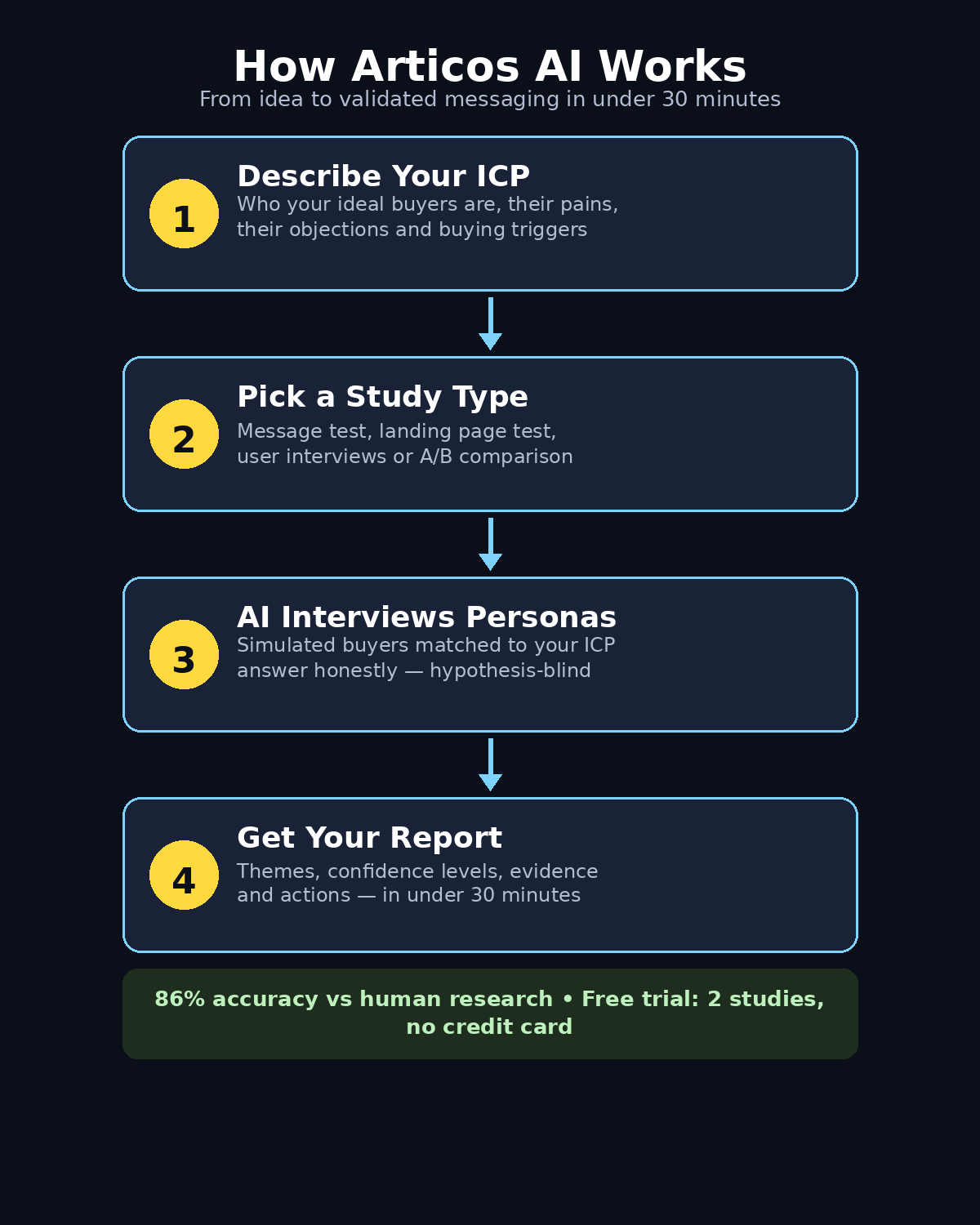
You describe what you want to test. It can be a headline, a pricing page, a positioning statement, or a whole landing page. Then you pick a study type. In short, Articos AI for beginners means testing before you launch. There is no recruiting, no waiting weeks, and no big budget. Articos generates simulated personas matched to your ideal customer profile (ICP). It runs structured interviews with them. Then it returns a clear report. The report lists key themes, confidence levels, supporting evidence, and suggested actions.
It is not a survey tool and not a chatbot. The personas are built on peer-reviewed methodology grounded in behavioral science. The interviews are hypothesis-blind. That means the personas are not led toward the answer you want to hear. That matters. Confirmation bias is the biggest trap in user research. If you only ask questions that confirm your idea, you will always get a yes.
Articos is most useful for early research. Use it to test ideas before you spend money on ads, a launch, or a redesign. If you run a small business or a digital agency, you need to know whether your message will resonate. Tools like this save weeks of back-and-forth. A good digital agency will always validate messaging before a campaign — and Articos gives even a one-person team that same ability.
Who Should Use Articos AI?
Articos is built for a specific audience, and knowing whether you are in it saves you time:
- SaaS founders and marketing teams validating messaging and positioning before a launch or campaign.
- Agencies that need fast, credible user feedback for client landing pages without recruiting panels.
- Indie makers and small businesses who cannot afford traditional user research but still need to know if their headline works.
- Product marketers testing pricing pages, feature concepts, and new positioning statements.
- Content and growth teams who want to A/B test two versions of a message and see which one real buyers would prefer.
If you are a student or a hobbyist with no product to test, Articos will feel less useful — you need something real to put in front of the personas. But if you have a website, a product, or even a draft landing page, you can run a meaningful study on the free trial today.
Articos AI Pricing: What Is Free?
Before you start, here is the honest pricing picture as of late October 2026. Prices change, so always check the official pricing page before you rely on a number.
The free trial gives you 14 days and 1,000 credits — roughly 2 studies — with no credit card required. That is the beginner-friendly entry point, and it is genuinely enough to test one landing page and one headline properly.
Paid plans start at $79 per month for the Starter plan (3,000 credits, with a launch bonus of +1,200 credits per month when checked in October 2026) and $199 per month for Pro (7,000 credits, launch bonus +2,800 per month). Each study burns roughly 400 credits, and monthly credits reset, so a study is not something you run casually every day on a paid plan either.
The smart beginner move: use the free trial to run two real studies on the two things that matter most to your business — your homepage headline and your pricing or landing page — and decide from the results whether the paid plan earns its keep.
Step 1: Create Your Free Articos Account
Go to articos.com and start the free trial. Setting up Articos AI for beginners takes about two minutes. You sign up with your email and create a workspace. No credit card is asked for at this stage. That is exactly how a free trial should work.
During setup, Articos will ask about your company and what you sell. Answer honestly and simply — this information helps the platform build better personas later. If you are testing a client project, use the client’s business details, not your own. Keep your workspace name clear, for example “My SaaS — Homepage Test,” so your studies stay organized when you run more than one.
Step 2: Define Your Ideal Customer Profile (ICP)
This is the most important step in the whole process, and beginners often rush it. Articos builds its simulated personas from the ICP you describe, so a vague ICP gives you vague personas, and vague personas give you useless feedback.
Getting the ICP right is the most important skill in Articos AI for beginners. Write down these details before you open the study builder:
- Who they are: job title, company size, industry, location.
- What they do today: the tool or process they currently use to solve the problem.
- Their pain points: the three frustrations they complain about most.
- Their buying triggers: what event makes them start looking for a solution.
- Their objections: the reasons they would say no — price, switching cost, trust, complexity.
For example, do not write “small business owners.” Instead, write “owners of 5–20 person e-commerce stores in the US.” Add that they manage customer support in a shared Gmail inbox. They lose track of tickets. They worry a new tool will take weeks to set up. That level of detail is what makes the personas feel like real buyers.
If your ICP is weak, your results will be weak. That is true no matter how good the AI is. Poor CRM data or a biased ICP can reduce the quality of recommendations. So take ten minutes here and save yourself a wasted study.
Step 3: Choose Your Study Type
Articos AI for beginners offers four main study types. Pick the one that matches the question you actually need answered:
- Message testing: test a headline, tagline, or positioning statement. Best when you have two or three headline options and cannot decide.
- Landing page testing: test a full page. The personas react to the whole page — headline, copy, layout, call to action — and tell you what confused them and what convinced them.
- User interviews: open-ended conversations with personas about their needs, pains, and buying process. Best for early discovery.
- A/B comparison: put two versions of a message or page head to head and see which one wins, with reasons.
For your first study, message testing or landing page testing gives the clearest, most actionable result. Interviews are powerful but produce broader findings that are harder to act on in one afternoon.
Step 4: Describe What You Want to Test
Now paste in the thing you want tested. For a headline test, paste your headline options exactly as they would appear on the page. For a landing page test, paste the page URL. You can also paste the full page copy.
Add context in plain language. Say what the product does, who it is for, and what action you want visitors to take. Do not write marketing fluff here. Write the truth. The personas will react to what you actually say. If your description is inflated, their feedback will be about a product that does not exist.
One practical tip: test one thing at a time. If you paste a headline, a pricing table, and three feature descriptions into a single study, you will not know which part caused which reaction. Run a focused study, fix what it finds, then run the next one.
Step 5: Generate Your Simulated Personas
Articos now generates a set of simulated personas matched to your ICP. Review them before the study runs. Each persona should feel like a specific person: a name, a role, a company context, goals, frustrations, and a buying style.
Check for two problems. First, look for personas that are too similar to each other. If all five share the same job title in the same industry, your ICP description was too narrow. Second, look for personas that do not match your real customers at all. If they do not match, go back to Step 2 and sharpen the ICP. This review takes two minutes. It is the difference between a study you trust and one you ignore.
Step 6: Run the Study and Let the Interviews Happen
Start the study. Articos AI for beginners runs structured, hypothesis-blind interviews with each persona. Results arrive in under 30 minutes, according to the platform. You do not need to sit and watch. The interviews happen automatically.
While you wait, do something useful. Write down what you expect the personas to say. Which headline do you think will win? What objection do you expect most? Write your prediction down before you see results. That protects you from rewriting history after the fact. “Oh, I knew that all along” is the enemy of learning.
Articos also offers Live Calls, a newer capability for real-time voice conversations with simulated personas at any point in a study. For beginners, the standard written interviews are enough; Live Calls are worth trying once you are comfortable with the basic reports.
Step 7: Read the Report the Right Way
Your report arrives with key themes, confidence levels, supporting evidence, and suggested actions. Every finding is traced back to individual persona responses. Reading an Articos AI for beginners report is simple. Use this order:
- The headline verdict: which message or version won, and by how much.
- The themes: the 3–5 patterns that came up across multiple personas. A complaint from one persona is an anecdote; the same complaint from four is a finding.
- The evidence: read the actual persona quotes behind each theme. If a quote sounds generic, discount that theme.
- The objections: what made personas hesitate. These are gold — they are the exact words your real landing page needs to answer.
- The suggested actions: treat these as a starting list, not orders. You know your product better than the report does.
Do not cherry-pick the findings that agree with you. The uncomfortable findings are the reason you ran the study. The headline you loved may confuse personas. The feature you lead with may bore them. Those findings matter most.
Step 8: Use Articos MCP Inside Claude or ChatGPT
This is the feature that made Articos the #1 Product of the Day in October 2026. Articos MCP connects the platform to your AI agent, so you can run studies from inside Claude or ChatGPT with a single prompt instead of opening a dashboard.
Connect the MCP server from your Articos account settings, following the official setup guide for your agent. Once connected, you can ask your agent to run a messaging test. It can pull the results and even draft revised copy based on what the personas said. All of that happens in one conversation. Articos AI for beginners becomes much faster this way. If you enjoy building with Google’s AI tools, our Google Play Personal Apps AI guide shows another beginner-friendly way to use AI without writing code.
For beginners, the practical workflow is simple. Draft a headline in ChatGPT or Claude. Ask it to test the headline with Articos. Read the result. Then ask it to rewrite the headline based on the feedback. That loop is the whole point: write, test, rewrite. The MCP integration removes the friction that usually stops people from testing at all.
Step 9: Turn Findings Into Real Changes
A report that sits in a folder changes nothing. Articos AI for beginners only works if you act on the results. Within 24 hours of your study, make the changes it justifies:
- Rewrite the headline if personas found it confusing or uninteresting. Use their words, not yours — the exact phrases personas used to describe the problem usually convert better than your marketing language.
- Answer the top objection on the page. If three personas worried about setup time, add a line near the call to action: “Set up in under 10 minutes, no code required.”
- Cut the feature nobody cared about from the top of the page. Move it down or remove it.
- Keep what worked. If personas loved a specific benefit, make it more prominent instead of burying it.
Then run a second study on the revised page with your remaining free-trial credits. That before-and-after comparison is the most convincing evidence you will ever get. It shows the changes helped. And it costs you nothing extra on the trial.
Teams that work with AI automation services often build this test-and-revise loop into every launch, because a validated message is worth more than a faster launch. The same logic applies to a one-person business: thirty minutes of testing beats thirty days of guessing.
Step 10: Validate With Real Humans Before You Scale
Here is the honest limit you must respect. Simulated personas are signal. They are not a substitute for real customer interviews. Articos itself is benchmarked at 86 percent agreement with human research. That is impressive, but not 100 percent. Treat the results as a strong early signal. It tells you where to look. Then confirm the biggest findings with real people.
After your Articos study, do three quick real-world checks:
- Talk to 3–5 real customers or target users and ask the same core question the study asked. If they agree with the personas, you have a validated finding.
- Run a small live A/B test on your landing page with real traffic, using the winning headline from Articos.
- Watch your analytics for two weeks after the change: bounce rate, time on page, and conversion rate will tell you whether the personas were right.
If the real-world checks agree with Articos, you can trust the platform for faster decisions in the future. If they disagree, you have learned something important about where simulation ends and reality begins — and that lesson is worth more than any single report.
Articos AI vs Traditional User Research
| Feature | Articos AI | Traditional User Research |
|---|---|---|
| Time to results | Under 30 minutes | 2–4 weeks |
| Cost to start | Free trial (2 studies, no card) | Hundreds to thousands of dollars |
| Recruiting needed | No — personas are generated | Yes — find, screen, schedule, pay participants |
| Best for | Early validation, messaging, landing pages | Deep insight, complex products, regulated industries |
| Accuracy | 86% vs human research benchmarks | Human ground truth |
| Reusable | Yes — rerun anytime with new copy | Each round needs new recruiting |
| Live voice interviews | Live Calls with simulated personas | Real interviews with real people |
The table makes the trade-off clear: Articos wins on speed, cost, and convenience, while traditional research wins on depth and certainty. For a beginner validating a headline or a landing page, Articos is the right first step. For a high-stakes decision — a full rebrand, a pricing overhaul, an enterprise launch — use Articos first to narrow the options, then confirm with real humans.
Common Beginner Mistakes to Avoid
- Testing with a vague ICP. “Everyone” is not an ICP. If your personas could be anyone, their feedback will apply to no one.
- Testing too much at once. One headline or one page per study. Focused tests give focused answers.
- Treating the 86 percent figure as a guarantee. It is a benchmark against human research, not a promise that every finding is right. Always sanity-check the big claims.
- Ignoring the objections. The negative findings are the most valuable part of the report. If you only act on praise, you wasted the study.
- Running a study and changing nothing. A report without action is just a PDF. Make at least one change within 24 hours.
- Skipping the real-human check. Simulation is a shortcut to insight, not a replacement for talking to customers.
Frequently Asked Questions
Is Articos AI really free?
Yes. Articos AI for beginners starts free. The trial gives you 14 days and 1,000 credits — about 2 full studies — with no credit card required. After that you need a paid plan, starting at $79 per month for Starter. Check the official pricing page for current details, because launch bonuses and prices change.
How accurate is Articos AI compared to real user research?
Articos says its methodology was peer-reviewed across 46 controlled studies in 9 domains and agrees with publicly documented human user research benchmarks 86 percent of the time. Treat that as a strong signal, not a guarantee — always confirm major findings with real users before making expensive decisions.
What can I test with Articos AI?
You can test messaging and headlines, positioning statements, full landing pages, pricing pages, product concepts, and run A/B comparisons between two versions. You can also run open-ended user interviews with personas to explore needs, pain points, and buying triggers.
Do I need to recruit real users to use Articos?
No. Articos generates simulated personas matched to the ideal customer profile you describe, so there is no recruiting, scheduling, or paying participants. That is the main reason results arrive in under 30 minutes instead of weeks.
What is Articos MCP?
Articos MCP is a Model Context Protocol integration that connects Articos to AI agents like Claude and ChatGPT. It lets you run studies and get results from inside your agent with a single prompt. It launched in October 2026 and reached #1 Product of the Day on Product Hunt on October 13, 2026.
Is Articos AI good for small businesses?
Yes — small businesses and indie makers are one of its best audiences, because traditional user research is usually too slow and expensive for them. The free trial is enough to validate a homepage headline and a landing page, which are the two highest-impact tests for most small businesses.
Final Thoughts
Articos AI for beginners does one thing well: it tells you what your ideal customers will think before you ship. For beginners, the free trial is the perfect way to learn user research. There is no recruiting, no waiting weeks, and no spending money. Define a sharp ICP. Test one focused thing. Read the report honestly. Change your page within a day. Then confirm the big findings with real humans.
The teams that win in 2026 are not the ones with the most tools — they are the ones that test before they launch. Articos gives you that testing habit in under 30 minutes, and the free trial means there is no reason not to try it on your most important page this week.
Explore More Free AI Tools
Want to keep building with free AI? Try the AI Title Generator, Meta Description Generator, AI Rewriter, and Keyword Density Checker at aitoolsteps.com — they are free, beginner-friendly, and a great next step after your first Articos study.