

Learning how to use OpenSEO AI is easier than you think. Good SEO tools have always had one big problem: the price. Semrush and Ahrefs, the two industry-standard suites, cost well over $100 a month — far too much for a new blogger, a small business owner, or a student who just wants to rank their first website. That is exactly the gap OpenSEO was built to fill.
OpenSEO is an open-source SEO platform that launched on Product Hunt on October 8, 2026, where it finished #2 on the daily leaderboard. It packs keyword research, rank tracking, competitor analysis, backlink research, technical site audits, and AI visibility tracking into one modern workspace — and it is designed to work hand in hand with AI agents through MCP, so your coding assistant can build an SEO strategy from real search data instead of generic advice.
In this beginner-friendly guide, you will learn how to use OpenSEO AI step by step: trying the free web tools, setting up your first project, finding keywords, auditing your site, and checking how AI search engines see your brand. No SEO experience needed, and you can start without paying anything.
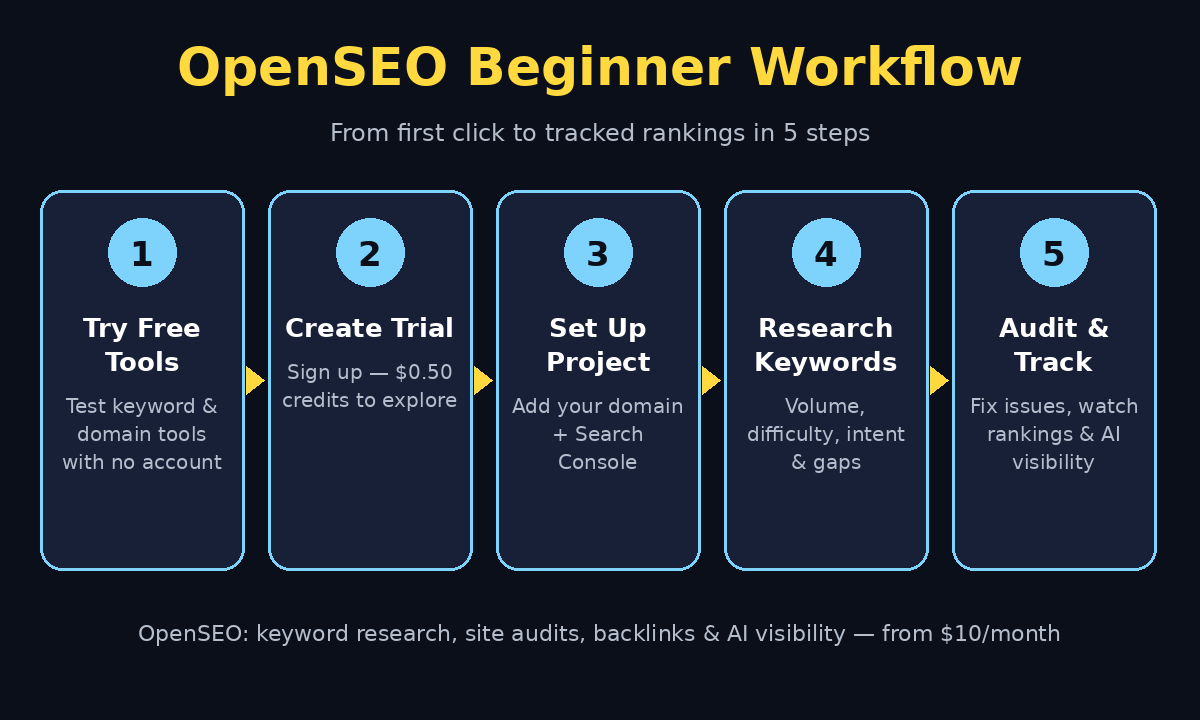
Step 1: Understand What OpenSEO Is — and What It Isn’t
Before you click anything, it helps to know what you are getting. OpenSEO is an open-source application (MIT-licensed) that gives you a Semrush-style interface for SEO research. Its main workflows are keyword research, rank tracking, domain and competitor analysis, backlink research, site audits, and AI visibility — tracking how ChatGPT, Perplexity, and Google AI Overviews mention your brand.
What it is not: a free replacement for the underlying search data. OpenSEO’s market data comes from DataForSEO, a separate pay-as-you-go provider, and its built-in AI agent needs an OpenRouter key. The hosted version bundles this into a simple plan — $10 a month including $10 of usage — and a free trial comes with $0.50 of credits to try things out. There are also free web tools you can use without an account at all.
The honest way to think about it: OpenSEO removes the expensive software subscription, not the cost of data itself. For a beginner running a small site, the trial credits and free tools are plenty to learn with, and the $10 plan is still roughly a tenth of what the big suites charge.
Step 2: Try the Free Web Tools First (No Account Needed)
The smartest first move costs nothing and takes two minutes. OpenSEO offers a set of free web tools on its website that let you test the platform before signing up.
- Open the OpenSEO website and look for its free tools section.
- Try a keyword lookup for a topic you want to write about — you will see search volume, difficulty, CPC, and intent signals next to live Google results.
- Run a quick domain check on your own website to see estimated traffic, ranking keywords, and top pages.
This tells you two things immediately: whether you like the interface, and whether the data looks useful for your niche. If you run a small business website and the numbers feel overwhelming, remember you do not have to master every metric on day one. If you’d rather hand the whole job to professionals, a digital agency like D365A can run this kind of research for you — but learning the basics yourself first means you will understand exactly what any agency report is telling you.
Step 3: Create Your Free Trial Account
Once you like what you see, create an account on the hosted version of OpenSEO. This is the shortest path — no servers, no setup, no code.
- Sign up with your email address and confirm your account.
- Your free trial includes $0.50 of usage credits, which covers a handful of keyword searches, a small site audit, and a domain lookup.
- Open the pricing page and use the usage estimator before you run big jobs, because OpenSEO is usage-based: heavy keyword or backlink research beyond your included credits adds cost.
A practical tip for beginners: treat your trial credits like a demo budget. Plan one small, real task — for example, researching keywords for your next three blog posts — instead of clicking through every feature at random. You will learn more, and you will not burn credits on curiosity clicks.
Step 4: Set Up Your First Project
Every piece of work in OpenSEO lives inside a project, which keeps your keywords, audits, and tracked rankings organized around one website.
- Click to create a new project and enter your website’s domain.
- Add a short description of what your site is about — this project context is what the AI features use to tailor suggestions to your business.
- Connect Google Search Console if you have it. This adds your real search performance data (actual clicks and impressions) alongside the estimated market data, and it is free.
Setting up a project takes under five minutes, and it is worth doing properly: a clean project with the right domain and description makes every later report more relevant. Teams building AI-powered workflows around their content can explore how Agentic Affairs approaches AI automation services — the same idea applies here, because OpenSEO’s project context is what lets an AI agent give you advice specific to your site instead of generic SEO tips.
Step 5: Do Your First Keyword Research
Keyword research is the heart of OpenSEO, and it is where beginners get their first real win.
- Open the keyword research tool and type a seed topic — for example, “homemade protein bars” if you run a food blog.
- OpenSEO expands your seed into keyword ideas, each with search volume, keyword difficulty, CPC, and intent (informational, commercial, transactional, or navigational).
- Look at the live Google results shown beside the metrics. This matters: a keyword with big volume but dominated by giant authority sites is a bad first target.
- Save promising keywords and tag them for content planning — for example, tag one cluster “blog posts” and another “product pages.”
The beginner rule is simple: pick keywords with modest volume and low-to-medium difficulty where the top results look beatable. One well-chosen keyword that you can realistically rank for is worth more than fifty impressive-looking ones you never will. Save your first list before moving on — you will build your content plan from it in Step 9.
Step 6: Analyze a Competitor’s Domain
You do not have to guess what works in your niche. OpenSEO’s domain tools let you inspect any competitor’s public SEO footprint.
- Enter a competitor’s domain in the domain analysis tool.
- You will see estimated traffic, their ranking keywords, their top pages, their backlinks, and their referring domains.
- Filter their ranking keywords by low difficulty and decent volume — these are topics a smaller site can realistically compete for.
- Note which of their pages earn the most backlinks. Those pages reveal what content other websites consider worth linking to.
Use this ethically: you are studying public search data to understand a market, not copying anyone’s content. The goal is to find gaps — questions your competitors rank poorly for, or topics they have not covered well — and then answer those questions better on your own site. This competitor check is a practical part of how to use OpenSEO AI for research.
Step 7: Run a Site Audit on Your Own Website
A site audit is a health check for your website. OpenSEO crawls your pages and flags technical problems that can hold back rankings.
- Start a site audit from your project and enter your domain.
- The audit checks status codes, page titles, meta descriptions, headings, indexability, image alt text coverage, internal links, response times, and optionally Lighthouse findings like page speed.
- Work through the issues in priority order: broken pages and missing titles first, then duplicate meta descriptions, then smaller fixes like missing alt text.
- Re-run the audit after fixing a batch of issues to confirm they are resolved.
Beginners often discover quick wins here — a missing meta description on a popular page, or an image without alt text. Fixing ten small audit issues can do more for a new site than writing another blog post, because it removes obstacles Google already penalizes you for. Learning how to use OpenSEO AI for audits makes those fixes easier to prioritize.
Step 8: Check Backlinks and Referring Domains
Backlinks — links from other websites to yours — remain one of the strongest ranking signals, and OpenSEO shows you who links to you and to your competitors.
- Open the backlink research tool and enter your domain.
- Review your referring domains and the quality of each link. A handful of links from real, relevant websites beats hundreds of low-quality directory links.
- Repeat the check for your top competitor and note which sites link to them but not to you. Those sites are your outreach list: they already link to content like yours.
- Watch for spammy or suspicious links. If you ever see a flood of irrelevant links, that is a problem to investigate, not a gift.
For a beginner, the realistic goal is not hundreds of backlinks. It is understanding your starting point and finding ten relevant websites that might genuinely want to reference your content. Checking backlinks this way is another core part of how to use OpenSEO AI.
Step 9: Track Rankings and AI Visibility
SEO is a long game, and tracking is how you know whether your work is paying off.
- Add your saved keywords from Step 5 to rank tracking, so OpenSEO monitors your positions over time.
- Check the AI visibility section to see how ChatGPT, Perplexity, and Google AI Overviews mention — or ignore — your brand for the questions your buyers actually ask.
- Review both reports weekly, not daily. Rankings move slowly, and daily checking just creates anxiety.
- When a page climbs, note what you did: the keyword choice, the content depth, the internal links. Repeat that pattern.
This is also where OpenSEO’s AI angle becomes practical. As more buyers ask AI chatbots instead of Google, appearing in AI answers is becoming as valuable as ranking in search results. Tracking both from one dashboard keeps you ahead of that shift instead of discovering it a year late. Tracking progress weekly is how to use OpenSEO AI to stay consistent.
Step 10: Connect OpenSEO to Your AI Agent with MCP
This is the feature that makes OpenSEO different from a cheaper Semrush clone. Through MCP (Model Context Protocol), your AI coding agent — Claude Code, Codex, OpenClaw, or similar tools — can query OpenSEO directly.
- In OpenSEO, find the MCP connection settings and generate your connection details.
- Add them to your AI agent’s MCP configuration, following the setup guide for your specific agent.
- Now ask your agent for SEO help grounded in real data: “Build a content plan for my site using my saved keywords,” or “Find content gaps against this competitor.”
- Review everything the agent suggests before publishing. Real data makes the advice better, but you are still the editor.
For beginners, this step is optional — everything in Steps 1–9 works fine without it. But if you already use an AI coding assistant, this connection turns it from a generic writing helper into an SEO strategist that knows your actual keywords, competitors, and rankings. Even without MCP, you already know how to use OpenSEO AI for the core workflows.
OpenSEO vs Other SEO Tools
| Feature | OpenSEO | Semrush / Ahrefs | Google Search Console (free) |
|---|---|---|---|
| Price | Free trial credits; hosted from $10/month with $10 usage included; self-host option | $100+ per month | Free |
| Keyword research | Yes, with volume, difficulty, CPC, intent | Yes, larger databases | No (only your own queries) |
| Site audits | Yes, technical + Lighthouse | Yes | Limited (indexing, Core Web Vitals) |
| Backlink research | Yes | Yes, deeper history | Only links to your own site |
| Rank tracking | Yes | Yes | No (position data only for your site) |
| AI visibility tracking | Yes (ChatGPT, Perplexity, AI Overviews) | Emerging/partial | No |
| AI agent connection (MCP) | Yes, built in | Limited | No |
| Best for | Beginners and small teams wanting pro data cheaply | Agencies and large teams | Every site owner, as a companion tool |
The sensible beginner stack is OpenSEO plus Google Search Console: OpenSEO for research and planning, Search Console for your real performance data. Together they cover almost everything a new site needs, at a fraction of the old price.
Frequently Asked Questions
Is OpenSEO really free?
Partly. The software itself is open source and free to self-host, and the hosted version offers free web tools plus a trial with $0.50 of credits. Full research data runs on a usage-based plan starting at $10 a month (which includes $10 of usage). That is still far cheaper than the $100-plus subscriptions of the big suites, but it is not unlimited-free — use the pricing estimator before large jobs.
Do I need to know coding to use OpenSEO?
No. The hosted version works like any normal web app: sign up, create a project, and click through the tools. Coding only comes in if you choose to self-host it on your own Cloudflare account, which is an advanced option most beginners should skip.
Is my data safe with OpenSEO?
Self-hosting gives you full control over your projects and credentials, since the app runs on your own infrastructure. On the hosted version, your project data lives on OpenSEO’s servers like any SaaS tool, and you can connect Google Search Console to add your own verified data. Either way, avoid entering sensitive credentials you do not need for SEO work.
Can a complete SEO beginner use OpenSEO? (how to use OpenSEO AI)
Yes — that is the point of this guide. Start with the free tools, then keyword research for one real topic, then a site audit of your own site. You do not need to understand every metric on day one; volume, difficulty, and intent are enough to pick your first keywords, and the audit flags tell you exactly what to fix.
Should I pick OpenSEO over Semrush for a small blog?
For a small blog or new business site, yes in most cases. You get the core workflows — keywords, audits, backlinks, rank tracking, AI visibility — for around a tenth of the price. Semrush still wins on database depth and history for large agencies, but a beginner will rarely use that depth. Start with OpenSEO, and upgrade only when you can name a specific feature you are missing.
Final Thoughts (how to use OpenSEO AI)
OpenSEO is one of the most beginner-friendly SEO launches of 2026 because it attacks the real barrier: price. For the cost of a couple of coffees a month — or nothing at all while you learn with the free tools and trial credits — you get keyword research, site audits, backlink data, rank tracking, and AI visibility in one workspace, plus an MCP connection that lets your AI agent work from real data.
Your action plan for today is simple. Try a free keyword lookup, then sign up for the trial and research keywords for your next three posts. Run a site audit on your own website and fix the top five issues. Add those keywords to rank tracking and check back in a week. That single loop — research, fix, track — is the whole SEO habit, and OpenSEO gives you the tools to run it without a $100 subscription standing in the way. Once you have learned how to use OpenSEO AI, repeat that loop each week.
Explore More Free AI Tools
Want to keep building your AI toolkit? Try the AI Title Generator, Meta Description Generator, AI Rewriter, and Keyword Density Checker at https://aitoolsteps.com/ — they are free, beginner-friendly, and a great next step after your first keyword research session.