

Imagine this: you are about to buy a pair of headphones online, you pay the full price, and only later you discover there was a coupon code and a cashback offer waiting for you. That small moment of regret is exactly what Minty AI is built to remove, and this Minty AI for beginners guide will make sure it never happens to you again. Minty is a free AI shopping companion that finds cashback offers and coupons for you automatically while you shop at supported stores, so you keep more money in your pocket without hunting for codes yourself.
Minty, described by its makers as the fastest-growing AI shopping companion, expanded to Android on October 28, 2026, just in time for the holiday shopping season, joining its existing iPhone app. New members also get $10 in cashback added to their account when they sign up. In this beginner-friendly guide, you will learn what Minty AI is, how to install it, how to set it up in minutes, and how to use its smartest feature, PromptToSave, to save on almost every order.
If you are new to AI tools in general, do not worry. You need no technical skills for this one. If you can install an app and shop online, you can use Minty. Let us walk through it step by step.
Step 1: Download Minty AI for Beginners on Android or iPhone
The first step is simply getting the app on your phone. Minty is available on both major mobile platforms: it launched on iOS first and arrived on Android on October 28, 2026, so both iPhone and Android users can now use it.
- Open the Google Play Store on Android or the App Store on iPhone.
- Search for “Minty” and look for the official Minty AI shopping companion app. Check the developer name and the app icon before installing, because copycat apps sometimes appear around popular launches.
- Tap Install or Get, then wait for the download to finish.
- Open the app once it is installed. You will be greeted with a short introduction explaining how cashback and coupons work inside Minty.
Tip: install Minty before your next big shopping trip, not during it. Setting it up calmly at home means you will not miss an offer while rushing through checkout.
Step 2: Create Your Free Account and Claim the $10 Signup Bonus
Minty AI for beginners starts here: Minty is free to join, and new members receive $10 in cashback when they sign up. That bonus alone makes the first few minutes worthwhile, because it is essentially free money toward your next purchase.
- Tap Sign Up and enter your email address, or use a supported sign-in option if one is offered.
- Create a strong password that you do not reuse on other shopping sites.
- Confirm your email address if Minty sends you a verification message.
- Check your Minty account or wallet section to confirm the $10 signup cashback has been added.
Read the bonus terms inside the app before you spend it. Signup bonuses usually come with simple conditions, such as a minimum purchase or a waiting period before withdrawal, and knowing them in advance avoids disappointment later.
Step 3: Minty AI for Beginners — Set Your Shopping Preferences
Minty works best when it knows what you like to buy. A few minutes of setup now means better, more relevant offers later, instead of a flood of deals you will never use.
- Choose the categories you shop in most: electronics, fashion, beauty, home goods, groceries, or gifts.
- Turn on notifications for deals, but keep them limited to your favourite categories so your phone does not buzz all day.
- Allow the permissions Minty asks for, such as recognising supported stores while you browse, because that is how it brings offers to you automatically.
- If Minty asks about your location or region, answer honestly: cashback offers and supported stores can differ by country.
Think of this step like telling a personal shopper your taste. The clearer you are, the more useful the suggestions become.
Step 4: Shop at Supported Stores and Let Minty Find Offers Automatically
This is the core idea behind Minty AI for beginners, and it is refreshingly simple. You do not have to search for coupon codes before every purchase. Instead, Minty recognises supported stores as you browse and brings the available cashback offers and coupons to you.
- Start your shopping trip the way you normally would, through the Minty app or with Minty active on your phone.
- When you visit a supported store, Minty shows you the cashback offer and any coupons available for that store.
- Read the offer carefully: some cashback rates apply to the whole order, while others exclude sale items, gift cards, or certain brands.
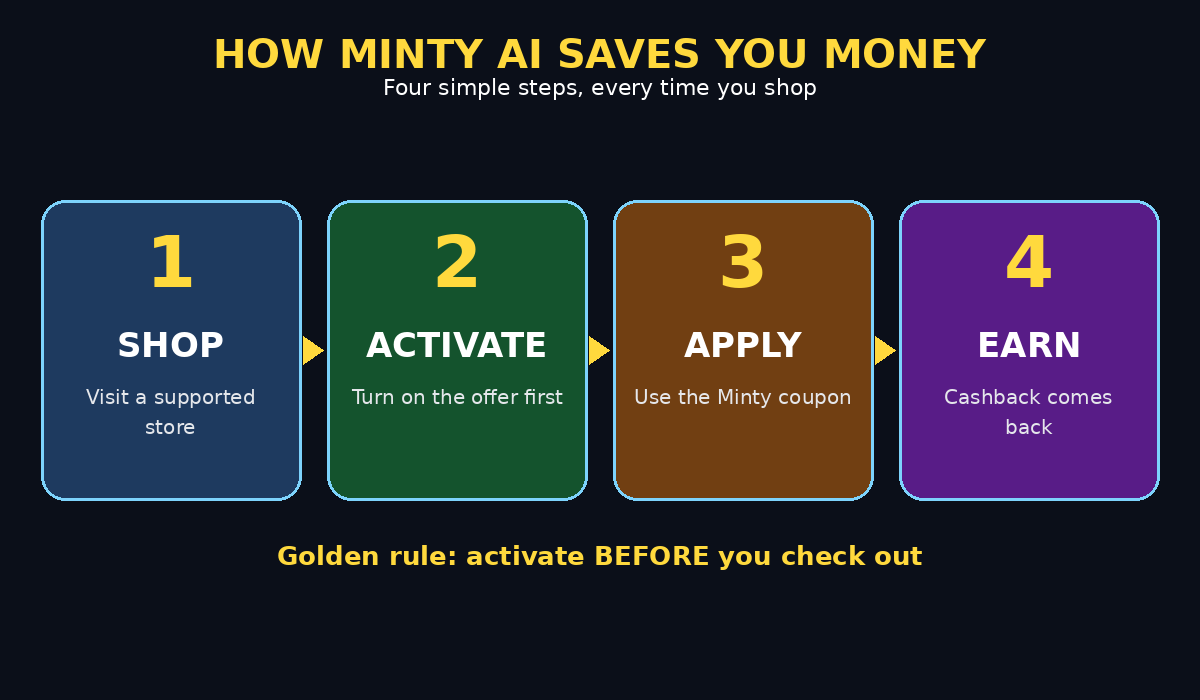
- Activate the offer before you check out. This is the single most important habit in this entire guide, because an offer that is not activated cannot be tracked.
The idea is sometimes called proactive commerce: instead of you going looking for a good deal, especially during the busy holiday rush, the deal comes to you at exactly the moment you need it. That is why Minty timed its Android launch for the weeks before the busiest shopping period of the year.
Step 5: Minty AI for Beginners — Use PromptToSave to Find a Deal
Minty’s most interesting feature is called PromptToSave. It gives you ready-made prompts based on what shoppers commonly look for, so you can quickly ask Minty, ChatGPT, Claude, Google Gemini, Grok, Microsoft Copilot, Muse, Perplexity, or another AI platform for help finding a deal.
- Open PromptToSave inside the Minty app and pick a prompt that matches your goal, for example finding the lowest price on a product, comparing two brands, or checking whether a better coupon exists.
- Copy the prompt, paste it into your favourite AI chatbot, and add your product name and budget.
- Compare the AI’s answer with Minty’s own offer. Sometimes the chatbot finds an extra code; sometimes Minty’s cashback is the better deal.
- Never share payment details, passwords, or full card numbers with any chatbot. A deal prompt only needs the product name, the store, and your budget.
PromptToSave is a great example of how AI tools work best together. Minty handles the cashback and coupons, while a general chatbot helps you research and compare. Used together, they cover both sides of smart shopping: finding the right product and paying the lowest fair price for it. Businesses that want to understand this kind of connected AI experience often work with a digital agency that builds customer journeys across apps, chatbots, and stores.
Step 6: Activate Cashback Before You Check Out
For Minty AI for beginners, one rule matters most: cashback only works if the purchase is tracked, and tracking starts when you activate the offer. Treat this as a non-negotiable part of checkout, like entering your shipping address.
- Find the store’s offer inside Minty and tap Activate before you add items to your basket, or at the very latest before payment.
- Complete the purchase in the same session, without switching devices halfway through, because switching can break tracking.
- Do not use another coupon site or cashback extension for the same order unless Minty says the offers can be combined. Stacking two trackers on one order is the most common reason cashback goes missing.
- Keep your order confirmation email until the cashback appears in your Minty account.
If your cashback does not appear after the expected waiting period, contact Minty support from inside the app and share your order number and date. Support teams can usually trace a purchase when you give them clean, complete details.
Step 7: Minty AI for Beginners — Apply Coupons the Smart Way
Coupons and cashback are related but different. A coupon lowers the price you pay today, while cashback returns part of what you paid later. The best savings often come from using both correctly.
- Let Minty surface the coupon first, rather than pasting random codes from the internet that may be expired.
- Apply one coupon code at checkout and check that the total actually drops before you pay.
- If a code fails, try the next Minty suggestion instead of testing ten codes manually; expired codes waste time and sometimes lock a checkout page.
- Remember that some stores reduce cashback when a large coupon is used. Compare the final total with and without the coupon when the saving is close.
A good rule of thumb for beginners: take the combination that gives you the lowest final cost after both the coupon discount and the expected cashback, not just the biggest headline percentage.
Step 8: Track Your Cashback and Withdraw It
Saving money feels real only when you can see it adding up, which is why Minty AI for beginners keeps your cashback visible in your account. Minty keeps your cashback in your account, so check it regularly and learn how withdrawals work before you need the money.
- Open your Minty wallet or earnings section after each tracked purchase to confirm the cashback is pending or confirmed.
- Note the difference between pending and confirmed cashback. Pending means the store has not yet finalised the order, for example during a return window, while confirmed means it is ready to withdraw.
- Check the minimum withdrawal amount and the available payout methods inside the app.
- Withdraw in small amounts first, so you understand the process and timing before a large holiday-season balance builds up.
Keeping a simple note of what you bought, where, and how much cashback you expect makes it much easier to spot a missing reward. A spreadsheet or even a phone note is enough.
Step 9: Minty AI for Beginners — Plan Your Holiday Shopping
Minty launched on Android right before the holiday season for a reason: this is when shoppers spend the most and when small percentages turn into real money. A little planning multiplies your savings.
- Make your gift list early and check Minty for each store on the list before buying anything.
- Buy higher-value items, such as electronics or appliances, through an activated cashback offer rather than on impulse.
- Use PromptToSave to compare prices across stores before committing to the first one you see.
- Set a budget per person on your gift list and let cashback stretch it further, rather than using savings as an excuse to overspend.
The smartest holiday shoppers are not the ones who buy the most. They are the ones who buy the same gifts, from the same stores, but keep a percentage of every order coming back to them.
Step 10: Stay Safe and Avoid Common Beginner Mistakes
Any tool that touches shopping and money deserves a little caution, and Minty AI for beginners is no exception. Minty itself is free and legitimate, but a few habits will keep your account and your money safe.
- Only download Minty from the official App Store or Google Play listing, never from a link in a random message or advertisement.
- Never share your Minty password, one-time codes, or payment details with anyone claiming to be Minty support.
- Do not click “cashback” links from unknown emails. Open the Minty app directly instead.
- Read the terms for each offer, especially around returns: returning an item usually cancels its cashback, which is normal and fair.
- If an offer looks too good to be true, such as 90 percent cashback on a popular store, verify it inside the official app before trusting it.
These habits matter beyond shopping apps. The same careful approach applies whenever AI automation services connect to your accounts: use official apps, grant only the permissions a feature truly needs, and check results before acting on them.
How Minty Compares With Other Ways to Save
Beginners often ask whether Minty replaces coupon websites and cashback browser extensions. The honest answer is that it overlaps with both, but its strength is doing the work for you on your phone.
| Method | Effort required | Best for | Main drawback |
|---|---|---|---|
| Minty AI app | Low: offers come to you automatically | Phone shoppers and holiday deals | Only works at supported stores |
| Manual coupon websites | High: search and test codes yourself | One-off rare codes | Many codes are expired |
| Cashback browser extension | Medium: desktop only, must remember to activate | Desktop shoppers | Easy to forget on mobile |
| Store loyalty programmes | Low: automatic points | Stores you visit weekly | Rewards locked to one store |
For most beginners, the winning combination is simple, and Minty AI for beginners fits right into it: use Minty on your phone, keep a store loyalty account where you shop often, and use PromptToSave with a chatbot when you are comparing a big purchase. You do not need five saving apps. You need one habit: activate before checkout.
Frequently Asked Questions
Is Minty AI really free?
Yes. Minty AI for beginners is free to download and join, new members get $10 in cashback on signup, and the company says its Android launch brings its savings tools to more shoppers at no cost. Some stores may have their own conditions, but Minty itself does not charge you to use its cashback and coupon features.
Does Minty work on both Android and iPhone?
Yes. Minty was available on iOS first, and on October 28, 2026 it launched on Android as well, bringing the mobile experience to both platforms in time for the holiday shopping season.
What is PromptToSave in Minty?
PromptToSave is a Minty feature that offers ready-made prompts based on what shoppers commonly look for. You copy a prompt into Minty, ChatGPT, Claude, Gemini, Grok, Copilot, Muse, Perplexity, or another AI platform and ask for help finding a deal, comparing prices, or checking for a better coupon.
Why did my cashback not appear?
The most common reasons are forgetting to activate the offer before checkout, switching devices mid-purchase, using another cashback tracker on the same order, or buying an excluded item such as a gift card. Check the offer terms, wait out the pending period, and then contact Minty support with your order details.
Can I use Minty with coupons from other websites?
Sometimes, but not always. A coupon from another site can break cashback tracking if the store credits that site instead of Minty. When in doubt, use Minty’s own coupon for that order and compare the final total.
Is Minty safe to use?
Minty is a legitimate free shopping companion, but stay careful like with any money app: download only from official app stores, never share passwords or codes, and verify surprising offers inside the official app before trusting them.
Final Thoughts
Minty AI will not make you rich, and no honest guide should promise that. What it will do, if you build the activate-before-checkout habit, is return a steady percentage of money you were going to spend anyway. Across a holiday season of gifts, electronics, clothes, and home goods, that percentage adds up to real savings.
Start today with this Minty AI for beginners routine: install the app, claim the $10 signup cashback, set your categories, and try PromptToSave on your next purchase. Then, the next time a friend says they paid full price for something you bought cheaper, you will know exactly which app to recommend.
Explore More Free AI Tools
Want to keep learning? Try the AI Title Generator, Meta Description Generator, AI Rewriter, and Keyword Density Checker at AIToolSteps — all free, and all designed to make your everyday work with AI tools faster and easier.