

If you have ever stared at 60 pages of lecture notes the night before an exam, you already know the real problem is not the studying — it is the preparing to study. Making flashcards by hand takes hours, and that is exactly the problem Knowt AI solves. Knowt is a free AI-powered study platform that turns your notes, PDFs, lecture videos, and even photos of textbook pages into flashcards, summaries, practice tests, and study guides in seconds.
Used by millions of students, Knowt has become the go-to free alternative to paid study apps like Quizlet’s premium tiers. Its free Learn Mode, spaced repetition, and AI flashcard generator give students a complete study system without paying a cent. In this beginner-friendly guide, you will learn how to use Knowt AI step by step — from creating your first account to generating AI flashcards, taking practice tests, and locking knowledge in with spaced repetition.
Whether you are a high school student prepping for exams, a college student drowning in readings, or a professional studying for a certification, this guide will get you from zero to studying smarter in under 30 minutes.
Step 1: Create Your Free Knowt AI Account
Getting started with Knowt takes about two minutes, and the core study features are completely free.
- Go to knowt.com in your browser (it works on Chrome, Safari, and Edge).
- Click Sign up and create an account with your Google account or an email address — no credit card required.
- Download the free Knowt mobile app (iOS and Android) so your flashcards sync between your phone and computer.
- Optionally install the Knowt Chrome extension, which lets you generate flashcards from any webpage and import flashcard sets from Quizlet in one click.
Once you are signed in, you will land on the Knowt dashboard. Do not worry if it looks empty — it fills up fast once you add your first study materials.
Step 2: Tour the Knowt AI Dashboard — Flashcards, Notes, and Exams
Before creating anything, take two minutes to understand the three main areas of Knowt:
- Flashcards: This is home base. Every flashcard set you create, generate, or import lives here, organized by subject.
- Notes & AI tools: Upload PDFs, paste notes, or add a video link, and Knowt’s AI converts them into study material.
- Exams tab: Free study guides, flashcards, and practice tests for standardized exams like AP, SAT, ACT, IB, and GCSE.
The interface is intentionally simple — one of the reasons students pick Knowt over clunkier alternatives. Everything syncs automatically in Knowt AI, so a set you make on your laptop appears on your phone instantly.
Step 3: Create Your First Knowt AI Flashcard Set Manually
Even though AI generation is Knowt’s star feature, start with one manual set so you understand the building blocks.
- Click Create and choose Flashcard set.
- Give the set a clear name, like “Biology Chapter 5 — Cell Division”.
- Add terms on the left and definitions on the right. You can add images to either side, which is great for anatomy, geography, or language learning.
- Click Create, and your set is ready to study.
Manual sets in Knowt AI are perfect for vocabulary lists, formulas, and anything short. For longer material, the AI generator in the next step will save you hours.
Step 4: Let Knowt AI Generate Flashcards from Your Notes or PDFs
This is the feature that makes Knowt worth trying. Instead of writing cards by hand, let the AI read your material and build the set for you.
- Click Create and choose AI Flashcards (or open the AI study tools section).
- Upload a file — Knowt accepts PDFs, PowerPoint slides, and images — or simply paste your typed or handwritten lecture notes.
- Wait a few seconds while Knowt’s AI scans the material, identifies key concepts, and generates question-and-answer flashcards.
- Review the generated cards: edit anything that looks off, delete duplicates, and add your own cards where the AI missed something.
In practice, the AI catches roughly 90% of the key concepts in a typical chapter — a huge head start compared to starting from a blank page. Always do a quick review pass, though: AI-generated cards are a draft, not a finished deck, and your corrections make them stick better anyway.
Step 5: Generate Flashcards from Lecture Videos with Knowt AI
Missed a lecture, or want to study from a recorded class? Knowt can turn video into flashcards too.
- Paste the link to a lecture video (or upload a recording) into the AI flashcard tool.
- Knowt’s AI summarizes the video and creates flashcards from the key points.
- Use the built-in AI lecture notetaker to get a written summary alongside the cards — perfect for revision the week before an exam.
This Knowt AI feature is a lifesaver for courses built around recorded lectures, where the alternative is rewatching hours of video at 2x speed.
Step 6: Import Your Quizlet Sets into Knowt AI in One Click
Already have flashcard sets on Quizlet? You do not have to rebuild them. This is one of Knowt AI’s most popular features, especially since Quizlet moved its Learn mode and practice tests behind a paywall.
- Install the Knowt Chrome extension.
- Open any Quizlet (or Cram) flashcard set in your browser.
- The extension auto-detects the set — click to import, and the whole deck (including images) copies into Knowt in about a minute.
- Your imported set immediately gets Knowt’s free Learn mode, practice tests, and spaced repetition applied to it.
Students migrating entire libraries of decks report that sets of 100+ cards import accurately in roughly a minute. It is the fastest way to escape a paywall without losing your work.
Step 7: Study with the Free Knowt AI Learn Mode
Learn Mode is Knowt’s flagship study experience — and unlike some competitors, it is completely free with unlimited rounds.
- Open any flashcard set and click Learn.
- Knowt quizzes you with multiple question types: multiple choice, true/false, and written answers.
- The mode adapts as you go, repeating the cards you get wrong until you master them.
If you only use one Knowt AI feature, make it this one. Active recall (being tested on material) beats re-reading notes every single time, and Learn Mode automates the whole process.
Step 8: Take AI-Generated Practice Tests
Flashcards build memory; practice tests build exam readiness. Knowt generates full practice tests from any set, note, PDF, or video.
- Open a set and choose Practice Test.
- Knowt builds a timed test with mixed question formats based on your material.
- Complete it under exam-like conditions — no peeking at notes — then review every wrong answer.
For standardized exams, check the Knowt AI Exams tab first: Knowt offers free AP, SAT, ACT, IB, and GCSE study guides with ready-made flashcards and practice tests, so you may not need to build anything from scratch.
Step 9: Use Knowt AI Spaced Repetition to Lock In Memory
Cramming works for tomorrow’s quiz and fails for next month’s final. Knowt AI’s spaced repetition algorithm schedules reviews at the exact moment you are about to forget each card, based on proven cognitive science.
- Study mode automatically tracks which cards you know well and which you struggle with.
- Cards you miss come back sooner; cards you nail get pushed further into the future.
- Study a little each day instead of marathon sessions — 20 focused minutes with spaced repetition beats 3 hours of re-reading.
This is the closest thing to a “study autopilot” that actually works: show up daily, and Knowt handles the scheduling.
Step 10: Ask Kai, the AI Tutor, When You Are Stuck
When a flashcard is not enough and you need an explanation, Knowt AI’s built-in AI tutor (Kai) can help.
- Open Kai from your study set and ask questions in plain language, like “Explain mitosis like I’m 12” or “Why does this formula work?”
- Kai answers based on your study material, so explanations stay relevant to your course instead of drifting into generic textbook territory.
- Use it for the 10% of concepts that confuse you — then go back to Learn Mode to cement them.
Think of Kai as a patient tutor who never gets tired of your follow-up questions. Combined with flashcards and practice tests, it covers the full loop: learn, test, understand, repeat.
Knowt AI vs Other Study Tools: Free Plan Comparison
| Feature | Knowt | Quizlet | Anki | NotebookLM |
|---|---|---|---|---|
| AI flashcard generation | Yes, free | Limited | No (manual) | Study guides, not cards |
| Learn/adaptive study mode | Free, unlimited | Paid | Via add-ons | Not available |
| Practice tests | Free | Paid | Via add-ons | Quiz-style Q&A |
| Spaced repetition | Built-in, free | Paid | Built-in, free | Not available |
| Import Quizlet sets | One-click, free | N/A | Manual | Not available |
| Study from PDFs/videos | Yes, free | Limited | No | Yes, free |
| Mobile apps | iOS + Android, free | Free with limits | Paid iOS app | Web + mobile |
| Best for | Students wanting free AI study tools | Social flashcard sharing | Power users, med/law exams | Research from your own documents |
Knowt AI wins for students who want a complete, free, AI-assisted study system with zero setup. Anki remains the power-user favorite for heavy memorization (medical and law students swear by it), while NotebookLM is better when your goal is understanding long documents rather than memorizing facts.
Frequently Asked Questions About Knowt AI
Is Knowt AI really free?
Yes — Knowt’s core study features are free, including AI flashcard generation, unlimited Learn Mode rounds, practice tests, spaced repetition, and Quizlet imports. There is no credit card required to start. Knowt also offers an optional paid tier that unlocks extra limits and advanced features, but most students never need it.
How accurate are Knowt’s AI-generated flashcards?
In real-world use, Knowt’s AI captures around 90% of the key concepts from typical notes, PDFs, and lecture videos. Accuracy is best with well-organized material and slightly lower with messy or highly technical content. Always review generated cards before studying — a quick edit pass takes minutes and improves your results.
Can Knowt replace Quizlet completely?
For most students, yes. Knowt imports your existing Quizlet sets (including images) in about a minute, then gives you free Learn Mode, practice tests, and spaced repetition — the exact features Quizlet put behind its paywall. The main thing you lose is Quizlet’s larger public library, though Knowt’s own library of student-created sets is growing fast.
Does Knowt work offline?
Knowt needs an internet connection for AI generation and most study features, since the AI runs in the cloud. This is the main limitation to know about: if you study somewhere without Wi-Fi (like some commutes or flights), plan ahead or screenshot key sets.
Can teachers use Knowt AI for their classes?
Yes. Knowt includes teacher tools for creating classes, assigning AI-generated activities and auto-graded assessments, and monitoring student progress. Teachers can also use 30+ AI teaching tools, including rubric and lesson-plan generators — useful for quickly creating differentiated materials at scale.
Final Thoughts
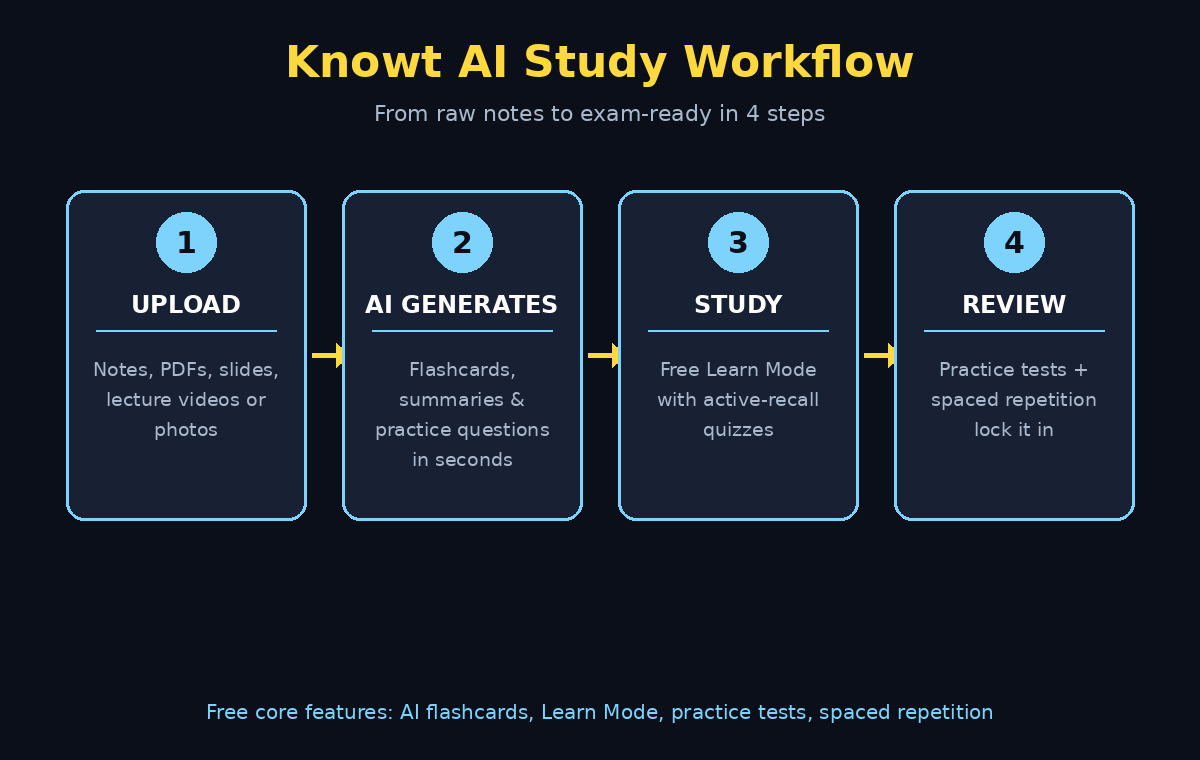
Knowt AI earns its popularity honestly: it removes the most boring part of studying (making the materials) and keeps the most effective parts (testing yourself, spaced review) completely free. Upload your notes, let the AI build the flashcards, study in Learn Mode, test yourself with practice tests, and let spaced repetition handle the schedule.
If you run a business or create content, the same “let AI do the repetitive work” principle applies everywhere. A professional digital agency can help you apply AI workflows to marketing, content, and customer support — the same way Knowt applies AI to studying. And if you want to go further with automation across your tools and team, AI automation services can connect AI agents to your real business processes.
Start with one subject this week: import or generate a single flashcard set in Knowt, run one Learn Mode session, and notice how much faster it feels than re-reading notes. Your future exam-season self will thank you.
Explore More Free AI Tools
Want to keep building your free AI toolkit? Try these next:
- AI Title Generator — craft click-worthy headlines for your blog posts and videos: AIToolSteps
- Meta Description Generator — write SEO-perfect meta descriptions in seconds: AIToolSteps
- AI Rewriter — rephrase essays and articles while keeping the meaning: AIToolSteps
- Keyword Density Checker — check your content is SEO-optimized before publishing: AIToolSteps
For hundreds more beginner-friendly AI guides, browse the tutorials at aitoolsteps.com.