

Imagine telling a smart assistant, in plain everyday words, “Buy Bitcoin when it dips five percent and sell when it climbs ten,” — and having it instantly turn that idea into a real, working trading strategy you can test with fake money first. That is exactly what Binance AI Pro does. Launched to all Binance users on October 19, 2026, it is a free AI agent that builds, tests, and runs crypto trading strategies from a simple conversation — no coding required.
In this beginner-friendly guide to how to use Binance AI Pro, you will learn what it is (and what it is not), how the free Standard plan works, how to describe your first trading idea, how to test it safely with simulated trading, and how to deploy it live when you are ready. No technical background needed — if you can chat with a chatbot, you can use Binance AI Pro.
Quick risk note before we start: Crypto trading is risky, and automated strategies do not remove that risk. This article is educational — it is not financial advice. Always test with simulated trading first, and never trade money you cannot afford to lose.
Step 1: Understand What Binance AI Pro Is (and Is Not)
Binance AI Pro is a finance-focused AI agent inside Binance Intelligence — Binance’s suite of AI products that also includes Binance Agent OS (a toolkit for developers) and a 24/7 personal Binance AI assistant. Here is the simple version:
- What it is: A chat interface where you describe a trading idea in plain language, and the AI generates a visual, editable trading strategy workflow from it. You then test it with paper trading and decide yourself whether to run it with real money.
- What it is NOT: A robot that trades for you on its own. Binance AI Pro never moves money or executes trades without your explicit approval at every step. It writes the strategy code; you decide whether, when, and what to execute.
It supports spot and USDS-M futures strategies, works on the Binance website and the Binance app with no separate sign-up, and every user starts on a free Standard plan that includes strategy creation, testing, and live deployment.
Step 2: Meet the Rest of the Binance Intelligence Suite
You do not need to memorize these, but knowing the family helps you find the right tool:
- Binance AI Pro — the strategy-building agent covered in this guide. Chat → strategy → test → trade.
- Binance AI — a 24/7 assistant that adapts the app to how you use it, rolling out progressively from October 5, 2026.
- Binance Agent OS — a developer platform connecting AI applications to Binance’s trading, market data, wallet, payment, and on-chain capabilities (it already handles over 280,000 daily calls).
For beginners, only Binance AI Pro matters. The others are either automatic or built for developers.
Step 3: Know the Plans — Free Standard vs Premium
Binance AI Pro runs on a freemium model. Every user starts on the free Standard plan; a Premium upgrade exists for heavier users.
| Feature | Standard (Free) | Premium (19.99 USDC/month) |
|---|---|---|
| Chat on web and in the Binance app | Yes | Yes |
| Generate and preview strategies | Yes | Yes |
| Test strategies with simulated (paper) trading | Yes | Yes |
| Deploy strategies to live trading | Yes | Yes |
| Max strategies (total, any state) | 10 | 10 |
| Monthly AI credits | 250,000 (refreshed monthly) | 10,000,000 (refreshed monthly) |
| AI models | DeepSeek | Frontier models like ChatGPT Sol, ChatGPT Astra, and Claude Opus (in available regions) |
| Credit top-ups | No | Yes |
| Best for | Beginners and casual experimenters | Active strategy builders and pros |
Key takeaway for beginners: the free Standard plan gives you everything you need to learn — you can build, test, AND deploy real strategies without paying anything. Premium just adds more credits, stronger AI models, and top-ups for power users.
Step 4: Get Ready — You Need a Binance Account
Binance AI Pro is available to all Binance users with no separate registration. The only prerequisite is a normal Binance account:
- Create an account on binance.com or in the Binance app if you do not have one. Complete the identity verification (KYC) your region requires.
- Update your app to the latest version if you plan to use the mobile route.
- No extra download needed — Binance AI Pro lives inside the existing Binance app and website.
Availability can vary by region, so if the AI Pro entry point does not appear for you yet, check back — Binance is rolling it out progressively through late October 2026.
Step 5: Open Binance AI Pro on the Web
The desktop view is the best place to learn, because it shows a split screen: your conversation on one side and the visual strategy workflow on the other.
- Log in to your Binance account on the website.
- Open Binance AI Pro from [AI] in the top navigation bar, or go directly to ai.binance.com.
- The chat window opens. You are already on the free Standard plan — nothing to buy or activate.
Tip: bookmark ai.binance.com so you can jump straight back to your strategies later.
Step 6: Open Binance AI Pro on the App
Prefer trading from your phone? The mobile flow is nearly identical:
- Open the Binance app and tap the Binance AI icon on the homepage.
- Tap the “Get more with AI Pro” banner (wording may say “Unlock more features with Binance AI Pro”).
- The conversation interface opens. On mobile you chat through the conversation view; the full visual workflow is available on desktop.
If you started as a Binance AI Pro (Beta) user earlier in 2026: your beta service keeps running as usual, you can use both versions at the same time, and you can optionally migrate your beta chat history and strategies into the new Binance AI Pro.
Step 7: Describe Your Trading Idea in Plain Words
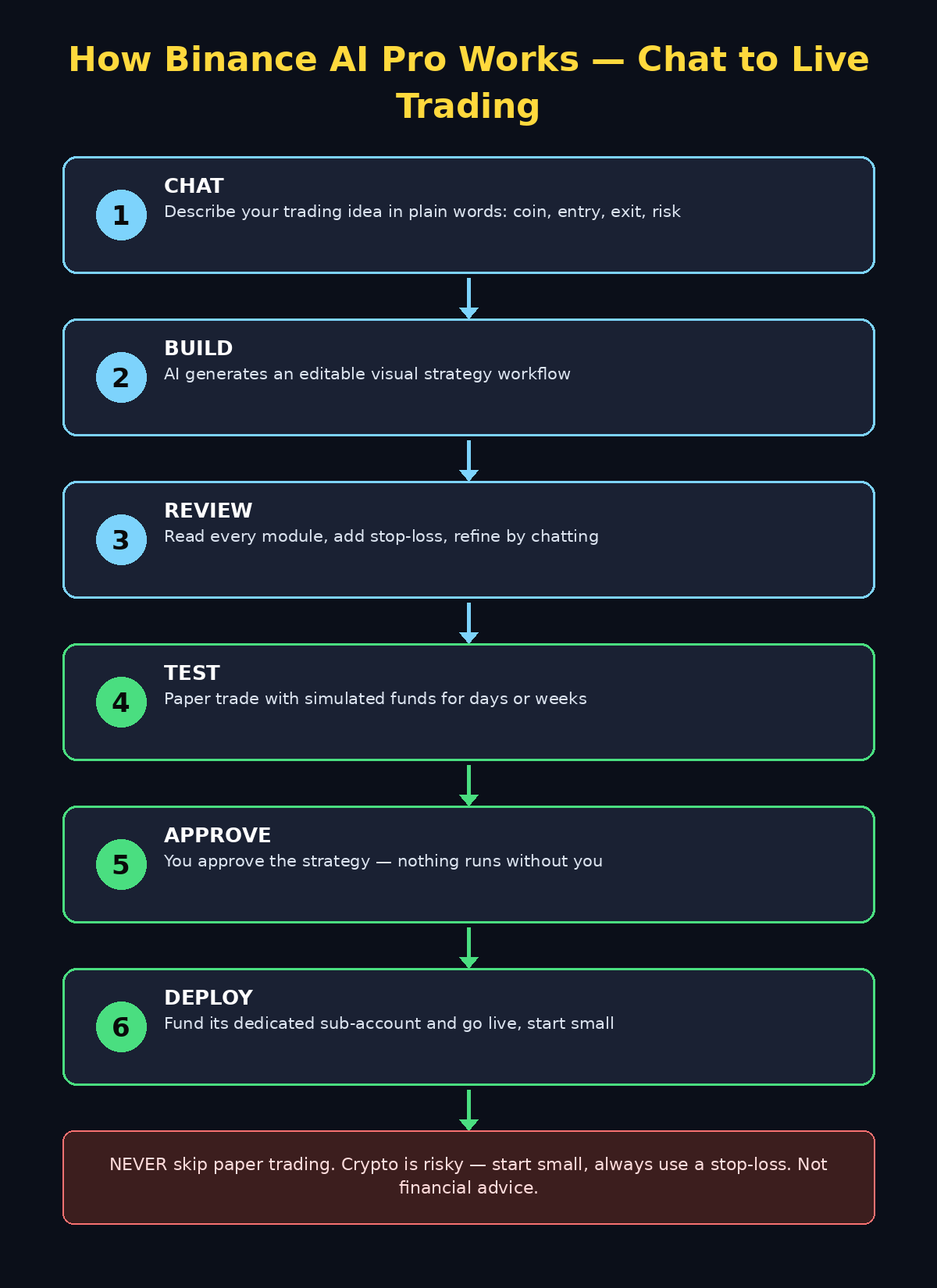
This is the fun part. Just describe what you want, the way you would explain it to a friend. Be specific about three things: what to trade, when to act, and how much risk to take.
Example prompts to copy and adapt:
- “Watch Bitcoin. If the price drops 5% in one day, buy $100 worth. If it rises 10% from my buy price, sell everything.”
- “For Ethereum: every morning check the trend. If it went up two days in a row, buy a small amount. If it drops below last week’s low, stop.”
- “Build a simple grid strategy for Solana between $180 and $240, with a stop-loss at $170.”
The AI reads your message, fills in the technical gaps, and generates an initial strategy alongside a visual flowchart — an editable workflow you can actually read and understand. No code on your screen, just boxes and arrows showing exactly what the strategy will do and when.
Pro tip: start with spot strategies on coins you already follow. Futures add leverage, which multiplies both gains AND losses — learn on spot first. If you run a business that needs a more customized automation setup around crypto or AI workflows, a specialist team like the digital agency at d365a can help you design something that fits your operations safely.
Step 8: Review the Visual Strategy Workflow
Never approve anything you do not understand. Before testing, read the workflow the AI drew:
- Walk through every box. Each module is one rule (entry condition, exit condition, risk limit, coin, amount). Click a module to ask the AI what it does, adjust it, add components, or remove them.
- Check the risk rules. Make sure your stop-loss and maximum position size are there. If the AI did not add a stop-loss, ask it: “Add a stop-loss at 8% below my entry price.”
- Keep refining through conversation. You can keep chatting — “make the grid tighter,” “only trade on weekdays,” “never risk more than $50 per trade” — until the workflow matches your idea.
On desktop you see the conversation and workflow side by side; on mobile the conversation leads and you can switch to the workflow view. Either way, any change requires your fresh approval before it can trade.
Step 9: Test It With Simulated (Paper) Trading
This step is non-negotiable for beginners. Binance AI Pro lets you test every strategy with simulated trading — hypothetical funds, real market conditions, zero real risk.
- With your strategy previewed, choose to run it in simulated/paper trading mode.
- Let it run for a few days or weeks so it sees different market conditions (a calm week and a volatile week teach you more than one quiet day).
- Watch the results dashboard: win rate, biggest loss, total return, and how often it actually traded.
- Refine and re-test. A strategy that only works in one market mood is not ready for real money.
Paper trading on the free plan costs you nothing but time — treat it as free tuition.
Step 10: Approve and Deploy to Live Trading
Only move here when the paper-tested strategy behaves the way you expect.
- Review the final workflow one more time and approve the strategy explicitly.
- Transfer funds to the strategy’s dedicated sub-account. Each live strategy runs in its own isolated sub-account, funded only by you through a manual transfer — the AI agent cannot move your funds on its own.
- Start small. Fund the first live run with an amount you are genuinely comfortable losing.
- Monitor the first week closely. Real money changes how a strategy feels — be ready to pause it.
Remember: the agent writes the code, but you stay in control at every step. Every workflow and every trade needs your approval before execution.
Step 11: Manage Your Strategies (You Get 10)
Binance caps each user at 10 strategies total — whether they are simulated, live, or signal-only. That limit is actually a blessing for beginners: it forces you to focus.
- Name them clearly: “BTC dip-buy spot” beats “Strategy 1”.
- Delete experiments you abandoned. Keeping your slot count tidy means you always have room for a new idea.
- One live strategy at a time is a good beginner rule. Master one before adding a second.
- Pause before deleting. A paused strategy keeps its history so you can learn from it later.
Step 12: Safety Rules Every Beginner Should Follow
Automated trading fails beginners for psychological reasons, not technical ones. Tape these rules to your wall:
- Never start on futures. Spot first, futures later — leverage turns small mistakes into big losses.
- Cap every strategy’s funding. Decide the maximum per strategy (say, 5–10% of your crypto portfolio) and never exceed it.
- Use stop-losses on every strategy. No exceptions — the AI can add one if you ask.
- Do not chase losses. If a strategy fails, pause it and study the paper-trading logs instead of doubling the funding.
- Beware of “set and forget.” Markets change; a strategy that worked in October can stop working in November. Review monthly.
- Keep records. Screenshot your workflows and results — you will forget why you built things.
If you want to learn AI strategy building more broadly — beyond trading — resources from agentic-affairs cover AI automation concepts that will sharpen how you prompt any agent, including trading agents.
Frequently Asked Questions
Is Binance AI Pro really free?
Yes. Every Binance user starts on the free Standard plan, which includes chatting, strategy generation, simulated trading, and live deployment with 250,000 monthly credits refreshed free each month. The optional Premium plan (19.99 USDC/month) adds 10 million monthly credits, frontier AI models, and credit top-ups — but beginners do not need it.
Do I need to know coding to use Binance AI Pro?
No. That is the entire point of the tool. You describe your idea in plain language, the AI builds the strategy and draws it as a visual workflow, and you refine it by chatting. You never see or touch code.
Can Binance AI Pro trade without my permission?
No. You must review and approve every workflow and every trade before it executes. Each live strategy runs in a dedicated sub-account that you fund yourself through a manual transfer — the agent cannot move your funds on its own.
How many strategies can I run at once?
You are capped at 10 strategies in total across simulated, live, and signal-only states. Beginners should start with one live strategy while testing new ideas in simulated mode.
Is Binance AI Pro available in my country?
Availability is subject to regional restrictions — Binance did not publish a full list. If the AI Pro entry point is missing from your app or the website, it has not rolled out to your region yet; check back or update your app.
What happens to my old Beta strategies?
If you used Binance AI Pro (Beta), it keeps working as usual and your subscription stays active. You can use both products at the same time, and you can optionally migrate your beta chat history and strategies into the new Binance AI Pro.
Final Thoughts
Binance AI Pro is one of the most beginner-friendly AI launches of October 2026: it turns plain-language trading ideas into tested, automated strategies with zero code, a generous free tier, and a mandatory approval step that keeps you in control. Follow the safe path — learn in chat, review the workflow, paper trade for weeks, start small live — and you will have learned more about strategy building than most people learn in a year of watching charts.
The biggest mistake beginners make is skipping paper trading. Do not be that beginner. Let the AI do the building, but keep the judgment — when to trust a strategy and when to pause it — firmly with you.
Explore More Free AI Tools
Want to keep learning? Try these free AI tools on AIToolSteps:
- AI Title Generator — craft click-worthy headlines for your posts at https://aitoolsteps.com/
- Meta Description Generator — write SEO snippets in seconds at https://aitoolsteps.com/
- AI Rewriter — rewrite and polish any text at https://aitoolsteps.com/
- Keyword Density Checker — check your SEO keyword balance at https://aitoolsteps.com/
And if you are building content about crypto or AI tools, these guides pair well with this one: how to use Perplexity AI for fast market research, and how to use Ollama to run AI models privately on your own computer.