

How to Use Muse Spark Open AI for Beginners (2026)
Meta just changed the AI game again — this time with a model anyone can try, study, and build on. Muse Spark Open is Meta’s brand-new open-weight AI model, released in October 2026 as part of the Muse Spark family from Meta Superintelligence Labs. Unlike closed chatbots, “open weight” means the model’s trained brain is downloadable and runnable by developers — but you do NOT need a data center, a Mac Studio, or any coding experience to try it. Free hosted chat playgrounds let you use Muse Spark Open AI in your browser within minutes.
In this beginner-friendly guide, you will learn exactly what Muse Spark Open AI is, how it differs from Muse Spark 1.x, and — step by step — how to try it for free, tune its reasoning modes, and use it for coding and agentic tasks. No credit card required to get started.
Step 1: Understand What Muse Spark Open AI Actually Is
Muse Spark Open is the first open-weight release in Meta’s Muse Spark lineup, which began with the original Muse Spark in April 2026 and continued through Muse Spark 1.1, 1.2 and 1.3. The key difference is simple: closed models run only on the company’s servers, while open-weight models publish their trained parameters so researchers and developers can download, inspect, self-host, and fine-tune them.
Here is what matters for beginners:
- It is a reasoning model built for coding and agentic workflows. Meta designed it for multi-file refactoring, debugging, and understanding large codebases — the kind of work AI coding assistants do.
- It has a 1 million token context window. That means it can read an enormous amount of text or code in one go — entire projects, not just single files.
- It accepts text and image input. You can paste code plus screenshots in the same request.
- It supports adjustable reasoning effort. You can choose low, medium, high, or xhigh reasoning levels depending on how hard the problem is.
- It is genuinely huge. At full precision the parameters need more than 1.6 terabytes of memory; even a compressed 4-bit version needs about 493GB. Meta demonstrated it running on two Apple Mac Studios with M5 Ultra chips — so downloading and running it at home is a project for serious enthusiasts, not beginners.
The good news: you never have to download it. Free hosted playgrounds give you the full model in your browser.
Step 2: Pick Your Free Route — No Downloads Needed
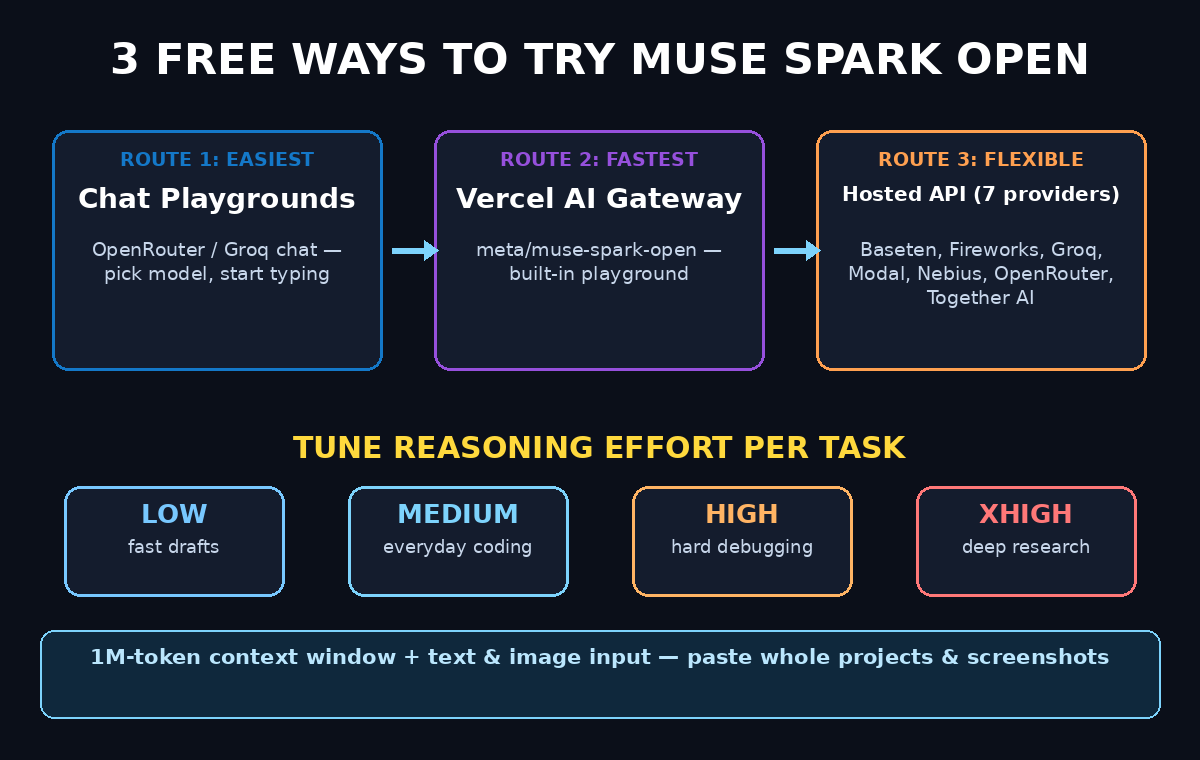
For a beginner, three beginner-friendly routes let you try Muse Spark Open AI without touching a server:
- Route A — Free chat playgrounds (easiest): Sites like OpenRouter’s chat interface let you select the model and start typing, with free credits or free-tier access.
- Route B — Groq or other hosted providers: Several of Meta’s seven launch providers (Baseten, Fireworks AI, Groq, Modal, Nebius, OpenRouter, Together AI) offer free tiers or trial credits. Groq is known for extreme speed.
- Route C — Vercel AI Gateway playground: Muse Spark Open is available as `meta/muse-spark-open` on Vercel AI Gateway with a built-in model playground you can try directly.
Pick ONE route to start — Route A is the fastest path to your first prompt. You can explore the others later in this guide.
Step 3: Sign Up and Get Your Free Access
Here is how to get running on a hosted playground (the steps are nearly identical on OpenRouter, Groq, and similar providers):
- Create a free account. Head to your chosen provider’s website and sign up with an email or Google account. This takes under two minutes.
- Check the free tier. Look for the model list and confirm Muse Spark Open is available on the free plan or with trial credits. Provider pricing varies — Artificial Analysis listed around $1.25 per million input tokens and $4.25 per million output tokens on paid plans, but free-tier access is enough for learning.
- Find the model ID. Each provider names the model slightly differently. On Vercel AI Gateway the canonical name is `meta/muse-spark-open`. On other providers, search their model list for “Muse Spark Open”.
- Open the chat playground. Most providers have a browser-based chat page where you can select the model from a dropdown and start chatting — no API key needed for the playground itself.
You are now one click away from your first prompt. Total time so far: about five minutes.
Step 4: Run Your First Prompt (and Tune Reasoning Effort)
With the model selected in the playground, try your first prompt. Because Muse Spark Open is a reasoning model, it works best with goal-oriented tasks rather than single factual questions.
Try this first prompt:
“Refactor this Python function to handle edge cases and add type hints: [paste a short function]”
Or, for a writing task:
“Draft a 150-word product description for a waterproof hiking backpack aimed at weekend hikers.”
Now the special trick — reasoning effort. Muse Spark Open supports low, medium, high, and xhigh reasoning levels:
- Low: fastest answers, best for simple questions and drafts.
- Medium: the sweet spot for everyday coding and writing help.
- High / xhigh: slower but much deeper — use for debugging tricky code, complex refactors, or research-style questions.
If your playground exposes a reasoning-effort setting, start at medium. Switch to high when the model gets something wrong, and drop to low when you just want speed.
Step 5: Try It on a Real Coding Task
Muse Spark Open shines brightest on code. Here is a beginner workflow to feel its strengths:
- Paste a buggy snippet and ask: “Find the bug in this code and explain it like I’m a beginner, then show the fixed version.”
- Ask for a multi-file plan: “This project has three files: app.py, utils.py, and config.py. Outline how to add a login feature across all three.”
- Test with a screenshot: Because the model accepts image input, you can upload a screenshot of an error message alongside your code. Prompt: “Here is my code and the error I’m seeing. What is wrong?”
- Compare reasoning levels: Run the same debugging prompt at low and high effort and notice the difference — high effort will typically reason through more possibilities before answering.
This is the same class of agentic coding work Meta demonstrated running entirely on two Mac Studios through its Muse Code tool — and you are doing it from a browser tab.
Step 6: Use the Model’s 1M Context Window Smartly
A 1-million-token context window sounds abstract until you use it. In practice it means you can paste:
- An entire short project (dozens of files) in one request
- A long document plus your questions about it
- Multiple code files and ask for cross-file changes
Beginner workflow:
- Open the playground and select Muse Spark Open.
- Paste your main file, then your helper file, clearly labeled (e.g. “// FILE: app.py” then “// FILE: helpers.py”).
- Prompt: “These two files work together. Add error logging to both, keeping the existing style.”
- Let the model work across both files at once — this is exactly what the 1M context window enables.
Note: very long inputs cost more on paid plans, so practice this on free tiers before scaling up. For teams building real products with AI assistance at scale, working with an experienced digital agency can help turn experiments like these into production workflows.
Step 7: Compare Muse Spark Open With the Closed Muse Spark Models
Beginners often get confused by the Muse Spark family tree. Here is the simple breakdown:
- Muse Spark (original, April 2026): The first model from Meta Superintelligence Labs, famous for searching Instagram, Facebook, and Threads content. Available free inside the Meta AI app and meta.ai.
- Muse Spark 1.1 / 1.2 / 1.3: Closed-weight upgrades — bigger context (up to 1M tokens), subagent orchestration, computer-use skills. Accessed via the Meta AI app’s “Thinking” mode or the Meta Model API (about $1.25/$4.25 per million tokens, with $20 free credits for new API accounts).
- Muse Spark Open (October 2026): The open-weight sibling — downloadable weights plus the same seven hosted providers. Best for developers and anyone who wants to inspect, self-host, or fine-tune.
Rule of thumb: use the Meta AI app for everyday chatting and social search; use Muse Spark Open via a hosted playground when you want an open model for coding projects or research you can reproduce and control.
Step 8: Connect It to Coding Agents (Optional Next Level)
Once you are comfortable in the playground, the natural next step is plugging Muse Spark Open into an AI coding agent like Claude Code, Codex, or Cursor. On Vercel AI Gateway the setup is straightforward:
- Install or upgrade the Vercel CLI.
- Run the coding-agents setup command from the gateway docs.
- Select `meta/muse-spark-open` as the model inside your agent.
Your agent can now use the open model for multi-file refactors and codebase-wide questions. This is an intermediate step — skip it until the playground feels easy. When your experiments grow into client work, structured AI automation services can help you deploy agent workflows reliably.
Step 9: Know the Limits Before You Rely on It
Every AI model has limits, and Muse Spark Open is no exception:
- It is text-output only for chat use. It accepts images as input but replies in text.
- Weights are free; compute is not. Downloading the model costs nothing, but running it needs serious hardware (hundreds of GB of memory). Hosted APIs charge per token beyond free tiers.
- Benchmarks vs. real utility. Some researchers have noted that benchmark numbers can be curated — always test the model on YOUR actual tasks rather than trusting leaderboards.
- Free tiers change. Providers adjust free limits often. If a playground suddenly asks for payment, check another of the seven launch providers before paying.
Step 10: Build a Daily Practice Habit
Like any tool, Muse Spark Open rewards daily use. Here is a simple 15-minute routine:
- Day 1–2: Chat playground basics — prompts, reasoning levels, image input.
- Day 3–4: Debug one real piece of your own code with a screenshot of the error.
- Day 5–6: Try a two-file refactor using labeled file pastes.
- Day 7: Compare the same task on low vs. high reasoning effort and note the quality gap.
By the end of week one, you will know exactly when this model beats the chatbots you already use — and when it doesn’t.
Muse Spark Open vs Other Free AI Options
| Feature | Muse Spark Open (playground) | Meta AI app (Muse Spark) | ChatGPT / Claude (free) |
|---|---|---|---|
| Cost to try | Free tiers on 7 providers | Free | Free with limits |
| Open weights | Yes — downloadable | No | No |
| Context window | 1M tokens | Up to 1M (1.1+) | Smaller on free tiers |
| Image input | Yes | Yes | Yes |
| Social content search | No | Yes (IG/FB/Threads) | No |
| Self-hostable | Yes | No | No |
| Best for beginners | Coding & agent experiments | Everyday chat + social search | General writing & Q&A |
Frequently Asked Questions
Is Muse Spark Open AI really free to use?
The model weights are free to download, and all seven launch providers (Baseten, Fireworks AI, Groq, Modal, Nebius, OpenRouter, Together AI) offer free tiers or trial credits that let beginners try it without paying. Heavy usage on paid plans runs about $1.25 per million input tokens and $4.25 per million output tokens, but learning and experimenting fit comfortably in free tiers.
Do I need to download the model to use it?
No. Downloading requires roughly 530GB (compressed) to 1.6TB (full precision) of storage plus serious GPU or Mac Studio hardware. For beginners, hosted chat playgrounds give you the full model in your browser with zero downloads.
What is the difference between Muse Spark and Muse Spark Open?
Muse Spark is Meta’s closed flagship model family (1.0 through 1.3) available in the Meta AI app, famous for searching Instagram and social content. Muse Spark Open is the open-weight release — its trained parameters are public so developers can download, self-host, and fine-tune it. Both come from Meta Superintelligence Labs.
Can beginners use Muse Spark Open for coding if they are not programmers?
Yes — start with the chat playground. You can paste code you don’t fully understand and ask the model to explain it “like I’m a beginner,” fix bugs, or suggest improvements. It is an excellent learning companion, not just a professional tool.
What does “reasoning effort” mean?
It controls how long the model “thinks” before answering. Low effort is fast and fine for simple tasks; high and xhigh effort make the model work through harder problems step by step, producing better answers for debugging and complex refactors at the cost of speed.
Is my data used for training when I use a hosted playground?
It depends on the provider. Many gateways (including Vercel AI Gateway) offer zero-data-retention options. Check your provider’s privacy settings before pasting sensitive code, and never paste passwords or secrets into any AI tool.
Final Thoughts
Muse Spark Open is one of the most exciting AI releases of October 2026: a genuinely powerful open-weight reasoning model with a 1M-token context window that beginners can try for free in a browser tab. You don’t need a Mac Studio or a single line of server config — pick a hosted playground, tune the reasoning effort, and start with real coding tasks.
The open-weights movement means the best AI is no longer locked inside one company’s app. Start experimenting today, build the daily habit, and you’ll be ahead of 99% of people still waiting for “someday” to learn AI.
Explore More Free AI Tools
Want to sharpen the words around your AI projects? Try these free tools on AIToolSteps:
- AI Title Generator — craft click-worthy headlines in seconds: https://aitoolsteps.com/
- Meta Description Generator — write perfect 160-character descriptions: https://aitoolsteps.com/
- AI Rewriter — polish any draft instantly: https://aitoolsteps.com/
- Keyword Density Checker — keep your SEO on target: https://aitoolsteps.com/