

If you run a small shop, an online store, or you create content for a brand, you know the weekly struggle: you need a square Instagram post, a vertical story, and a fresh product photo — all in the same week — and you do not have a marketing department. Markan AI was built exactly for people like you. It is a free AI-assisted creative workspace that launched its iPhone and iPad app on September 24, 2026, and it helps small businesses, online sellers, and creators design on-brand social posts, product scenes, captions, and full content plans without design skills. This beginner’s guide on how to use Markan AI walks you through everything step by step — from setting up your brand profile to spending your free daily AI uses wisely.
What Is Markan AI?
Markan AI is an AI-powered content creation platform for brands, built around a simple idea: everything the platform produces starts as a draft that you review and adapt before sharing. The platform combines an AI Studio (for posts, stories, captions, images, and content plans), a Product Studio (for turning ordinary product photos into studio-style scenes), a browsable Collection of backgrounds, templates, and models, plus archiving and a planning calendar.
The free mobile app, called Markan AI: Content & Design, is available as a free download on the Apple App Store for iPhone and iPad (it requires iOS 16.4 or iPadOS 16.4 or later), with optional in-app purchases. You can use the same Markan account on the web and in the app, so work you start on your laptop continues on your phone. The interface supports Turkish, English, German, French, Arabic, and Russian, and every member gets three free AI uses per day, shared across the content, analysis, and product-image tools. According to founder Şükrü Kerimoğlu, the goal is to remove the biggest barrier small shops face — tools that assume there is a whole marketing team behind every business.
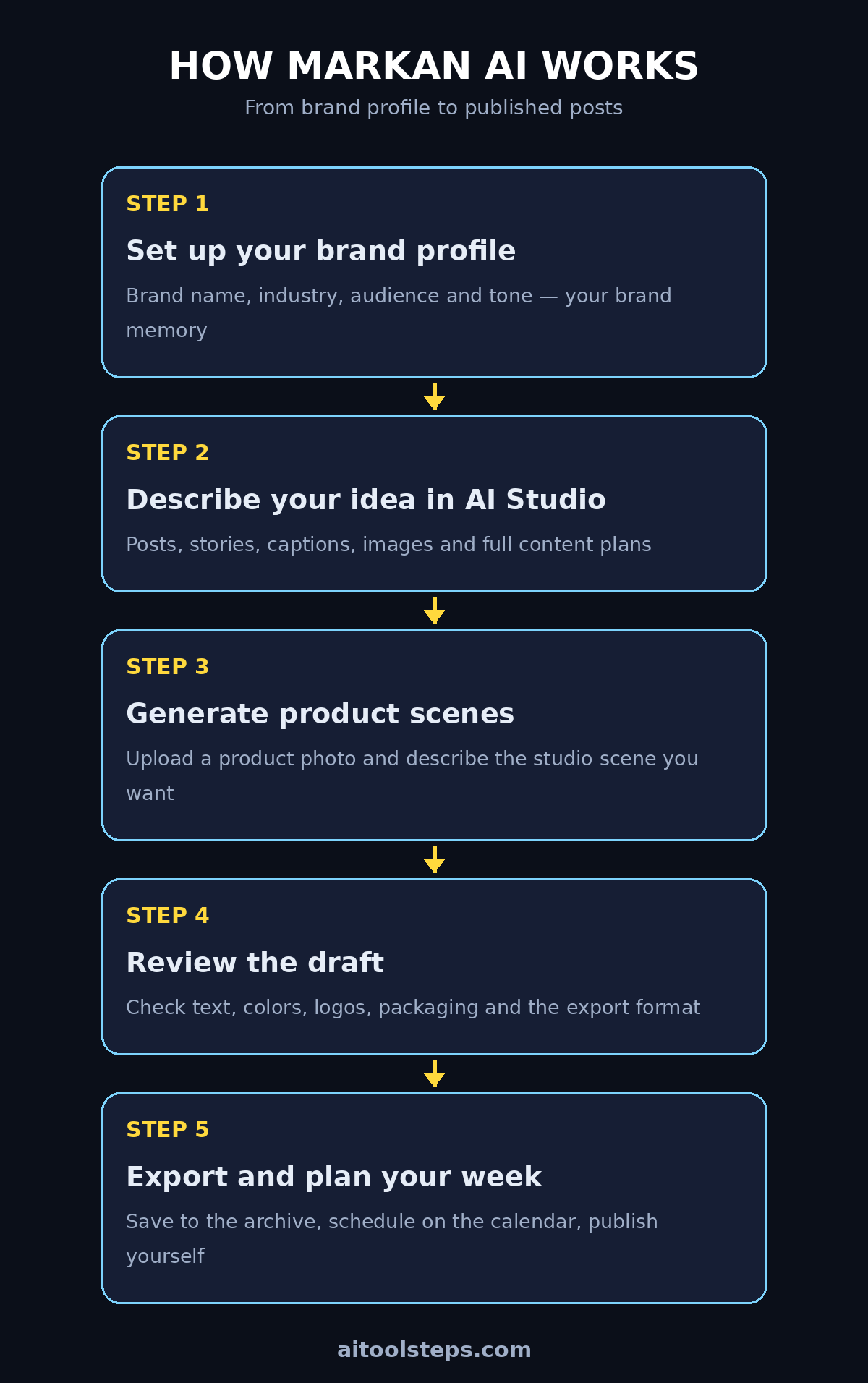
Step 1: Download Markan AI and Create Your Free Account
Start by downloading Markan AI: Content & Design from the Apple App Store — the download itself is free. Open the app and create your account (or sign in if you already use Markan on the web; existing website users sign in with the same account and everything syncs).
Key things to know at sign-up:
- No credit card is required to start — the free plan includes a daily free allowance.
- You get three free AI uses per day, shared across all AI tools in the app.
- The same account works on the Markan website and in the mobile app.
- The app works in six languages: Turkish, English, German, French, Arabic, and Russian.
Once you are inside, the redesigned home screen becomes your launchpad. Before generating anything, take two minutes to look around — knowing where the AI Studio, Product Studio, Collection, and calendar live will make every later step faster.
Step 2: Set Up Your Brand Profile (the Secret to Consistent Content)
The single most important step in learning how to use Markan AI is setting up your brand profile. This is where you save your brand name, industry, target audience, and communication tone — Markan calls this your brand memory, and it is what keeps every post, caption, and product scene consistent.
Be specific when you fill it in:
- Brand name and industry — e.g. “a handmade candle shop” rather than just “candles”.
- Target audience — who buys from you? (young professionals, busy parents, students?)
- Communication tone — friendly and playful, calm and premium, bold and energetic?
Why does this matter? Because Markan AI uses your brand profile to shape everything it generates. A premium tone produces elegant, minimal captions; a playful tone produces emojis and casual lines. If you work with a digital agency like d365a, you will recognize this as the same brand-kit logic agencies use — except here it takes five minutes instead of a week of onboarding. You can update your brand memory any time as your business evolves.
Step 3: Tour the Home Screen and Learn from the Short Tutorials
Markan’s redesigned home screen includes short tutorials that teach the app in minutes — genuinely use them. They are bite-sized, visual, and cover the core workflows: creating in AI Studio, transforming product photos, exploring the Collection, and organizing with the archive and calendar.
During your tour, notice the three main areas:
- Create in AI Studio — your main content workshop.
- Explore Collection — backgrounds, templates, and models you can bring into the Studio.
- Learn and Organize — tutorials, your archive, brand memory, the planning calendar, and support.
Beginners often skip tutorials and then waste their free daily AI uses on trial and error. Ten minutes here saves you days of guessing later — and your three free daily uses are too precious to burn on experiments you could have avoided.
Step 4: Create Social Posts and Stories in AI Studio
AI Studio is where you develop post and story ideas, captions, images, product scenes, and content plans. Describe what you need in plain words — for example, “a cozy autumn Instagram post announcing our new vanilla candle” — and the AI generates options shaped by your brand profile.
A beginner-friendly workflow that works well:
- Pick the format first: square post, portrait post, story, or landscape.
- Describe the idea in one or two sentences, mentioning your product and the mood.
- Generate, then pick the strongest option — do not settle for the first draft.
- Ask for variations: a different background, a different headline angle, a shorter caption.
- Review, edit, save, and export using your device’s sharing tools.
One of Markan’s smartest design choices, as founder Şükrü Kerimoğlu puts it: “A seller now needs the same product in a square post, a vertical post and a story, often in the same week.” AI Studio is built for exactly that — generate once, adapt the same concept across every format, without a separate photo shoot for each placement.
Step 5: Turn Ordinary Product Photos into Studio Shots with Product Studio
Product Studio is the feature online sellers will love most. Upload an existing product photograph, describe the scene you want — “the candle on a marble table with soft morning light” — and Markan AI generates alternative scenes and presentation formats around your real product.
Practical tips for great results:
- Start with a clean, well-lit product photo — the AI keeps your product’s real details, so quality in means quality out.
- Describe the scene concretely: surface, lighting, background mood, and props.
- Try one scene at a time and compare before generating more.
- Always review the output before publishing: check colors, shapes, logos, and packaging details. Markan itself advises users to verify these details, because AI-generated imagery can contain errors.
This single feature can replace expensive product photography for small catalogs. If your business is exploring how AI automation services like agentic-affairs fit into marketing, Product Studio is a perfect first example: a repetitive, costly task — studio product shots — compressed into a two-minute AI workflow.
Step 6: Explore the Collection for Backgrounds, Templates, and Models
The Explore Collection is Markan’s library of models, studio backgrounds, and templates. Think of it as raw material: instead of starting from a blank prompt, you can browse the collection, find a background or template that fits your brand, and bring the selected reference straight into AI Studio.
How to use it well:
- Filter or browse for the mood that matches your brand tone (minimal, bold, cozy, premium).
- Bring a reference into AI Studio and let the AI adapt it to your product and brand colors.
- Note that asset access and downloads can depend on your plan and the usage terms.
Beginners often underuse the Collection because the blank prompt box looks tempting. Resist the urge: starting from a proven template usually beats starting from zero, especially when you only have three free AI uses per day.
Step 7: Generate Captions and Full Content Plans
Markan AI does not just make images — it writes. In AI Studio you can generate captions for your posts and even full content plans that map out what to post across the week. Because the AI knows your brand tone from your profile, the captions actually sound like you instead of generic marketing copy.
A simple caption workflow:
- Generate the visual first so the caption can reference it.
- Ask for a caption in your brand tone, with a call to action (e.g. “Shop the new scent today”).
- Generate two or three variants and pick the strongest line from each.
- Add your own hashtags — the AI gives you the voice, you add the local knowledge.
Then step back and use the content-plan feature to organize a week of posts at once. Planning beats posting on impulse: a calm Monday plan means you never scramble for “what do I post today” again.
Step 8: Stay Organized with the Archive and Planning Calendar
Every creation can be saved to your archive, and the built-in calendar lets you plan when each piece goes out. This is where Markan shifts from a fun generator to a serious content system: your archive becomes a reusable library, and your calendar becomes your posting schedule.
One important limitation to understand: the calendar is for planning only — it does not automatically post to your social accounts. You still export each piece and publish it yourself. That is actually good news for beginners, because nothing goes live without your final review. Markan Assistant is also available in the app if you need help or get stuck.
Build a simple weekly habit: Sunday evening, open the calendar, drag your saved pieces into the week’s slots, and your whole week of content is planned in fifteen minutes.
Step 9: Review Every AI Output Before You Publish
This step is non-negotiable, and Markan’s own App Store listing says it plainly: AI output may contain errors — review before publishing. Everything the platform produces is a draft, not a finished product.
Run this checklist before any post goes live:
- Text and spelling — AI images and captions can misspell words or invent odd phrases.
- Brand details — does it use your brand name, colors, and tone correctly?
- Product accuracy — colors, shapes, logos, and packaging must match the real product.
- Format — is it the right size for where you are posting (square, portrait, story, landscape)?
Think of yourself as the editor and the AI as a very fast junior designer. The AI does 90 percent of the work in seconds; your review is the 10 percent that protects your brand’s reputation. This review habit is what separates beginners who look professional from beginners who post obvious AI mistakes.
Step 10: Spend Your 3 Free Daily Uses Wisely (Free vs Premium)
Every member gets three free AI uses per day, shared across content, analysis, and product-image tools. On the free plan, each generation counts — so plan before you generate.
Smart ways to stretch the free plan:
- Write your prompt fully before hitting generate (no half-thoughts).
- Batch similar tasks: generate three product scenes in one session instead of one per day.
- Use the Collection to start from templates — better first attempts mean fewer regenerations.
- Do your reviewing and editing outside the AI (in your archive), so you never regenerate something you could have fixed by hand.
If you consistently run out, Premium unlocks additional AI capacity and Premium tools through optional monthly or yearly auto-renewable Apple subscriptions (prices are shown in the app before you buy, and you manage or cancel in your Apple account settings). The comparison below helps you decide.
Markan AI Free vs Premium: Quick Comparison
| Feature | Free plan | Premium |
|---|---|---|
| Price | Free download | Optional monthly/yearly subscription |
| Daily AI uses | 3 per day, shared across tools | Additional AI capacity |
| AI Studio (posts, captions, plans) | Yes | Yes, with Premium tools |
| Product Studio | Yes | Yes, with Premium tools |
| Collection (backgrounds, templates) | Yes (plan-dependent access) | Expanded access |
| Archive and planning calendar | Yes | Yes |
| Markan Assistant | Yes | Yes |
| Best for | Beginners testing the app | Shops posting daily at volume |
FAQ: How to Use Markan AI
Is Markan AI really free?
Yes. The app is a free download and every member starts with a daily free allowance — currently three free AI uses per day across the content, analysis, and product-image tools. Optional Premium subscriptions unlock more AI capacity and Premium tools, but you can learn the entire workflow in this guide on the free plan.
Does Markan AI automatically post to my social media accounts?
No. The calendar is a planning tool — it helps you organize what goes out and when, but it does not publish to social networks automatically. You review, export, and share each piece yourself, which means nothing ever goes live without your approval.
Is Markan AI available on Android?
The mobile app is currently iPhone and iPad only (it needs iOS 16.4 or iPadOS 16.4 or later). However, Markan also has a web workspace, and you use the same account on the web and in the app — so Android and desktop users can work through the website with the same brand profile and archive.
What languages does Markan AI support?
Six: Turkish, English, German, French, Arabic, and Russian — across the app interface. The company is based in Turkey, so Turkish users get a fully native experience, but English support is complete for international creators.
Is Markan AI good for online sellers?
Yes — it is one of the app’s strongest use cases. Product Studio turns a single product photo into multiple studio-style scenes, and you can export square posts, portrait posts, stories, and landscape formats from the same concept. Just remember to verify product details (colors, logos, packaging) before publishing anything.
Final Thoughts
Now you know how to use Markan AI — from downloading the free app and building your brand profile, to generating posts in AI Studio, transforming product photos in Product Studio, writing captions, planning your week on the calendar, and reviewing everything before it goes live. The three-free-uses-a-day limit is actually a feature for beginners: it forces you to plan, prompt carefully, and review like a professional. Start with one product and one format today, build your brand profile properly, and let the daily habit compound. Your small shop can now produce a week’s worth of on-brand content in a single evening — no marketing department required.
Explore More Free AI Tools
Love free AI tools? Keep exploring with the free generators at aitoolsteps.com — try the AI Title Generator for catchy headlines, the Meta Description Generator for SEO snippets, the AI Rewriter to polish your scripts, and the Keyword Density Checker to optimize every article before you publish.