

If you run a small business, a startup, or a freelance service, learning how to use Pancake AI could completely change how you find customers — because the hardest part of growing is not building the product, it is getting in front of new customers. You can have the best product in the world, but if nobody knows about it, nothing happens. Traditional outreach means hours of list-building, copy-pasting messages, and following up — the kind of boring, repetitive work most founders put off until next week.
Pancake AI flips that completely. It calls itself "the Vercel for GTM" (go-to-market), and the idea is simple: you describe who you want to reach in one sentence, and your AI agent does the rest — finding leads, writing personalized messages in your voice, following up, and even booking meetings. In this beginner's guide, you will learn exactly how to use Pancake AI step by step, even if you have never run a marketing campaign in your life.
What Is Pancake AI, in Plain English?
Think of it this way: tools like Claude and Codex can already plan your marketing. They cannot run it, because they have no data to find the right people, no way to send messages, and no memory of your business. Pancake is the missing piece that plugs into your AI agent.
One connection (through something called MCP, which we will explain in Step 8) gives your agent three things:
- A GTM Brain — Pancake reads your website and learns who buys from you, what to say, and where to find them. It keeps itself up to date.
- 40+ data providers — Pancake reads funding rounds, open job roles, and tech stacks from sources like Dealroom, TheirStack, and Wappalyzer, so it can spot people who are showing buying signals right now.
- Sending infrastructure — messages go out from your own email and messaging accounts, in your voice.
You type one sentence — for example, "Find founders who just raised a seed round and are hiring a marketing lead" — and Pancake turns it into a Play: a living campaign that keeps searching for people who fit, shows you why each one fits, and reaches out to them under your name. That is genuinely the whole product. In October 2026, Pancake hit #1 Product of the Day on Product Hunt for the second time (its first win was back in May, after which the team rebuilt almost everything), and early customers report results like 15 meetings booked in a single week with a 10%+ reply rate.
Who Should Use Pancake?
Pancake is built for:
- Startup founders who need customers but have no sales team
- solo founders and freelancers who want clients without cold-calling strangers all day
- Small marketing teams that want to test outreach ideas fast
- Agencies that run outreach for multiple clients — if you run a digital agency or want AI automation services for your outreach, partners like D365A can help you plug tools like this into a wider growth system
If you are a beginner who just wants to try AI tools for fun, Pancake is still worth understanding, because it shows where AI agents are heading: not just answering questions, but doing real work on your behalf. For more on how AI agents are reshaping business workflows, see the guides at Agentic Affairs.
Step 1: Understand What a "Play" Is Before You Sign Up
Before you create an account, spend two minutes understanding the core concept, because everything in Pancake revolves around it.
A Play is one go-to-market idea put to work. Instead of a static contact list that goes stale, a Play keeps searching for people who match your description, every day. Each Play has four parts:
- Who — the people you want (e.g. founders, heads of marketing)
- Company — the kind of company (e.g. B2B startups, 10 to 50 people)
- Signal — the buying signal that makes them worth contacting now (e.g. just raised a seed round, hiring a marketing lead)
- Pace — how fast it runs (e.g. 25 leads a week, running daily)
Then the Play runs three actions on loop: Find → Qualify → Reach out. You approve each lead before any message goes out, so you stay in control. Understanding this makes the setup steps below feel obvious instead of overwhelming.
Step 2: How to Use Pancake AI — Create Your Account and Start the Trial
Head to pancake.ai and sign up. Here is the honest pricing picture so nothing surprises you as you learn how to use Pancake AI:
- There is no ongoing free plan. Pancake is a paid product aimed at businesses.
- You get a 7-day trial with 15,000 credits — plenty to test a real Play. Note that a credit card is required to start the trial, so keep that in mind.
- Paid plans start at $99/month (60,000 credits, whole team included), with higher tiers at $189, $359, $679, and $1,299/month. Extra sending accounts cost $39/month each.
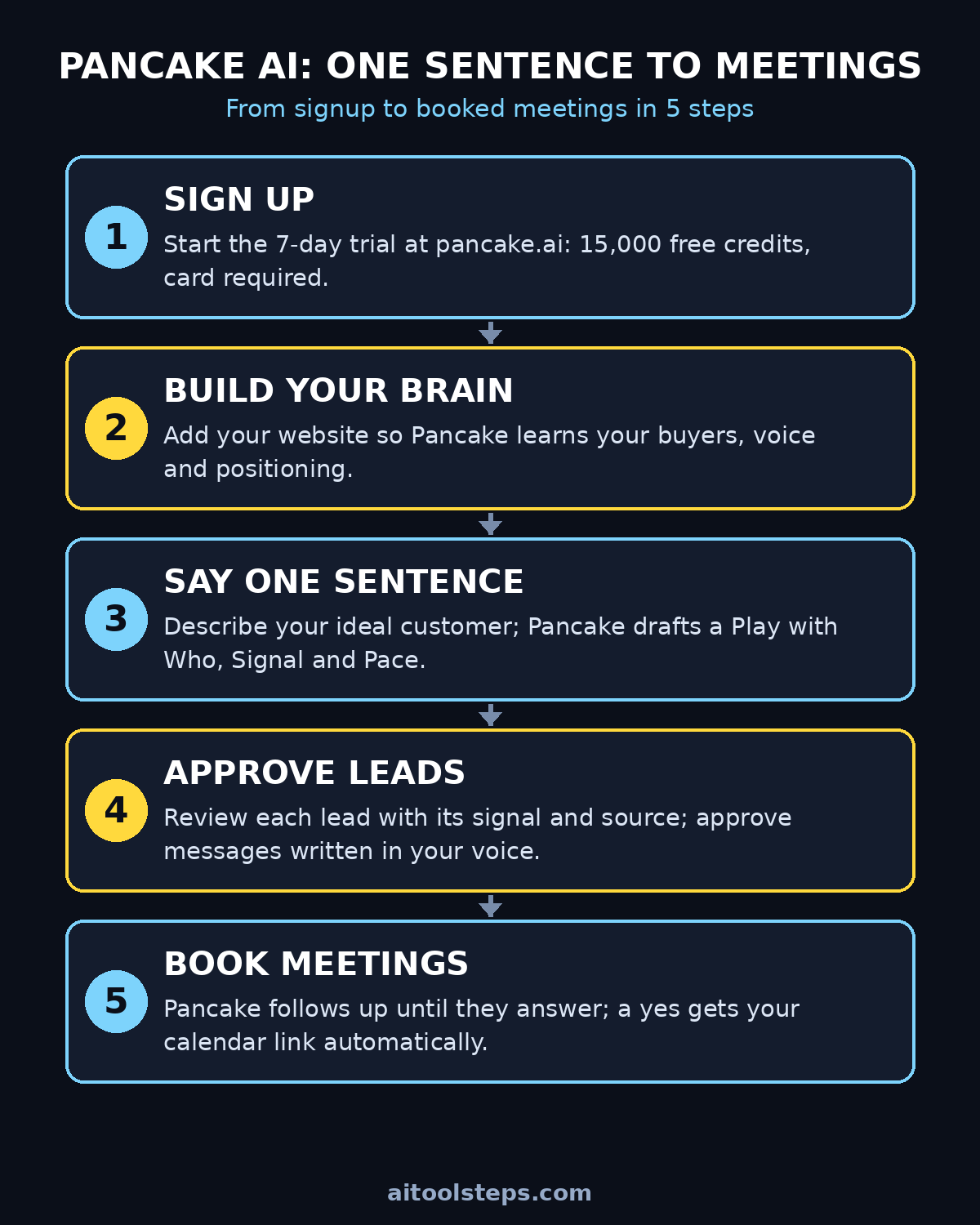
For a beginner, the trial is the whole point: you can build a real campaign, see real leads, and judge the results before spending a dollar. Sign up with your work email, pick a workspace name (your company or your own name is fine), and complete the short onboarding questions about what you sell.
Step 3: Add Your Website So Pancake Builds Your GTM Brain
This is the step most beginners skip or rush — do not. The moment you add your website, Pancake reads it and builds your GTM Brain: your ideal customer profile, your positioning, your competitors, and the voice you write in.
Why does this matter? Because every lead Pancake finds and every message it writes is based on this Brain. A good Brain means:
- Leads that actually match what you sell (not random contacts)
- Messages that sound like you, not a robot
- Plays that find the right buying signals for your market
To do it: paste your website URL when prompted during onboarding (or in settings later). If you do not have a website yet, write two or three sentences describing what you sell, who it helps, and what makes it different — Pancake will work with that too. Double-check the Brain summary Pancake generates and correct anything it gets wrong about your business. Five minutes here saves hours of bad leads later.
Step 4: Describe Your Ideal Customer in One Sentence
Now for the fun part. In the Pancake app you will see a chat box asking "What's your next GTM idea?" with a few suggested Plays (like finding companies that just raised funding, or ones hiring a specific role).
Type one plain-English sentence describing who you want to reach. Examples:
- "Find founders who just raised a seed round and are hiring a marketing lead."
- "Find e-commerce stores posting about a rebranding on social media."
- "Find dental clinics in my city that just opened a second location."
Be specific but natural — write it the way you would explain it to a friend. Pancake reads your GTM Brain, searches its data sources, and builds a draft Play: who it will target, which signals it will watch, and how fast it will run. You approve the Play before anything goes live, so a vague first sentence is fine — as you get comfortable with how to use Pancake AI, you can sharpen it when you review the draft.
Step 5: How to Use Pancake AI Plays — Review and Deploy Your First Play
Pancake shows you the draft Play as a clean card: Who, Company, Signal, Pace, and the three actions (Find → Qualify → Reach out). Look for three things:
- Is the "Who" right? Job titles and company size should match your real buyers.
- Is the signal fresh? "Just raised a round" and "hiring now" beat "in your industry."
- Is the pace comfortable? Start with a modest pace (like 25 leads a week) so you can review everything.
When it looks right, hit Deploy Play. It is now live and runs daily — new matching leads keep appearing without you lifting a finger. You can pause or edit any Play at any time from your dashboard.
Step 6: Check Your Leads and See Why Each One Fits
This is where Pancake earns beginners' trust. Every lead comes with a short explanation of why it fits and where that information came from — for example, "Seed round announced last week (Dealroom)" plus "Hiring a marketing lead (open roles data)."
Make it a habit, especially in week one, to skim your new leads each morning:
- Approve the ones that fit — they move to outreach.
- Reject the ones that do not — and tell Pancake why in a sentence. This trains your GTM Brain, so tomorrow's leads are better.
- Spot-check the reasons — if the "why it fits" explanations look thin or wrong, revisit your Step 3 website description.
Five minutes of feedback per day compounds fast. Early users who do this report noticeably better lead quality within the first week.
Step 7: Let Pancake Write in Your Voice (and Approve Every Message)
Here is the part that feels like magic: Pancake drafts a personal message for every lead, referencing the specific signal that made them a fit, written in the voice it learned from your website. Nothing goes out without your approval — you review each message and approve, edit, or skip it.
Two beginner tips that make a real difference:
- Keep your voice examples strong. The more of your real writing Pancake can learn from (your site, your posts), the less editing you will do.
- Resist the urge to write like a pushy salesperson. The best-performing outreach on Pancake reads like a short, honest note from one human to another. Mention the signal ("saw you just raised your seed round — congrats"), say plainly why you are writing, and keep it under 100 words.
Once you approve messages, Pancake sends them from your own accounts and follows up until the lead answers. That follow-up automation alone replaces the spreadsheet-and-reminder system most small teams run by hand — and it is one of the biggest reasons learning how to use Pancake AI pays for itself so quickly.
Step 8: How to Use Pancake AI With Claude or Codex (The Power-User Move)
Everything so far works inside the Pancake app — no technical skill needed. But Pancake's headline feature is that your own AI agent can drive it. If you already use Claude or Codex, this is where learning how to use Pancake AI really pays off.
Pancake connects through MCP (Model Context Protocol) — think of it as a plug that lets your AI agent use Pancake's brain, data, and sending tools. The official instructions live at pancake.ai/install.md and the setup takes a few minutes: you add Pancake's MCP server to your agent, and from then on you can run plays from inside Claude or Codex.
A real example from Pancake's own demo: you tell Claude "Find founders who just raised a seed round and are hiring a marketing lead." Claude reads your GTM Brain, searches funding news (148 rounds found), checks who is hiring (25 fit), proposes the Play — and when you approve, Claude asks permission to use Pancake's "Deploy Play" tool. One click and it is live, running daily. Your agent decides; Pancake runs it.
You do not need this on day one. But knowing it exists helps you understand why people call Pancake "the Vercel for GTM": just as Vercel made putting a website online effortless, Pancake makes putting a customer-finding play online effortless — from a sentence, from your agent, or from a click.
Step 9: Watch Replies Roll In and Book the Meetings
When a lead replies, Pancake reads the answer and sorts it for you:
- A yes (or a warm maybe) → Pancake sends your calendar link, from your account. The meeting lands on your calendar; you just show up and close.
- A no → logged politely, no awkward follow-ups.
- Anything else → comes back to you to handle personally.
Beginner mistake to avoid: deploying a Play and then ignoring your inbox for a week. The first replies are gold — they tell you whether your one-sentence idea is actually resonating. If replies are cold, tighten the signal (Step 4). If replies are warm but no meetings, check your calendar link and your follow-up timing. Small tweaks here multiply your results.
Step 10: Scale What Works, Pause What Doesn't
After one to two weeks, look at your numbers per Play: leads found, reply rate, meetings booked. Then do the obvious, ruthless thing:
- Double down on the Play with the best reply rate — raise its pace, or clone it with a slightly different signal.
- Pause the Play nobody answers — the signal was probably wrong, not the tool.
- Refresh your Brain every month or when your offering changes, so messaging stays accurate.
Pancake's own early customers put numbers on this: around a 10%+ reply rate, 15 meetings booked in a week, and real pipeline within 7 days (their words, from founders at companies like Kinro and AgentMail). Your mileage will vary — but the loop of one sentence → Play → leads → feedback → better Play is the whole game, and it takes minutes a day once it is running.
Pancake vs the Old Way: A Quick Comparison
| Manual outreach | Traditional sales tools | Pancake AI | |
|---|---|---|---|
| Finding leads | Hours of Googling and LinkedIn | Big static lists, often stale | A Play that keeps finding fresh leads daily |
| Knowing why a lead fits | Your gut feeling | Filters you set once | Every lead shows its signal + source |
| Writing messages | Copy-paste templates | Mail-merge with {first name} | Personal message per lead, in your voice |
| Follow-ups | Spreadsheets + reminders | Drip sequences you built by hand | Automatic, until they answer |
| Running it from your AI agent | Not possible | Not possible | One MCP connection to Claude/Codex |
| Skill needed | Lots of patience | List-building skill | One clear sentence |
Frequently Asked Questions
Is Pancake AI free?
There is no ongoing free plan. You can try it with a 7-day trial that includes 15,000 credits, but a credit card is required to start the trial. Paid plans begin at $99/month per workspace (your whole team included). Watch your credit usage during the trial — lead finding is credit-metered, so start with a modest Play pace.
Do I need to know how to code to use Pancake?
No. The core product is a chat-style app: you type a sentence, review a Play, approve leads and messages. The Claude/Codex MCP connection is optional and aimed at people who already use AI agents — it is a power feature, not a requirement.
What is a GTM Brain?
It is Pancake's model of your business, built from your website: who buys from you, what to say to them, where to find them, and how you sound. It powers lead matching and message writing, stays up to date, and gets better when you approve or reject leads.
Where does Pancake get its lead data?
From 40+ data and enrichment providers, including funding-round data (Dealroom), hiring and tech-stack data (TheirStack, Wappalyzer), and more. Every lead shows you which signal matched and where it came from, so you can verify instead of trusting blindly.
Will Pancake spam people on my behalf?
No — and this matters. You approve every lead and every message before anything is sent, messages go from your own accounts in your voice, and Pancake stops following up the moment someone answers or opts out. Used as designed, it is personal outreach at scale, not spam.
Can I use Pancake if I do not have a website?
Yes. You can describe your business in a few sentences during onboarding instead. That said, a website gives the GTM Brain much more to learn from — even a simple one-page site will noticeably improve your lead quality.
Final Thoughts
Now you know how to use Pancake AI — and it is one of those rare tools that is genuinely beginner-friendly and genuinely powerful. A complete beginner can deploy a real outreach campaign in an afternoon: sign up, add a website, type one sentence, approve a Play. And a power user can hand the whole machine to Claude or Codex and let an AI agent run go-to-market around the clock.
The honest caveats: there is no free plan (budget for the trial card requirement), and your results live or die on the quality of your one-sentence idea and your daily feedback. But if finding customers is the bottleneck in your business — and for most small businesses, it is — Pancake turns the most dreaded job in a founder's week into a five-minute daily habit.
Explore More Free AI Tools
Want to keep exploring? Check out these free tools on AIToolSteps: the AI Title Generator, Meta Description Generator, AI Rewriter, and Keyword Density Checker — all waiting for you at aitoolsteps.com.