

Posting on social media every single day is exhausting, which is why Spira AI exists. You need ideas, then scripts, then filming, then editing, then captions, then hashtags — and then you do it all again tomorrow, on TikTok, Instagram, and YouTube. Most creators burn out. Most small businesses just stop posting. Spira AI changes that equation entirely.
Spira AI was built to end that grind. Moreover, it calls itself “the AI that runs your entire social” — an autonomous AI social media manager that creates your content, publishes it across TikTok, Instagram, YouTube, X, and LinkedIn, and tracks how every post performs, all from one dashboard. Its AI Influencer agents can even run your channels 24/7, catching trends, creating videos in your brand’s voice, and posting on schedule — while you stay in control through chat-based approvals, or let them run fully on their own.
Furthermore, the tool is trending for good reason: it was built by teams behind Creatify AI, TikTok, CapCut, Meta, Snap, and Midjourney, it racked up 10M+ impressions before its public launch, and it is free to start with no credit card required. In this beginner guide, you will learn exactly how to use Spira AI step by step: what it is, how to set up your free account, connect your socials, create your AI influencer avatar, publish your first posts, and read the analytics like a pro.
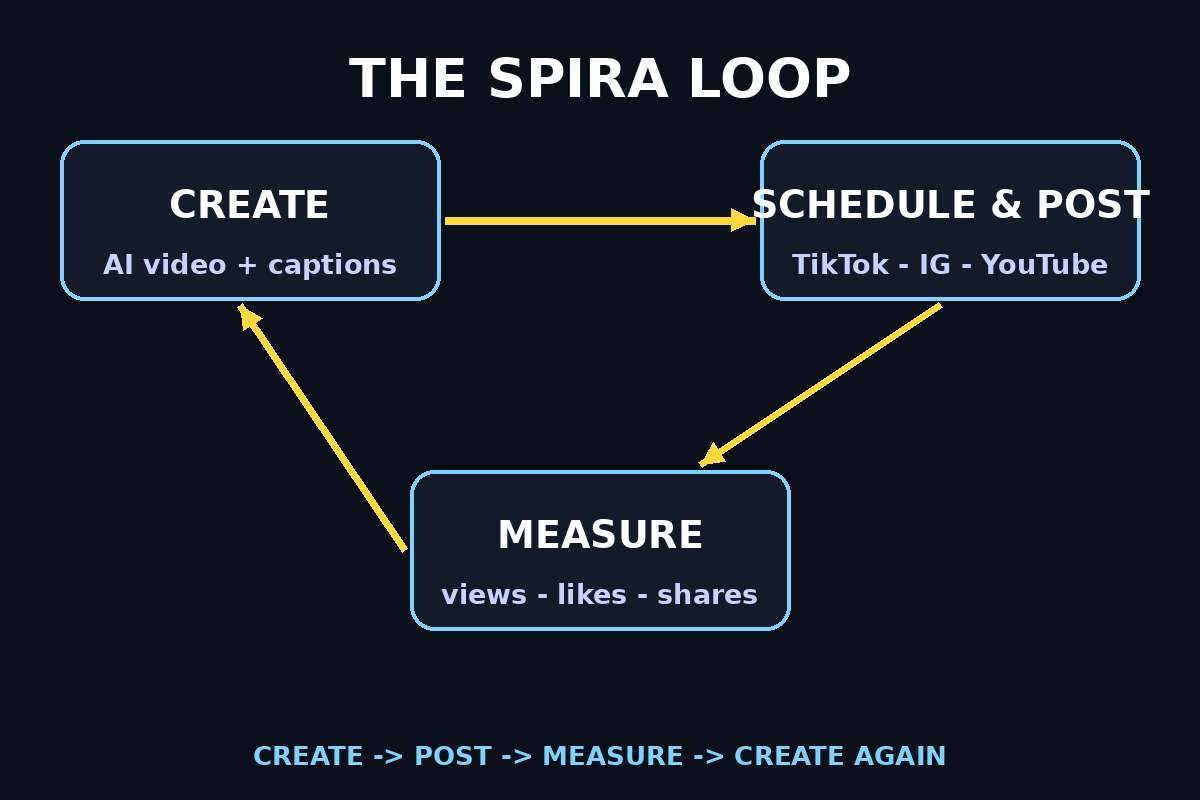
Step 1: Understand What Spira AI Actually Is
Moreover, before you sign up, it helps to understand what Spira AI is — because it is not just another scheduler.
Furthermore, most social media tools solve only half the problem. A scheduler like Postiz queues up content you already made — but you still have to shoot, edit, and write everything yourself. Spira AI exists for when the supply of content is the problem. Its own team puts it this way: with a scheduler alone, a thirty-post month still means producing thirty videos somewhere else. With Spira, those thirty posts are one automation — each run writes a fresh script, renders the video, and publishes it natively.
Here is the full loop Spira runs for you:
- Create — AI content creation with viral templates and top AI models. Pick a template, add your product or topic, and generate text posts, image posts, carousels, or short-form videos at scale.
- Schedule and post — connect your accounts, preview every destination, and publish natively to TikTok, Instagram, YouTube, X, and LinkedIn from one calendar.
- Measure — live performance counts on every post. See views, likes, and shares as they come in, understand what works, and iterate.
Additionally, the standout feature is the AI Influencer: an autonomous agent with a persona, memory, and skills that plans, generates, and publishes content for your brand around the clock. It monitors trends and competitor activity in real time, learns from performance data, and refines its strategy over time. And in a refreshingly honest touch, Spira says every AI-generated post is labeled as AI-generated — no fake humans.
Step 2: What You Need to Start Using Spira AI
The setup is light. Here is your checklist:
- An email address — to create your free Spira AI account. No credit card required for the free plan.
- Your social accounts — the TikTok, Instagram, YouTube, X, or LinkedIn accounts you want Spira AI to post to. Have your logins ready.
- Brand assets (optional but powerful) — your logo, a few product photos, and any slogans or taglines. Spira ingests these as your “brand DNA” and treats them as priority source material, so everything it creates stays on-brand.
- A reference photo (optional) — if you want a consistent AI avatar, a clear photo helps Spira lock your persona’s face and style so the same character appears in every video with no visual “drift.”
- About 10 minutes — that is genuinely enough to go from signup to your first scheduled post, according to Spira’s own onboarding.
Additionally, you do not need video editing skills, a camera, or any existing content library. That is the whole point.
Step 3: Create Your Free Spira AI Account
In fact, head to spira.ai and sign up. The free plan is the perfect sandbox:
- Free plan — up to 50 credits with limited trial access to premium features. It includes a starter loop: content creation, scheduling, and posting to connected platforms. No credit card, no commitment.
- How credits work — Spira AI runs on a credit system. Each AI model has a specific credit cost based on output type, length, resolution, and settings. Credits do not roll over between billing cycles, so use them or lose them each month.
- If you outgrow free — the Creator plan is around $15/month for roughly 1,200 credits, watermark removal, access to all video and image models (including Seedance2.0, GPT Image2, and Nano Banana Pro), up to 3 Influencer Agents, and posting to TikTok, X, and LinkedIn. Growth plans start around $59/month with bigger credit pools (2,500 to 15,000) and up to 10 Influencer Agents. Enterprise is custom.
In fact, for this guide, the free plan is all you need. Sign up, confirm your email, and you will land in the main dashboard.
Step 4: Connect Your Social Accounts to Spira AI
This is the step that turns Spira AI from a content toy into a real manager. In the dashboard, find the publishing or accounts section and connect each platform:
- Choose the platform — TikTok, Instagram, YouTube, X, or LinkedIn.
- Authorize the connection through the platform’s official login flow (Spira AI publishes natively, so this is a proper integration, not a hack).
- Repeat for every account you want Spira to manage. Multi-account publishing is built in, so agencies and creators running several brands can keep every account moving from one queue.
Importantly, take a moment to check permissions as you connect each one. Native publishing means Spira posts as your account, so make sure you are connecting the right profiles — especially if you manage both personal and business accounts on the same platform.
Step 5: Create Your Spira AI Influencer Avatar
In practice, now the fun part. Spira’s AI Influencer is an on-brand avatar that presents your videos — no camera, no filming, no “face for social media” required.
Here is how to set yours up:
- Go to the avatar or influencer section and choose create new avatar.
- Upload a clear, front-facing reference photo if you want the avatar to look like you — or pick a stylized persona if you prefer a brand character.
- Set the persona details: name, voice style, tone, and point of view. This is what stops ten AI accounts from all sounding the same — each influencer gets its own voice.
- Generate a test clip and watch it critically. Spira’s big claim is no drift: the avatar locks to your reference face and baked-in style, so the same character shows up consistently across dozens of posts. If something looks off, adjust and regenerate before you scale up.
Why does this matter? Consistency is what makes an audience trust a face — even an AI one. Meanwhile, a character that changes every video feels low-quality; a locked persona feels like a host. Take the extra five minutes here.
Step 6: Build Your Brand DNA in Spira AI
Similarly, an AI that posts for you is only as good as what it knows about you. Spira AI lets you upload your brand DNA — the source material it prioritizes in every generation:
- Logos and brand marks — so intros, overlays, and thumbnails stay consistent.
- Product shots — Spira AI can generate “product beauty shots” and build edits around your actual products.
- Reference videos — show it the style you like, and it matches the vibe.
- Slogan and caption libraries — your taglines, calls to action, and tone examples, so captions sound like you wrote them.
As a result, upload these once, and they flow into every future post automatically. This single step is the difference between generic AI slop and content your existing followers recognize as yours. Businesses that already work with a digital agency for branding will find this familiar — it is the same “brand kit” idea, just feeding an AI instead of a designer.
Step 7: Generate Your First Post with Spira AI
Moreover, with accounts connected and brand DNA loaded, it is time to create. Spira AI gives you two main paths:
Furthermore, path A — the template route (fastest): Pick a viral template, add your product or topic, and generate. Choose your format — text post, image post, carousel, or short-form video — and let the AI caption generator write platform-ready copy. Preview how it looks for each destination (TikTok, Instagram, YouTube, LinkedIn, X) and adjust per platform without rebuilding everything.
Additionally, path B — the AI Influencer route (most hands-off): Give your influencer agent a prompt, a trending topic, or even an existing channel as inspiration, and it writes the script, renders the video — presenter, on-trend B-roll, captions, and music in one pass — and queues it for publishing. The Spira AI Maxima video model (launched October 2026) is built exactly for this: script in, finished social video out, nothing left to re-edit.
Practical tips for your first generation:
- Start with one platform and one format — a TikTok short, for example. Master the loop small before you automate everywhere.
- Write prompts like briefs: topic, audience, tone, and one clear call to action.
- Generate two or three variants and pick the best. Credits are cheap on the free plan; taste is built by comparing.
Step 8: Schedule, Approve, and Publish with Spira AI
In fact, creation is only half the loop — now Spira AI handles the part creators hate: the actual posting.
- Preview every destination. Before anything goes live, Spira AI shows you exactly how the post looks on each platform. Captions, aspect ratios, and hashtag styles differ per network — fix them here, once.
- Choose your approval mode. This is an important decision: you can review every generated post before it publishes, or go full auto and let the agent publish on schedule without you. Beginners should start with manual approval. Watch three to five posts go through the review step, and only switch to full auto when you trust the output.
- Set the schedule. Drop approved posts onto the calendar. Spira publishes natively at the scheduled time — no manual uploading, no phone reminders, no “oops, forgot to post.”
- Keep the queue fed. Because each automation run generates fresh content, you can set a cadence — say, one short a day — and the system keeps producing. The calendar shows what went out and what is next.
Importantly, the approval flow is the feature that makes Spira safe to recommend: full automation with a human checkpoint is very different from blind autopilot.
Step 9: Track Performance in Spira AI
Here is where Spira AI pulls ahead of “post and pray” workflows. Every published post reports live counts — views, likes, shares — right inside the same dashboard. No exporting data, no third-party analytics tab.
What to actually do with the numbers:
- Find your winners weekly. Sort by views and engagement. What topics, formats, and hooks worked? Do more of that.
- Watch the trend signals. Spira AI monitors trends and audience signals in real time. When it flags a rising trend in your niche, that is your cue to generate a batch around it now.
- Let the feedback loop work. The AI Influencer agents learn from performance results and iterate the content strategy over time. Your job shifts from “make content” to “steer strategy” — approve the direction, kill what flops, double down on what flies.
- Compare across platforms. The same video can flop on TikTok and fly on YouTube Shorts. the Spira per-platform analytics make that visible, so you stop guessing where your audience actually is.
In practice, this measure-and-iterate loop is the unglamorous engine behind every “overnight” social media success. Spira just automates the tedious half of it.
Step 10: Spira AI Limits to Know Before You Scale
Meanwhile, honest expectations make better users. Here is what to know:
- Credits are the real budget. The free 50 credits go fast if you generate lots of video. Plan your experiments: a few test generations to learn the system, then a focused weekly batch. Remember, unused credits do not roll over.
- AI-labeled, always. Every AI-generated post is labeled as AI-generated. That is good for trust, but it means Spira is not the tool for pretending content is handmade.
- Review before you automate. The jump from manual approval to full auto is where mistakes happen. Earn the autopilot.
- It is a system, not a studio. Spira’s own comparison pages make this clear: it treats the channel as the product, not the individual video. If you want one perfect hand-crafted ad, use a video studio. If you want a channel that never sleeps, use Spira.
How does it stack up against the alternatives?
| Feature | Spira AI | Postiz (scheduler) | Doing it manually |
|---|---|---|---|
| Creates the content for you | Yes — AI video, images, captions | No — you supply everything | Yes — with your time |
| Publishes natively | Yes — TikTok, Instagram, YouTube, X, LinkedIn | Yes — 10+ platforms | Yes — one app at a time |
| AI avatars / influencers | Yes — consistent personas | No | No |
| Analytics built in | Yes — live counts + learning loop | Yes — post & account stats | Scattered across apps |
| Free to start | Yes — 50 credits, no card | Self-host free (AGPL) | Free — costs hours |
| Best for | Automated always-on channels | Scheduling existing content | Full creative control |
And a final note on the bigger picture: Spira is part of the wave of AI agents that do work instead of just chatting — planning, executing, and learning in a loop. If that world fascinates you, the team at Agentic Affairs tracks exactly how agentic AI is evolving beyond tools like this one.
Spira AI: Frequently Asked Questions
Is Spira AI really free?
In practice, yes, to start. Moreover, the free plan gives you up to 50 credits with trial access to premium features — including content creation, scheduling, and posting — with no credit card required. Paid plans start around $15/month (Creator, ~1,200 credits) and scale up from there. Credits do not roll over month to month on any plan.
Which social platforms does Spira AI support?
Consequently, spira publishes natively to TikTok, Instagram, YouTube, X (Twitter), and LinkedIn. Additionally, you connect each account once, then create, preview, schedule, and publish for every destination from a single dashboard and calendar.
Is Spira AI content labeled as AI-generated?
Similarly, yes — and that is deliberate. Spira states that every AI-generated post is labeled as AI-generated. As a result, you get the scale of automation without misleading your audience, which matters more than ever as platforms tighten their AI-content rules.
Do I need to appear on camera to use Spira AI?
As a result, no. Meanwhile, that is one of Spira’s biggest selling points. Similarly, the AI Influencer avatars present your videos, locked to a consistent face and style, so you can run a video channel without ever filming yourself. Bring a reference photo for a personal avatar, or use a stylized brand character.
What happens when my Spira AI credits run out?
Moreover, generation pauses until your credits refresh at the next billing cycle or you upgrade (or buy extra credits). Scheduled posts that are already created and approved are unaffected — only new AI generation consumes credits. Plan bigger batches for early in your cycle.
Can Spira AI replace my social media manager?
Importantly, for content volume, largely yes — it creates, posts, and measures around the clock. In practice, for strategy, taste, and brand judgment, it is a powerful assistant, not a replacement. Consequently, the best setup most teams land on: Spira handles the daily grind, a human steers the strategy and approves the direction.
Final Thoughts on Spira AI
Spira AI is the clearest example yet of where social media management is heading: not another dashboard to babysit, but an agent that does the work — creating, publishing, and learning while you focus on literally anything else. Start free, connect one account, generate your first week of posts, and watch the performance loop teach you what your audience actually wants.
Furthermore, the creators who win the next two years will not be the ones who post the most by hand. Additionally, they will be the ones who direct AI systems best. Spira is a fine place to start learning how.
Explore More Free AI Tools
Furthermore, keep building your AI toolkit with these free tools on AIToolSteps:
- AI Title Generator — craft catchy headlines for your posts and videos: https://aitoolsteps.com/
- Meta Description Generator — write SEO-friendly descriptions in seconds: https://aitoolsteps.com/
- AI Rewriter — polish and rephrase any text instantly: https://aitoolsteps.com/
- Keyword Density Checker — analyze your content for SEO: https://aitoolsteps.com/
Additionally, related: How to Use Google NotebookLM for Beginners — another beginner-friendly AI guide on AIToolSteps.