

Ask an AI coding agent to build a dropdown menu and it will write one from scratch. Ask it again tomorrow and it will write a different one. Both will probably work, but neither will handle keyboard navigation properly, neither will announce itself correctly to a screen reader, and neither will match the rest of your app. This is the hidden cost of letting agents write user interfaces: every component is a one-off, and quality depends on the model's mood that day.
UI SDK, a new open-source library from Vercel Labs, fixes this at the root. Instead of handing your agent finished components, it hands it the building blocks those components are made from: more than 50 tested, accessible behaviors such as popups, selection, typeahead, focus management, and drag and drop. Your agent assembles those behaviors into whatever interface you describe — a date picker, a kanban board, a settings panel — and the result behaves correctly because the pieces underneath it already do. Vercel launched UI SDK on November 12, 2026, as version 0.1.0-beta.1 under the Apache-2.0 licence, and it appeared on Product Hunt on November 16, 2026. Vercel CEO Guillermo Rauch called it "the x86 instruction set for agents to build new UI components spontaneously."
In this beginner-friendly guide, you will learn how to use UI SDK AI from zero: what it actually is, how it differs from the component libraries you already know, how to install it, how to give your coding agent its skill file, and how to build and operate your first agent-driven interface. You do not need to be a React expert, and you do not need design skills. If you can run a terminal command and describe what you want in plain English, you can use UI SDK. Everything in this guide uses the free, open-source library — no account, no API key, and no credit card.
Step 1: Understand What UI SDK AI Actually Is
UI SDK is not a component library. That is the first thing to understand, because most tutorials will describe it as one and that description will mislead you. A component library gives you finished pieces: a Button, a Select, a Dialog. UI SDK gives you the layer underneath those pieces.
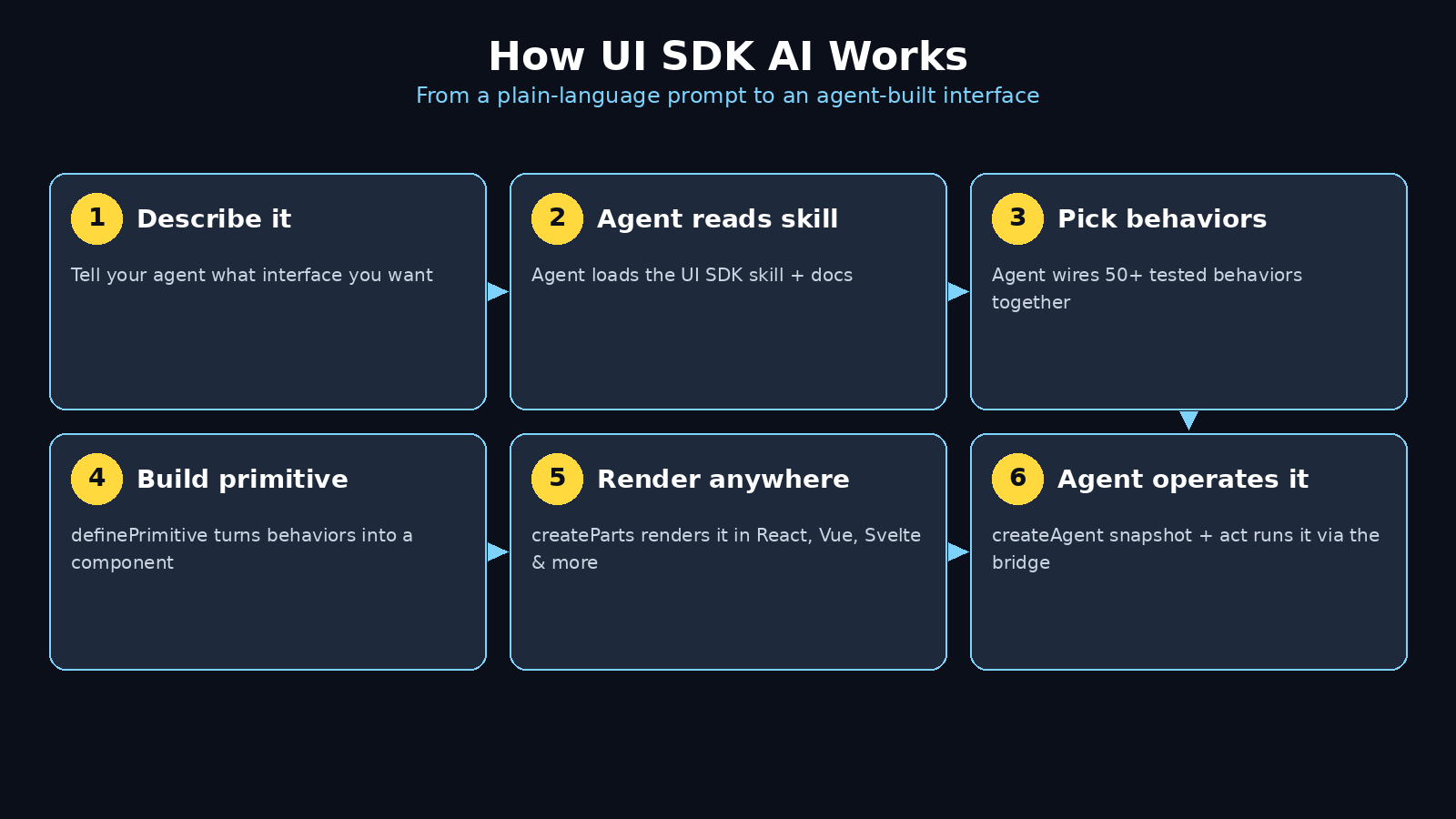
At its centre is @ui-sdk/core, a TypeScript library of behaviors. A behavior is one small, well-tested piece of interface logic: createPopup handles opening and closing a floating panel, createSelection handles choosing items from a list, createTypeahead handles typing to jump to a matching option. There are more than 50 of these behaviors, grouped into ten categories: focus, keys, selection, popups, dragging, lists, trees, transitions, canvases, and utilities. A primitive combines behaviors with state and named slots through definePrimitive, and the components you import from @ui-sdk/react are primitives rendered by the React adapter. The same primitives render in Vue, Svelte, Solid, and Web Components through their own adapters, using createParts. One behavior definition, five frameworks.
The practical difference is simple. In a normal component library, a component you need but the library does not ship is your problem, built from scratch. In UI SDK, you build it from the same behaviors the built-in components use. Your agent does not invent keyboard handling or focus trapping; it wires together pieces that already do those things correctly. And because the library is open source under Apache-2.0, you can use it in personal projects, client work, and commercial products without paying anything.
Step 2: See How UI SDK AI Differs From Radix and Base UI
If you have used Radix or Base UI, UI SDK will feel familiar at first glance. All three are headless libraries: they ship behavior and accessibility without styling, so you bring your own design. The difference is who the library is built for.
Radix and Base UI are built for human developers. You read their docs, import a component, and wire it up yourself. UI SDK is built for agents as well as humans. Its documentation says so plainly, in a line that stopped many readers cold: "Don't worry, you don't need to learn how to write this. Your agents will." The library ships an agent bridge that no other headless library has, and that bridge is the whole point of the tool.
The other big difference is framework support. Radix and Base UI are React-only. UI SDK works across React, Vue, Svelte, Solid, and Web Components from one core library. If you need a component such as a color picker, date picker, or tree view without adding a second library, or you want AI agents to operate your interface through structured tools, UI SDK is the pick — with one honest caveat: it is a beta, and beta APIs can change before general availability.
Step 3: Check the Requirements Before You Install
UI SDK is a modern library with modern minimum versions, and checking them first saves an afternoon of confusing errors. The React adapter needs React 19 as its floor. Vue needs version 3.5, Svelte needs 5.33, and Solid needs the 2 release candidate. If your project is still on React 18, do not install UI SDK yet — the peer dependency range will fight you. Upgrade the framework first, or start a fresh project.
You also need a few basics before the install works smoothly:
- Node.js installed, because the install runs through npm
- A React 19 project — a fresh Next.js app is the easiest starting point for beginners, but any React 19 project works
- An AI coding tool that can follow instructions and run terminal commands: Claude Code is the best-documented option, but Cursor, VS Code with an agent, and Codex all work the same way
One more thing to know before you start: UI SDK is in beta. The official README says the framework, APIs, documentation, and behavior may change before general availability. Treat anything you build with it as a learning project or an experiment, not as a production system you cannot afford to update.
Step 4: Install UI SDK AI in Your Project
Installation takes two commands and about a minute. Open your terminal, move into your project folder, and run the install for the core library plus the adapter for your framework:
npm install @ui-sdk/react @ui-sdk/core
If you work in Vue instead of React, swap @ui-sdk/react for the Vue adapter package; the core package stays the same. That is the whole install. There is no account to create, no key to paste, and no configuration file to write before you can start using it.
Next, give your agent the UI SDK skill. Vercel ships the library's documentation as a skill file your coding agent can load, so it knows the behaviors, the patterns, and the current API without you pasting docs into the chat. Run:
npx skills add vercel-labs/ui --skill ui-sdk
Once the skill is added, your agent can read the official docs directly whenever it needs them. This step matters more than it looks: a beta library changes fast, and an agent working from the live skill file will use the current API instead of whatever it remembers from training data. If you run a digital agency or build client sites, keeping the skill updated is the cheapest way to keep every agent-built interface consistent — the same reason many teams centralise their tooling choices through a digital agency playbook instead of letting each project invent its own stack.
Step 5: Build Your First Component With an Agent
Now the fun part. Open your coding agent in the project and describe the interface you want in plain language. Try something concrete, such as: "Build a settings panel with a theme selector, a language dropdown, and a notification toggle, using UI SDK primitives."
Watch what the agent does. Instead of writing hundreds of lines of custom dropdown logic, it imports primitives from @ui-sdk/react, combines behaviors such as createPopup, createSelection, and createTypeahead, and renders them with createParts. The dropdown opens and closes correctly, arrow keys move through the options, typing jumps to a matching item, and Escape closes the panel. None of that logic was invented on the spot — it came from the behaviors in the core library.
Try a second prompt that no component library could answer: "Build an icon picker." There is no icon picker in UI SDK, and there is no icon picker in Radix or Base UI either. With UI SDK, your agent builds one from the same behaviors the built-in components use, and the result joins the same system. That is the "x86 instruction set" idea: behaviors are the instructions, and agents combine them into components nobody designed in advance. When your agent finishes, run the app and test the component with your keyboard alone. If you can open it, move through it, select something, and close it without touching the mouse, the behaviors are doing their job.
Step 6: Let an Agent Operate Your Interface With the Agent Bridge
Building components is only half of UI SDK. The other half is the agent bridge, and it is the feature that makes this library different from everything else in its category. The bridge lets an AI agent read and operate the components already on your page, through structured tools instead of screenshots and mouse clicks.
It works through three calls from @ui-sdk/react/agent. First, createAgent() connects to every UI SDK component on the page. Then snapshot() lists them with their labels, state, and available actions. Finally, act() calls those actions through each component's own API. Your change callbacks can tell when an action came from an agent, because the details carry source === "agent". There is also registerTools(), which offers the same tools to an agent built into the browser through WebMCP.
Vercel's own benchmark shows why this matters. On a project-settings task, using Sonnet through Claude Code with medians of three runs, the agent bridge cut tool calls from 16 to 5 and cost from $0.073 to $0.032, compared with driving the same screen through browser tools. Treat those numbers as one small benchmark, not a guarantee — it is a single task, three runs, and the browser side used a different component library — but the direction is clear: structured tools are cheaper and more reliable than clicking pixels. For anyone building AI automation services or agent-driven products, that reliability gap is the difference between a demo and a feature you can ship.
Step 7: Style the Components Your Way
Because UI SDK is headless, it ships no visual design of its own. That is a feature, not a missing piece: your components look like your app, not like a demo. You style the named slots each primitive exposes, using whatever styling approach your project already uses — Tailwind CSS, plain CSS, or CSS modules all work.
Start simple. Give the popup a background, a border, and a shadow. Style the selected option differently from the rest. Add a focus ring so keyboard users can see where they are. Then ask your agent to apply the same styling pattern to every component it builds, so the whole app stays consistent. A good prompt is: "Style all UI SDK components with our design tokens: dark background, light text, and the accent color for the selected state."
One warning from early users: do not skip the focus styles. Headless libraries depend on visible focus indicators for keyboard accessibility, and an agent will not always add them unless you ask. Check every component with the Tab key before you call it done.
Step 8: Compare UI SDK AI With the Alternatives
Before you commit to any new library, it helps to see the trade-offs in one place. The table below compares UI SDK with the two headless libraries it is most often measured against, using the versions current in November 2026.
| Feature | UI SDK | Radix | Base UI |
|---|---|---|---|
| Frameworks | React, Vue, Svelte, Solid, Web Components | React only | React only |
| Agent bridge (snapshot, act, WebMCP) | Yes | No | No |
| Reusable behaviors | 50+ in @ui-sdk/core | Components only | Components only |
| Build custom components from behaviors | Yes, with definePrimitive | No — build from scratch | No — build from scratch |
| Licence and price | Apache-2.0, free | MIT, free | MIT, free |
| Maturity | Beta (0.1.0-beta.1) | Stable (1.8.1) | Stable (1.9.0) |
The pattern is clear. If you want stability and a React-only project, Radix or Base UI are the safer choices today. If you want agents to build and operate your interface, and you work across frameworks, UI SDK is the only one of the three designed for that job — and you accept beta status in exchange.
Step 9: Avoid the Beginner Mistakes
A new beta library has sharp edges, and knowing them in advance saves hours. First, do not treat UI SDK as a drop-in replacement for shadcn/ui or the Vercel AI SDK. It is a separate product with a separate job: shadcn/ui gives you finished styled components, the AI SDK helps you build AI features, and UI SDK gives agents behaviors to build interfaces with. Mixing up the three is the most common beginner confusion.
Second, remember the beta warning. APIs may change, and documentation may move. Keep the skill file updated with npx skills add vercel-labs/ui --skill ui-sdk whenever you return to a project after a break, and check the changelog before upgrading.
Third, watch for accessibility gaps in the beta. Early users have already filed issues — for example, an open issue reports that the FieldError component is not a live region, so a validation error that appears after the page loads is never announced to a screen reader. That does not make the library unusable, but it means you should test error states with a screen reader before shipping anything that handles forms. If you find a gap, file it: beta libraries improve fastest when beginners report what they hit.
Fourth, do not let the agent skip testing. After every component the agent builds, test it with the keyboard, test it at a narrow screen width, and test it with the agent bridge snapshot to confirm the component is visible to agents. Five minutes of testing per component beats an afternoon of debugging later.
Step 10: Ship a Small Project and Keep Learning
The best way to learn UI SDK is to finish something small with it. Pick a real but bounded project: a settings page, a feedback form with a star rating, or a small dashboard with filters and a date picker. Build it with your agent, style it, test it with the keyboard, and then operate it through the agent bridge by asking the agent to change a setting on the live page.
Once that works, go deeper. Read the official docs at ui-sdk.dev, browse the source on GitHub at github.com/vercel-labs/ui, and watch the repository — it went from nothing to more than 4,000 stars in its first nineteen days, so the community around it is moving fast. Try building a custom component the library does not ship, such as a kanban board or a command palette, from the core behaviors. That exercise teaches you more about the library than any tutorial can.
If you build client work with agents, consider where UI SDK fits in your workflow. Teams that ship agent-built interfaces for customers often pair a tool like this with a clear delivery process, and the guides on digital agency workflows and AI automation services are useful references when you turn an experiment into a service you can offer with confidence.
Frequently Asked Questions
Is UI SDK AI really free?
Yes. UI SDK is open source under the Apache-2.0 licence, and the Product Hunt listing shows a price of zero. You can use it in personal, client, and commercial projects without paying anything or asking for permission. There is no paid tier to unlock and no API key to buy. Your only costs are the ones you already have: your editor, your coding agent subscription, and your hosting.
Do I need to know React to use UI SDK AI?
You need a basic understanding of how a React project is put together, but you do not need to be a React expert. The library's own pitch is that your agent writes the primitive code for you. You describe the interface in plain language, the agent wires the behaviors together, and you review and test the result. Beginners who can run npm install and describe what they want clearly will get further, faster, than experts who try to hand-write every behavior themselves.
What is the difference between UI SDK and shadcn/ui?
They solve different problems. shadcn/ui gives you finished, styled components that you install as source code into your project. UI SDK gives you the behaviors underneath components — popups, selection, typeahead, focus — so agents can build components, including ones nobody designed yet. Many developers use both: shadcn/ui for finished components, UI SDK for agent-built and agent-operated interfaces. Neither replaces the other.
Can UI SDK AI work with Vue or Svelte?
Yes. UI SDK is built around one core library, @ui-sdk/core, with adapters for React, Vue, Svelte, Solid, and Web Components. The same behavior definition renders in all five frameworks through createParts. The minimum versions are Vue 3.5, Svelte 5.33, Solid 2 RC, and React 19, so check your project version before installing.
Is UI SDK AI stable enough for production?
Not yet, honestly. UI SDK is in beta at version 0.1.0-beta.1, and Vercel says the APIs, documentation, and behavior may change before general availability. It is excellent for learning projects, prototypes, internal tools, and experiments. For a production app you cannot afford to update on short notice, use a stable library such as Radix or Base UI today and revisit UI SDK when it reaches a stable release.
How does the agent bridge actually work?
The bridge connects your agent to the UI SDK components on the page through structured tools instead of screenshots and clicks. createAgent() connects to every component, snapshot() lists them with labels, state, and available actions, and act() performs an action through the component's own API. registerTools() exposes the same tools through WebMCP for agents built into the browser. Your change callbacks see details.source === "agent" when an action came through the bridge, so you can log it, confirm it, or restrict it.
Final Thoughts
UI SDK is a bet on a specific future: one where AI agents do not just write code, but build and operate the interfaces people use every day. The library is small, young, and honestly unfinished — it is a beta with open accessibility issues and APIs that may change. But the idea underneath it is sound. Tested behaviors beat invented code, structured tools beat screenshots, and one core library across five frameworks beats five separate implementations.
For beginners, the right move is simple. Install it in a side project this week, add the skill file, and let your agent build one interface with it. Test that interface with your keyboard. Operate it through the agent bridge. If the experience clicks, you have learned a tool that will matter more every month as agents take on more interface work. If it does not click yet, you have lost an afternoon and learned exactly where the rough edges are. Either way, you will understand the next generation of UI tooling better than most developers — and that understanding compounds fast.
Explore More Free AI Tools
Want to keep building with free AI tools? Try the AI Title Generator to write click-worthy headlines for your next article, the Meta Description Generator to craft search snippets that earn clicks, the AI Rewriter to polish rough drafts into clean copy, and the Keyword Density Checker to keep your pages optimised without stuffing — all free at aitoolsteps.com.