

Most AI models are brilliant — until you ask them something that happened today. They cannot open a web page, check a live price, or read a fresh article. That gap is exactly what Tabstack AI fixes. Built by Mozilla and launched on Product Hunt on November 19, 2026, Tabstack is a managed web API that gives your AI model live web access without giving up your privacy. You get 10,000 free credits to start, no credit card required, and you can run your first research job in minutes — no code needed.
In this beginner-friendly guide, you will learn how to use Tabstack AI step by step: creating a free account, running research in the no-code console playground, extracting clean data from any page, automating real browser tasks in plain English, and connecting it to your own AI agent with the Python SDK. By the end, you will know exactly what each of its four tools does and when to use it.
Step 1: Understand What Tabstack Actually Does
Before you click anything, it helps to understand the problem Tabstack solves. An AI model on its own cannot browse the web. If you want it to research a topic, read a page, or fill in a form, you normally have to build that whole system yourself: a browser, a search tool, a page reader, a parser, and error handling for every site that fights back. That is a serious infrastructure project, not a weekend task.
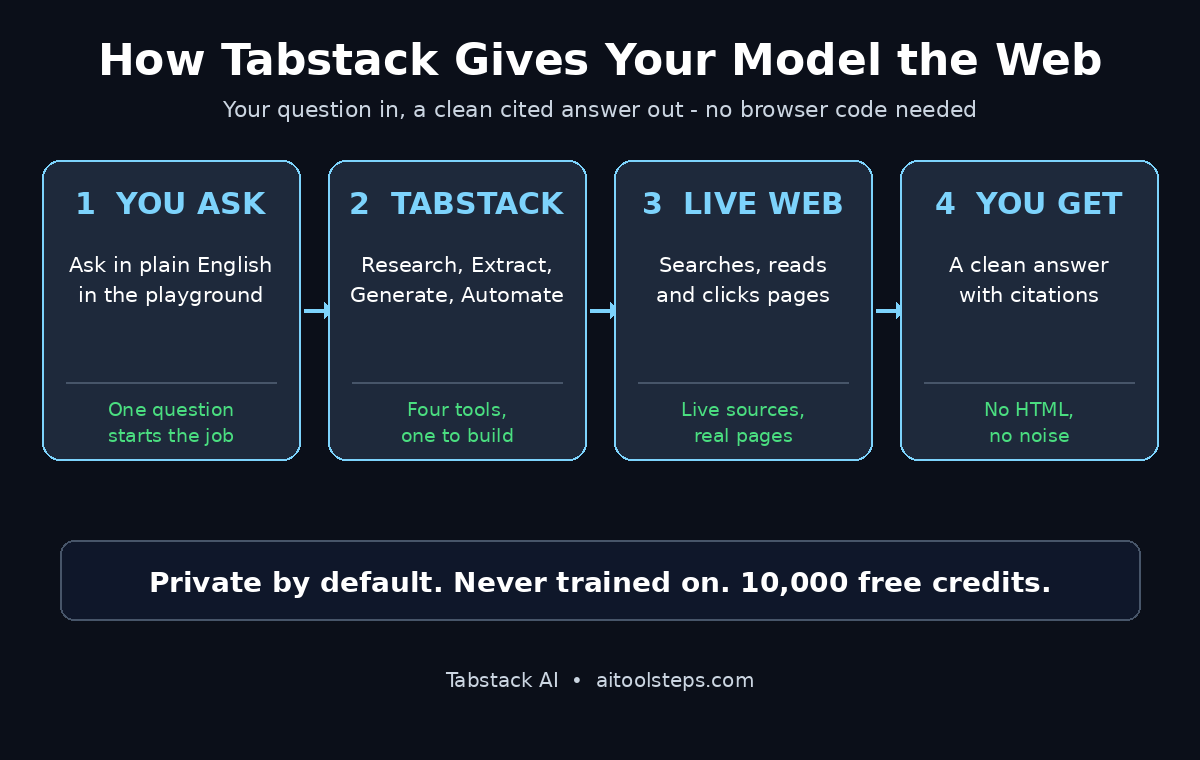
Tabstack removes all of that. It manages the browsers and the web interactions outside your model, so your model just asks for what it needs and gets a clean answer back. It offers four simple endpoints, and each one covers a different job:
- Research: ask a question in plain English and get a finished, cited answer from live sources.
- Extract: pull structured data from any URL, matched to the schema you define.
- Generate: turn any web page into clean Markdown you can feed straight to a model.
- Automate: describe a multi-step browser task and let Tabstack drive a real browser to do it.
The privacy promise matters here too. Tabstack is built by Mozilla, and its rule is simple: never trained on, private by default. Your payloads are not used to train models, customer data is treated as ephemeral, and Tabstack honours robots.txt with its own dedicated user-agent. If you build agentic workflows for clients, that kind of guarantee is worth more than any feature list — and the team at Agentic Affairs covers exactly this shift toward agents that work with live, trusted web data.
Step 2: Create Your Free Account and Claim 10,000 Credits
Getting started takes about two minutes, and you do not need a credit card.
- Open tabstack.ai in your browser and choose Sign in or Create a free account. You can sign up with your email or a Google account.
- Once you are inside the console, your account already includes 10,000 free credits. There is nothing to activate and no card to add.
- Open your account or API settings and copy your API key. Keep it somewhere safe, like a password manager — you will need it for the SDK and CLI steps later. Never paste it into a public chat or a shared document.
What does 10,000 credits actually buy? According to Tabstack, it covers about 1,000 Markdown extractions or 40 Fast Research actions, or any mix of the two. That is plenty to test every endpoint properly before you spend anything. If you run a digital agency and want to trial live web research for client reports, the free credits are enough to run a real pilot first.
Step 3: How to Use Tabstack AI Research in the Console Playground
You do not need to write a single line of code to try Tabstack. The console playground lets you test everything from your browser.
- In the Tabstack console, open the playground and choose Research.
- Type a question the way you would ask a researcher. Be specific: instead of “AI news”, try “What are the three biggest AI model launches of November 2026, and what does each one cost?”
- Hit run. Tabstack searches live sources, reads the pages, fills in the gaps, and brings the findings together with citations.
Notice what you get back: a finished answer, not a pile of links. A normal search API returns links and leaves your model to read every page. Tabstack does the reading and returns the answer with its sources attached, so your model spends its tokens on reasoning instead of rendering pages. Save the answer, check a citation or two, and you have just run your first Tabstack job.
Beginner tip: the more specific your question, the better the answer. Add a date, a product name, or a comparison (“versus”) and the research comes back sharper.
Step 4: Try the Extract Endpoint — How to Use Tabstack AI on Any Web Page
Research answers questions. Extract pulls structured data out of pages — and this is where Tabstack starts saving real time.
- In the console playground, choose Extract and paste any public URL: a product page, a pricing page, a blog post, or a job listing.
- Tell Tabstack what you want back. For example: product name, price, rating, and availability. You describe the fields; Tabstack matches them to the page.
- Run it and check the output. You get clean, structured data instead of raw HTML.
This beats copying and pasting by hand, and it beats scraping the page yourself. Raw HTML is full of menus, ads, scripts, and tracking code. Tabstack filters out the noise before it reaches your model, which is why it prevents you from burning your budget on parsing raw HTML. Try it on three different kinds of pages — a store, a news article, and a directory listing — and you will quickly see which fields it reads reliably.
Step 5: Turn Any Page into Clean Markdown with Generate
Sometimes you do not want structured fields. You want the whole page, clean and readable, ready to drop into a prompt. That is the Generate endpoint.
- Choose Generate in the playground and paste a URL.
- Tabstack returns the page as clean Markdown: headings, paragraphs, lists, and links, with the clutter stripped out.
- Copy the Markdown into ChatGPT, Claude, or Gemini and ask your follow-up question directly on top of it.
This is the simplest way to let a model read a page that is too long to paste by hand. It is also the cheapest way to use Tabstack: Markdown extraction is the lowest-cost action on the platform, which is why your 10,000 free credits stretch to roughly 1,000 extractions. If you are learning how to use Tabstack AI for daily research, Generate is the endpoint you will reach for first.
Step 6: Automate a Real Browser Task — How to Use Tabstack AI in Plain English
This is the endpoint that surprises most beginners. Automate does not just read pages — it drives a real browser through a task you describe in plain English.
- Choose Automate and describe the job as a task, not a tool chain. For example: “Go to Hacker News, find the top posts, group them by website, and return the 10 websites with the most posts.”
- Tabstack navigates the site, clicks through the flow, fills forms where needed, and reaches pages that only render after interaction.
- The result streams back in one API call. You get the finished output, not a script you have to run.
Under the hood, Tabstack automates through the page’s accessibility tree rather than screenshots, which uses 60 to 80 percent fewer tokens than screenshot-based agents. That matters when you run the same task every day: the same job simply costs less. Start with a read-only task like the Hacker News example before you automate anything that submits a form or spends money.
Step 7: How to Use Tabstack AI with the Python SDK
Once the playground clicks for you, connecting Tabstack to your own agent takes only a few lines of Python. This is how you move from trying it to actually using it.
Install the SDK with pip:
pip install tabstackCreate a client with your API key and run a research job:
from tabstack import Tabstack

tabs = Tabstack(api_key="YOUR_API_KEY")
result = await tabs.agent.research(
    query="What are the top AI agent launches this month?"
)
print(result)
Check the Tabstack documentation at docs.tabstack.ai for the latest SDK version and the full endpoint reference, because a young API changes fast.
You do not need to host a browser, manage proxies, or write a scraper. The SDK call is the whole integration: your agent asks Tabstack for web access, and Tabstack returns the result. That is the entire point of treating web browsing as infrastructure — you build what your agent does, not how it gets around the web.
Step 8: How to Use Tabstack AI from the Command Line
If you live in the terminal, the CLI is the fastest way to run a one-off Tabstack job without opening the console or writing a script.
Install it with the official installer:
curl -fsSL https://tabstack.ai/install.sh | shRun a quick research or extraction job from the command line with your API key set in your environment. Use it for ad-hoc checks: “What changed on this competitor’s pricing page today?” is a thirty-second job from the terminal.
The CLI is also handy for scheduled checks. Pair it with a cron job or a simple script and you have a lightweight monitor: every morning, Tabstack checks a page, extracts the field you care about, and reports the change. No dashboard to build, no server to run.
Step 9: Set Privacy Controls and Respect Robots.txt
Tabstack’s privacy stance is a feature, not a footnote — and learning how to use Tabstack AI responsibly means handling a few duties yourself as the user.
- Never send secrets. Do not paste passwords, private API keys, or personal data into a research query or an automation task. Treat every prompt as data that leaves your machine.
- Use scoped API keys. If Tabstack lets you create keys with limited permissions, give each project its own key so you can revoke one without breaking the others.
- Check your data settings. An organisation admin can turn off detailed data collection in the console, so new request payloads are not stored. Operational and security logs still apply, as described in Tabstack’s Privacy Notice.
- Respect robots.txt. Tabstack honours robots.txt directives addressed to its user-agent, and site owners can set access controls for it. If a site blocks automated access, do not try to route around that block — pick another source.
Mozilla’s commitments are explicit: Tabstack and its contracted model providers do not use your payloads to train models, and retrieved content is never used for training. That is a strong reason to prefer it over a scraper you run yourself, where every page you fetch is your own liability.
Step 10: Track Your Credits and Pick the Right Plan
Free credits end eventually, so once you know how to use Tabstack AI, learn the pricing before you build something that depends on it every day.
- Free trial: 10,000 credits, no credit card. Enough to evaluate all four endpoints.
- Pay-as-you-go: about $0.35 per 1,000 credits, for tinkerers who use it occasionally.
- Starter: $10 per month with 100,000 credits, the sensible first paid step for a daily habit.
- Team: $99 per month with 500,000 credits, for small teams sharing one workspace.
- Pro: $499 per month with 3,000,000 credits, for production workloads.
Watch your usage in the console for the first two weeks. If you mostly run Generate extractions, the free credits last a long time. If you run Fast Research or Automate jobs daily, you will feel the meter move faster — those are the heavier actions. Upgrade only when the free credits run out mid-project, not before. And remember that Tabstack also offers Pilo, its open-source automation engine, as a self-hosted path if you ever need full control of the browser, automation behind a login, or an air-gapped setup.
Tabstack vs the Alternatives
| Approach | Setup effort | Token cost | Best for |
|---|---|---|---|
| Tabstack | Sign up, paste a question | Low — noise filtered before your model | Research, extraction and browser tasks with citations |
| Plain search API | API key + your own reader | High — your model reads every page | Quick link lists only |
| Screenshot-based browser agent | Agent framework + prompts | Very high — every step is an image | Visual tasks that need pixel-level control |
| DIY scraping | Code, proxies, maintenance | Medium — raw HTML eats context | One fixed site you fully control |
The pattern is simple: the more Tabstack does before the answer reaches your model, the less you pay in tokens and the less you maintain. That is why it fits beginners so well — the hard parts are managed for you.
Frequently Asked Questions
Is Tabstack AI really free?
Yes, to start. Every new account includes 10,000 free credits with no credit card required — roughly 1,000 Markdown extractions or 40 Fast Research actions. After that, you can pay as you go at about $0.35 per 1,000 credits, or move to the $10-per-month Starter plan with 100,000 credits.
Do I need to know how to code to use Tabstack?
No. The console playground runs Research, Extract, Generate, and Automate from your browser with no code at all. Coding only helps when you want to connect Tabstack to your own AI agent or automate jobs on a schedule — and even then, the Python SDK needs just a few lines.
Does Mozilla train AI models on my Tabstack data?
No. Tabstack states clearly that it does not train models on customer payloads, and its contracted model providers are bound by the same rule. Customer data is treated as ephemeral, and you can turn off detailed data collection in the console.
What is the difference between Research and Extract?
Research answers a question: you ask in plain English and get a finished, cited answer from live sources. Extract pulls structured data from a specific URL into the fields you define, like prices or dates. Use Research when you want an answer; use Extract when you want data you can put in a spreadsheet.
Can Tabstack log into websites and automate tasks behind a login?
The hosted Tabstack service is built for the public web. If you need automation behind a login, an air-gapped system, or no hosted processing at all, Tabstack points you to Pilo, its open-source automation engine and self-hosted path.
Which Tabstack endpoint should a beginner try first?
Start with Research in the console playground. It needs no setup, shows off the cited answers immediately, and teaches you how to write good prompts for the other endpoints. Then try Generate on a long article, Extract on a product page, and Automate on a simple read-only task.
Final Thoughts
Tabstack is a quiet but important idea: web access should be infrastructure, not a project. Mozilla built it so that any AI agent — yours included — can research live sources, extract clean data, and automate real browser tasks without you building or maintaining a browsing stack. The free tier is genuinely usable, the privacy commitments are explicit, and the console playground means you can prove the value to yourself in ten minutes.
Start with one Research job today — the fastest way to see how to use Tabstack AI in real work. Ask it something you actually need answered, check the citations, and compare the result with what your chatbot gives you from memory alone. That gap — between what a model remembers and what the live web says — is the whole reason Tabstack exists. Once you see it, you will not want to research without live web access again.
Explore More Free AI Tools
Want to keep building your free AI toolkit? Try our free tools on AIToolSteps.com — the AI Title Generator, Meta Description Generator, AI Rewriter, and Keyword Density Checker are all free and ready to use right now.