

You set a daily Google Ads budget of $50. By noon, half of it is gone — and not a single sale came from those clicks. Sound familiar? You are not imagining it. A large share of paid-search clicks never come from real customers at all. Research from the University of Baltimore puts the invalid-click rate in paid search at around 14%, which means roughly $14 out of every $100 you spend can vanish into bots, click farms, and competitors tapping your ads on purpose. ScroogeFrog AI exists to find that wasted spend and stop it. It launched on Product Hunt on November 11, 2026, took the top daily spot, and it bundles three things beginners actually need: a real-time traffic audit, a Google Ads audit, and plain-language AI recommendations that tell you exactly what to switch off.
In this beginner’s guide, you will learn how to use ScroogeFrog AI from zero. You will create an account, add your website, connect Google Ads, and run your first audit. Then you will read the results the way a marketer should — in detection-only mode first — before you block anything. No coding, no analytics degree, and no credit card needed to start the 14-day trial. You only need one live ad campaign and about an hour of your time.
Step 1: Understand What ScroogeFrog AI Is — and What It Catches
Before you connect anything, it helps to understand the problem. Click fraud is not one thing. It is several different kinds of fake traffic, and each one wastes your budget in a different way. Automated bots click ads at scale and never buy anything. Competitors click your ads to drain your daily budget before real customers see them. Click farms employ people to tap ads all day. And low-quality placements on partner sites send visitors who bounce in two seconds. ScroogeFrog AI is built to catch all of these.
The tool identifies a visitor by more than 20 characteristics, not just an IP address. That matters, because a bot can change its IP address, switch browsers, or clear its cookies in seconds. ScroogeFrog looks at the combination of signals — device fingerprint, behavior patterns, and what the visitor does after the click — so the same bad actor is recognized even when the surface details change. It also watches behavior after the click: how long the visitor stays, whether they scroll, and whether they act like a person who is actually interested. A real shopper reads. A bot does not.
Under the hood, the platform uses two model families. Long Short-Term Memory networks study sequences of actions over time, while gradient boosting models classify each visitor as bot or human. You do not need to understand either model to use the tool — but knowing that it analyzes behavior, not just IP addresses, explains why it catches fraud that a simple IP block list would miss. ScroogeFrog belongs to a new wave of AI automation tools that turn raw marketing data into decisions a small business owner can act on without hiring an analyst.
Step 2: Work Out How Much Fake Traffic Costs You with ScroogeFrog AI
Before you spend a dollar on any protection tool, do the math on your own account. Open Google Ads and look at your last 30 days. Write down three numbers: total ad spend, total clicks, and total conversions. Now apply the 14% invalid-click figure as a rough estimate. If you spent $1,000 last month, around $140 may have gone to clicks that could never convert. Over a year, that is close to $1,700 — more than most small businesses spend on their entire marketing software stack.
Your real number could be higher or lower. Accounts in competitive niches — legal services, insurance, finance, and local services — attract more competitor clicks. Accounts with broad match keywords and Display Network placements attract more bot traffic. The only way to know your true number is to audit, which is exactly what Step 6 does. But this quick estimate gives you a reason to care, and it gives you a baseline to compare against after a month of protection.
One honest caveat: not every click without a conversion is fraud. Plenty of real people click an ad, look around, and leave. That is normal shopping behavior, and no tool should block it. The difference is the pattern. Real visitors vary. Bots repeat the same behavior, at the same speed, from the same kinds of devices, again and again. ScroogeFrog’s job is to separate those two groups — and your job, in the first two weeks, is to check its work before you trust it.
Step 3: Create Your Free ScroogeFrog Account
Start at the official ScroogeFrog website and look for the sign-up or free trial button. Every paid plan includes a 14-day trial, so you can run a real audit on your own traffic before you commit. The entry plan is called Test, at $10 a month, and it covers one website and up to 20,000 traffic-audit clicks. That is enough for a small business or a single campaign. Bigger plans scale up from there: Lite at $99 a month, Medium at $249, and Pro at $499, with roughly half-price annual billing. A Custom tier is available by quote for agencies and very large accounts.
Sign up with your work email — ideally the same email that owns your Google Ads account, since you will connect the two in Step 5. After confirming your email, you will land on the ScroogeFrog dashboard. It is mostly empty at first: no websites yet, no audits yet, and no recommendations. That is normal. The dashboard has three areas you will use constantly. Traffic Audit shows what is happening on your website right now. Google Ads Audit breaks your spend down by campaign, ad group, and placement. Recommendations turns the findings into plain-language actions. Knowing where these live now will save you hunting later.
Take a minute to check the pricing page while you are here, and note the quotas. The Test plan covers one site and 20,000 clicks; the Pro plan covers up to 100 sites and 100 Google accounts, with tens of millions of clicks, and multi-account MCC connections start from the Medium plan. If you run ads for clients, that last detail matters: a digital agency managing several client accounts needs at least Medium to connect them all under one dashboard.
Step 4: Add Your Website and Install the Tracking
A traffic audit can only see what it can measure, so the first real setup step is connecting your website. In the ScroogeFrog dashboard, add your site’s domain and follow the instructions to install the tracking code. This is usually a small snippet you add to your site, similar to installing Google Analytics. This is the first hands-on part of how to use ScroogeFrog AI — without the tracking code, there is nothing to audit. If your site runs on WordPress, you can add it through your theme settings or a header-and-footer plugin. If you use a website builder, look for a custom-code or tracking-code section in its settings.
Once the code is live, verify it before you do anything else. ScroogeFrog should show your site as connected and start receiving visits within minutes. Open your own website in a fresh browser tab and click around for a minute, then check the dashboard to see whether your visit appeared. If it did not, the code is probably in the wrong place — check that it sits on every page, not just the homepage, and that no caching plugin is serving an old version of your pages without it.
Install the tracking on every page that receives ad traffic, including landing pages built in a separate tool. A landing page without the tracking code is a blind spot: clicks land there, bots bounce there, and ScroogeFrog never sees any of it. If you run ads to pages on a different domain — a booking system, for example — add that domain too, or accept that its traffic stays unseen.
Step 5: Connect Your Google Ads Account to ScroogeFrog AI
With the website connected, the next step is connecting Google Ads. In the dashboard, open the Google Ads section and sign in with the Google account that owns or manages your ads. Grant only the permissions ScroogeFrog asks for — read access to campaigns, ad groups, keywords, and placements. You are not handing over control of your ads at this stage. You are letting the tool read your spend data so it can match clicks to campaigns.
If you manage ads for several clients or brands, connect the MCC (manager) account if your plan supports it — MCC connections start from the Medium plan. On the Test or Lite plan, connect one account at a time and audit your biggest spender first. That is where the savings are largest, and it keeps your first audit simple enough to read properly.
After connecting, give the tool a few hours to pull your historical data. It needs enough history to tell normal from abnormal: a keyword that always converts at 3% on weekdays and suddenly drops to zero on a Tuesday is a signal, but only if the tool can see the normal pattern first. While you wait, do not change any campaign settings. You want a clean before-and-after picture, and every change you make now muddies it.
Step 6: Run Your First Traffic Audit
Now comes the part that makes the tool worth using. Open the Traffic Audit and run it on your live traffic. ScroogeFrog analyzes your visitors in real time and scores each one. The audit breaks your traffic down into clear groups: real visitors, suspicious clicks, bot traffic, and weak sources. It also breaks your Google Ads spend down to campaigns, ad groups, and placements, so you can see exactly where the waste sits instead of guessing.
Start with the big picture. Look at the overall invalid-traffic percentage and compare it with the 14% industry estimate from Step 2. Then drill down. Start with the campaign view: which one carries the highest share of suspicious clicks? Then look at the keyword level to see which terms attract the most bot traffic. Finally, check placements — a specific website or app in the Display Network may send visitors who never stay longer than a second. These are the questions the audit answers, and the answers are usually surprising. Many advertisers discover that one or two placements are responsible for most of their wasted spend.
Run the audit on a full week of data, not a single day. One bad day can be a fluke — a competitor testing your ads, or a botnet passing through. A week shows the pattern. Save or screenshot the first audit. It is your baseline, and in a month you will want to prove, with numbers, that the tool paid for itself.
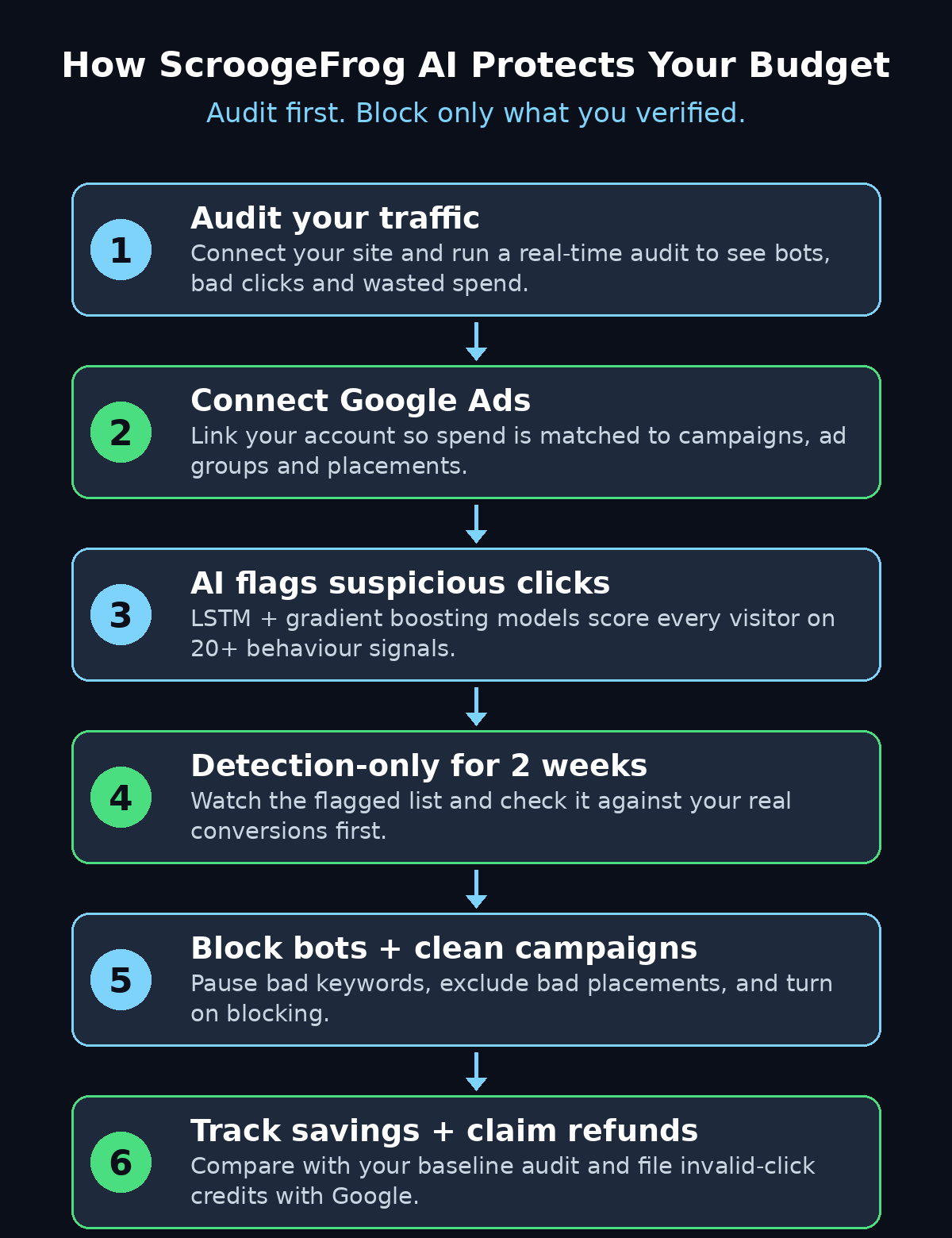
The diagram above shows the full loop: audit your traffic, connect Google Ads, let the AI flag suspicious clicks, watch in detection-only mode, then block and track your savings. Every step after the audit is about verifying before you act.
Step 7: Read the ScroogeFrog AI Recommendations in Plain Language
The most useful part of ScroogeFrog is not the raw data — it is the recommendations. Instead of handing you a spreadsheet of bot scores, the tool turns its findings into concrete steps in plain language: pause this keyword, exclude that placement, investigate this sudden spike, or flag this IP range for review. Read every recommendation before you act on any of them — if you are still learning how to use ScroogeFrog AI, this list is the best place to start each week.
Work through the list from the biggest saving downwards. A recommendation to pause one keyword that burned $120 last week matters more than ten small placement tweaks worth $3 each. For each item, check the evidence the tool shows you: how many clicks, what share were flagged, and what those visitors did after clicking. If the evidence is thin — three clicks, all flagged, on a brand-new keyword — treat it as a watch item, not an action item. If the evidence is heavy — 400 clicks, 60% flagged, average time on site under two seconds — that is a real problem.
Keep a simple note of what you change and when. A one-line log — date, action, reason — is enough. It stops you from undoing a good fix a month later because you forgot why it was made, and it gives you a record to show a client or a manager when they ask what the tool actually did.
Step 8: Run Detection-Only Mode for Two Weeks First
This is the step most beginners skip, and it is the most important one in the whole guide. Do not turn on blocking on day one. Run ScroogeFrog in detection-only mode for at least two weeks — this patient approach is the most important part of how to use ScroogeFrog AI safely — and and check the flagged sessions against your own conversions before you enable landing-page blocking. Independent reviewers give the same advice, and for good reason: every detection system produces false positives, and blocking a real customer costs you far more than a bot click ever will.
During these two weeks, do a short daily check. Open the flagged list and look for patterns that look human. Did a flagged visitor actually buy something, fill in a form, or spend four minutes reading your pricing page? If so, that is a false positive — note it, and check whether it shares something with other flagged visitors, like a particular device or location. A good tool learns from this, and a careful advertiser catches the mistakes before they cost money.
Also watch your conversion rate during this period. If it stays steady while the tool flags 10–15% of clicks as invalid, the flags are probably right: you are removing traffic that never converted anyway. If your conversion rate drops sharply, something real is being caught in the net. Pause, investigate, and do not enable blocking until the numbers make sense again.
Step 9: Turn On Blocking and Clean Up Your Campaigns
After two clean weeks in detection-only mode, you can start acting. Turn on blocking for the sources you have verified as fraudulent, and work through the campaign fixes the audit recommended. Pause the keywords that attract mostly bot clicks. Exclude the placements that send visitors who bounce instantly. Add the worst IP ranges to your exclusion lists. Do these changes one group at a time, a few per day, so you can see the effect of each change in your Google Ads data.
Do not try to fix everything in one sitting. If you pause five keywords, exclude twenty placements, and enable blocking all on the same day, and your cost per conversion improves, you will never know which change did it — and you will never know which one to repeat next time. Small, measured changes are slower, but they teach you how your account actually behaves. That knowledge is worth more than any single fix.
Keep the detection running even after blocking is on. New bots appear constantly, and a placement that was clean last month can turn bad overnight. A weekly five-minute check — flagged share, top bad placements, any new spikes — is enough to stay ahead of it.
Step 10: Track Your ScroogeFrog AI Savings and Claim Invalid-Click Refunds
The final step is proving the value. Compare your new numbers with the baseline audit from Step 6. Look at three things: invalid-click share, cost per conversion, and total wasted spend. If your invalid-click share fell from 15% to 3%, and your cost per conversion dropped by a similar share, the tool has paid for itself many times over. ScroogeFrog’s own savings calculator uses the 14% invalid-click rate as its starting assumption — your own before-and-after numbers are better than any calculator, because they are real.
There is also money to claim back. Google refunds invalid clicks when they are reported properly, and ScroogeFrog’s reporting gives you the evidence to file those claims. The platform’s own site displays a support letter confirming a $3,900 credit for invalid traffic — a reminder that the refunds are real, but only if you document the fraud and ask. Check your Google Ads billing for invalid-activity credits each month, and keep your audit reports as the supporting evidence.
Set a monthly routine. Once a month, run a fresh audit, review the recommendations, and update your exclusion lists. Fraud patterns shift, campaigns change, and new placements appear. A tool that runs once and is forgotten stops protecting you within weeks. A tool you check monthly keeps paying for itself all year.
ScroogeFrog AI vs ClickCease vs TrafficGuard: Which Fits a Beginner?
ScroogeFrog is not the only click-fraud tool, and the right choice depends on your budget and your ad spend. Here is how the three best-known options compare for a beginner running Google Ads.
| Feature | ScroogeFrog AI | ClickCease | TrafficGuard |
|---|---|---|---|
| Main focus | Traffic + Google Ads audit with AI recommendations | Click-fraud blocking for Google Ads | Multi-channel traffic protection |
| Starting price | $10/month (Test plan) | From $12/month | From $49/month (Shield plan) |
| Free trial | 14-day trial on every plan | Free trial available | 30-day free trial in detection mode |
| Detection method | LSTM + gradient boosting, 20+ visitor signals | Behavioral click analysis | AI traffic verification |
| Best for | Beginners who want audit + advice in one place | Small budgets needing simple blocking | Bigger spenders wanting multi-channel cover |
| Watch out for | Coverage centers on Google Ads, not every network | Fewer audit insights than ScroogeFrog | Higher entry price for small accounts |
For a beginner with a small Google Ads budget, ScroogeFrog’s $10 Test plan and its plain-language recommendations are the easiest starting point. If your monthly spend is under $500, start there. If you spend far more, or you advertise across several networks, compare the Pro plan with TrafficGuard’s Scale plan before you commit. Whichever you choose, the rule from Step 8 still applies: detection first, blocking second.
Frequently Asked Questions
Is ScroogeFrog AI really free to try?
Yes. Every plan, including the $10-a-month Test plan, comes with a 14-day trial, and the platform also offers a free pilot stage where you can see the audit results before paying. There is no free-forever plan, so set a reminder before your trial ends and judge the tool on your own numbers — if it cannot show you real wasted spend in two weeks, do not pay for it.
How much invalid traffic should I expect?
The University of Baltimore figure used by ScroogeFrog’s savings calculator is around 14% of paid-search clicks. Your own share depends on your niche, your keywords, and your placements. Competitive niches and broad-match keywords usually see more. Run the audit in Step 6 to get your real number instead of guessing from an average.
Will ScroogeFrog block real customers by mistake?
It can, which is why detection-only mode matters. No detection system is perfect, and a false positive that blocks a real buyer costs far more than a bot click. Run detection-only for at least two weeks, check flagged sessions against your own conversions, and only enable blocking for sources you have verified as fraudulent.
Does ScroogeFrog work with ads on Facebook or TikTok?
Its coverage centers on Google Ads and your own website traffic. If most of your spend is on Meta or TikTok, its value is lower, because it cannot audit those networks the same way. Check the current coverage on the pricing page before you sign up, and consider a multi-channel tool if your budget is spread across several networks.
Can I use ScroogeFrog for client accounts as an agency?
Yes, but check the plan limits first. The Test plan covers one site, and MCC (multi-account) connections start from the Medium plan at $249 a month. The Pro plan covers up to 100 sites and 100 Google accounts. A digital agency running ads for several clients should start on Medium and scale up only when the client count justifies it.
How do I get a refund for invalid clicks from Google?
Google credits invalid activity automatically in many cases, but you can also report it with evidence. Keep your ScroogeFrog audit reports showing the flagged clicks, the dates, and the campaigns affected, then check your Google Ads billing for invalid-activity credits and raise any missing ones through Google Ads support with the reports attached.
Final Thoughts
Click fraud is a quiet tax on every Google Ads account, and most advertisers pay it without ever noticing. ScroogeFrog AI makes the tax visible: it audits your traffic, connects the waste to specific campaigns and placements, and tells you in plain language what to switch off. The tool is new — it launched on Product Hunt on November 11, 2026 — so expect some rough edges, and take the independent advice seriously: start in detection-only mode, watch it for two weeks, and check its flags against your own conversions before you block anything.
Done that way, the routine is simple and it compounds. Once you know how to use ScroogeFrog AI in detection mode, the monthly routine takes minutes: audit once, fix the worst waste, check monthly, and claim the refunds you are owed. If your account matches the 14% industry average, protecting it is not a nice-to-have — it is the cheapest performance improvement you will ever make to your advertising. Start the 14-day trial, run your first audit this week, and let your own numbers decide whether it earns a place in your budget.
Explore More Free AI Tools
Want more free AI tools that save you time and money? Try the AI Title Generator to write click-worthy headlines for your ads and blog posts, the Meta Description Generator to craft search snippets that earn the click, the AI Rewriter to refresh old ad copy in seconds, and the Keyword Density Checker to keep your landing pages on topic. All four are free on AIToolSteps — no sign-up needed.