

Imagine a buyer messages you about a flat at 9 in the evening. You are at a viewing, then stuck in traffic, then having dinner — and by the time you reply the next morning, that buyer has already booked a viewing with another agent. This happens every day in property sales, and it is exactly the problem Rivo AI was built to solve. Rivo AI is a WhatsApp-based AI assistant for property agents, launched in Singapore on October 27, 2026. It answers buyer and tenant enquiries in seconds, asks the right qualifying questions, and books viewings through Google Calendar — even while you are busy, asleep, or on another viewing.
The launch came with a striking piece of research. Rivo tested 394 Singapore property agents between October 16 and 19, 2026, and found that agents who replied personally took an average of two hours and 14 minutes to respond to WhatsApp enquiries. Nearly one in three replies took over an hour, 19% took over four hours, and the longest wait was 27 hours. About one in five enquiries went unanswered during the day, and only half of agents contacted from overseas numbers replied personally at all. For a buyer, that wait feels like being ignored. For an agent, every slow or missed reply is a potential deal walking away.
In this beginner guide, you will learn how to use Rivo AI from scratch: what its two assistants do, how to sign up for the 30-day free trial, how to connect your WhatsApp Business number and Google Calendar, how to test the system safely before it talks to real buyers, and how to review the leads it qualifies for you. You do not need any technical skill. If you can use WhatsApp, you can use Rivo AI.
Step 1: Understand What Rivo AI Actually Is
Rivo AI is a Singapore-based technology company that builds WhatsApp-based AI assistants for property agents. It is not a chatbot you install on your website and it is not a new messaging app your buyers must download. It works inside WhatsApp — the app your buyers already use every day — through your existing WhatsApp Business number.
The service has two parts that work together:
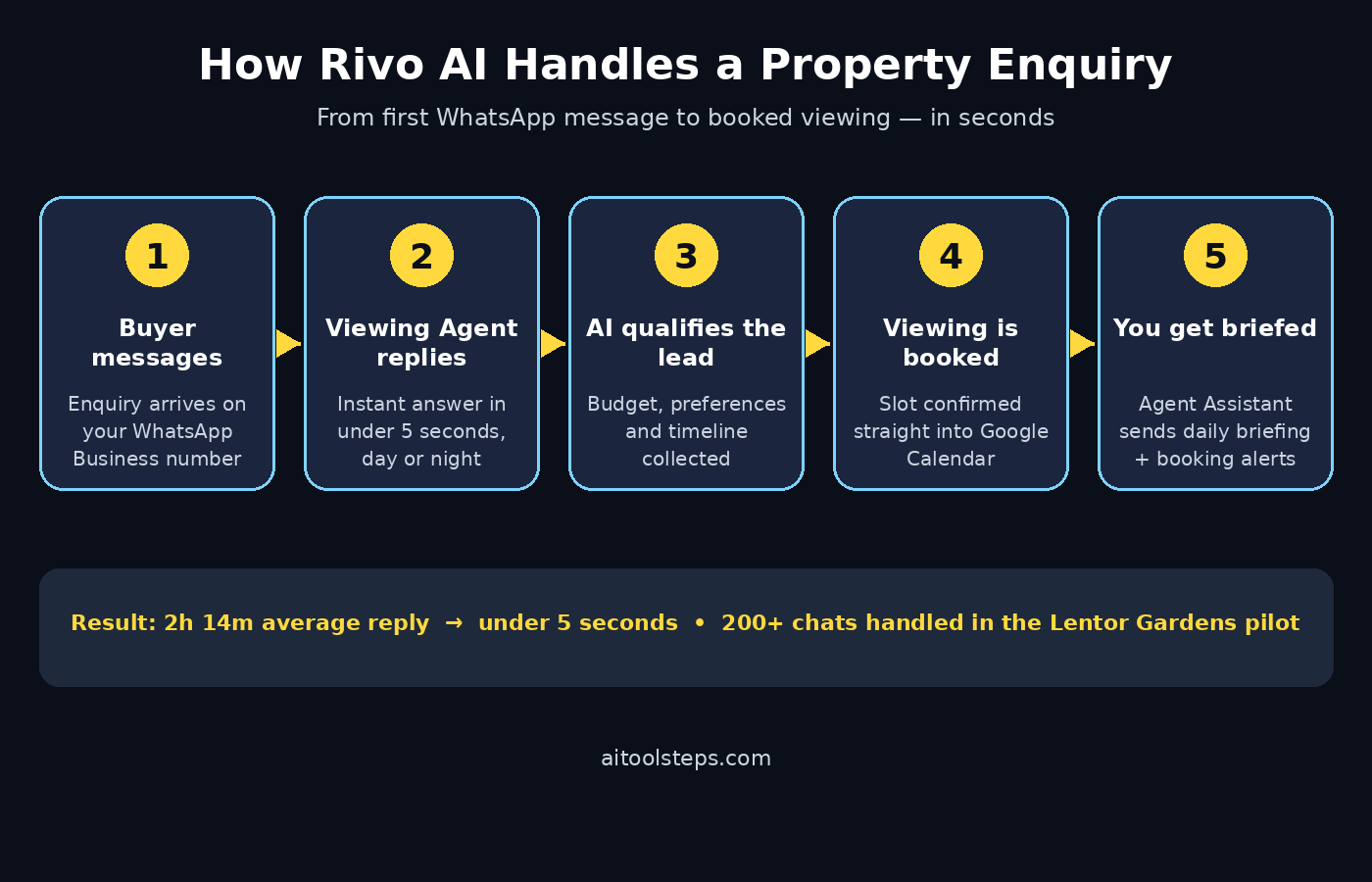
- The Viewing Agent: the customer-facing assistant. It replies to incoming property enquiries in under five seconds, gathers key details such as budget, property preferences and purchase timeline, and schedules viewings through Google Calendar.
- The Agent Assistant: your behind-the-scenes helper. It sends you daily briefings, booking alerts and conversation updates, so you always know what the Viewing Agent has done and when you need to step in personally.
Think of it this way: the Viewing Agent is your always-on receptionist, and the Agent Assistant is your morning briefing from that receptionist. You stay in control of the relationship — the AI handles the fast, repetitive first response, and you take over where a human touch matters.
Step 2: Know Why Speed Matters Before You Set Anything Up with Rivo AI
Before you touch a setting, it helps to understand what slow replies actually cost. Rivo’s field test of 394 agents tells the story plainly:
- Average personal reply time: 2 hours and 14 minutes.
- 29% of personal replies took more than an hour; 19% took more than four hours.
- The longest recorded wait was 27 hours.
- About one in five enquiries went unanswered during the day.
- Only half of agents contacted from overseas numbers replied personally.
Buyers expect an answer in minutes, not hours — as Rivo founder and CEO Raja Ahmed Shuja put it at launch, agents are not ignoring buyers on purpose, they are juggling hundreds of conversations on their own. A tool like Rivo does not replace the agent; it removes the waiting. And because the system answers instantly around the clock, overseas buyers in different time zones get the same fast response as local ones.
Step 3: Sign Up for the 30-Day Free Trial
Rivo’s Viewing Agent and Agent Assistant are available now to Singapore property agents, with a 30-day free trial and no setup fee or lock-in period. Here is how to start:
- Go to rivoai.co, the company’s official website, and look for the sign-up or free trial option.
- Create your account with your work email and your agency details.
- Confirm your email address if the service asks you to — this keeps your account secure and makes sure booking alerts reach you.
- Take a note of your trial end date. A free trial is only useful if you test it properly, so plan to run it on live enquiries for at least two full weeks before deciding.
Because there is no setup fee and no lock-in, the trial is genuinely low risk: if the system does not fit how you work, you can walk away. For small agencies and solo agents, that matters — a digital agency can charge thousands for a custom automation setup, while Rivo lets you test a working assistant before spending anything.
Step 4: Connect Your WhatsApp Business Number with Rivo AI
The Viewing Agent works through your existing WhatsApp Business number, so buyers keep messaging the number they already know. Connecting it is the most important step in the whole setup:
- Make sure you are using WhatsApp Business, not the personal WhatsApp app, for your work number.
- In Rivo’s setup flow, choose the option to connect your WhatsApp Business number and follow the on-screen prompts to authorize the connection.
- Keep your phone nearby during setup — WhatsApp connections usually need a confirmation on your device.
- Once connected, send yourself a test message from another number to confirm the Viewing Agent is live.
Do not connect a personal number you use with family and friends. Keeping your work assistant on your business number protects your privacy and keeps every buyer conversation in one professional place.
Step 5: Teach the Viewing Agent How You Work
Out of the box, the Viewing Agent knows how to greet a buyer, ask qualifying questions and offer a viewing. But it works best when it knows your basics:
- Your listings: tell it which properties you are currently marketing, with prices, locations and key features.
- Your qualifying questions: the defaults cover budget, property preferences and purchase timeline — add anything you always ask, such as preferred move-in date or financing status.
- Your tone: keep replies short, friendly and professional. Buyers on WhatsApp expect chat, not a brochure.
- Your boundaries: decide what the assistant should never promise — for example, it should never confirm a price reduction or a viewing time you have not approved.
Write these answers in plain language, the way you would explain them to a new assistant on their first day. The clearer your instructions, the fewer conversations you will need to rescue later.
Step 6: Connect Google Calendar for Viewing Bookings with Rivo AI
The Viewing Agent books viewings through Google Calendar, so this connection turns a chat into a confirmed appointment:
- Connect the Google Calendar you actually use for viewings — not a calendar you never check.
- Set your viewing availability: the days and hours you genuinely take appointments, plus how long each viewing lasts.
- Add buffer time between viewings so you are not racing across town.
- Block out holidays and personal commitments before the assistant starts booking.
Once this is connected, the flow is simple: a buyer says they want to see a property, the Viewing Agent offers your real open slots, the buyer picks one, and the appointment lands on your calendar. No back-and-forth of “are you free Tuesday?” messages, and no double bookings.
Step 7: Set Up the Agent Assistant Briefings with Rivo AI
The Agent Assistant is how you stay in charge without watching WhatsApp all day. Configure it to send you:
- Daily briefings: a summary of yesterday’s conversations, new qualified leads and upcoming viewings.
- Booking alerts: an instant message whenever a viewing is booked, changed or cancelled.
- Conversation updates: notes on any chat that needs your personal attention — for example, a buyer with an unusual request or a high-value enquiry.
Read your first few briefings carefully and compare them with the actual chats. This is how you learn what the assistant handles well and where you want to adjust its instructions. For agents exploring AI automation services more broadly, this briefing habit is the single most useful discipline: automation works when a human reviews it daily, not when it runs forgotten.
Step 8: Test With a Practice Enquiry Before Going Live
Never let a new assistant talk to real buyers before you have tested it yourself. Run these practice chats from a friend’s phone or a second number:
- Send a simple enquiry: “Hi, is the 3-bedroom flat near Lentor still available?” Check the reply arrives in seconds and sounds natural.
- Answer the qualifying questions the way a real buyer would, including a vague answer (“budget depends”) to see how it handles uncertainty.
- Book a test viewing and confirm it appears on your Google Calendar.
- Try a tricky message — a question about a property you do not handle, or a request in another language — and see how the assistant responds or hands over.
- Read the Agent Assistant’s briefing after your test and confirm it describes the conversation accurately.
Fix anything that sounds wrong before real buyers meet it. A five-minute test now saves an embarrassing first impression later.
Step 9: Review Qualified Leads and Step In Personally
Rivo’s live pilot at Lentor Gardens shows what the system can do at scale: it managed more than 200 buyer conversations, identified 79 qualified leads and booked four property viewings without human involvement. Your job is to work the qualified leads it hands you:
- Each morning, read the daily briefing and pick out the qualified leads — buyers with a real budget, a clear preference and a timeline.
- Contact qualified leads personally the same day. A quick human message after an instant AI reply is a powerful combination.
- For unqualified or early-stage enquiries, let the assistant keep nurturing them and check back when their timeline firms up.
- When a conversation needs empathy, negotiation or local knowledge, step in yourself — that is where agents earn their fee.
The goal is not to automate yourself away. It is to make sure no buyer waits hours for a first reply, while you spend your time on the conversations that actually close deals.
Step 10: Measure Results and Decide After the Trial
At the end of your 30-day trial, judge Rivo on numbers, not feelings:
- Response time: are buyers now answered in seconds instead of hours?
- Qualified leads: how many did the Viewing Agent identify, and how many turned into viewings?
- Bookings: how many viewings were booked without your involvement?
- Time saved: how many hours of back-and-forth messaging did you avoid each week?
- Missed enquiries: did the unanswered rate drop to near zero, including overnight and overseas messages?
If the numbers beat your old manual routine, keep it. If a particular step underperforms — say, bookings are fine but qualification is weak — adjust the assistant’s questions before giving up on the tool. Most AI assistants improve dramatically once their instructions match how you actually sell.
Rivo AI vs the Alternatives
| Option | First reply speed | Books viewings automatically | Works while you sleep | Best for |
|---|---|---|---|---|
| Rivo AI | Under 5 seconds | Yes, via Google Calendar | Yes | Property agents on WhatsApp |
| Replying manually | ~2 hours on average | No | No | Very low enquiry volume |
| Generic website chatbot | Instant | Rarely | Yes | Website visitors only |
| Hiring an assistant | Minutes | Yes | No, working hours only | Large agencies with budget |
The honest comparison is this: manual replies are free but slow, a hired assistant is fast but expensive and still sleeps, and a generic chatbot answers instantly but does not understand property. Rivo’s edge is that it combines instant replies with property-specific qualification and real calendar booking, inside the app buyers already use.
Frequently Asked Questions
Is Rivo AI really free?
Yes, to start. Rivo offers a 30-day free trial with no setup fee and no lock-in period. Check the pricing page on rivoai.co before your trial ends so you know the paid cost and can decide with real numbers from your own trial.
Do my buyers need to install anything?
No. Buyers simply message your existing WhatsApp Business number as they always have. The AI replies inside that same chat — there is no new app for them to download or learn.
Will buyers know they are talking to an AI?
The Viewing Agent replies instantly and conversationally, but you should be transparent. A short note in your WhatsApp Business greeting — for example, that an assistant may reply first and you will follow up personally — builds trust and sets the right expectation.
Can Rivo AI replace a property agent?
No, and it is not designed to. It handles the fast first response, qualification and booking. Negotiations, valuations, legal questions and the personal trust of a big purchase still need a human agent — Rivo simply makes sure you get to those conversations faster.
Does Rivo AI work outside Singapore?
At launch, Rivo says its service is available to Singapore property agents, and its pilot and field test were Singapore-based. Agents elsewhere can still watch the rollout, and the setup lessons in this guide — instant replies, qualification and calendar booking — apply to any WhatsApp-based assistant you choose.
What happens if the AI gives a wrong answer?
Check your Agent Assistant briefings daily, correct the assistant’s instructions, and step into any conversation that looks off. Treat the first two weeks as training: every correction you make now prevents the same mistake later.
Final Thoughts
Property is a speed game, and Rivo’s own research proves it: buyers wait hours, one in five messages goes unanswered, and overseas buyers are the most likely to be ignored. Rivo AI does not ask you to work longer hours or hire staff you cannot afford. It answers in seconds, qualifies the buyer, books the viewing, and briefs you each morning — and it does all of that inside WhatsApp, where your buyers already are.
Start with the 30-day free trial, connect your WhatsApp Business number and Google Calendar, test it with a practice enquiry, and judge it on your own numbers after a month. If it books even a few extra viewings that would otherwise have gone to a faster rival, it has paid for itself many times over.
Explore More Free AI Tools
Want to keep building your AI toolkit? Try our AI Title Generator, Meta Description Generator, AI Rewriter, and Keyword Density Checker — all free on AIToolSteps, and all built for beginners who want results without a learning curve.