

Imagine telling an AI assistant, in plain English, “find me 20 small businesses in Lahore that sell handmade clothes, then draft a short outreach message for each one” — and watching it actually open websites, read pages, and do the browsing work for you. That is the promise of Retriever AI for beginners. Retriever AI, also known as rtrvr, is a free AI browser agent that finishes work across websites: it finds leads, sends outreach, shortlists TikTok and Instagram creators for campaigns, and even applies to jobs. It launched on Product Hunt on October 14, 2026, where it earned third place as Product of the Day, and it offers a free mode with no subscription and no credit card required to start.
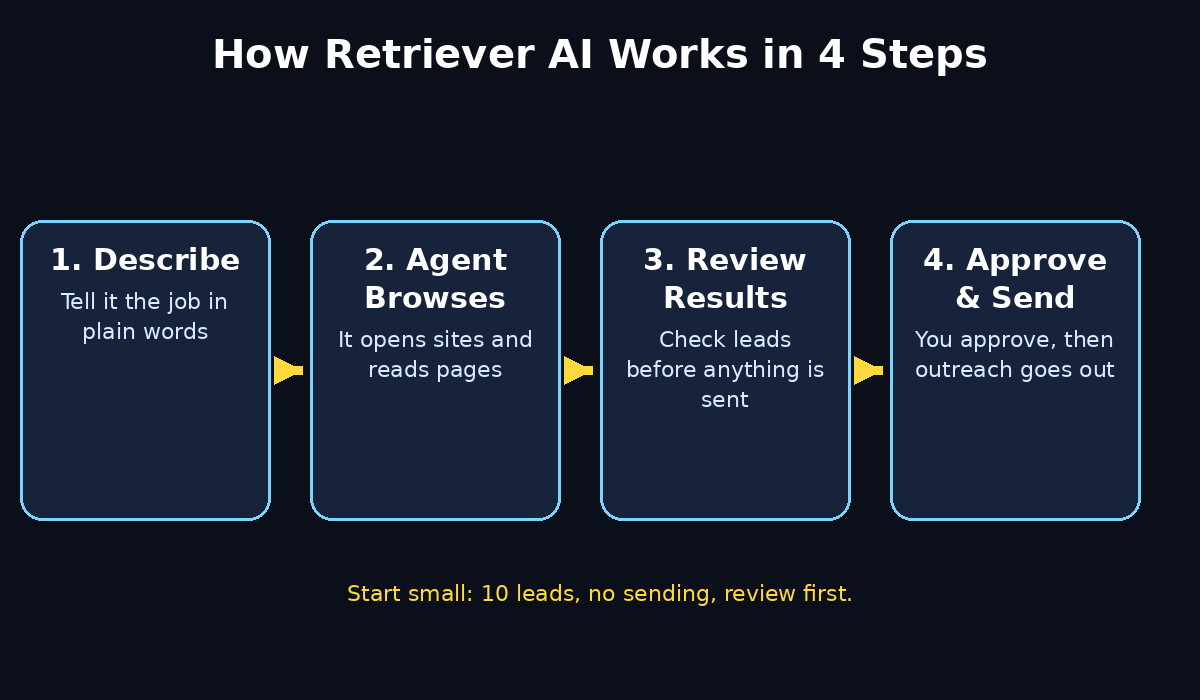
Unlike a normal chatbot that only talks about a task, a browser agent drives the browser itself. It clicks, scrolls, fills in forms, and reads results, while you watch and approve the important steps. That difference matters for beginners, because it turns hours of repetitive tab-hopping into one clear instruction and a reviewable result. This guide walks you through Retriever AI for beginners from start to finish: creating a free account, running your first task, finding leads, sending outreach safely, shortlisting creators, applying to jobs, and staying inside the free plan. No coding is needed, and no technical background is assumed.
Step 1: Create Your Free Retriever AI Account
Start by opening Retriever AI in your Chrome browser and creating a free account. The free mode costs nothing, needs no subscription, and gives you a daily fair-use allowance plus welcome credits to try real tasks. Sign up with your email address, confirm it if asked, and choose a strong password. Keep your work email separate from personal accounts if you plan to use the tool for business outreach, because the messages and leads you generate will live in that workspace.
Once you are inside, take two minutes to explore the dashboard before running anything. Look for the place where you start a new task, the history of tasks you have already run, and your credit balance. Knowing where those three things live will save you confusion later. If you run a small business or a freelance service, this is also a good moment to think about what outcome you actually want — more leads, more replies, or faster job applications — because a clear goal makes a much better first task. A digital agency that already handles outreach for clients, for example, can treat Retriever AI as a research assistant that prepares lists, while a solo freelancer can use it to cut the boring part of prospecting. If you ever need help turning those lists into a proper campaign, a team like the one at D365A digital agency shows how agencies structure outreach around real client work.
Step 2: Install It in Chrome or Use a Cloud Browser
Retriever AI works in your own Chrome browser or in cloud browsers hosted by the service. For beginners, starting in your own Chrome browser is usually the simplest choice, because you stay logged in to the sites you already use and you can see exactly what the agent is doing. Install the Chrome extension if one is offered during setup, grant only the permissions it asks for to run tasks, and keep the extension updated.
The cloud browser option is useful when you do not want to tie up your own computer, or when a task needs to run while you do something else. The trade-off is that you will need to sign in to websites inside that cloud session instead. Either way, never hand the agent passwords for banking, payment, or highly sensitive accounts, and never let it complete a purchase or send money on your behalf without you checking first. For a first run, your own browser is best: you can watch every step, pause the task if something looks wrong, and learn how the agent behaves before you trust it with longer jobs.
Step 3: Write Your First Task in Plain Language
The most important skill in Retriever AI for beginners is writing a good task description. Forget technical language. Write the way you would explain the job to a careful assistant: what to find, where to look, what counts as a good result, and what to do with it. A vague instruction like “find leads” will give you vague results. A specific instruction will not.
Try a first task like this: “Find 10 independent coffee shops in Manchester with a website and an Instagram page. For each one, record the business name, website, Instagram handle, and city. Do not contact anyone yet.” Notice what makes it work: a number, a place, a type of business, the exact fields you want, and a clear stop rule. Run this small task first, even if your real goal is bigger. You will learn how fast it works, how accurate its results are, and how the results are presented, without risking a large outreach campaign on your first try.
- Start small: 5 to 10 results for your first task.
- Name the place, the business type, and the fields you want.
- Say clearly whether the agent should contact anyone or only collect information.
- Add one rule for what to skip, such as businesses without a website.
Step 4: Find Leads Without Copy-Pasting for Hours
Lead finding is where Retriever AI saves the most time for beginners. Instead of opening dozens of tabs yourself, you describe your ideal customer and let the agent search, visit pages, and build a list. You can target by business type, location, platform, or niche, and you can ask it to collect contact details that are publicly listed, such as a contact page, a business email shown on a website, or a social profile.
When the results come back, do not blindly trust every row. Open three or four of them yourself and check that the business is real, still operating, and actually a good fit. Delete duplicates, remove businesses that are too large or too small for your offer, and keep notes on why each lead made the list. That ten-minute review is what turns a raw list into a useful pipeline. For agencies and growing businesses, this research step pairs naturally with broader automation work, and reading about AI automation services can help you see where a browser agent fits alongside your other tools rather than replacing your judgement.
Step 5: Send Outreach That Sounds Human, Not Spammy
Finding leads is only half the job; outreach is where beginners most often go wrong. Retriever AI can draft and send outreach, but you should always review the message before it goes out. A good outreach message is short, specific, and about the other person: mention something real about their business, say plainly what you offer, and end with one easy next step, such as a short reply or a 15-minute call.
Use the agent to prepare drafts in bulk, then personalise the first line for each lead before sending. Send in small batches — ten to twenty a day is a sensible beginner pace — and watch your reply rate before scaling up. Never buy scraped email lists, never misrepresent who you are, and always include a simple way for people to opt out. If a site or platform has its own rules about automated messages, respect them; getting an account restricted will cost you far more than a few extra sends are worth. Quality outreach, sent slowly and honestly, beats hundreds of generic messages every time.
Step 6: Shortlist TikTok and Instagram Creators for Campaigns
If you run a brand, a shop, or a content campaign, Retriever AI can shortlist TikTok and Instagram creators for you. Describe the niche, the audience size range, the location, and the kind of content you want — for example, “find 15 UK-based creators who post about handmade skincare, with between 5,000 and 50,000 followers, and list their handle, follower count, and recent post topics.”
Review the shortlist the same way you review leads: watch a few recent videos from each creator, check that their audience actually matches your customers, and look for signs of genuine engagement rather than just follower counts. A creator with 8,000 loyal followers who reply to every post is often a better partner than one with 100,000 silent followers. Keep a simple spreadsheet of the creators you like, the rate you discussed, and the campaign result, so your second campaign starts from evidence instead of guesswork.
Step 7: Apply to Jobs Faster Without Losing Control
Job seekers can use Retriever AI to apply to jobs across websites, which is a huge time saver when applications ask for the same details again and again. Start by describing the role, the location, and the platforms you want to target, and give the agent your basic details and a clear instruction about which roles count as a match. Let it find openings and prepare applications, but read each application before it is submitted.
Never let an agent invent experience, qualifications, or salary history for you, and never let it submit an application to a company you would not actually want to work for. The best beginner workflow is semi-automatic: the agent finds and drafts, you approve and submit. That keeps your applications honest and tailored, while still removing the repetitive form-filling that makes job hunting exhausting. Save copies of every application you approve, so you can follow up confidently when an employer replies.
Step 8: Review Results, Approve Sends, and Fix Mistakes
Every task in Retriever AI ends with results you should check. Open the task history, read through the collected rows, and look for the three most common beginner mistakes: wrong businesses that do not match your brief, missing fields where the agent could not find a detail, and duplicate entries. Fix the brief and re-run a small corrected task rather than accepting a flawed list.
Set a personal rule before you scale up: nothing gets sent, posted, or submitted without your approval until you have completed at least five successful tasks. That rule protects your reputation, your accounts, and your clients. If a task goes wrong — it visits the wrong site, fills in a wrong field, or stops halfway — pause it, note what instruction was unclear, and rewrite that instruction more precisely. Browser agents improve dramatically when the brief improves, and most early failures are brief problems, not tool problems.
Step 9: Track Credits, Limits, and What the Free Plan Covers
Retriever AI for beginners starts in free mode at no cost, with sponsored content and a daily fair-use allowance, plus welcome credits when you sign up. Paid plans start with Starter at around 9.99 dollars per month for 1,000 credits, followed by Pro and Team tiers for heavier use. Features such as schedules, triggers, cookie sync, and API or MCP control of Chrome generally need a paid plan, so check the current pricing page before you plan a workflow around them.
Track two numbers every week: how many credits your typical task uses, and how many replies or useful leads each task produces. If one task type consistently produces results and another consistently wastes credits, shift your effort to the winner. Do not upgrade just because a paid feature sounds exciting; upgrade when your free allowance is genuinely stopping work that already earns replies, leads, or interviews. That discipline keeps a free tool free for as long as possible.
Step 10: Stay Safe, Private, and Within the Rules
A browser agent is powerful because it acts as you, so safety rules matter more here than with a normal chatbot. Use it only on your own accounts, only on websites where automation is allowed, and only with data you have a right to use. Do not ask it to scrape private information, bypass logins, break a site’s terms, or impersonate someone else. Keep sensitive documents out of task descriptions, review anything it drafts that mentions prices, promises, or legal claims, and log out of shared computers when you finish.
If a task asks for a login, a code, or a payment, stop and handle that step yourself. Treat the agent as a junior assistant with a lot of energy and no judgement: excellent at repetitive browsing, but not the right person to make promises, spend money, or speak for your business unsupervised. With those boundaries in place, Retriever AI becomes a genuinely useful daily helper rather than a risk to your accounts.
Retriever AI Plans Compared
| Plan | Price | Best for | Key limits for beginners |
|---|---|---|---|
| Free Mode | 0 dollars, no subscription | Trying your first tasks | Sponsored content, daily fair-use allowance |
| Starter | About 9.99 dollars per month | Regular lead lists and outreach | 1,000 credits per month |
| Pro | About 29.99 dollars per month | Daily campaigns and heavier use | Higher credit allowance, more advanced controls |
| Team | About 99.99 dollars per month | Small teams sharing workflows | Team seats and shared workspaces |
Prices can change, so confirm them on the official pricing page before you buy. For most beginners, the free mode is enough for the first few weeks, and Starter is the sensible first upgrade once you know your weekly credit use.
Frequently Asked Questions
Is Retriever AI really free for beginners?
Yes, Retriever AI offers a free mode with no subscription, plus welcome credits when you sign up. The free mode shows sponsored content and has a daily fair-use allowance, so very heavy daily use will hit limits, but learning the tool, running small lead lists, and testing outreach drafts all work without paying.
Do I need coding skills to use Retriever AI?
No. You describe tasks in plain English, such as finding leads in a city or shortlisting creators in a niche. The agent handles the browsing steps. Clear, specific instructions matter far more than technical knowledge, and starting with small tasks is the fastest way to learn.
Can Retriever AI send outreach messages automatically?
It can prepare and send outreach, but beginners should review every message before sending. Approve drafts, personalise the first line, send in small batches, and respect each platform’s rules. Automatic sending without review is the fastest way to damage your reputation or lose an account.
Is Retriever AI safe to use with my accounts?
It is safe when used carefully: use only your own accounts, only on sites that allow automation, and never share banking or payment logins. Keep sensitive details out of task descriptions, approve anything it sends, and stop any task that asks for a code or payment so you can handle that step yourself.
How is Retriever AI different from ChatGPT or a normal chatbot?
A normal chatbot answers questions in chat. Retriever AI is a browser agent: it actually opens websites, clicks through pages, fills in forms, and collects results for you. That makes it better for repetitive web work like lead research and job applications, while a chatbot remains better for writing, brainstorming, and explanations.
Should I upgrade from the free plan?
Upgrade only when free limits are stopping work that already produces results. Track your weekly credit use and your reply or lead rate first. If free mode covers your learning and your first campaigns, stay free; move to Starter when you consistently need more credits for proven tasks.
Final Thoughts
Retriever AI for beginners is best understood as a tireless browsing assistant, not a magic button. Its real value shows up in the boring, repetitive work that eats your week: building lead lists, preparing outreach drafts, shortlisting creators, and filling in job applications. Give it clear instructions, start small, review everything before it goes out, and keep the human decisions — who to contact, what to promise, and what to approve — firmly with you.
Try one small task today: ten leads in one city, or ten creators in one niche, with no sending at all. Review the results, fix the brief, and run it again. That single loop will teach you more about browser agents than any tutorial, and it will leave you with a useful list at the end of it. Once that loop feels easy, you can scale up with confidence, knowing exactly what the tool does well and where your judgement still matters most.
Explore More Free AI Tools
Keep building your free toolkit with the other free tools on AI Tool Steps: try the AI Title Generator, the Meta Description Generator, the AI Rewriter, and the Keyword Density Checker on aitoolsteps.com to polish the titles, descriptions, and outreach copy your Retriever AI tasks produce.