
Every voice assistant has the same awkward pause. You finish a sentence, and then you wait — half a second, a full second — while the assistant works out what you said. That pause is the reason talking to AI still feels slower than typing, even though the AI itself answers in milliseconds. Earlybird AI attacks that pause at its root. Instead of waiting for each word to end before recognising it, Earlybird predicts each word about 90 milliseconds before you finish speaking it, so the words appear on screen while they are still leaving your mouth. In this guide you will learn how to use Earlybird AI for free, from your first live transcription to wiring it into a voice agent that feels instant.
Earlybird launched on Product Hunt on 10 November 2026, and it is free, with open weights and open code. The model is tiny — just 29 million parameters and 17 MB — and it runs on an ordinary CPU, with no graphics card, no cloud account and no per-minute charge. Its maker, Sahil Mahendrakar, built it while working on voice agents and kept hitting the same delay: speech-to-text waits for each word to end before it shows it, so the agent cannot start working until then. Earlybird removes that wait. On audiobook speech, the median word is predicted correctly 90 ms before it is fully spoken, where other streaming models get it right 90 to 400 ms after the word ends. That difference is small in numbers and huge in feel.
Step 1: What Is Earlybird AI and Why 90 Milliseconds Matter
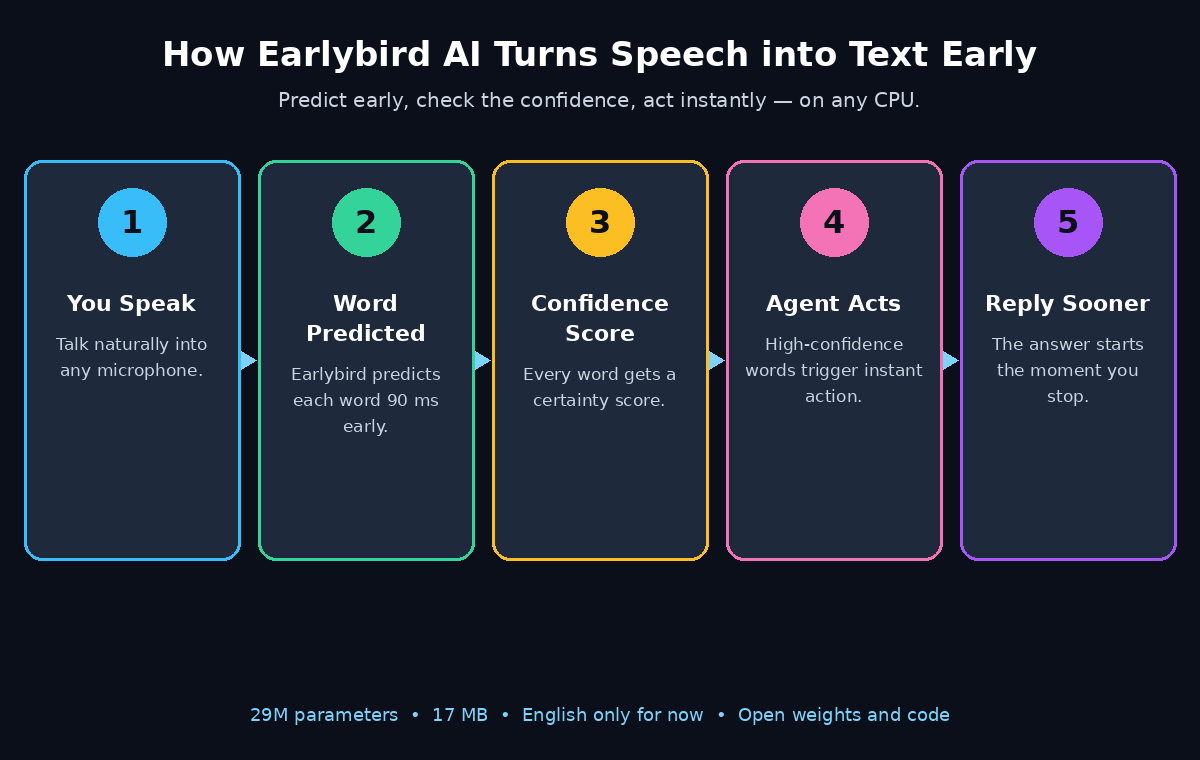
Earlybird is an on-device speech-to-text model. Speech-to-text, also called automatic speech recognition, turns spoken words into written text. Most speech-to-text tools work in one of two ways: they record a whole chunk of audio and transcribe it afterwards, or they stream the audio and transcribe each word as soon as it ends. Earlybird is a streaming model with a twist — it does not wait for the word to end. It listens to the first part of a word, predicts the rest, and outputs the word early, together with a confidence score that says how sure it is.
Ninety milliseconds sounds like nothing. It is less than a blink. But in a conversation, latency adds up at every step: the microphone hears you, the transcriber recognises the words, the AI thinks, the voice replies. A normal streaming transcriber adds a 90 to 400 ms delay after every single word. That delay sits at the very start of the chain, so everything downstream starts late. Earlybird flips that step from a delay into a head start. The agent can begin thinking while you are still speaking, and the reply can start almost the moment you stop. That is the difference between a voice assistant that feels like a walkie-talkie and one that feels like a conversation.
Why 90 Milliseconds Change the Conversation
- 17 MB, not 17 GB: the whole model fits in a file smaller than a single phone photo. It downloads in seconds and runs on any laptop.
- CPU only: no graphics card is needed. A normal office laptop, a mini PC or a small server can run it.
- Confidence on every word: each word comes with a score, so software can decide what to trust and what to double-check.
- Open weights and code: the model and its code are public. You can inspect them, run them yourself and build them into your own app.
- Free: there is no subscription, no free tier that runs out, and no per-minute price.
What Earlybird Is — and What It Is Not
Earlybird is not a chatbot and not a voice assistant by itself. It is the listening half of one. It turns your voice into text fast enough for the rest of the system to keep up with you. That is the first thing to grasp when you learn how to use Earlybird AI: it is a listener, not a talker.
Step 2: How Earlybird Predicts Words Before You Finish Them
Speech is more predictable than it feels. When you say “I would like to book a…”, the next word is very likely “flight” or “table” or “ticket” — and the sound of the word itself gives it away long before the final consonant. Earlybird uses both clues at once. It listens to the sound arriving right now and the words you have already said. As soon as enough of a word has been spoken to identify it with confidence, Earlybird outputs it. On audiobook speech, that happens a median of 90 ms before the word is fully spoken.
The confidence score is what makes this safe instead of reckless. Every predicted word carries a number that says how certain the model is. A word the model is sure about can be acted on immediately. That means a common word, clearly spoken, in a predictable sentence. A word it is unsure about can be held back for a few more milliseconds until the sound confirms it. That is exactly how a good voice agent should use Earlybird: act now on the high-confidence words, wait on the uncertain ones. That judgment call is the core skill of how to use Earlybird AI well. The maker designed the confidence scores for this purpose. It is the feature that separates Earlybird from a model that simply guesses fast.
The Honest Limits of Earlybird
There are honest limits, and they matter for beginners. Earlybird works in English only for now. The maker has said support for other languages is planned, but it is not here yet. And on noisy audio, the quality dips slightly compared with clean recordings, because background noise eats into the very clues the prediction relies on. If your use case is a quiet room and English speech, Earlybird is at its best. If it is a crowded street in another language, a bigger multilingual model is still the safer choice today.
For a small business, this kind of speed has a practical payoff. A digital agency that builds voice assistants can make its phone agents answer noticeably faster. It needs no bigger servers: the model is small enough to run anywhere, and the head start comes free.
Step 3: Get Earlybird — Download the Open Weights and Code
Earlybird ships as open weights and open code. You download the model file and the program that runs it. There is no account to sign up for. The project’s public page is its Product Hunt launch page, where the maker links the weights and the code. Start there: open the Earlybird page on Product Hunt and follow the links to the repository and the model files. That page is the front door for how to use Earlybird AI — it links the weights, the code and the setup guide in one place. There is no sign-up form, no API key and no waiting list. The whole point of a 17 MB open model is that you can just take it and run it.
Before you download anything, check that your computer is ready. The requirements are deliberately modest, and that is part of the appeal.
- Any modern computer: Windows, Mac or Linux. If your machine can run a web browser comfortably, it can run Earlybird.
- About 100 MB of free disk space: the model itself is 17 MB, plus the code and its dependencies.
- A microphone: a laptop’s built-in microphone works for testing, and a headset or USB microphone works better for real use.
- Python or the runtime listed in the repository: follow the setup steps in the project’s own README. They are written for the current release, and they are the one place where the exact commands live.
Download the Earlybird Model and Code
Download the 17 MB model file first, then the code. Keep the two together in one folder so the program can find the weights. If the repository offers a demo script, run that before anything else. A working demo proves the model loads and your microphone is being heard. It also gives you a baseline to compare against when you start changing settings. Do not skip the demo — it takes a minute. It separates “the model does not work” from “my settings are wrong”, which saves a lot of guessing later. Once the demo runs, you have passed the hardest step of how to use Earlybird AI. The rest is practice.
Step 4: Run Your First Live Transcription on Any CPU
Your first run should be a live microphone test, not a file. Live transcription shows you the feature that makes Earlybird special. You see the words appear before you finish saying them. A file transcription never shows you that. Open the demo or example program from the repository, point it at the downloaded model, and speak a normal sentence into your microphone.
Try a sentence with ordinary, predictable words first, such as “The weather today is sunny and warm with a light breeze.” Watch the screen as you speak. With a normal streaming transcriber, each word appears just after you finish it. With Earlybird, you will see words appear a fraction of a second early. The effect is subtle at first. Then it becomes obvious: the text keeps pace with you instead of trailing behind you. Speak at your normal speed. There is no need to slow down or over-enunciate. The makers measured the model on natural audiobook speech, not on carefully read words.
Test Earlybird with a Hard Sentence
Then try a harder sentence, one with a name or an unusual word in it, such as “Please send the invoice to Magdalena Kowalski before Thursday.” Watch what happens to the unusual word. It may appear a little later than the easy words, or with a lower confidence score. That is the model doing exactly what it should. It waits for more sound before committing to a word it cannot predict. This is the behaviour you want to understand early, because it tells you how the model will behave on real speech, where names, numbers and jargon appear all the time.
- Use a headset or a close microphone: clean audio is the single biggest factor in accuracy. A microphone two centimetres from your mouth beats a laptop microphone across the room.
- Keep the room quiet: background music, a television or a second conversation all cost accuracy. They cost Earlybird more than most models because they blur the prediction clues.
- Speak naturally: do not pause between words. The model predicts from context, and context disappears when you speak word by word.
- Check the CPU load: a 29-million-parameter model is light work for a modern CPU, but if your machine is old or busy, close heavy apps before a live session.
Step 5: Read the Confidence Score on Every Word
The confidence score is Earlybird’s most useful feature. It is also the one beginners most often ignore. Every word the model outputs comes with a number — high means the model is sure, low means it is guessing. Learning to read that number is what turns Earlybird from a fast transcriber into a reliable building block.
Think of the score as a traffic light. High-confidence words are green: use them immediately. A voice agent can start searching, start drafting a reply, or start an action on a green word without waiting. Medium-confidence words are amber: keep them on screen, but do not act on them yet. The next few milliseconds of audio will usually confirm or correct them. Low-confidence words are red: hold them, wait for the full word, and if the score stays low, ask the speaker to repeat that part. A simple rule that works well in practice is to act on words above roughly 0.9 confidence, display words between 0.7 and 0.9, and hold anything below 0.7 until more audio arrives. The exact thresholds depend on your use case, so treat these as a starting point and tune them with real recordings.
What Low Confidence Scores Tell You
Confidence also tells you where your audio is failing. If scores are high on short common words but low on names and numbers, your microphone is probably fine and the model is simply being careful — that is normal. If scores are low on everything, including easy words, the problem is almost always the audio: too much background noise, a microphone too far away, or a very quiet speaker. Fix the audio first. No setting in the model compensates for a bad recording, and chasing settings while the microphone is the problem wastes an afternoon.
One more habit worth building: log the low-confidence words. Over a week of real use, the same words keep appearing — product names, client names, street names, technical terms. That list is your training data for the next step: adding those words to a custom vocabulary or a correction list so the model handles them better next time. Building that list is how to use Earlybird AI like a professional: the model improves because you pay attention to what it gets wrong.
Step 6: Build a Faster Voice Agent with Earlybird
This is the job Sahil built Earlybird for. A voice agent is a chain: microphone, speech-to-text, AI brain, text-to-speech, speaker. The speech-to-text step sits at the front of that chain. Every millisecond it saves is a millisecond the whole conversation saves. With a normal streaming model, the agent cannot even start thinking until each word has ended. With Earlybird, the agent can start thinking while the word is still being spoken — and for a voice agent, that head start is often the difference between feeling instant and feeling laggy.
How Earlybird Speeds Up a Voice Agent
The wiring is straightforward. Earlybird takes the live microphone stream and produces words with confidence scores. Your agent code watches those words as they arrive. When a high-confidence word completes a phrase the agent understands, the agent can begin its work immediately. That could be a greeting, a yes or no, or a command like “book” or “cancel”. It fetches data or drafts a reply while you are still finishing the sentence. When the words are uncertain, the agent waits. The result is an agent that interrupts less, answers sooner, and feels more like talking to a person than to a machine.
Because the model is 17 MB and runs on a CPU, you can run the whole listening half of the agent on the same small server — or even the same laptop — as the rest of your system. There is no cloud transcription bill, no per-minute charge, and no audio leaving your machine. That matters for privacy. A doctor’s office, a law firm or a support desk can transcribe calls on its own machines. Patient and client voices never go to a third party. Teams exploring AI automation services often start exactly here: a fast, private listener that they own outright, before they add the more expensive AI brain on top. If you can wire one trigger phrase, you already know how to use Earlybird AI in production — the rest is adding more phrases.
Four Rules for a Fast Earlybird Voice Agent
- Start with one trigger phrase: teach the agent to react to a single high-confidence phrase, such as “book an appointment”, and watch it respond while the speaker is still talking.
- Set a confidence threshold for actions: let the agent act on words above 0.9, and make it wait below that. Acting on a guessed word is worse than waiting.
- Keep the model close to the microphone: run Earlybird on the same machine that captures the audio. Sending audio across a network adds back the latency you just saved.
- Measure the real delay: time the gap between the end of a spoken sentence and the start of the agent’s reply, with Earlybird and without it. The difference is your proof that the change was worth it.
Step 7: Use Earlybird for Live Captions
Live captions are the simplest useful thing you can build with Earlybird. They are also the best way to show the model off to someone else. A caption is just the transcription displayed on screen as the person speaks — for a video call, a classroom, a church service, a conference talk or a livestream. The earlier the words appear, the more natural the captions feel. A 90 ms head start per word adds up. The captions keep pace with the speaker instead of trailing a sentence behind.
Set it up the same way as the live transcription test: microphone in, Earlybird running, words displayed in large text on screen. Two settings matter more than any other. First, show high-confidence words immediately and hold low-confidence words for a beat. A flickering caption that corrects itself is harder to read. One that arrives a fraction later but stays still is easier. Second, keep a rolling window of the last two or three sentences on screen rather than clearing the text after each sentence; readers catch up faster when they can glance back.
Live captions are also where Earlybird’s limits show most clearly, so set expectations honestly. In a quiet room with one English speaker and a good microphone, the captions will be excellent. In a panel discussion with four people talking over each other in a hall with an echo, they will struggle — and so will every other speech-to-text model, because the audio itself is the problem. If captions are your main use case, invest in the microphone before you invest in settings: a lapel microphone on the speaker beats any amount of tuning. That microphone-first habit is the simplest version of how to use Earlybird AI for captions.
Step 8: Transcribe Audio Files and Podcasts Offline
Earlybird is built for live audio. The same model can transcribe recorded files too, and doing it offline is the point. Feed an audio file into the model instead of the microphone. You get a transcript without uploading the recording anywhere. That matters for interviews, meetings, lectures and podcasts where the audio is private, or where the file is simply too large to send to a cloud service comfortably.
The workflow is simple: take your recording, convert it to a standard format if needed — WAV or MP3 at 16 kHz mono is the safest choice for speech models — and run it through the model. The transcript comes back as text, and because Earlybird attaches a confidence score to every word, you can find the uncertain passages quickly: search the transcript for low-confidence words and check only those against the audio, instead of proofreading the whole thing. For a one-hour interview, that turns a full re-listen into a ten-minute check of the flagged words.
Practical Tips for Earlybird File Transcription
A few practical notes for file transcription. First, split long recordings into chunks of a few minutes. Very long files are harder to keep in sync, and a failure near the end wastes the whole run. Second, keep the original audio — the transcript is a working document, not an archive. You will want to re-check a passage against the recording sooner or later. Third, remember the English-only limit. An English podcast transcribes well. A mixed-language interview will not, and the model will not warn you. It will simply produce its best guess in English.
- Interviews: transcribe the recording, search the low-confidence words, and quote only the passages you verified against the audio.
- Meetings: pair the transcript with the meeting notes — the transcript is the record, the notes are the decisions.
- Podcasts: turn episodes into searchable text so listeners can find the minute where a topic was discussed.
- Lectures: give students a transcript they can search, with the uncertain words marked for the lecturer to correct.
Each of these jobs follows the same pattern, and that pattern is how to use Earlybird AI for files: feed the audio in, read the confidence scores, and check only the uncertain words.
Step 9: Handle Noisy Audio and Accents Honestly
No speech-to-text model is magic, and Earlybird’s maker is open about its weak spots: quality dips slightly on noisy audio, and the model speaks English only for now. A beginner who knows these limits in advance will get better results than one who discovers them mid-project. This step is about working around them rather than pretending they do not exist.
Noise is the bigger of the two. Background music, traffic, a fan, a second conversation — all of them blur the sound clues Earlybird uses to predict a word early. The fixes are boring and they work: move the microphone closer to the speaker, turn off the noise source if you can, and use a headset with a boom microphone instead of a laptop microphone. A noise-suppression step before the model helps too. Many voice apps have one built in. It works as long as it does not distort the voice itself. Test with and without it; if the confidence scores go up, keep it.
Accents and Earlybird Accuracy
Accents deserve a fair note. Earlybird was measured on audiobook speech, which is clear, well-enunciated English. Strong regional accents, fast conversational speech and mumbling all cost accuracy, because the model’s predictions lean on familiar patterns. If your speakers have strong accents, run a short test first: five minutes of real speech from a real speaker tells you more than any benchmark. If the confidence scores stay high, you are fine. When they sag, use Earlybird for the speakers it handles well. Use a larger multilingual model for the rest. You can also wait for the planned language support, which the maker has said is coming.
Finally, do not fight the model on names. Proper names — people, companies, products, streets — are the hardest words for any speech-to-text system, because they cannot be predicted from context. Keep a list of the names your project uses, and check them in every transcript. A two-minute manual check of names beats an hour of debugging a model that was never going to guess “Kowalski” correctly on the first try. That check is part of how to use Earlybird AI honestly: trust the model where it is strong, and verify it where it is not.
Step 10: Fix Common Problems
Most problems you meet while learning how to use Earlybird AI have a short list of causes. Working through them in order saves time. Start with the audio, then the setup, then the settings — in that order, because the audio is the cause nine times out of ten.
The Most Common Earlybird Problems
- “The model will not load”: check that the model file is in the folder the program expects. Also check that it downloaded completely. A 17 MB file that stopped at 12 MB will fail in a confusing way. Re-download it and compare the file size.
- “Words appear late, not early”: make sure you are running the streaming mode, not the file mode. A file transcription has no reason to predict early, because the whole recording is already there.
- “Confidence scores are low on everything”: fix the audio first. Move the microphone closer, reduce background noise, and check that the right microphone is selected — laptops often default to the wrong input.
- “It transcribes the wrong language”: Earlybird is English-only for now. Speech in another language falls back to its best English guess, which looks like nonsense. Use a multilingual model for non-English audio until Earlybird adds more languages.
- “The transcript has strange words in it”: check the low-confidence words first — they are where the errors live. If a specific word keeps coming out wrong, add it to a correction list or a custom vocabulary.
- “It works on my laptop but not on the server”: check the microphone and audio drivers on the server, and check that the model file was copied with the code. A headless server has no microphone by default, so live mode needs an audio source wired in.
- “The CPU is maxed out”: a 29-million-parameter model should be light work. If the CPU is struggling, another process is usually the cause — or the audio is being resampled badly. Close other apps and check the audio sample rate matches what the model expects.
When the Earlybird Problem Survives the Checklist
When a problem survives all of these, go back to the demo. If the demo works and your setup does not, the difference between the two is the bug. Change one thing at a time from the demo’s settings toward yours until it breaks. That is the fastest way to find a configuration problem in any open-source tool.
Earlybird vs Whisper vs Cloud Streaming Speech-to-Text
How does Earlybird compare with the other ways to turn speech into text? The table below gives a quick beginner-friendly overview. The right choice depends on what you value most: speed, language coverage, accuracy or cost.
| Option | Best for | Size | Latency behaviour | Cost | Privacy |
|---|---|---|---|---|---|
| Earlybird | Voice agents and live captions that must feel instant | 29M params, 17 MB | Words predicted ~90 ms before they end | Free, open weights | Fully on-device |
| Whisper (OpenAI) | Accurate transcription in many languages | From ~39M to ~1.5B params | Waits for audio chunks; not built for early prediction | Free, open weights | On-device if self-hosted |
| Cloud streaming STT | Biggest accuracy, many languages, no setup | Runs on provider servers | Words appear 90–400 ms after they end, plus network delay | Paid per minute | Audio leaves your device |
| Phone dictation | Quick notes on the go | Built into the phone | Fast, but tuned for dictation, not agents | Free with the phone | Often processed in the cloud |
Earlybird’s advantage is narrow and real: it is the fastest way to get words out of a microphone, on the cheapest hardware, with no bill and no audio leaving your machine. Whisper is the better choice when you need many languages or the highest accuracy on a recording. Cloud services are the better choice when you want the biggest model and zero setup and you do not mind paying per minute or sending audio away. For a voice agent, a live caption system or any project where a 90 ms head start changes how the product feels, Earlybird is the tool built for the job.
Frequently Asked Questions About Earlybird AI
Is Earlybird AI really free?
Yes. Earlybird is free, with open weights and open code. There is no account, no subscription and no per-minute charge. You download the 17 MB model and the code, run it on your own computer, and use it as much as you like. The project launched on Product Hunt on 10 November 2026, where the maker links the public weights and code.
Can I use Earlybird AI offline?
Yes. Earlybird runs entirely on your own computer. The 17 MB model and the code live on your machine. Transcription happens locally on your CPU. Once you have downloaded the model, no internet connection is needed to transcribe. That makes it useful for travel, for places with unreliable internet, and for any work where audio should not leave the building.
Which languages does Earlybird AI support?
English only, for now. The maker has said support for other languages is planned, but it has not arrived yet. If you need transcription in another language today, use a multilingual model such as Whisper instead, and keep an eye on Earlybird’s project page for language updates.
How accurate is Earlybird AI?
On clean English audiobook speech, the median word is predicted correctly 90 ms before it is fully spoken. Accuracy is best in a quiet room with a good microphone and natural, clearly spoken English. On noisy audio the quality dips slightly, and on strong accents, mumbling or unusual names it will be less certain — which is exactly what the per-word confidence score tells you. Use the score to find the words worth double-checking.
Can I use Earlybird AI in my own app or voice agent?
Yes — that is what it is for. The weights and code are open, and the model is 17 MB. It runs on a CPU. That makes it small enough to ship inside an app or run on the same server as your voice agent. Wire the live microphone stream into Earlybird. Read the words and their confidence scores as they arrive. Let your agent act on high-confidence words immediately and wait on uncertain ones. In short, that is how to use Earlybird AI inside your own product.
How is Earlybird AI different from Whisper?
Whisper is a general-purpose transcription model: it is multilingual, very accurate, and designed to transcribe recordings well. Earlybird is a specialist: it is English-only and much smaller. But it predicts words before they are finished, which makes it faster for live use. Choose Whisper for accurate transcription of recordings in many languages; choose Earlybird when a voice agent or live captions need words as early as physically possible.
Final Thoughts
Learning how to use Earlybird AI is a small project with an outsized payoff. In under an hour you can go from a curious beginner to someone running a speech-to-text model that sees words before they are finished — live on your own CPU, with no account, no bill and no audio leaving your machine. The 90 ms head start sounds trivial until you feel it in a voice agent. The reply starts the moment you stop speaking. The captions keep pace with the speaker. The whole conversation stops feeling like a walkie-talkie.
Start small. Download the weights and code from the project’s page, run the demo, and speak one normal sentence into your microphone. Watch the words appear early, watch the confidence scores, and then try a harder sentence with a name in it. Once that first live transcription clicks, wire it into the simplest voice agent you can build. Start with one trigger phrase and one fast answer. Then measure the delay before and after. Speed is the feature here, and it is the one you can feel in the first minute. Your microphone has been waiting for a listener this fast, and now you have a free one that fits in 17 MB.
Explore More Free AI Tools
Enjoyed this guide? Keep exploring free AI tools on AI Tool Steps. Try the AI Title Generator to write better headlines. Use the Meta Description Generator for search-friendly descriptions. Polish your drafts with the AI Rewriter, and check your SEO with the Keyword Density Checker. Browse the full collection of beginner-friendly guides in the AI How-To Guides section, and come back tomorrow for the next free tool.