

AI coding agents changed how software gets written. In 2026, tools like Claude Code, Codex, and Gemini CLI can build a whole feature while you watch — sometimes while you are not watching at all. The code arrives fast, the tests pass, and everything looks finished. But there is a quiet problem hiding underneath all that speed: somebody still has to read the code and decide whether it is actually right. When an agent writes hundreds of lines in a few minutes, the old way of reviewing — one human reading every line — simply cannot keep up, and that is exactly the gap Co-Review AI fills.
That is the problem Co-Review AI was built to solve. Launched on 10 November 2026, Co-Review AI is a free, open-source review workspace that helps developers understand repositories, comment on changes, and ask coding agents to explain their own work. Instead of staring at a wall of agent-written code on your own, you open the change in Co-Review, connect Claude Code or another compatible agent, and have a conversation about the code — in context, line by line, until you actually understand what was built and why.
In this beginner-friendly guide, you will learn exactly what Co-Review AI is, how to get it running, how to connect your coding agent, and how to review a full change set from start to finish. You will also learn how to leave comments the agent can act on, how to run a repository-wide review, and how to fix the most common problems. No technical background is needed beyond basic familiarity with code — if you have ever opened a pull request and wondered what a change actually does, this guide is for you.
Step 1: Understand What Co-Review AI Actually Does
Co-Review AI is best understood as a reading room for code your AI agent wrote. When a coding agent finishes a task, it leaves behind a set of changes — new files, edited functions, updated tests, and sometimes changes to files you have never opened. A normal code review shows you the diff, the list of added and removed lines, and leaves the understanding up to you. Co-Review AI adds the missing piece: the agent itself, sitting next to the code, ready to explain it.
The workspace is built around three simple ideas. First, you review whole repositories, not just single files, so you can see how a change fits into the bigger picture. Second, you can comment on any change directly in the workspace, the same way you would comment on a pull request. Third — and this is the part that makes it different — you can ask a connected coding agent to explain the code in context. Instead of guessing why a function was written a certain way, you ask, and the agent answers with the code right there on screen.
Think of it this way: a traditional review is like proofreading a book in a language you only half speak, alone, with a red pen. Co-Review AI is like proofreading the same book with the author sitting beside you, able to explain any paragraph the moment you point at it. You still make the final decision — the agent explains, you judge — but you no longer have to guess.
Co-Review AI is also free and MIT-licensed open source, which matters for beginners. There is no per-seat price, no trial that expires, and no feature locked behind a paywall. You can download it, run it, and read the source code yourself to see exactly what it does with your repository. For a tool that asks you to trust it with your code, that openness is a genuine advantage.
Step 2: Check What Co-Review AI Needs Before You Start
Before you download anything, make sure you have the few things Co-Review AI depends on. The list is short, but skipping this check is the most common reason beginners get stuck on the first run.
- A code repository to review: Co-Review AI works on real projects — your own code, a team project, or any repository an agent has recently changed. If you do not have one yet, any small project will do for practice. The point is to review real agent-written changes, not toy examples.
- A coding agent to connect: Co-Review AI connects to Claude Code and other MCP-compatible coding agents, including Pi. If you already use Claude Code, you are ready. If you use a different agent, check that it supports the MCP protocol — most modern coding agents do.
- A computer that can run it: Co-Review AI is an open-source application you run locally. A normal modern laptop or desktop is enough — this is a review workspace, not a model you have to train.
- A Git-based workflow: Co-Review AI is built around changes — diffs, commits, and branches. If your project already uses Git, the review flow will feel familiar immediately.
One honest note before you continue: Co-Review AI launched on 10 November 2026, so it is brand new. The core workflow — open a repository, connect an agent, review changes, ask questions — is the finished product. But as with any tool in its first weeks, small details can change between releases. If a button or a menu looks slightly different from this guide, check the project’s own documentation for the latest release notes. The concepts in this guide will still apply.
Step 3: Get Co-Review AI for Free
Getting Co-Review AI is straightforward because it is open source. There is no sales call, no account to create, and no credit card to enter. You get the application from its public repository and run it on your own machine.
- Find the Co-Review project page and open its repository. The project is published as open source under the MIT licence, so the code is public and free to use.
- Download or clone the repository onto your computer, the same way you would get any open-source project.
- Follow the setup instructions in the repository’s readme to install and start the application. The readme is the most up-to-date source for the exact commands, so follow it rather than a guide written weeks earlier.
- Launch Co-Review AI and confirm it opens to the workspace screen — an empty review workspace waiting for a repository.
Because the tool is free and open source, there is no “free plan” with limits to worry about. You are not renting a service with a monthly allowance; you are running software on your own machine. That also means your code stays local unless you choose to connect a cloud-based agent — a privacy point worth remembering, and one we will come back to in the FAQ.
If you work with a digital agency or a team that ships code with AI agents every day, this free, self-hosted setup is exactly what makes Co-Review AI practical to adopt: there is no procurement process, no per-seat bill, and no vendor lock-in to argue about. You can try it on one repository this afternoon and decide for yourself whether it earns a permanent place in your workflow.
Step 4: Open Your Repository in Co-Review AI
With the application running, the first real step is to open the repository you want to review. This is where Co-Review AI starts to feel different from a plain diff viewer, because it loads the whole repository — not just the changed files — so the agent has full context for its explanations.
- Open Co-Review AI and choose the option to open or add a repository.
- Point it at the project folder on your computer, or connect the repository you want to review.
- Wait for the workspace to load. Co-Review AI reads the repository structure so it can show you files, folders, and the history of recent changes.
- Look at the change list first. You should see the recent changes the agent made — which files were added, which were edited, and which were deleted.
Take a moment to get your bearings before you start reviewing. Open the repository tree and find the files you know best. Then look at the files the agent touched that you do not recognise. That gap — between what you know and what the agent changed — is exactly what Co-Review AI is for. You are not expected to understand everything at a glance. The workspace exists so you can close that gap one question at a time.
A practical tip for your first review: start with a small change set. Pick a recent agent task that touched three to five files, not a fifty-file rewrite. You will learn the workflow faster on a small review, and you will build the habit of actually understanding each change before you approve it. The fifty-file reviews can wait until the workflow feels natural.
Step 5: Connect Claude Code to Co-Review AI
This is the step that turns Co-Review AI from a diff viewer into a review partner. Connecting your coding agent is what lets you ask questions about the code and get answers grounded in the actual repository, not in general knowledge.
- In Co-Review AI, open the agent integrations section of the workspace.
- Choose Claude Code as your agent. Co-Review AI is designed to connect to Claude Code directly, and it also supports other MCP-compatible coding agents such as Pi.
- Follow the prompts to authorise the connection. The agent needs permission to read your repository so it can explain the code in context.
- Confirm the connection is live — you should see the agent listed as connected in the workspace, ready to answer questions about the code on screen.
Think of the connection as a permission slip, the same way you would grant any tool access to your code: you are telling the agent, “you may read this repository and explain it to me.” The agent can only see what you connect it to, and you can disconnect it at any time. That control matters, because a review tool touches your most valuable asset — your codebase.
If your agent is not Claude Code, the same idea applies. Co-Review AI speaks to agents through MCP, the open protocol that modern coding agents use to connect to tools. If your agent supports MCP, it should be able to join the workspace the same way. Check the project’s documentation for the current list of tested agents, because new integrations are likely to appear quickly in the weeks after launch.
Step 6: Ask the Agent to Explain Code You Do Not Understand
Now for the part that makes Co-Review AI worth using. Open a changed file, find a section you do not understand, and ask the agent about it — right there, in context.
Good questions are specific. Instead of “explain this file”, try questions like these:
- “Why does this function check the user twice — once here and once in the middleware?”
- “What happens if this API call fails? Is there a fallback?”
- “Explain this change in plain language, as if I am new to this codebase.”
- “What does this new file do, and which other files depend on it?”
- “Is there a simpler way to write this? What would you change?”
The agent answers with the code in front of you, so you can follow along line by line. If an answer does not make sense, ask a follow-up — “show me where that value comes from” or “walk me through what happens when the user clicks submit”. A review conversation is not a single question; it is a short back-and-forth until you genuinely understand the change.
This is also where beginners gain the most. Reading agent-written code alone can feel like reading someone else’s homework: the logic is correct, but the reasoning is invisible. Asking the agent to explain its own work makes the reasoning visible. Over time, you will find you ask fewer questions about the same patterns — because you have actually learned how they work, not just approved them blindly. And if you want to keep up with how fast this agent-explains-its-own-code world is moving, Agentic Affairs covers new AI agent launches and integrations like Co-Review AI as they happen.
One habit to build early: never approve a change you cannot explain back in your own words. If the agent’s explanation is still fuzzy after two follow-ups, that is a signal — either the code is genuinely complex and deserves a closer look, or the code is more complicated than it needs to be. Both are worth knowing before you merge.
Step 7: Review a Full Change Set in Co-Review AI, File by File
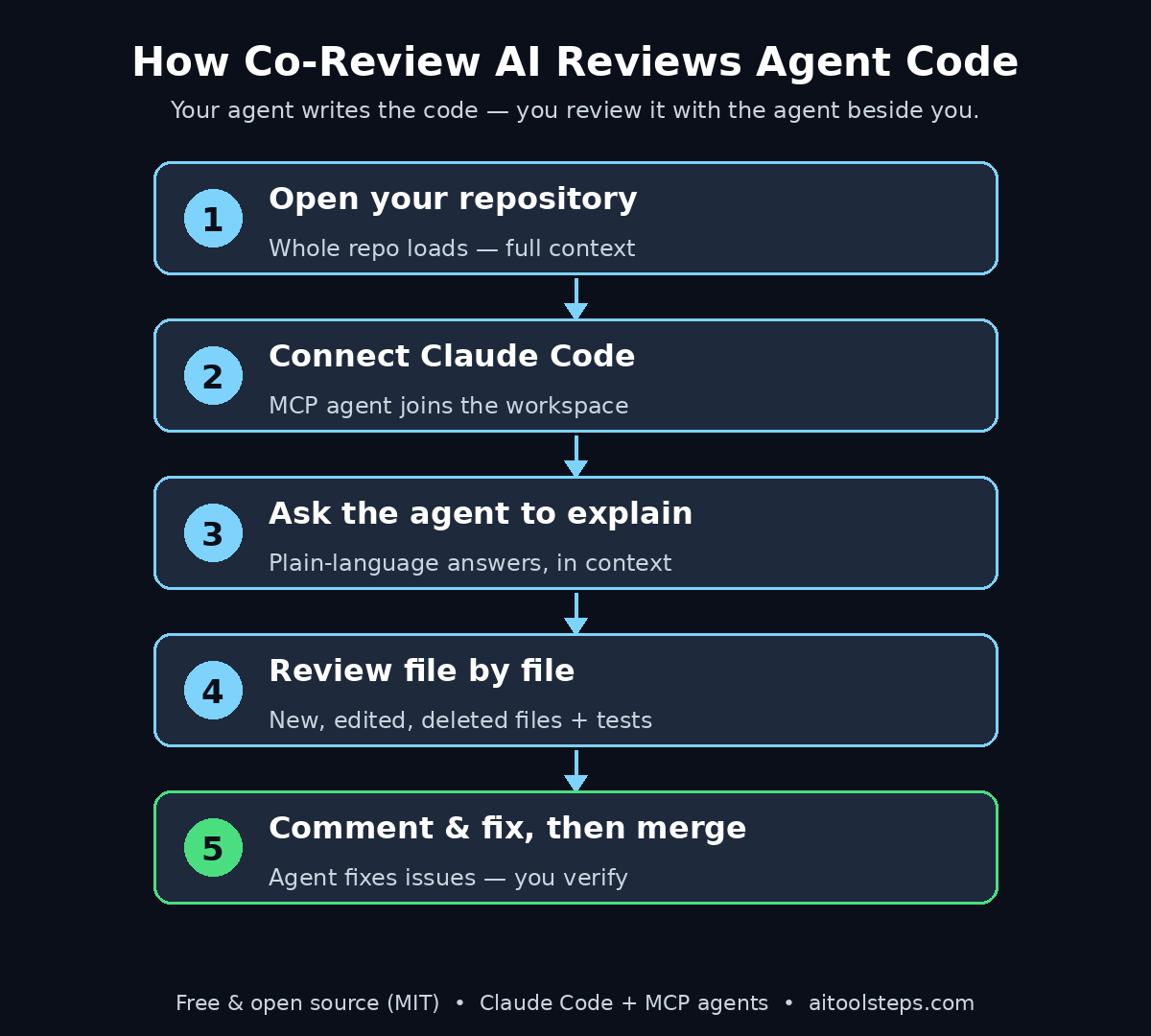
Explaining single functions is useful, but a real review covers the whole change set. Co-Review AI is built for repository-wide review, so use it that way: walk through every changed file, in order, and understand each one before you move on.
A reliable order for a full review looks like this:
- Start with the summary: ask the agent for a one-paragraph summary of the whole change — what was the goal, and what did it touch?
- Then the new files: new files are where new behaviour lives. Ask what each new file does and why it was needed instead of extending an existing file.
- Then the edited files: for each edited file, look at what changed and ask about anything that is not obvious. Pay special attention to changes in files you did not expect the agent to touch.
- Then the deleted files: deletions are easy to miss and expensive to regret. Ask why each deleted file was removed and whether anything still depends on it.
- Finally, the tests: check that the change includes tests, and ask the agent what the tests actually cover — and what they do not cover.
Work through the list slowly. The whole point of Co-Review AI is that review stops being a race against the diff and becomes a conversation. If a change set is large, split it into two review sessions rather than skimming the second half. A review you skimmed is barely better than no review at all — and with an agent ready to explain everything, there is no good reason to skim.
Keep a simple rule for yourself: every file gets either an “understood” or a “question”. Nothing gets approved on a shrug. Co-Review AI makes that rule cheap to follow, because asking a question takes seconds and the answer arrives in context.
Step 8: Leave Comments and Ask the Agent to Fix Issues in Co-Review AI
Understanding the code is only half the job. The other half is acting on what you find — and Co-Review AI lets you do that without leaving the workspace. When you spot a problem, you comment on it directly, and you can ask the connected agent to fix it.
- Comment on the exact lines: select the code that worries you and leave a comment in the workspace, just as you would on a pull request. A precise comment — “this will fail when the list is empty” — is far more useful than “check this”.
- Ask the agent to fix it: where the issue is clear, ask the connected agent to propose or apply a fix, then review the fix the same way you reviewed the original change.
- Ask for alternatives: if the code works but feels wrong, ask “is there a cleaner way to do this?” and compare the agent’s suggestion with the original before you decide.
- Track what is resolved: mark comments as resolved only after you have seen the fix and understood it. A comment closed without a verified fix is a bug waiting to happen.
This comment-and-fix loop is where Co-Review AI earns its name. Traditional review ends with a list of comments that someone has to act on later, in a different tool, from memory. Here, the reviewer, the code, and the agent that wrote the code are all in the same place. The distance between “I found a problem” and “the problem is fixed and I understand the fix” shrinks to minutes.
Be honest in your comments, even the small ones. A confusing variable name, a missing edge case, a test that does not test what its name promises — these are all worth a comment. Small issues caught in review are free. The same issues caught in production are not.
Step 9: Run a Repository-Wide Review Before You Merge in Co-Review AI
Before any agent-written change is merged, run one final pass that looks at the repository as a whole, not just the changed files. Co-Review AI supports repository-wide review for exactly this reason: some problems only appear when you step back and look at the full picture.
- Ask for the blast radius: “Which parts of the app does this change affect?” A change to a shared function can ripple into places the diff never shows.
- Check for duplication: agents sometimes write a new helper that already exists under a different name. Ask whether the new code duplicates existing logic.
- Check the security basics: ask the agent to flag any place where user input reaches a database, a file, or an external service without validation. This is not a substitute for a proper security review, but it catches the obvious cases.
- Check the error paths: ask what happens when each external call fails. Happy-path code is easy to write; honest error handling is what separates a demo from a product.
- Confirm the tests match the claims: if the agent says a feature works, ask which test proves it, and read that test.
Only merge when you can answer three questions without hesitation: what does this change do, what could it break, and how would I know if it broke? If you cannot answer all three, you have not finished the review — you have only finished reading. Co-Review AI exists to close exactly that gap.
Teams that adopt this habit find something surprising: reviews get faster, not slower. The first few reviews feel careful and deliberate, because they are. But once the team trusts the process — ask, understand, comment, fix, verify — the cycle becomes routine, and the fear of merging agent-written code quietly disappears.
Step 10: Fix Common Co-Review AI Problems
Most Co-Review AI problems have simple causes. Work through this checklist before assuming the tool is broken — and remember that a tool launched on 10 November 2026 is still in its earliest releases, so checking the project page for the latest version is always a sensible first step.
- The agent does not answer: check that Claude Code or your chosen agent is still connected in the integrations section. Reconnecting the agent fixes most silent-agent problems.
- The workspace shows no changes: confirm you opened the right repository and the right branch. Agent work often lands on a feature branch, not the main branch.
- Explanations feel generic: ask more specific questions. “Explain this file” invites a summary; “why does this function return null instead of throwing an error” invites a real answer. Point at exact lines when you can.
- The app will not start: re-check the setup steps in the repository readme — most launch failures come from a missed installation step or a version mismatch.
- The agent cannot see a file: make sure the file is inside the repository you opened, not in an ignored folder or an uncommitted location outside the project.
- Something looks different from this guide: the project is days old and moving fast. Check the release notes for the version you installed — a renamed button is not a bug.
If a problem survives this checklist, the project’s public repository is the best place to look next. Open-source projects live or die by their issue trackers, and a tool this new will have an active one. Search it before you file a new issue — someone has very likely hit the same problem already.
Co-Review AI vs Other Ways to Review Agent-Written Code
Co-Review AI is not the only way to review code an agent wrote. Here is how it compares with the options most developers already know, so you can decide whether it deserves a place in your workflow.
| Method | How you review | Agent explains in context | Repository-wide view | Comment + fix in one place | Price |
|---|---|---|---|---|---|
| Co-Review AI | Workspace + connected agent | Yes | Yes | Yes | Free, open source |
| GitHub pull request review | Diff in the browser | No | Partial | Comments only | Free / paid plans |
| GitHub Copilot code review | AI comments on PRs | Partial | Partial | Comments only | Paid plans |
| Reading code in your editor | Files, one by one | No | Manual | No | Free |
| CodeRabbit | AI review on PRs | Partial | Yes | Comments only | Free tier / $19 per user per month |
The table makes the trade-off clear. A GitHub pull request shows you the diff, but it cannot explain it — understanding is entirely on you. Copilot review and CodeRabbit add AI comments to pull requests, which helps, but the agent is not sitting beside you answering follow-up questions in context, and the fix still happens somewhere else. Reading code in your editor is free and thorough, but it is also the slowest option when an agent has just written hundreds of lines. Co-Review AI is the only option in this list that combines a repository-wide view, an agent that explains code in context, and a comment-and-fix loop in one free, open-source workspace. Its weakness is youth: it launched on 10 November 2026, so it does not yet have the polished integrations or the long track record of the older tools. For a beginner reviewing agent-written code, though, the in-context explanation alone is worth trying it.
Frequently Asked Questions
Is Co-Review AI really free?
Yes. Co-Review AI is free and MIT-licensed open source. There is no paid tier, no trial, and no per-seat charge. You download it and run it on your own machine. Your only possible cost is whatever your connected coding agent costs — Claude Code, for example, has its own pricing — but Co-Review AI itself costs nothing.
Does Co-Review AI work with agents other than Claude Code?
Yes. Co-Review AI connects to Claude Code and other MCP-compatible coding agents, including Pi. MCP is the open protocol modern coding agents use to connect to tools, so any agent that supports it should be able to join the workspace. Check the project’s documentation for the current list of tested agents.
Does my code leave my computer when I use Co-Review AI?
Co-Review AI itself runs locally, so your repository stays on your machine. But when you ask a connected cloud-based agent like Claude Code to explain code, that agent necessarily reads the code you show it — that is how it can answer. If your code is sensitive, check your agent provider’s privacy terms, and consider using a local agent for the most sensitive repositories.
Can Co-Review AI replace human code review?
No — and that is the point. Co-Review AI makes human review faster and better, but the human still decides. The agent explains, suggests, and fixes, but you are the one who approves the change. A tool that lets you approve code you do not understand is not a review tool; it is a rubber stamp. Use Co-Review AI to understand more, not to think less.
Can I use Co-Review AI on a team project?
Yes. The workflow works the same way on team repositories: open the repo, connect an agent, review the change, leave comments, and verify fixes. Because it is free and open source, every teammate can run it without a licence discussion. Agree as a team on one rule — nothing merges until the reviewer can explain the change in their own words — and Co-Review AI does the rest.
What if the agent’s explanation is wrong?
It can happen. Agents sometimes explain code confidently and incorrectly, especially in large or unusual codebases. That is why you review the explanation against the code itself, ask follow-up questions, and check the tests. If an explanation does not match what the code actually does, that mismatch is itself a finding — either the code is unclear, or the agent is confused, and both are worth a comment.
Final Thoughts
Co-Review AI arrived at exactly the right moment. AI agents now write code faster than any human can read it, and the old review process — one person, one diff, no help — was already breaking under the volume. Co-Review AI does not pretend the problem away. It gives you a workspace where the agent that wrote the code sits beside you and explains it, line by line, until you actually understand what you are approving.
It launched on 10 November 2026, it is free and MIT-licensed open source, and the workflow takes minutes to learn: open your repository, connect Claude Code or another MCP-compatible agent, review the change set file by file, ask questions until you understand, leave comments, and verify the fixes. The repository-wide review before merging is the habit that pays for everything else — it is the step that catches the duplicated helper, the missing error path, and the change that quietly touches half the app.
Start small. Pick one recent agent-written change, open it in Co-Review AI, and ask the agent to explain the three files you understand least. By the end of that first review, you will know whether this tool belongs in your daily workflow. For most developers working with coding agents in late 2026, the answer will be yes — because the alternative is approving code you never really read, and that is a habit nobody can afford.
Explore More Free AI Tools
Want to keep exploring? Try our free AI Title Generator, Meta Description Generator, AI Rewriter, and Keyword Density Checker — all free on AI Tool Steps, no sign-up needed.