

Every student knows the same frustrating loop — and it is the first thing to understand when you learn how to use Gauth AI. You read the chapter twice, you solve ten practice questions, and the next day you make the exact same mistake on the exact same kind of problem. The issue is rarely effort. It is that normal studying never tells you where you are weak — so you keep practising the things you already know and skipping the gap that actually costs you marks.
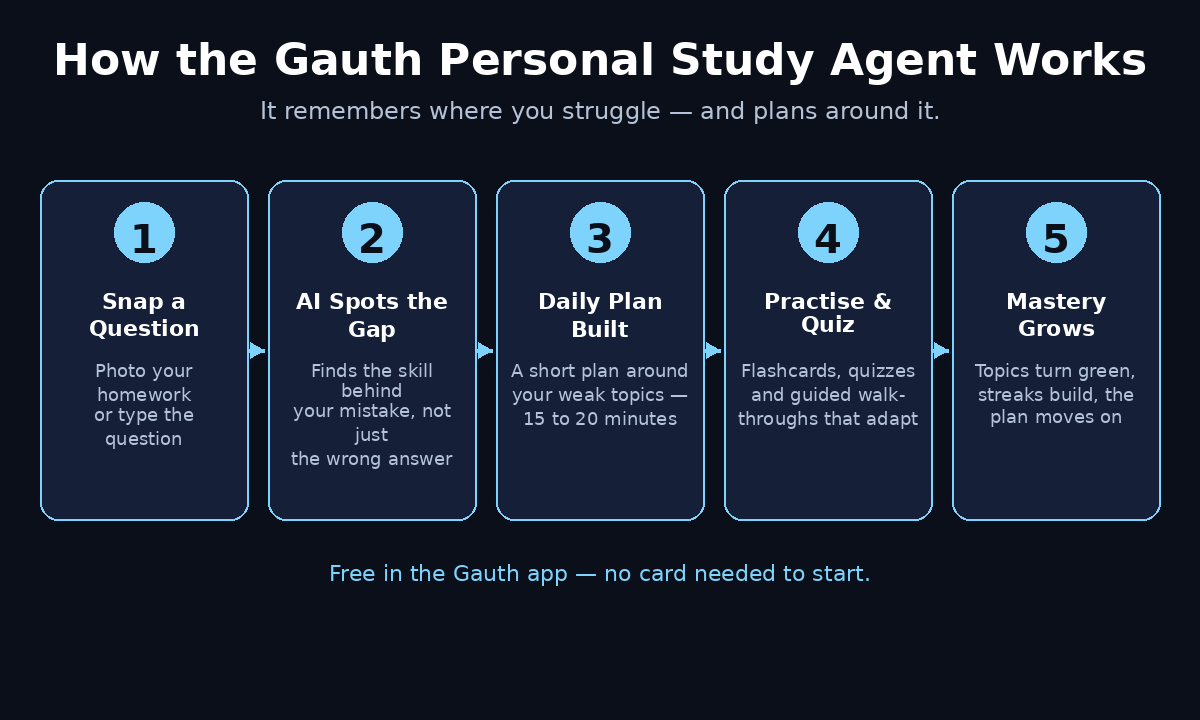
That is the problem Gauth AI’s new Personal Study Agent is built to solve. Launched on Product Hunt on November 23, 2026, where it reached #2 on the daily leaderboard, the Study Agent connects everything you do inside the Gauth app — the questions you snap, the quizzes you take, the topics you study — into one ongoing picture of how you learn. Instead of starting from scratch every session, it spots the gap behind a mistake, builds a short daily plan around it, and adjusts that plan when you miss a review or master a topic early.
This guide shows you exactly how to use Gauth AI from zero: downloading the free app, snapping your first question, reading the step-by-step answers properly, and letting the Personal Study Agent turn your mistakes into a study plan that actually works. No technical skill needed, and you can start free.
Step 1: How to Use Gauth AI — What It Is and What the Personal Study Agent Adds
Gauth is an AI study companion app from GauthTech Pte. Ltd., with more than 100 million installs and a 4.8-star rating. At its core it is simple: you ask it a study question — by typing it or snapping a photo of your homework — and it explains the answer step by step.
The Personal Study Agent, new in version 2.10.0 (updated November 23, 2026), is the layer on top of that. It remembers. Every question you snap, every quiz answer, every topic you open feeds one ongoing profile of your learning. When you get a question wrong, it does not just mark it wrong — it works out why you got it wrong. Was it the formula? The word problem? One skipped step in the middle? Then it builds tomorrow’s practice around that exact gap.
Think of the difference this way:
- Regular Gauth: answers the question in front of you.
- Personal Study Agent: remembers the question, finds the pattern in your mistakes, and plans what you should practise next.
The agent is a small example of a bigger shift: AI that remembers context and acts on it instead of forgetting everything between chats. If you want to understand how these agents work beyond homework help, Agentic Affairs explains agentic AI in plain language.
Step 2: Download and Set Up the Free App
Getting started takes about five minutes. Learning how to use Gauth AI starts with the free download, and the core study help, including the Study Agent, works on the free plan.
- Install Gauth. Search “Gauth: AI Study Companion” in the Google Play Store or Apple App Store and install it. The app is made by GauthTech Pte. Ltd. — check the developer name so you get the real one.
- Create your account. Sign up with Google, Apple, or an email address. Use the same account on every device so your study history stays in one place — the agent can only remember what it can see.
- Set your level and subjects. During setup, pick your grade or level (school, college, university) and the subjects you study most — maths, physics, chemistry, biology, English, and more. This is what the agent uses to shape your first daily plan.
- Allow camera access. Gauth’s most useful feature is snapping a photo of a question, so grant camera permission when asked. You can always type questions instead, but the camera is far faster for printed homework.
One honest note: Gauth is freemium. Basic features — snapping questions, step-by-step answers, quizzes, flashcards, and the Study Agent’s daily plan — are free. Advanced tools such as unlimited practice questions and detailed analytics sit behind a premium subscription. Start free, and only consider paying once you know exactly which paid feature you need.
Step 3: How to Use Gauth AI’s Camera — Snap Your First Question
When you learn how to use Gauth AI, this is the feature you will use most, and it takes less than a minute.
- Open the camera in the app. Tap the camera button on the home screen and point it at the question. Make sure the whole question is in the frame, including any diagram, table, or instruction such as “show your working”.
- Take a clear photo. Good light, flat page, no shadows across the text. A blurry photo gives a blurry answer — if Gauth misreads a number, the whole solution will be wrong.
- Crop to the question only. Drag the crop box so it covers exactly one question. Sending two questions at once confuses the answer, and the agent cannot tell which gap belongs to which problem.
- Tap to solve. Gauth reads the question and returns a step-by-step solution, usually within seconds.
If the question depends on a figure or a particular method your teacher taught, add that context in a short typed note before solving. A vague prompt leads to a vague answer; a question with its context intact gets a precise one. If Gauth’s answer looks wrong, check your photo first — a missed minus sign or a wrong unit is the most common cause.
Step 4: How to Use Gauth AI Answers — Read the Walkthrough, Don’t Just Copy It
This is the step most students skip, and it is the one that decides whether Gauth helps you learn or quietly makes you worse. A fast answer is not automatically a good explanation. If you copy the final result into your homework without understanding the method, you will fail the same question in the exam — where there is no app to ask.
Use this three-pass habit every time:
- Pass 1 — read the steps, not the answer. Follow each line of the walkthrough and ask yourself why that step happens. What formula was chosen, and why that one? What changed from the previous line?
- Pass 2 — find the step you did not know. There is almost always one. Maybe you chose the wrong formula, maybe you misread the word problem, maybe you dropped a sign while simplifying. Name it out loud or write it in your notes: “I keep forgetting to convert units before substituting.”
- Pass 3 — close the app and redo it. Cover the screen and solve the same question on paper from memory. If you get stuck, look at only the step where you stopped, then try again. The moment you can reproduce the method without the app, you actually own it.
Gauth’s step-by-step format makes this easy, because it breaks solutions into small labelled moves instead of one big block of maths. Use that structure: the step you cannot explain is exactly the gap the Study Agent will later build your practice around.
Step 5: Let the Study Agent Find the Gap Behind Your Mistake
After a few sessions, open the Personal Study Agent view. This is where Gauth stops being a question-answer app and starts behaving like a tutor who has been watching you work.
- Check your weak spots. The agent shows the topics and skills where you keep slipping — not just “algebra”, but “solving simultaneous equations when one equation needs multiplying first”. That level of detail is the whole point.
- Read the gap, not just the score. A quiz score of 6/10 tells you little. The agent’s breakdown tells you which two kinds of question cost you the four marks, and what misunderstanding sits behind them. Fix the misunderstanding and the marks follow.
- Trust the pattern, not one bad day. A single wrong answer can be a typo. Three wrong answers on the same skill across three days is a gap. The agent waits for the pattern before it changes your plan, so do not panic over one red mark.
Compare the agent’s diagnosis with your own notes and your teacher’s feedback. If they disagree — say the agent thinks your weakness is fractions but your teacher says it is reading the question — believe your teacher and tell the agent by practising the right thing. AI help needs a quick reality check, and your class materials are the reference point.
Step 6: Follow Your Daily Study Plan
Each day, the Study Agent builds you a short plan from your gaps. Once you know how to use Gauth AI’s daily plan, it is deliberately small — a handful of tasks, not a three-hour timetable — because a plan you actually finish beats a perfect plan you abandon by Tuesday.
- Open the daily plan first. Before you start tonight’s homework, look at what the agent scheduled: usually a mix of one weak-topic review, a few practice questions, and one flashcard set.
- Do the weak topic first. Your brain is freshest at the start of a session. Spend the first 15–20 minutes on the thing you are worst at, then move to homework and easier revision.
- Let the plan adjust. If you miss a review day, the agent moves that topic forward instead of piling it on top of tomorrow. If you master a topic early, it swaps in the next gap. You do not need to manage the schedule — that is the agent’s job.
- Keep sessions short and daily. Twenty focused minutes a day beats a four-hour Sunday panic session. The agent’s streak system is built around this: small daily wins, tracked visibly.
If you already use a planner or a notes app, keep using it — let Gauth handle what to practise and your planner handle when in your day it fits.
Step 7: How to Use Gauth AI Daily — Practise With Flashcards and Quizzes
Reading a solution feels like learning. It mostly is not. Real learning happens when you pull the answer out of your own head, get it wrong, and correct yourself. Gauth’s practice tools are built for exactly that.
- Flashcards for facts and formulas. The agent turns your weak topics into flashcard sets — formulas, definitions, key steps. Flip through them daily; the ones you keep missing come back more often.
- Quizzes for understanding. Short adaptive quizzes test whether you can apply a method, not just recognise it. The agent uses your quiz answers to update your profile, so every quiz makes the next plan smarter.
- Guided walkthroughs for hard problems. For questions you keep failing, Gauth can walk you through a similar problem one step at a time, asking you to supply each next move before it shows it. This is slower than reading a solution — and far more effective.
- Mix old and new. A good session is roughly half new material and half review of older weak topics. If you only ever practise today’s lesson, last month’s topics quietly fade.
A useful rule: if you can explain a flashcard answer in your own words without looking, you know it. If you can only recognise it when you see it, you do not — keep it in the rotation.
Step 8: Track Mastery, Streaks and Progress
Motivation dies without visible progress. Gauth tracks two things worth watching: topic mastery and streaks.
- Topic mastery shows how solid each topic is, based on your quizzes and practice over time — not one good day. Watch weak topics climb from red to green over a week or two. That climb is the honest measure of whether the plan is working.
- Streaks reward showing up daily. A 14-day streak means 14 days of small wins. Protect it — but remember a streak is a tool, not the goal. A 10-minute honest session counts; a rushed 2-minute tap-through to keep the streak alive does not.
- Review your week every Sunday. Spend five minutes looking at what improved, what is still red, and what the agent plans next. If a topic has stayed red for two weeks despite daily practice, that is a signal to ask a teacher or a classmate — some gaps need a human explanation.
Step 9: Use Gauth for Exam Revision
Exam week is where learning how to use Gauth AI properly earns its keep, because the agent already knows your weak spots — you do not waste the final days re-reading everything equally.
- Start revision from the agent’s weak list. Two weeks before the exam, your revision order should be: weakest topics first, then medium, then a light pass over strengths. The agent’s mastery view is literally that list.
- Simulate test conditions. Use Gauth’s quizzes as timed practice: no notes, no peeking, a fixed number of minutes per question. Then check the answers and, more importantly, read the gap analysis for every question you missed.
- Download lessons for offline study. Gauth lets you access downloaded lessons and quizzes offline, so a bus ride or a patchy connection does not cost you a revision session. Download the material the night before.
- Build a one-page cheat sheet — from memory. Before the exam, write out the key formulas and steps for your weakest topics on one page, without looking. Compare it with Gauth’s answers and fix the errors. That page is now the most valuable revision material you own, because it shows exactly what your brain could not yet produce alone.
- Do not cram new topics the night before. Use the last evening only for the agent’s review set — short, familiar, confidence-building. New material the night before mostly adds anxiety.
Step 10: How to Use Gauth AI Free — What You Really Get Without Paying
Gauth is honest about being freemium, and the free tier is genuinely usable. Here is the practical picture:
- Free: snap and solve questions, step-by-step answers, personalised study plans, adaptive quizzes, flashcards, topic mastery and streaks, offline access to downloaded lessons. That covers everything in this guide.
- Premium: unlimited practice questions, deeper performance analytics, and personalised recommendations beyond the free limits. Prices vary by plan and region (in-app purchases in the app range widely), so check the current price inside the app before deciding.
- Our advice: use the free plan for at least two full weeks first. If you hit a limit that actually blocks your studying — not just an upsell banner — then consider premium. Never pay for a study app before you know you will open it daily.
And if your goal goes beyond exams — say you are learning digital skills to earn as a freelancer — the study habits Gauth builds (finding your gaps, practising daily, tracking progress) transfer directly. A digital agency like D365A does this same loop for its clients: measure what is weak, fix it, measure again. Learning to study this way is learning to work this way.
Gauth AI vs Other Study Helpers
Gauth is not the only AI study tool. Here is how it compares with the most common alternatives, so you can pick the right one for your situation.
| Tool | Best for | Remembers your weak spots | Free plan |
|---|---|---|---|
| Gauth AI | Homework help + a daily study plan that adapts to your mistakes | Yes — Personal Study Agent tracks gaps across sessions | Yes — core features free |
| ChatGPT | Explaining any concept in plain language | No — each chat starts fresh | Yes — free tier with limits |
| Knowt AI | Turning notes and lectures into flashcards | Partly — tracks flashcard performance | Yes — free flashcards and study guides |
| Gizmo AI | Flashcard-based tutoring that quizzes you until you remember | Yes — spaced repetition adapts to what you forget | Yes — free tutor and flashcards |
Gauth wins when your main problem is homework you cannot start and mistakes you keep repeating. If you already have good notes and just need them turned into flashcards, Knowt AI may fit better; if you want a tutor that drills you with flashcards, try Gizmo AI. Many students use Gauth for homework and one of the others for revision — they solve different parts of the same problem.
Frequently Asked Questions
Is Gauth AI really free?
Yes, to download and to use for the core features: snapping questions, step-by-step answers, daily study plans, quizzes, flashcards and mastery tracking are all free. Premium subscriptions unlock unlimited practice questions and deeper analytics. Start free and only pay if you hit a limit that blocks your studying.
What is the Gauth Personal Study Agent?
It is the memory layer inside the Gauth app, launched on Product Hunt on November 23, 2026. It connects the questions you snap, the quizzes you take and the topics you study into one picture of how you learn, spots the gap behind your mistakes, and builds a short daily plan around it — then adjusts the plan as you improve or miss a review.
Can Gauth solve any homework question?
It handles most school and college subjects — maths, physics, chemistry, biology, English and more — best when the question is clearly photographed with any diagram included. Very new, very niche, or badly worded questions can still confuse it, so always check the answer against your class notes.
Does Gauth do my homework for me?
It can give you the answer, but that is the worst way to use it. If you only copy answers, you will fail the same questions in the exam. Use the step-by-step walkthrough to understand the method, then redo the question yourself without the app. That is how the Study Agent’s gap detection actually helps you.
Does Gauth work offline?
Partly. You need internet for solving new questions and real-time feedback, but downloaded lessons and quizzes are available offline, which is useful for revision on the move or with a weak connection.
Is Gauth safe for school students?
Gauth is rated for everyone and is used by millions of students. As with any app, do not share personal details in chats, and remember that your school may have its own rules about using AI help for graded work — when in doubt, ask your teacher what is allowed.
Final Thoughts
The students who get the most from Gauth AI are not the ones who ask it the most questions — they are the ones who truly learn how to use Gauth AI instead of just copying its answers. They are the ones who let it remember. Snap the question, read the walkthrough properly, redo it yourself — and then let the Personal Study Agent do the part humans are bad at: noticing that you have made the same mistake three times, and quietly putting that exact skill into tomorrow’s plan.
Start tonight. Install the free app, snap one question you are stuck on, and follow the three-pass habit from Step 4. Then open the Study Agent tomorrow and look at what it learned about you. In two weeks, the red topics on your mastery screen will tell you — honestly, without flattery — whether you are actually improving. That feedback loop, repeated daily, is worth more than any single answer the app will ever give you.
Explore More Free AI Tools
Want more free AI tools that save you time every day? Try the AI Title Generator, Meta Description Generator, AI Rewriter, and Keyword Density Checker — all free on AI Tool Steps.