

If your business runs on clients, you already know the real problem is not finding clients — it is remembering them. You meet someone at a conference, promise to send a quote on Tuesday, and by Thursday the promise has slipped under a pile of emails. A renewal date passes quietly. A client you meant to call “soon” has not heard from you in four months. That slow leak of forgotten follow-ups is exactly what AlterContacts AI was built to fix, and this guide shows you how to use AlterContacts AI from your very first download to your first perfect follow-up.
AlterContacts, usually just called Alter, is a voice-first AI assistant that lives on your iPhone and keeps track of your clients for you. You talk about a meeting, and Alter files the details to the right client and turns them into tasks. Add a client, and the profile fills itself in from LinkedIn, the web, and your connected Gmail and Calendar. Every morning, you see who needs your attention and why. And when a follow-up is due, Alter drafts the next steps — you read it, edit it, and approve it before anything goes out.
AlterContacts launched on Product Hunt on 21 November 2026, where it took the number 1 spot for the day. It is built for anyone whose business runs on clients remembering them: financial advisors, property agents, consultants, and salespeople. The good news for beginners is that you can start free — the Product Hunt listing shows a price of 0 USD — and a launch-week code, PRODUCTHUNT, gets you a month of Pro free when you redeem it at altercontacts.ai. This guide walks you through every step, so you can set it up in an afternoon and wake up tomorrow to a morning briefing that tells you exactly who to call first.
Step 1: Understand What AlterContacts AI Is (and What It Is Not)
Before you download anything, it helps to understand what you are getting. AlterContacts AI is not a traditional CRM, and it does not want to be one. A traditional CRM is a database you have to feed: every call logged by hand, every field filled in by you, every follow-up remembered by you. Alter flips that around. It is a relationship assistant that does the remembering, so you can do the relating.
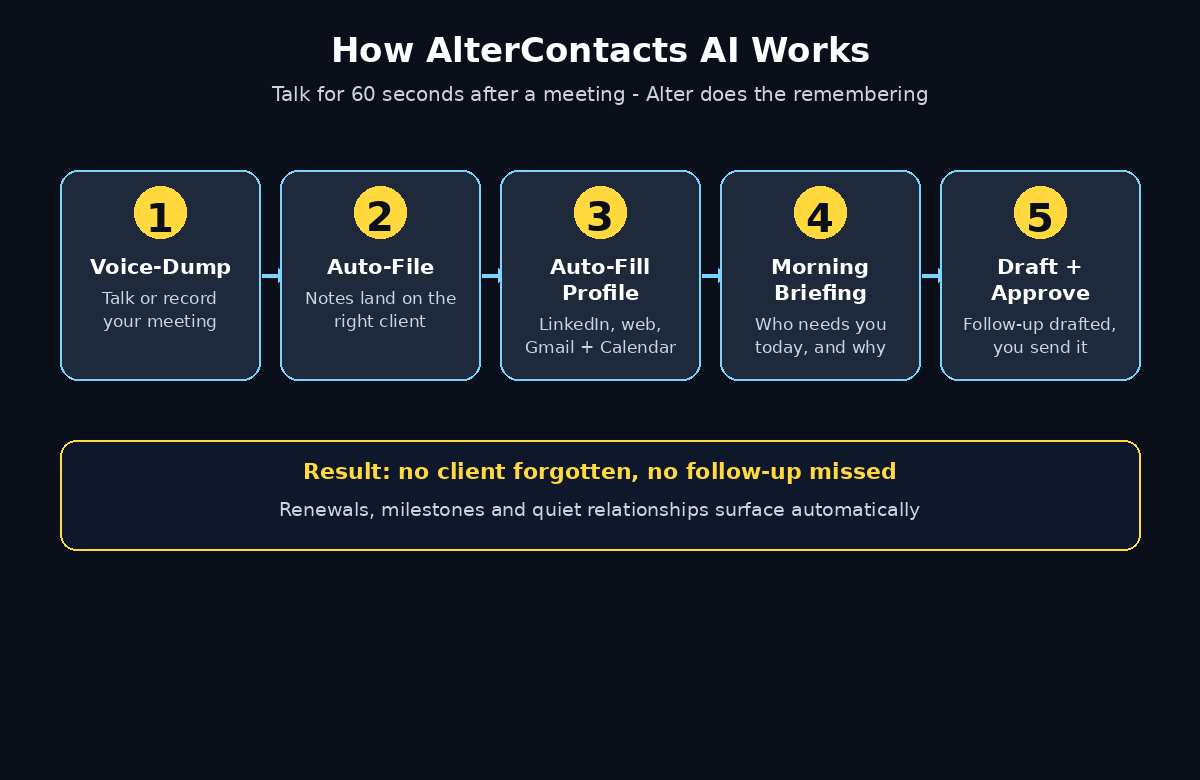
Here is the core idea in one sentence: you talk, Alter remembers. That is the heart of how to use AlterContacts AI — the assistant does the remembering so you can do the relating. After a meeting you voice-dump what happened — or record the whole meeting — and Alter files the notes to the right client, pulls out what you promised, and turns those promises into tasks with dates. Your inbox and calendar are tracked for each client in the background, so Alter notices when a renewal is coming up, when a personal milestone is near, or when a relationship has gone quiet for too long.
What AlterContacts is not: it is not an autopilot that messages your clients without you. When a follow-up is due, Alter drafts the next step, but you read it, edit it, and approve it. That human-in-the-loop design matters, because your clients trust your voice, not a robot’s. If you run a small business and want the same thinking applied more broadly, a digital agency like D365A builds AI automation that keeps client work organised in exactly this way — tools that remember the details so people can focus on the relationship.
Here is what makes AlterContacts different from a normal contacts app:
- It listens instead of asking you to type. A 60-second voice note after a meeting becomes structured notes, tasks, and reminders.
- Client profiles build themselves. Add a name and Alter pulls in details from LinkedIn, the web, Gmail, and Calendar.
- It watches the calendar for you. Renewals, milestones, and quiet relationships surface in a morning briefing.
- It drafts, you decide. Follow-up messages are prepared for your approval — nothing is sent on autopilot.
- It is built for relationship businesses. Financial advisors, brokers, property agents, and consultants are the people it was designed around.
Step 2: Download AlterContacts and Create Your Free Account
Getting started with AlterContacts AI takes about five minutes, and you need nothing more than your iPhone. If this is your first time learning how to use AlterContacts AI, the setup below walks you through it screen by screen.
- Download the app. Search for “AlterContacts” in the App Store on your iPhone. Alter is built as an iPhone assistant, so your phone is where the voice features live.
- Create your account. Open the app and sign up with your email address. There is no credit card asked for at sign-up, and the free tier lets you start using the core features straight away.
- Redeem the launch offer. During launch week, enter the code PRODUCTHUNT at altercontacts.ai to get a month of Pro free. If you are reading this after launch week, check the app for the current offer — the free tier still covers the basics.
- Allow microphone access. This step matters more than it looks. The whole point of Alter is that you talk instead of type, so let the app use your microphone when it asks. Without it, you lose the voice-dump feature that makes the tool special.
- Turn on notifications. Your morning briefing and follow-up reminders only help you if they reach you, so allow notifications when the app asks.
One honest note for beginners: AlterContacts is brand new — it launched on Product Hunt on 21 November 2026. Early apps change fast, so treat the official site and the app itself as the source of truth for pricing and features, and expect small rough edges in the first weeks. That is also the best time to learn it, because the free tier lets you practise on real clients without paying anything.
Step 3: Add Your First Clients and Watch Profiles Fill Themselves
This is the step where learning how to use AlterContacts AI starts to feel like magic, and it takes less than a minute per client. You do not build profiles by hand — you add a name, and Alter does the research.
- Add a client by name. Tap to add a client and type their name. That is all Alter needs to start.
- Let Alter auto-fill the profile. Alter pulls details from LinkedIn, the web, and your connected Gmail and Calendar to build a profile: their role, their company, recent context, and how you know them. Check what it found and correct anything that looks wrong — the profile gets smarter as you confirm details.
- Start with your ten most important clients. Do not try to import your whole address book on day one. Add the ten people whose follow-ups matter most, and let Alter prove itself on them first.
- Add context in your own words. If you know something Alter cannot find online — “prefers WhatsApp over email” or “daughter’s graduation in June” — add it as a note. These small human details are what turn a contact into a relationship.
- Connect Gmail and Calendar. This is the step that makes the profiles truly useful. When Alter can see your email and calendar, it tracks every thread and meeting per client, so the profile stays current without you lifting a finger. You can disconnect at any time.
The auto-filled profile is the foundation of everything else Alter does. Without it, the morning briefing has nothing to work with. With it, every later step — voice notes, follow-ups, renewal alerts — has the context it needs to be genuinely helpful instead of generically polite.
Step 4: Voice-Dump After a Meeting (Your New 60-Second Habit)
This is the single habit that makes AlterContacts worth using, and it is the easiest part of learning how to use AlterContacts AI. After every meeting or call, take 60 seconds to talk to Alter before you move on to the next thing.
- Open Alter and tap to record. Just talk the way you would to a colleague: “Met Sarah from Bright Homes, she wants the two-bedroom near the park, budget around 300k, husband needs to see it before Friday, and she asked me to send the floor plans.”
- Or record the whole meeting. If the conversation is long or detailed, record it directly and let Alter do the work. It files the recording to the right client and turns it into notes and tasks.
- Watch Alter file it to the right client. The AI matches your voice note to the correct client profile, so the notes land where they belong instead of in a random notebook.
- Check the tasks it created. Alter pulls out what you promised — “send floor plans by Friday” — and turns it into a dated task. Review the list, adjust any date that is wrong, and delete anything it misunderstood.
- Do it in the car, on the walk back, or at your desk. The point is speed. A voice note takes a minute; typing the same notes takes ten, so most people never do it at all. That is why the follow-ups get forgotten.
The beauty of this step is that it removes the one thing that kills every CRM: data entry. You never sit down to “update the CRM” again. You just talk for a minute after each meeting, and the system stays current. If you are learning how to use AlterContacts AI as a financial advisor or property agent, this single habit will save you more lost business than any other feature in the app.
Step 5: Read Your Morning Briefing and Know Who Needs You Today
Every morning, Alter gives you a short briefing: who needs your attention today, and why. This is where the tool earns its place on your home screen, and it is the daily payoff for learning how to use AlterContacts AI properly.
- Open the briefing first thing. Before email, before messages, spend two minutes with Alter’s list of who needs attention today. It is prioritised, so the most urgent client is at the top.
- Understand the “why” behind each name. Alter tells you the reason: a follow-up is due, a renewal is approaching, a birthday or milestone is near, or a relationship has gone quiet for weeks. You are not guessing — you are acting on a reason.
- Work the list top to bottom. Call, message, or email each person in order. Because Alter has already drafted the next step for many of them, each one takes minutes instead of half an hour of preparation.
- Clear the list and start tomorrow fresh. When you have handled the day’s names, the list is done. Tomorrow brings a new briefing, built from what changed overnight in your inbox and calendar.
Think of the morning briefing as a personal assistant who read all your emails overnight and left a note on your desk. For a consultant juggling twenty clients, or a salesperson with a pipeline of fifty, that two-minute read replaces an hour of inbox archaeology every morning. The wider shift behind tools like Alter is agentic AI — software that works on your behalf instead of waiting for instructions. If you want to understand that trend, Agentic Affairs covers how agentic systems are changing everyday work, and Alter is that idea applied to the relationships your business runs on.
Step 6: Approve (or Edit) the Follow-Ups Alter Drafts for You
When a follow-up is due, Alter does not just remind you — it drafts the next step. This is the step where your judgement matters most, because the draft is a starting point, not a finished message. Once you know how to use AlterContacts AI to review drafts quickly, each follow-up takes minutes instead of half an hour.
- Open the follow-up when it appears. Alter shows you the draft alongside the context: what you last discussed, what you promised, and how long it has been.
- Read it in your voice, then edit it. Change anything that does not sound like you. Add the detail only you know — the joke from the last meeting, the name of their dog, the exact property they liked. The AI draft saves you the blank-page problem; your edit makes it human.
- Approve it, then send it yourself. You stay in control of every message that leaves your phone. Nothing goes to a client without your say-so, which is exactly how it should be.
- Mark the follow-up done. Once sent, Alter logs it against the client, so the next briefing knows the relationship is warm again and moves on to the next person who needs you.
A good rule for beginners: never send a draft untouched. The draft gets you 80 percent of the way in seconds, but the last 20 percent — your voice, your memory, your relationship — is what the client actually feels. Alter is brilliant at the remembering; you are irreplaceable at the relating.
Step 7: Let Alter Track Renewals, Milestones, and Quiet Relationships
Some of the most valuable follow-ups are the ones with no deadline at all — the client whose policy renews in March, the contact whose birthday is next week, the customer who used to message weekly and has gone silent. Knowing how to use AlterContacts AI to catch these quiet signals is what separates a good client list from a great one, and Alter watches for all three.
- Renewals surface before they are urgent. Because Alter tracks your inbox and calendar per client, it notices when a renewal or contract date is approaching and puts it in your briefing while you still have time to act.
- Personal milestones get flagged. Birthdays, work anniversaries, and the personal details you added in Step 3 become timely prompts. A short “happy birthday” message costs you a minute and is remembered for a year.
- Quiet relationships get noticed. If a client you usually hear from has gone silent for weeks, Alter flags the gap. Often the reason is simple — they are busy, or they assumed you were — and one message restarts the conversation.
- Set your own thresholds. If you talk to a client every week, two silent weeks is a signal. If you talk quarterly, it is normal. Teach Alter the rhythm of each relationship by acting on its prompts and dismissing the ones that are wrong.
This background tracking is the part of AlterContacts that no notebook or spreadsheet can copy. A spreadsheet does not notice silence. Alter does, and it tells you while there is still time to fix it.
Step 8: Connect Gmail and Calendar Properly (and Stay in Control)
Alter’s tracking only works if it can see your inbox and calendar, so this step deserves care. Connect them once, check what Alter can see, and know how to take control back. This part of learning how to use AlterContacts AI is about trust, so take it slowly and check everything.
- Connect Gmail from settings. Alter asks for access to read your email so it can match threads to clients and spot follow-ups, renewals, and promises in your messages. It uses that access only to keep your client profiles current.
- Connect your calendar the same way. Meetings become client context automatically — who you met, when, and what was on the agenda — without you logging anything.
- Review what Alter learned. After the first day, open a few client profiles and check the context Alter added from your email and calendar. Correct anything wrong; the system improves from your corrections.
- Know how to disconnect. You can remove Gmail or Calendar access at any time from the app settings. Alter still works with voice notes and manual notes — it just loses the automatic background tracking.
- Keep sensitive clients separate. If one client relationship should never touch an AI tool, do not add that client to Alter. The tool is for the relationships you want help remembering, not for every name you have ever met.
Privacy is a fair question for any tool that reads your email, and the honest answer is to read Alter’s privacy policy in the app before you connect anything, and to start with your everyday clients rather than your most sensitive ones. The value of the tool is real, but you should always know exactly what you have connected and why.
Step 9: Use AlterContacts AI Across Your Whole Client List
Once the first ten clients are working, scale the system to everyone who matters. The goal is simple: no client is ever forgotten again, and no follow-up depends on your memory alone.
- Add clients in batches of ten. Keep going until every active client is in Alter. Each batch takes a few minutes because the profiles fill themselves in.
- Voice-dump after every meeting, without exception. The system only works if the habit is unbroken. One missed meeting is one forgotten promise, so make the 60-second voice note as automatic as hanging up the phone.
- Check the morning briefing every day. Even on busy days, the two-minute read keeps you ahead of renewals and quiet relationships. Skip it for a week and the backlog returns.
- Review your tasks every Friday. Spend ten minutes clearing anything stale, updating dates, and noting which relationships need a personal touch next week. Alter’s task list makes this a quick review instead of a reconstruction.
- Let the drafts do the heavy lifting. By now you will trust Alter’s drafts enough to edit them quickly. The time you save on writing is time you spend on actual conversations — which is the work that grows a business.
At this point AlterContacts stops feeling like an app and starts feeling like a colleague: the one who remembers everything, never forgets a birthday, and always knows who you promised what to. That is the whole point of learning how to use AlterContacts AI — not to collect another tool, but to stop losing business to forgetfulness.
Step 10: AlterContacts AI vs Other Free Personal CRM Tools
AlterContacts is not the only tool that promises to help you remember people, so here is how it compares with the free options beginners usually consider. The right choice depends on whether you want a database you maintain, or an assistant that maintains itself.
| Tool | Free plan | Main AI follow-up feature | Sends messages itself? | Best for |
|---|---|---|---|---|
| AlterContacts AI | Yes, free to start; PRODUCTHUNT code gives 1 month of Pro free | Voice-dump meetings, auto-filled profiles, morning briefings, AI-drafted follow-ups | No, you approve every draft | Advisors, agents, consultants who live on client relationships |
| Dex | No, 6-day trial on web, 7-day trial in app | Keep-in-touch reminders, AI-drafted messages, Copilot | No, drafts only | Personal and professional relationships |
| HubSpot CRM | Yes, up to 2 users and 1,000 contacts | Breeze AI agents and assistant, run on credits | Yes, sequences on paid tiers | Teams that want an all-in-one platform |
| Mesh (formerly Clay) | Yes, personal plan up to 1,000 contacts | Nexus AI search, reconnect reminders | No | Individuals who want light tracking |
| Attio | Yes, up to 3 seats | Ask Attio, AI agents on credits | No, agents draft for review | Startups that want a flexible CRM |
The pattern is clear. HubSpot and Attio are powerful platforms, but they are built around pipelines and databases that you still have to feed. Dex and Mesh are closer to Alter in spirit, but neither one is voice-first, and neither one files a meeting for you from a 60-second voice note. Alter’s advantage is not the number of features — it is that the work of keeping it current happens by talking, not typing. For a financial advisor driving between client meetings, or a property agent who lives on the phone, that difference decides whether the system gets used or abandoned by February.
Step 11: Common Mistakes Beginners Make with AlterContacts AI
Most people who try AlterContacts and give up make one of these five mistakes. Avoid them and the tool will stick.
- Adding every contact at once. Importing 2,000 names on day one buries the ten that matter under noise. Start with ten, prove the habit, then expand.
- Skipping the voice note “just this once”. One skipped meeting becomes three, and by the end of the month the profiles are stale again. The 60-second habit is the whole system — protect it.
- Sending drafts without editing them. Clients can tell when a message was not written by you. Always add one personal detail before you approve a draft.
- Never connecting Gmail and Calendar. Without them, Alter is a smart notebook. With them, it is an assistant that notices renewals and silence on its own. Connect them, review what it learns, and keep control.
- Expecting perfection in week one. Alter is brand new, and its profiles and drafts will improve as you correct them. Give it two weeks of daily use before you judge it. The first week teaches Alter about your clients; the second week is when it starts saving you real time.
If you catch yourself making one of these mistakes, the fix is always the same: go back to the habit. One voice note after the next meeting, one morning briefing tomorrow, one approved follow-up. The system compounds quietly, and after a month you will wonder how you ever ran your client list from memory and a spreadsheet.
Step 12: Limits to Know Before You Rely on It
AlterContacts is a strong tool, but an honest guide should tell you its limits before you build your business around it.
- It is iPhone-first. Alter is built as an assistant on your iPhone. If your work lives on Android or desktop, check the current platform support in the app before you commit your whole client list.
- It is brand new. A 21 November 2026 launch means the app will change quickly, features may move, and pricing may change after launch week. Treat the official site as the source of truth and expect updates.
- Drafts need your judgement. AI-drafted follow-ups are good starting points, not finished messages. If you send them untouched, your clients will notice, and the relationship you are trying to protect will feel automated.
- It reads your email and calendar to work fully. That is the trade for background tracking. If that trade does not suit a particular client, keep that client out of Alter entirely.
- It will not replace your judgement about people. Alter can tell you that a client has gone quiet, but only you know whether they are busy, upset, or simply on holiday. Use its prompts as a starting point for a human decision, never as the decision itself.
None of these limits is a reason to skip the tool, and none of them changes how to use AlterContacts AI day to day. They are reasons to use it with your eyes open, starting free, with your most important ten clients, and letting the results decide whether it earns a permanent place in your day.
Frequently Asked Questions About AlterContacts AI
Is AlterContacts AI really free?
Yes, you can start AlterContacts AI for free — the Product Hunt listing shows a price of 0 USD. During launch week, the code PRODUCTHUNT gives you a month of Pro free when you redeem it at altercontacts.ai. After that, check the app for the current free tier and Pro pricing, because a brand-new app’s pricing can change quickly.
How do I use AlterContacts AI after a meeting?
Open the app and voice-dump what happened, or record the whole meeting. Alter files the notes to the right client, pulls out what you promised, and turns those promises into dated tasks. The whole habit takes about 60 seconds, and it is the single most important step in learning how to use AlterContacts AI well.
Does AlterContacts AI send messages to my clients automatically?
No. When a follow-up is due, Alter drafts the next step, but you read it, edit it, and approve it before anything is sent. Nothing goes to a client on autopilot, which keeps your messages sounding like you.
Who is AlterContacts AI built for?
It is built for anyone whose business runs on clients remembering them: financial advisors, property agents, consultants, brokers, and salespeople. If your income depends on follow-ups, renewals, and relationships that stay warm, Alter is designed for you.
Can AlterContacts AI fill in client details by itself?
Yes. Add a client by name and Alter auto-fills the profile from LinkedIn, the web, and your connected Gmail and Calendar. You should still check what it found and add the personal details only you know, like communication preferences and family milestones.
Is AlterContacts AI a replacement for a CRM like HubSpot?
Not exactly. HubSpot is a full sales platform built around pipelines, while AlterContacts is a voice-first relationship assistant built around remembering people and follow-ups. Many small businesses will find Alter is all they need; larger teams may use Alter for relationships and a CRM for pipeline tracking.
Final Thoughts
Forgetting a client is rarely a dramatic failure. It is quiet: a renewal that slips by, a birthday missed, a promise made in a meeting and never written down. Over a year, those small forgettings add up to real money and real relationships lost. AlterContacts AI exists to close that gap, and it does it in the most human way possible — by letting you talk instead of type.
Start today. Download the app, add your ten most important clients, connect Gmail and Calendar, and voice-dump your next meeting. Tomorrow morning, read the briefing and act on the first name. Do that for two weeks and you will know, from your own clients and your own follow-ups, whether Alter has earned its place in your day. For most people whose business runs on relationships, the answer will be yes — because the best follow-up system is the one you actually use, and the one you actually use is the one that only asks for 60 seconds of talking.
Explore More Free AI Tools
If you liked this guide, there is more where it came from. Try the AI Title Generator, the Meta Description Generator, the AI Rewriter, and the Keyword Density Checker — all free on AIToolSteps, and all built to help beginners get more from AI every day.