

Every business sits on a pile of information that nobody can find when they need it. The answers are there, buried in PDF price lists, help documents, policy pages and old blog posts, but a customer with a simple question will not dig through ten files to find them. They will ask you instead, and if nobody answers quickly, they will leave and buy from someone else. That is the problem Nexuro AI was built to solve, and this guide explains how to use Nexuro AI to turn the information you already own into a chatbot that answers for you around the clock.
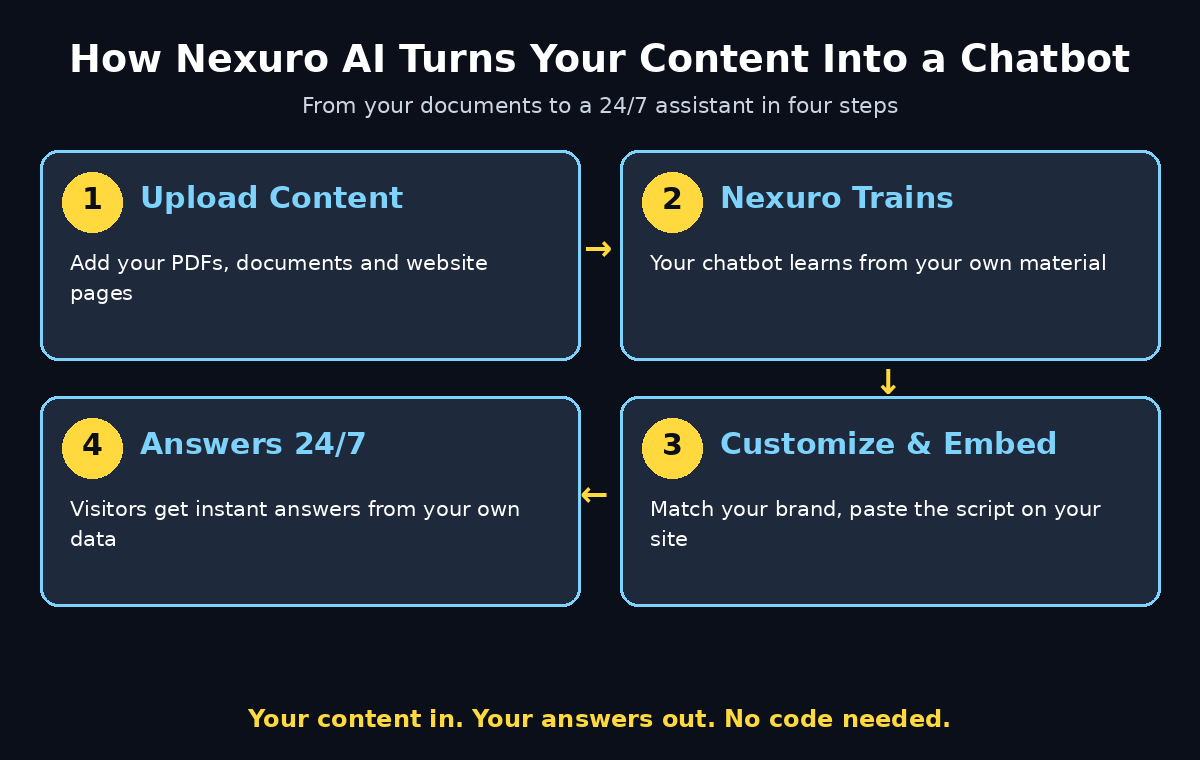
Nexuro AI launched on Product Hunt on 20 November 2026, built by maker Ajay around one clear idea: every business should be able to use AI to make its information more accessible, without hiring a development team or paying for an expensive custom AI solution. You upload your PDFs and documents, or connect your website, and Nexuro trains a chatbot on that content. Visitors can then ask it questions in plain language and get answers drawn from your own material, not from the open internet.
This beginner guide walks you through the whole process step by step. You will learn how to use Nexuro AI from scratch: create a free account, build your first chatbot, train it with your own content, customize it to match your brand, test it with real questions, embed it on your website, and read the dashboard to keep it improving. You do not need any coding skill, and you do not need any AI expertise. If you can upload a file and copy and paste a line of code, you can do this.
Step 1: Understand What Nexuro AI Is
Before you click anything, it helps to understand what Nexuro actually is in one sentence. Nexuro AI is a no-code chatbot builder that trains an AI assistant on your own documents and website content, so it can answer questions about your business in your words.
Here is how that is different from a general chatbot like ChatGPT:
- It answers from your data, not the whole internet. A general chatbot guesses from everything it was trained on. Nexuro answers from the PDFs, documents and website pages you give it, so its answers reflect your prices, your policies and your products.
- You build it without writing code. There is no programming, no API keys and no model configuration. You upload files, name your chatbot, and Nexuro handles the rest.
- One chatbot per job. You can create multiple chatbots for different websites and use cases, so your support bot, your sales bot and your course tutor can each have their own knowledge and their own personality.
- It lives on your website. Nexuro gives you a simple embed script, so the chatbot appears as a chat widget on your own site, where your visitors already are.
- You can see what it is doing. The dashboard shows messages, token usage, data sources and chatbot interactions, so you know exactly what people ask and whether the bot answered well.
Nexuro is built for small business owners, creators, educators and agencies. If you answer the same five questions every day, if your support inbox is full of “what are your prices” and “do you deliver to my city”, or if your students keep asking where the course material is, this tool is for you. It is also a good fit for a digital agency that wants to offer clients a smart website assistant without building one from scratch.
Step 2: Create Your Free Nexuro Account
Getting started takes only a few minutes, and if you are wondering how to use Nexuro AI for the first time, the good news is that the free plan lets you learn the tool properly before you spend anything.
- Open the Nexuro website. Go to Nexuro AI’s official site in your browser and look for the sign-up button on the homepage.
- Sign up with your email. Create your account with an email address and a password, or sign in with Google if that option is offered. Use an email you actually check, because account notices and usage alerts will go there.
- Open your dashboard. After sign-in you land on your Nexuro dashboard. This is your home base: your chatbots, your data sources, your messages and your usage all live here.
- Check the free plan limits. Before you build, look at what the free plan includes: how many chatbots you can create, how much content you can upload, and how many messages it covers. Knowing the limits up front stops surprises later.
Start on the free plan and build one chatbot properly before you think about upgrading. Paid plans exist for heavier use, but the free experience is enough to prove whether a chatbot helps your business. Check the current pricing page on Nexuro’s own site before you upgrade, because launch pricing can change.
Step 3: Create Your First Chatbot
When you first learn how to use Nexuro AI, the golden rule is that your first chatbot should do one job well. A bot that tries to answer everything for everyone usually answers nothing well, so pick the job that saves you the most time.
- Give it a clear name. Use a name your visitors will understand, such as “Shop Assistant”, “Course Helper” or “Support Bot”. The name sets expectations, so keep it honest about what the bot can do.
- Define its one job. Decide what this chatbot is for before you train it. A support chatbot answers questions about orders, delivery and returns. A sales chatbot explains products and prices. A course tutor points students to lessons and deadlines. Write that job down in one sentence and keep it in front of you while you build.
- Write a short description. Nexuro lets you describe your chatbot’s purpose. Use plain words: “Answers customer questions about our handmade soaps, shipping and returns.” A clear description helps the AI stay on topic.
- Set the tone. Choose how the bot should sound. Friendly and short suits a shop. Calm and precise suits a clinic or a law firm. Playful suits a creator’s fan page. The tone you pick is the voice your customers will hear, so match it to your brand, not to the default.
Resist the urge to build five chatbots on your first day. Build one, train it, test it, put it live, and watch how real people use it for a week. What you learn from that one bot will make the second one twice as good.
Step 4: Train It With Your Own Content
Training is the step that decides whether your chatbot is useful or useless. A chatbot trained on good, current documents gives good answers. A chatbot trained on old price lists and half-finished drafts gives confident wrong answers, which is worse than no answer at all.
- Upload your PDFs and documents. Start with the files your customers actually ask about: your product catalogue, your price list, your FAQ document, your returns policy, your delivery information and your service descriptions. Upload them to your chatbot’s knowledge base from the dashboard.
- Connect your website. Nexuro can also pull content from your website, so your help pages and blog guides become part of what the bot knows. This is the fastest way to give it broad coverage without uploading dozens of files by hand.
- Use clean, current sources. Before you upload a file, open it and check it. Delete the 2024 price list. Fix the phone number that changed in June. Remove the draft policy that was never approved. The bot can only be as accurate as the documents you feed it.
- Cover the questions people really ask. Look at your last twenty customer emails or chat messages. If eight of them ask about delivery time, make sure delivery time is clearly written in one of your uploaded documents. The knowledge base should answer the questions you already receive, not the questions you wish people would ask.
- Keep sources fresh. When a price changes, a product is discontinued or a policy is updated, update the source document and re-train the chatbot. A monthly five-minute check is enough for most small businesses.
Think of training like hiring: you would not hand a new employee a drawer of outdated papers and expect good answers. Give the bot the same clean, current information you would give a new team member, and it will perform like one.
Step 5: Customize the Chatbot to Match Your Brand
A chatbot that looks like a generic grey box feels like a stranger on your website. A chatbot that looks like it belongs there feels like part of your team. Customization is where you make that difference, and knowing how to use Nexuro AI well means treating it as part of the build, not an afterthought.
- Match your brand colors. Set the chat widget’s colors to your brand palette, so it blends with your website instead of clashing with it. If your site is dark and modern, do not let the widget be bright and bubbly.
- Write a welcoming greeting. The first message matters more than any other. Replace the default greeting with something that sounds like you: “Hi, I am Sara, the shop assistant. Ask me about sizes, delivery or returns.” A greeting that names the bot and its job gets far more clicks than “How can I help you?”
- Add suggested questions. Most visitors do not know what to type first. Show them three or four starter questions as clickable chips: “What are your delivery charges?”, “Do you have this in stock?”, “What is your return policy?” Each chip is a doorway into a conversation.
- Decide what happens when it does not know. This is the most important setting in the whole tool. A good chatbot says “I am not sure about that, let me connect you with the team” instead of guessing. Set a clear fallback message and, where possible, a way to reach a human.
- Preview before you publish. Open the preview and look at it the way a visitor would. Is the text readable? Does the widget cover an important button on mobile? Does the greeting sound like your business? Fix what looks wrong now, not after a hundred visitors have seen it.
Customization is not decoration. It is the difference between a tool your visitors trust and a pop-up they close on sight. Spend twenty minutes here and it will pay you back every day.
Step 6: Test It With Real Questions
A core part of learning how to use Nexuro AI is testing before you publish: never put a chatbot live without testing it first. The questions you think people will ask and the questions they actually ask are often completely different, and testing is how you find out.
- Ask the ten questions you hear most. Type them exactly the way customers type them, including typos and short forms: “price?”, “delivery time Lahore?”, “is this in stock?” If the bot handles the messy real versions, it will handle the polite ones easily.
- Ask the tricky ones too. Try questions with two parts (“Do you deliver to Karachi and what does it cost?”), questions about things you do not sell, and questions with wrong assumptions (“Is the 50 percent discount still on?”). Watch whether the bot corrects the assumption or agrees with it.
- Check the answers against your documents. Every answer should trace back to something you uploaded. If the bot invents a price, a date or a policy, the source document is missing or unclear. Fix the document, not the bot.
- Get a friend to break it. Ask someone who has never seen your business to chat with the bot for five minutes. They will ask the obvious questions you stopped noticing years ago, and those are exactly the questions your real visitors will ask.
- Keep a list of failures. Write down every question the bot answered badly. That list is your training plan: each failure points to a document you need to add or rewrite.
Testing is not a one-time step. Repeat it every time you add new content or change a price. Five minutes of testing after each update prevents the kind of wrong answer that costs you a customer.
Step 7: Embed It on Your Website
Once you know how to use Nexuro AI to build and test a bot, it is time to put it where your visitors can find it. Nexuro gives you a simple embed script, and adding it is easier than most beginners expect.
- Copy the embed script. In your Nexuro dashboard, open the chatbot you want to publish and find the embed code. It is a short snippet of code that you copy in one click.
- Paste it into your website. On most websites you paste the script just before the closing
</body>tag, or into a code or HTML block if your site builder has one. On WordPress, a header and footer code plugin or your theme’s custom code area does the job in under a minute. - Check it on desktop and mobile. Open your live site on a laptop and on a phone. The chat widget should sit neatly in a corner without covering your buy button, your menu or your contact form. On mobile especially, a widget that covers the screen is a widget people will hate.
- Put it on the pages that need it. The bot is most useful on the pages where questions happen: product pages, pricing pages, the checkout page and the contact page. If your platform lets you choose pages, start with those instead of putting it on every page at once.
- Tell your visitors it is there. A small note near your contact section, such as “Questions? Chat with our assistant any time”, sends far more people to the bot than a silent widget in the corner ever will.
If you run a business website and would rather have the whole setup handled for you, that is exactly the kind of work a digital agency does every day: building the site, wiring in the chatbot, and making sure the widget looks right on every device. Doing it yourself takes an afternoon. Handing it over takes one email.
Step 8: Track Messages, Tokens and Performance
Learning how to use Nexuro AI does not stop at launch: a chatbot you never check is a chatbot that slowly goes stale. Nexuro’s dashboard exists so you can see what is happening and improve it, and the habit takes less than ten minutes a week.
- Read the actual messages. Open the message history and read what visitors asked this week. The questions tell you what your website fails to explain, which is valuable information far beyond the chatbot itself.
- Watch your token usage. The dashboard shows how many tokens your chatbot is using. A sudden jump usually means the bot is answering long questions, or that someone is testing it heavily. Knowing your usage keeps you inside your plan limits.
- Find the unanswered questions. Look for the questions the bot could not answer or answered badly. Each one is a gap in your knowledge base. Add a document, or add one clear paragraph to an existing document, and the gap closes.
- Check which data sources get used. The dashboard shows which of your uploaded files and website pages the bot actually draws on. A source that is never used may be irrelevant, badly written, or about a topic nobody asks about. A source that is used constantly deserves to be kept perfect.
- Measure what matters. Count the questions the bot resolved without a human, the visitors who went from a chat to a purchase or a booking, and the support emails you no longer receive. Those three numbers tell you whether the chatbot is earning its place.
The dashboard is also where you will notice patterns. If twenty people in a week ask whether you ship internationally, that is not a chatbot problem, it is a website problem: the answer belongs on your shipping page in big letters. The chatbot is a listening device as much as an answering machine.
Step 9: Build More Chatbots for Different Jobs
Once you have learned how to use Nexuro AI for one job, the same recipe applies to every other job in your business. Nexuro lets you create multiple chatbots for different websites and use cases, so each one can stay focused instead of becoming a jack of all trades.
- A support chatbot for each website. If you run two sites, give each its own bot trained on that site’s content. A visitor on your shop should never get an answer about your blog’s courses.
- A sales chatbot for product questions. Train it on your catalogue, your comparisons and your bundle offers. Its job is to help a visitor choose, not to solve a delivery problem.
- A tutor chatbot for a course or classroom. Educators can train a bot on lesson notes, assignments and deadlines, so students get instant answers at midnight instead of waiting for Monday morning.
- An internal chatbot for your team. Train one on your company handbook, leave policy and expense rules. New staff get answers in seconds, and your HR inbox gets quieter.
- A lead-capture chatbot for a campaign. For a product launch or an event, build a small bot that answers the five launch questions and collects contact details from interested visitors.
This is also where the bigger picture matters. Chatbots like these are the simplest form of an AI agent: software that takes a job and does it on its own. If you want to understand where this kind of automation is heading, and what agents can do beyond answering questions, Agentic Affairs covers AI agents and agentic workflows in plain language. Start with one focused chatbot, learn how people use it, and let that experience guide your next one.
Step 10: How to Use Nexuro AI Without the Common Beginner Mistakes
Most people learning how to use Nexuro AI fail in the same handful of ways, and all of them are easy to avoid once you know them.
- Training on messy documents. Uploading every file you own, including drafts, duplicates and old prices, guarantees wrong answers. Upload less, but upload clean.
- Letting the bot guess. A chatbot that invents an answer is worse than one that says it does not know. Set a clear fallback and make “I don’t know” an acceptable answer.
- Skipping the test step. A bot that was never tested will fail in front of your first real visitor. Test with real questions before you publish, every time.
- Hiding the bot. A widget buried on one page, with no greeting and no suggested questions, will be ignored. Make it visible, friendly and easy to start.
- Never checking the dashboard. The bot will not tell you it is failing. You have to look. Ten minutes a week in the dashboard is the difference between a bot that improves and a bot that rots.
- Expecting it to replace humans. Nexuro handles the repeated questions so your team can handle the hard ones. The goal is not zero human contact, it is human contact where it actually matters.
Nexuro AI vs the Alternatives
Before you commit, it helps to see how Nexuro compares with the other ways of answering customer questions online.
| Option | Setup time | Needs coding | Answers from your own data | Cost to start | Works 24/7 |
|---|---|---|---|---|---|
| Nexuro AI | Minutes | No | Yes | Free plan | Yes |
| Generic AI chatbot | Minutes | No | No | Free | Yes |
| Live chat with a human team | Days | No | Yes | Staff salaries | Only on shift |
| Custom-built chatbot | Weeks | Yes | Yes | Developer fees | Yes |
The table makes the trade-off clear. A generic chatbot is fast and free, but it does not know your business. Live chat knows your business, but it sleeps. A custom build does everything, but it costs weeks and developer fees. Nexuro sits in the middle: it knows your business, it never sleeps, and it takes minutes to set up. For a small business, a creator or an educator, that middle ground is usually the right one.
Frequently Asked Questions About How to Use Nexuro AI
Is Nexuro AI really free?
Yes, Nexuro launched with a free plan, so you can create a chatbot and try the core features without paying. Affordable paid plans exist for heavier use, and there was a special lifetime launch offer at launch. Check the pricing page on Nexuro’s own site for the current limits and prices, because launch offers change over time.
Do I need coding skills to use Nexuro AI?
No. Nexuro is built for people with no coding skill and no AI expertise. You upload files or connect your website, customize the look, and paste a ready-made embed script onto your site. If you can upload a document and copy and paste, you can build a Nexuro chatbot.
What kind of files can I train Nexuro AI on?
You can train it with PDFs and documents, and you can connect your website so its pages become part of the knowledge base. The best training files are the ones your customers already ask about: product lists, price lists, FAQs, delivery and returns policies, and service descriptions. Keep them current and the answers stay accurate.
Can I use Nexuro AI on more than one website?
Yes. Nexuro lets you create multiple chatbots for different websites and use cases, so each website can have its own assistant trained on its own content. A shop bot, a course bot and a support bot can all live under the same account.
Will the chatbot make up answers?
It can, if it is trained on missing or unclear documents, because any AI will try to be helpful when it lacks information. The fix is in your control: give it clean, complete source documents, test it with real questions, and set a clear fallback message so it says it does not know instead of guessing. A bot that admits uncertainty is far more trustworthy than one that invents a price.
How is Nexuro AI different from a custom GPT in ChatGPT?
A custom GPT also answers from files you upload, but it lives inside ChatGPT, where your visitors would need an account and would have to leave your website. Nexuro lives on your own site as a chat widget, branded to match your business, and it tracks messages, token usage and interactions in a dashboard built for website owners. If the goal is to help visitors on your own website, Nexuro is the more direct tool.
Final Thoughts
Learning how to use Nexuro AI is less about learning a tool and more about organizing what you already know. Your business already has the answers. They are sitting in documents, on web pages and in your head. Nexuro simply puts those answers where your customers can reach them at any hour, in plain language, without you having to repeat yourself a hundred times a week.
Start small and start today. Create the free account, build one chatbot for your single most repeated question, train it on one clean document, test it with ten real questions, and put it on one page of your website. Watch what people ask for a week. Then improve the documents, add a second chatbot, and let the system grow with your business. The businesses that win with AI are rarely the ones with the biggest budgets. They are the ones that start with a real problem, solve it properly, and keep improving. Nexuro gives you a genuine chance to be one of them.
Explore More Free AI Tools
If you enjoyed building a chatbot with Nexuro, keep exploring. Try our free AI Title Generator to write better headlines, our Meta Description Generator to improve your search snippets, our AI Rewriter to polish your drafts, and our Keyword Density Checker to keep your articles SEO-friendly. Every tool is free, and every guide on this site shows you how to use it step by step.