

If you have ever opened a pull request, waited for the checks to go green, fixed a merge conflict, answered a review comment, and then discovered the branch fell behind again while you were doing all of that, you already know the most boring job in software development: pull request babysitting. Talyn AI exists to take that job off your plate. It is a free AI coding teammate that runs Claude Code and Codex for you in parallel cloud sandboxes, opens pull requests, fixes failing checks, resolves merge conflicts, and lands your code when everything is green.
Talyn launched on Product Hunt on November 15, 2026, where it finished as the number 5 Product of the Day with 132 upvotes. It is built for developers who already use AI coding agents but are tired of watching progress bars. Instead of running one agent on your laptop and staring at the terminal, you describe a task, Talyn spins up sandboxes in the cloud, and you come back to a finished diff or a pull request that is already green. The free plan includes 10 box-hours a month, which is enough to feel the difference before you spend anything.
This beginner guide shows you how to use Talyn AI from zero: what it is, how the free plan works, how to connect GitHub, how to run Claude Code and Codex side by side, and how to let an agent fix and merge your pull requests while you get on with real work. No coding-agent experience is needed beyond knowing what a pull request is.
Step 1: Understand What Talyn AI Actually Does
Talyn is not another chatbot and it is not a code editor. Think of it as mission control for AI coding agents. You give it a task in plain language, and it gives that task to a coding agent — Claude Code or Codex — running inside its own cloud sandbox. A sandbox is an isolated computer in the cloud where the agent can read your code, edit files, run tests, and open a pull request, all without touching your laptop.
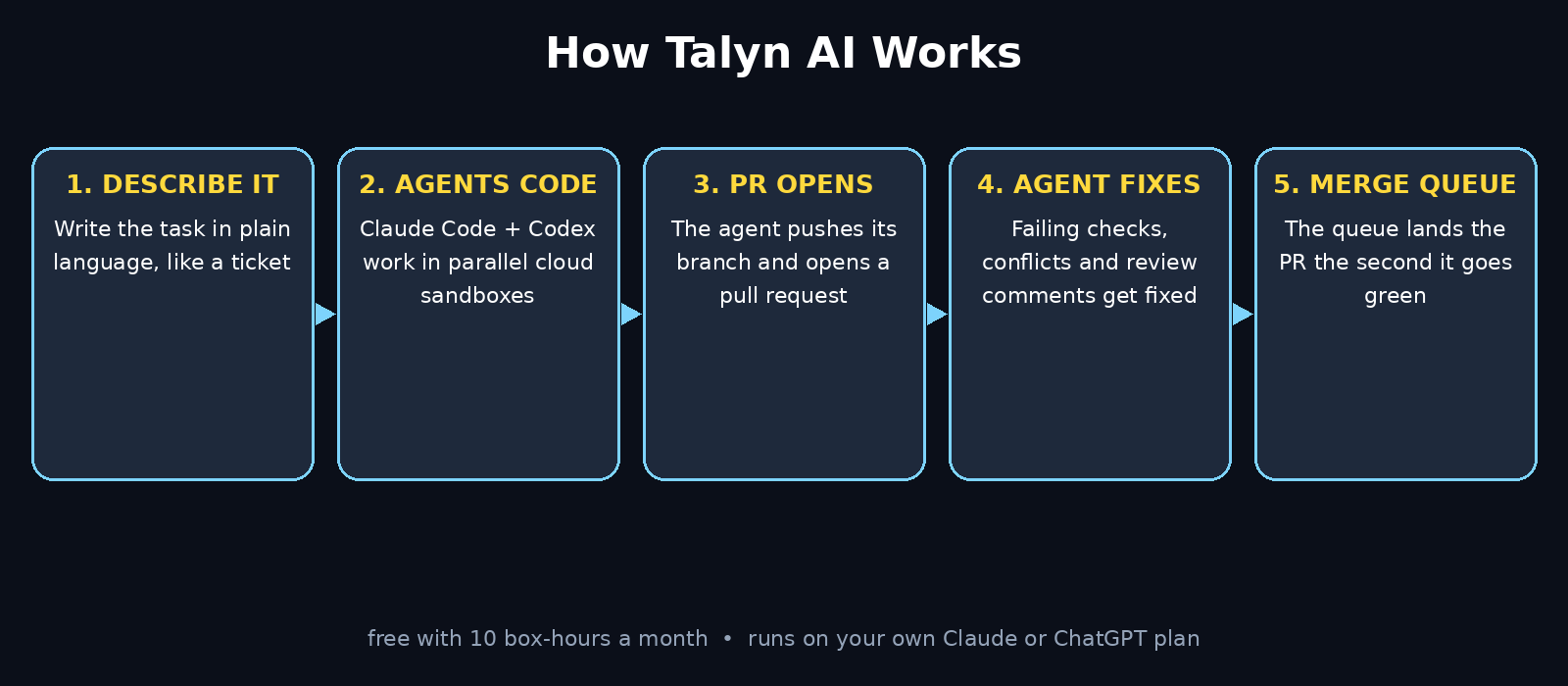
The key idea is that Talyn handles the whole journey from task to merged pull request. Most AI coding tools stop at writing the code. Talyn keeps going: it opens the pull request, watches the checks, fixes whatever goes red, resolves merge conflicts, answers review comments, and merges the pull request when it is ready. That last stretch — the hours between “code is written” and “code is merged” — is exactly where developers lose their afternoons.
Talyn runs on the AI plan you already pay for. It does not sell you a new model subscription. You connect your own Claude or ChatGPT plan, and the agents run on that. Talyn charges for the cloud sandbox time, measured in box-hours, and the free plan includes 10 box-hours every month. It works with GitHub on macOS, Windows, Linux, or straight from the browser, so there is nothing heavy to install.
If you follow the world of agentic AI tools, Talyn is part of a clear trend: agents are moving from answering questions to finishing multi-step jobs on their own. You can read more about that shift at Agentic Affairs, which tracks how AI agents are changing everyday work.
Step 2: Create Your Free Talyn Account
Start at the Talyn website. Click the sign-up button and create your account with your email or your GitHub account. Signing up with GitHub is the faster route because you will need to connect GitHub anyway in the next step, and it keeps your identity consistent across both services.
Once you are in, you will see the Talyn dashboard. It has three main areas: Sessions, where your agent coding tasks live; Pull Requests, where every open pull request across your connected repositories is listed; and the merge queue, where pull requests wait for their turn to land. Take a minute to look around before you connect anything. The layout is simple on purpose: one screen tells you what is happening, what needs your attention, and what has already shipped.
Your free plan is active from the moment you sign up. You get 10 box-hours a month, and Talyn shows your remaining balance in the dashboard so there are no surprises. That is all you need to start learning how to use Talyn AI on a real repository. A box-hour is one hour of one cloud sandbox running. A small fix might take minutes; a bigger feature might take an hour or two. You will learn to estimate quickly, and the dashboard always shows the cost before a run starts.
Step 3: Connect GitHub and Your Claude or ChatGPT Plan
Talyn needs two connections before it can do anything useful: your GitHub account and your AI plan.
First, connect GitHub. Talyn installs as a GitHub App on your account or organization. This is the normal, safe way for tools to work with GitHub: you choose exactly which repositories Talyn can see, and you can remove access at any time from your GitHub settings. Talyn works on personal private repositories with no organization and no admin rights, which matters for solo developers and small teams who do not have an enterprise setup.
Second, connect your AI plan. Talyn runs Claude Code and Codex on the plan you already pay for, so pick the one you have — a Claude subscription for Claude Code, or a ChatGPT subscription for Codex. You do not need both to start; one is enough, and you can add the other later when you want to run agents in parallel.
A quick word on permissions: Talyn asks for the access it needs to read your repositories, create branches, and open pull requests. It cannot merge past your branch protection rules. If your repository requires a human review or a passing check, Talyn waits exactly as GitHub configured it to. That is a feature, not a limitation — your safety rules stay in charge.
Step 4: Start Your First Agent Session
A session is one task given to one agent in one sandbox. To start your first session, open the Sessions area and describe the task in plain language, the way you would describe it to a colleague. Good first tasks are small and concrete. “Add a dark mode toggle to the settings page” is a good task. “Improve the app” is not — the agent will guess, and you will not like the guess.
Pick the repository, pick the agent — Claude Code or Codex — and pick the branch the agent should work from. Then send the task and close the laptop. The agent works in the cloud, so your computer is free. You can watch the session live if you like: Talyn shows the agent’s progress, the files it touches, and the commands it runs. Most beginners watch the first session closely and stop watching by the third, which is the point.
When the agent finishes, it shows you a diff — the exact changes it made — and you can review them in Talyn before anything becomes a pull request. Read the diff. If something looks wrong, send a follow-up message in the same session and the agent fixes it. Sessions keep their context, so follow-ups are cheap and fast.
- Start with one small task, not a whole feature.
- Write the task like a ticket: what to change, where, and how you will know it is done.
- Review every diff the first few times, even when it looks perfect.
Step 5: Run Claude Code and Codex in Parallel
This is where Talyn starts to feel different from running an agent on your laptop. You can start two sessions on two different tasks at the same time — one with Claude Code, one with Codex — and both work in their own sandboxes simultaneously. Your laptop does nothing. You just wait for two diffs instead of one.
Parallel sessions are perfect for independent work: one agent fixes a bug while another writes the documentation, or one builds a feature while another adds the tests. The rule is simple: the tasks must not touch the same files. If two agents edit the same file at the same time, you will spend your saved time untangling a merge conflict. Give each session its own corner of the codebase.
To try it, start one session for a bug fix with Claude Code and a second session for a small feature with Codex. It is the fastest way to learn how to use Talyn AI with two agents at once. Watch both progress bars move at once. When the diffs come back, review them one at a time. This is the workflow that turns a slow afternoon of context-switching into twenty minutes of reviewing finished work — and it is the reason Talyn’s tagline is “merge more, babysit less.”
For a small team or a digital agency juggling client work, parallel sessions are the difference between one developer doing one thing at a time and one developer supervising three finished tasks before lunch.
Step 6: Open a Pull Request Straight from Talyn
When a session’s diff looks good, Talyn can open the pull request for you. The agent pushes its branch and creates the pull request on GitHub with a title and description based on the task. You can edit the description before it goes out, which is worth doing: a good pull request description tells your reviewer what changed and why in two or three sentences.
The Pull Requests page is the heart of Talyn. It lists every pull request you have open across every connected repository, with the ones that need your attention pulled to the front. Filters let you narrow by repository, by status, or by review requests. If you work across several repositories, this single list replaces the daily ritual of opening each repository to check what is stuck.
Before the pull request goes out, Talyn runs the checks your repository requires. If a test fails or a lint rule complains, you will see it on the pull request page — and that is where the next step takes over.
Step 7: Fix a Failing Pull Request with an Agent
This is Talyn’s most useful trick, and it is the one beginners should learn first. A pull request goes red, falls behind its base branch, or picks up review comments. Instead of fixing it yourself, you send an agent to fix it.
On the Pull Requests page, hover over the pull request row and choose the fix option. The agent works in a sandbox, pushes its fixes to the pull request’s existing branch, and the pull request goes green in place. No second pull request is opened, so there is nothing to reconcile. The agent resolves merge conflicts, fixes failing checks, and handles unresolved review comments in one run.
If a session is already working on that pull request, Talyn sends the fix to that session’s chat instead, so two agents never push to the same branch at the same time. If there is nothing to fix, Talyn tells you why — the pull request is closed, a run is already working on it, or it has no conflicts, failing checks, or unresolved comments.
Some things an agent should not decide, and Talyn is honest about that. A product question, a credential the sandbox does not have, or a gate your repository says a person must clear will come back to you. The agent flags the problem instead of guessing, which is exactly the behavior you want from a teammate.
Step 8: Turn On Auto-Keep-Mergeable
Auto-keep-mergeable is the feature that removes the daily pull request check entirely. Flag a pull request as keep-mergeable, and Talyn watches it until it merges. The moment the branch falls behind, hits a conflict, or a check goes red, an agent is dispatched to fix it. You stop opening GitHub to check whether your pull request is still green, because Talyn is already watching.
You can flag pull requests one at a time for free. If you want every new pull request you open to be flagged automatically, that is part of the Pro plan. Start with manual flagging — it takes two seconds per pull request and teaches you which of your pull requests actually need watching.
There is a sensible safety limit: after three runs in a row that do not make the pull request mergeable, the watcher pauses. A pull request that fails three fixes in a row usually has a deeper problem — a broken test, a design disagreement, a dependency that changed — and it needs a human, not a fourth attempt. When the watcher pauses, Talyn tells you, and you take over.
Note that auto-keep-mergeable applies only to pull requests you opened, never to ones you review. That keeps the feature focused on your own work and avoids surprises on your teammates’ pull requests.
Step 9: Use the Merge Queue to Land Pull Requests in Order
Once a pull request is approved and green, it still has to merge — and merging is where order matters. Talyn’s merge queue lands ready pull requests in order, the moment they go green. Independent pull requests merge in parallel, so one slow build cannot stall the queue, and any entry that falls behind or breaks gets auto-fixed before it merges instead of being ejected back to you.
This is a real improvement over GitHub’s own merge queue, which is good but ejects a pull request back to you the moment something fails. Talyn’s queue does the fixing: when an entry falls behind its base, it takes GitHub’s free server-side update-branch option where that will work, and only spends an agent run when there is an actual conflict to resolve. When a check fails, it dispatches a fix run that pushes to the existing branch.
To use it, queue a pull request from the Pull Requests page. Talyn watches it, fixes whatever breaks, and merges it the second it is ready. Any plan can queue pull requests, and fix runs use box-hours from your plan. The queue never bypasses your branch protection: if a required check or a required reviewer is missing, it waits, exactly as you configured GitHub to make it.
If you already run GitHub’s merge queue on a repository, Talyn detects the external gate and arms GitHub auto-merge instead of trying to merge around it. The two tools cooperate instead of fighting.
Step 10: Track Box-Hours and Stay on the Free Plan
Talyn’s pricing is simple: the sandbox time you use, measured in box-hours, and the model runs on your own Claude or ChatGPT subscription. The free plan gives you 10 box-hours a month, which covers a surprising amount of work if you spend it wisely. That is the whole cost of learning how to use Talyn AI: nothing, until you outgrow the free tier.
Small habits stretch the free plan a long way. First, keep tasks small — a focused task finishes faster than a vague one, and the agent spends less time exploring. Second, use the free server-side branch update before spending an agent run on a pull request that is only behind its base. Third, review diffs promptly; a session that sits open while you are away is not costing box-hours, but a session you restart three times because the task was unclear does.
Check your usage in the dashboard once a week. Talyn shows how many box-hours you have used and how many remain, so you will never be surprised. If you regularly run out before the month ends, that is useful information: it means the tool is earning its keep, and the Pro plan is worth a look. If you never come close to the limit, the free plan is doing its job and you should keep it.
Talyn AI vs the Alternatives
| Feature | Talyn (Free) | GitHub Merge Queue | Manual PR Babysitting |
|---|---|---|---|
| Runs Claude Code and Codex in parallel | Yes | No | No |
| Cloud sandboxes, laptop stays free | Yes | Not applicable | No |
| Fixes failing checks automatically | Yes | No, ejects the PR | You do it by hand |
| Resolves merge conflicts | Yes | No | You do it by hand |
| Handles review comments | Yes | No | You do it by hand |
| Works on personal private repos | Yes | Needs org and plan | Yes |
| Merge queue with auto-fix | Yes | Queue only, no fixes | No |
| Free tier | 10 box-hours a month | Included with plan | Free, costs your time |
The table makes the trade-off clear. GitHub’s merge queue is solid if you already have it, but it never fixes anything. Manual babysitting costs nothing in money and everything in time. Talyn’s free tier sits in the middle: real automation, no payment, and the only cost is the box-hours you spend.
Frequently Asked Questions About How to Use Talyn AI
Is Talyn AI really free?
Yes, Talyn has a free plan with 10 box-hours a month. The AI models run on your own Claude or ChatGPT subscription, so you need one of those plans, but Talyn itself costs nothing at the free tier. Flagging pull requests one at a time and queueing pull requests are both free; the workspace default that keeps every new pull request green automatically is part of Pro.
Do I need to know how to code to use Talyn?
You need to understand repositories, branches, and pull requests, but you do not need to write code by hand. You describe tasks in plain language and review the diffs the agent produces. Beginners who can read a diff and spot an obvious mistake will do fine; the agent does the typing.
What is a box-hour?
A box-hour is one hour of one cloud sandbox running. When an agent works on your task, the sandbox is running and box-hours are used. When the agent finishes, the sandbox stops. The free plan includes 10 box-hours a month, and the dashboard always shows your remaining balance.
Can Talyn merge a pull request past branch protection?
No. Talyn merges through the ordinary GitHub pull request merge API, and it cannot bypass your branch protection rules. If a required check or a required reviewer is missing, the merge queue waits. Your safety rules always stay in charge.
What happens if the agent cannot fix my pull request?
After three runs in a row that do not make the pull request mergeable, the auto-keep-mergeable watcher pauses and tells you. Some problems — a broken test, a design question, a missing credential — need a human. Talyn flags the problem instead of guessing, and you take over from there.
Final Thoughts on How to Use Talyn AI
Talyn AI solves a problem every developer recognizes but nobody enjoys: the hours lost between writing code and merging it. Running Claude Code and Codex in parallel cloud sandboxes means your laptop stays free while the work gets done. The pull request fixer and the auto-keep-mergeable watcher mean you stop checking GitHub every hour to see if your pull request is still green. And the merge queue means approved work lands in order, the moment it is ready, instead of waiting for you to notice.
Start small. Create your free account, connect one repository, and give an agent one focused task. Watch the diff come back, review it, and let Talyn open the pull request. Then flag that pull request as keep-mergeable and walk away. When it merges itself while you are doing something else, you will understand why Talyn finished in the top five on Product Hunt on its launch day.
The free plan’s 10 box-hours a month are enough to prove the workflow on real work. If it saves you even one afternoon of pull request babysitting a month, it has already paid for itself — and at the free tier, that afternoon costs you nothing at all.
Explore More Free AI Tools
Want more free AI tools that save you time every day? Try the free tools at AIToolSteps: the AI Title Generator writes catchy titles for your posts, the Meta Description Generator creates search-ready descriptions, the AI Rewriter polishes your drafts, and the Keyword Density Checker keeps your SEO on track. All free, all in your browser, no sign-up needed.