

Imagine a phone line that answers every call, never gets tired, never puts anyone on hold, and sounds so natural that callers forget they are talking to software. That is exactly what Vaani AI lets you build — and you do not need to write a single line of code to do it.
Vaani AI is a no-code voice AI platform that turns a plain-English description into a working voice agent. You design the call flow, decide how the agent handles objections and awkward moments, connect your tools and knowledge base, and put the agent live on a real phone number. Every call ends with clean, structured data instead of a messy recording you have to listen to later.
The platform launched on Product Hunt on October 30, 2026, and took the number one Product of the Day spot with 370 upvotes and 108 comments. It comes from a small voice AI team in Bengaluru that spent years building voice systems for enterprise customers before opening a self-serve platform to everyone. New users can start with 1,000 free credits using the launch code PHL1000X, which makes this one of the most beginner-friendly ways to try real voice AI in November 2026.
This guide walks you through the whole process, step by step, from your first sign-up to your first live call.
Step 1: Understand What Vaani AI Actually Does
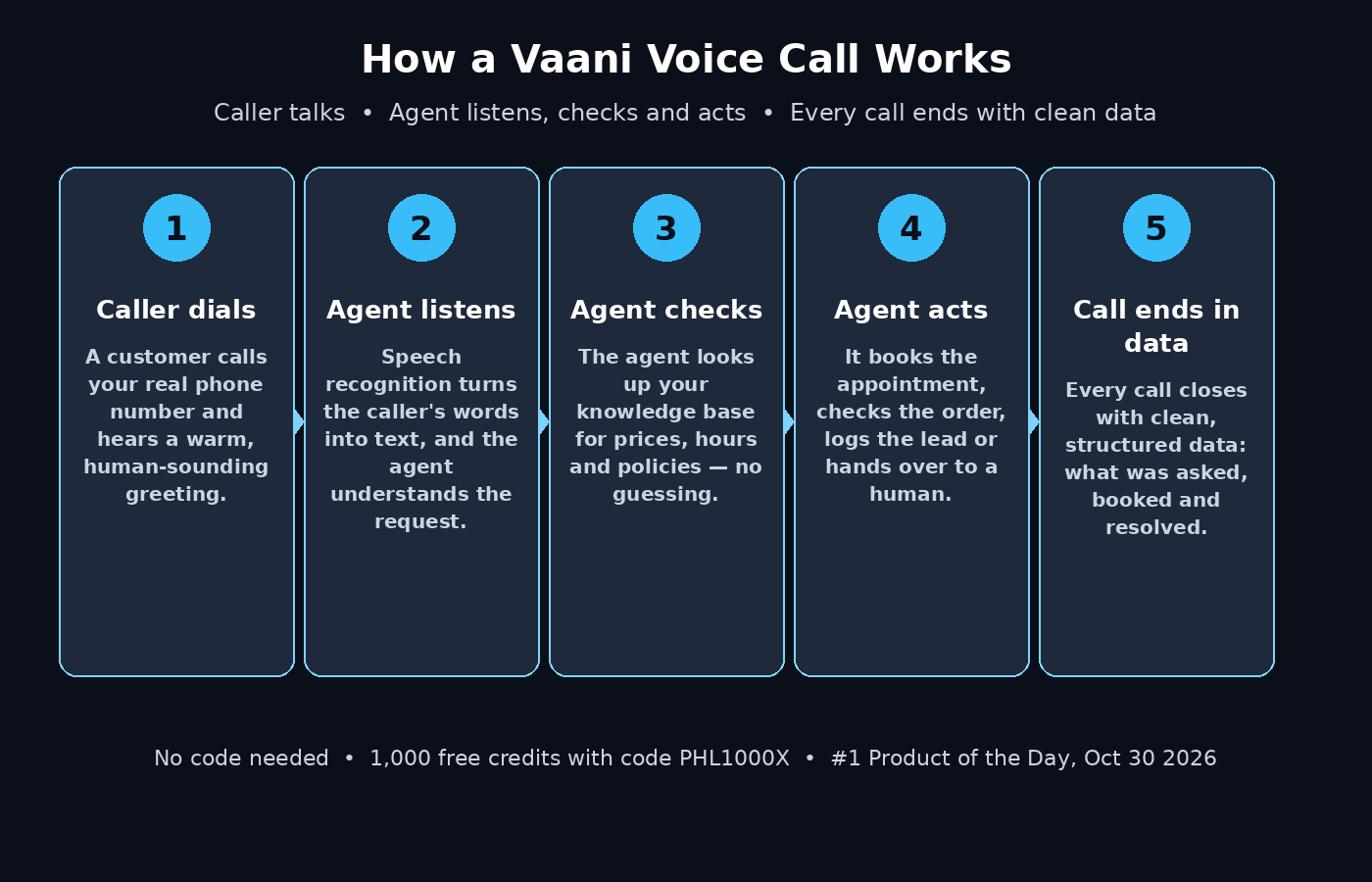
Before you click anything, it helps to know what you are building. A Vaani voice agent is an AI that holds a real phone conversation. A customer calls a number, the agent greets them, listens to what they need, asks follow-up questions, and takes the right action — booking an appointment, answering a product question, taking an order, or passing the call to a human when the situation needs one.
Traditional voice systems forced callers through rigid phone menus: press one for sales, press two for support. Vaani works the other way around. The caller just talks, and the agent understands. That is the difference between a phone tree and a conversation.
The platform handles the hard parts for you. Speech recognition turns the caller’s voice into text, a large language model decides what to say next, and a voice model speaks the reply out loud. You never touch any of that plumbing. Your job is the creative part: deciding what the agent should do, how it should sound, and what it should never do.
Step 2: Create Your Free Vaani Account
Head to the Vaani platform at platform.vaani.dev and create your account. The sign-up is quick — an email address and a password are enough to get started, and there is no credit card required for the free credits.
Once you are inside, take two minutes to look around the dashboard before building anything. You will see the main areas: Agents, where your voice agents live; Calls, where every conversation is logged; Knowledge Base, where you upload the facts your agent should know; and Tools, where you connect the outside services your agent can act on.
Getting familiar with this layout now saves you from hunting for buttons later, when you are in the middle of designing your first agent.
Step 3: Claim Your 1,000 Free Credits
Vaani launched with a simple offer: 1,000 free credits for Product Hunt users with the code PHL1000X. Enter the code in the billing or credits section of your account to claim it.
Free credits matter because voice AI is priced by the minute. Every test call you make, every experiment with a new voice, and every real customer conversation draws from your balance. One thousand credits is enough to build your agent, run a dozen test calls, and take a handful of real calls before you ever need to think about paying.
Treat those credits like a practice budget. Use them generously while you are learning, and keep an eye on the balance so you know what a real call actually costs you. That number is the foundation of any decision to scale up later.
Step 4: Describe Your Voice Agent in Plain English
Here is the part that feels almost too easy. When you create a new agent, Vaani asks you to describe what it should do — in plain English, not in code. Write a short paragraph like you would explain the job to a new employee.
For example: “You are the receptionist for a small dental clinic. Greet callers warmly, ask what they need, book appointments on weekdays between 9 and 6, answer questions about prices, and take a message if someone wants to speak to the dentist.”
That description becomes the agent’s core instruction. The platform turns it into a working starting point, and you refine it from there. The clearer your description, the better the first version behaves. Mention the business, the tone you want, the hours, and the exact jobs the agent is allowed to do.
If you run a small business, this is where Vaani starts paying for itself. A missed call is a missed customer, and a small team cannot answer the phone at midnight. A voice agent that handles the routine calls — bookings, opening hours, prices, directions — frees your team for the conversations that actually need a human.
Step 5: Design the Call Flow
A good phone call has a shape. It opens with a greeting, moves through the caller’s request, handles the details, and closes cleanly. In Vaani, you design that shape as a call flow.
Start with the opening line. This is the first thing every caller hears, so make it warm and useful: “Hi, thanks for calling Bright Smile Dental. How can I help you today?” A good opening tells the caller who they reached and invites them to speak.
Next, map out the main paths. What are the three or four reasons people call you? For a clinic, it is usually booking, rescheduling, pricing, and directions. For a shop, it is orders, delivery status, returns, and opening hours. Give the agent a clear path for each one, including what questions to ask and what information to collect.
Finally, design the ending. Every call should close with a summary: what was booked, what happens next, and a polite goodbye. A call that ends with “Your appointment is confirmed for Thursday at 4 pm. We will send you a reminder by text. Is there anything else?” feels finished. A call that just stops feels broken.
Step 6: Teach It to Handle Objections and Edge Cases
Real callers are not scripts. They interrupt, they change their minds mid-sentence, they ask something you did not expect, and sometimes they are upset. Vaani lets you design for these moments in advance, and this is what separates a toy demo from an agent you can trust with real customers.
Think about the tricky moments in your business. A caller who wants a slot that is already taken. A caller who asks for a discount. A caller who is angry about a late delivery. For each one, write a short instruction: what the agent should say, what it should offer, and when it should hand the call to a human.
Interruptions deserve special attention. On a phone call, people talk over each other, and a good agent needs to stop speaking, listen, and respond to the new question instead of ploughing on with its old sentence. Vaani is built for this kind of natural back-and-forth, so test it deliberately: interrupt your agent during a test call and see how gracefully it recovers.
The rule of thumb is simple: if a situation would make a human employee pause and think, your agent needs an instruction for it.
Step 7: Connect Your Knowledge Base
An agent that guesses is worse than an agent that says it does not know. The knowledge base is how you stop the guessing. Upload the facts your business runs on — price lists, service descriptions, opening hours, policies, frequently asked questions — and the agent answers from those documents instead of inventing answers.
Keep the knowledge base focused and current. A short, accurate document beats a hundred-page dump that nobody maintains. If your prices change, update the document the same day. If you add a new service, add it to the knowledge base before the agent starts telling callers about it.
This is also where a voice agent becomes genuinely useful for a team. Instead of every employee memorising the same answers, the knowledge lives in one place and every call gets the same correct answer. When a business grows, that consistency is worth more than any single feature.
Step 8: Connect Tools and Give It Real Actions
Answering questions is useful. Taking action is transformative. Vaani lets you connect tools so the agent can do real work during a call: check a calendar and book the slot, look up an order status, log a lead, or send a confirmation message.
Start with one tool that solves your most common request. If most of your calls are appointment bookings, connect the calendar first. If most calls are “where is my order”, connect the order system first. One working action beats five half-connected ones.
Each tool connection needs clear instructions about when to use it and what the agent is allowed to do with it. Be specific: the agent may check availability and book appointments, but it may not cancel them without a human. Those boundaries are what make an agent safe to put in front of real customers.
This is the same idea behind the wider world of AI agents — software that does not just answer, but acts. If you want to see how agencies are packaging this kind of automation for clients, the team at D365A, a digital agency, works on exactly this kind of AI-powered business automation. And for a broader look at where agentic AI is heading, Agentic Affairs covers the tools and trends shaping the agent economy.
Step 9: Put Your Agent on a Real Phone Number
An agent that only exists in a test window is a demo. The moment it matters is when a real customer dials a real number and talks to it. Vaani lets you connect your agent to a phone number so it can receive live calls.
Before you publish the number anywhere, run a full test from an actual phone. Call the number yourself and play the role of a difficult customer. Ask an odd question. Interrupt. Mumble. Try to book a time that does not exist. Every weakness you find in testing is a bad experience you just prevented for a real caller.
When the test calls sound smooth, share the number gradually. Put it on your website first, watch the call logs for a few days, fix the rough edges, and only then print it on cards or run ads with it. A staged rollout gives you control over the first impression.
Step 10: Test Calls, Read the Data, and Improve
Vaani’s most underrated feature is what happens after the call ends. Every conversation is logged, and each one ends with clean, structured data: who called, what they wanted, what was booked or resolved, and whether anything went wrong. You do not need to listen to hours of recordings to know how your agent is doing.
Make reviewing calls a weekly habit. Read five call summaries, note the moments where the agent hesitated or misunderstood, and fix the instructions. The most common fixes are small: a missing fact in the knowledge base, an unclear instruction, or a path in the call flow that nobody designed for. Each fix makes every future call a little better.
Over a month, this loop compounds. The agent that took three weeks of small fixes sounds noticeably more natural and handles noticeably more situations than the one you launched on day one. Voice agents improve like employees do — with practice and feedback.
Vaani AI vs Building a Voice Agent the Old Way
The old way of building a voice agent meant hiring developers, stitching together speech recognition, a language model, telephony, and call logic, and then maintaining all of it. Vaani compresses that into a single no-code workspace. Here is how the two approaches compare for a beginner.
| What you need | Vaani AI | Building it yourself |
|---|---|---|
| Coding skills | None — describe the agent in plain English | Required — speech, LLM, telephony and call logic |
| Time to first working agent | Under an hour | Weeks to months |
| Cost to start | Free — 1,000 credits with code PHL1000X | Developer time plus telephony and API bills |
| Handles interruptions | Built in — designed for natural conversation | You build it yourself, and it is hard |
| Knowledge base | Upload documents, the agent answers from them | Build retrieval and grounding from scratch |
| Call data | Every call ends with clean, structured data | You build logging and reporting yourself |
| Phone number | Connect a real number in the platform | Set up a telephony provider and integration |
| Best for | Small businesses, beginners, fast experiments | Teams with engineers and unusual requirements |
The trade-off is control. Building it yourself gives you total control over every component, but you pay for that control with time and money. For most beginners and small businesses, Vaani’s trade is the right one: you give up some low-level control and you get a working voice agent this week instead of next quarter.
Frequently Asked Questions About Vaani AI
Is Vaani AI really free to start?
Yes. New users can claim 1,000 free credits with the launch code PHL1000X, and there is no credit card required to sign up. The credits cover building your agent and running test calls plus a handful of real calls. Once the credits run out, you pay for the minutes you use.
Do I need to know how to code to use Vaani AI?
No. That is the whole point of the platform. You describe the agent in plain English, design the call flow with the visual tools, upload documents for the knowledge base, and connect tools through the dashboard. A beginner with no technical background can build a working agent in under an hour.
What kinds of calls can a Vaani agent handle?
The most common uses are appointment booking, answering product and pricing questions, taking orders, handling delivery and order-status queries, and qualifying leads. Any call that follows a repeatable pattern is a good fit. Calls that need deep human judgement — complaints that require empathy, complex negotiations, legal questions — should be handed to a person, and you can design that handover into the call flow.
Does Vaani AI work in languages other than English?
The Vaani team started with languages where voice data is scarce, and sounding local matters a lot to them. The platform supports multiple languages, and its voice models are designed to sound natural rather than robotic. Check the current language list in the platform when you sign up, because language support keeps expanding.
Can I use my own phone number with Vaani AI?
Yes. You can connect a real phone number to your agent so customers reach it by dialling a normal number. Test the agent thoroughly from a real phone before you publish the number on your website or business cards.
What happens to the data from my calls?
Every call ends with structured data — the caller’s request, what was resolved, and what was booked — and the full conversation is logged in your dashboard. Use those logs to improve the agent, and check Vaani’s privacy policy for how call data is stored and how long it is kept.
Final Thoughts
Voice AI used to be a project for big companies with engineering teams and six-figure budgets. Vaani AI turns it into something a small business owner can set up in an afternoon: describe the agent, design the call flow, upload your facts, connect one tool, and put it on a phone number.
The 1,000 free credits remove the last excuse for not trying it. Build one agent for your most common type of call, run ten test calls, and listen to how it sounds. If it handles the routine work well, you have just bought back hours of your team’s week. If it stumbles, the call logs will tell you exactly what to fix.
Start small, test honestly, and let the data guide you. The businesses that win with voice AI are not the ones with the fanciest setup — they are the ones that ship a simple agent, watch real calls, and improve it every week.
Explore More Free AI Tools
Want to keep building your AI toolkit? Try these free tools on AIToolSteps: the AI Title Generator writes click-worthy headlines for your pages, the Meta Description Generator drafts search snippets in seconds, the AI Rewriter polishes rough drafts into clean copy, and the Keyword Density Checker keeps your pages on-topic for search. They are all free, and they pair perfectly with the voice agent you just built.