

Every AI coding agent has the same embarrassing weakness: it forgets everything the moment a session ends. You spend an hour teaching Claude Code how your project is structured, which libraries you prefer, and what your client hates. Then tomorrow you start from zero and repeat the whole conversation. Harness Memory AI fixes exactly that problem. It gives your AI agents a real long-term memory that survives across sessions and even across different agent tools.
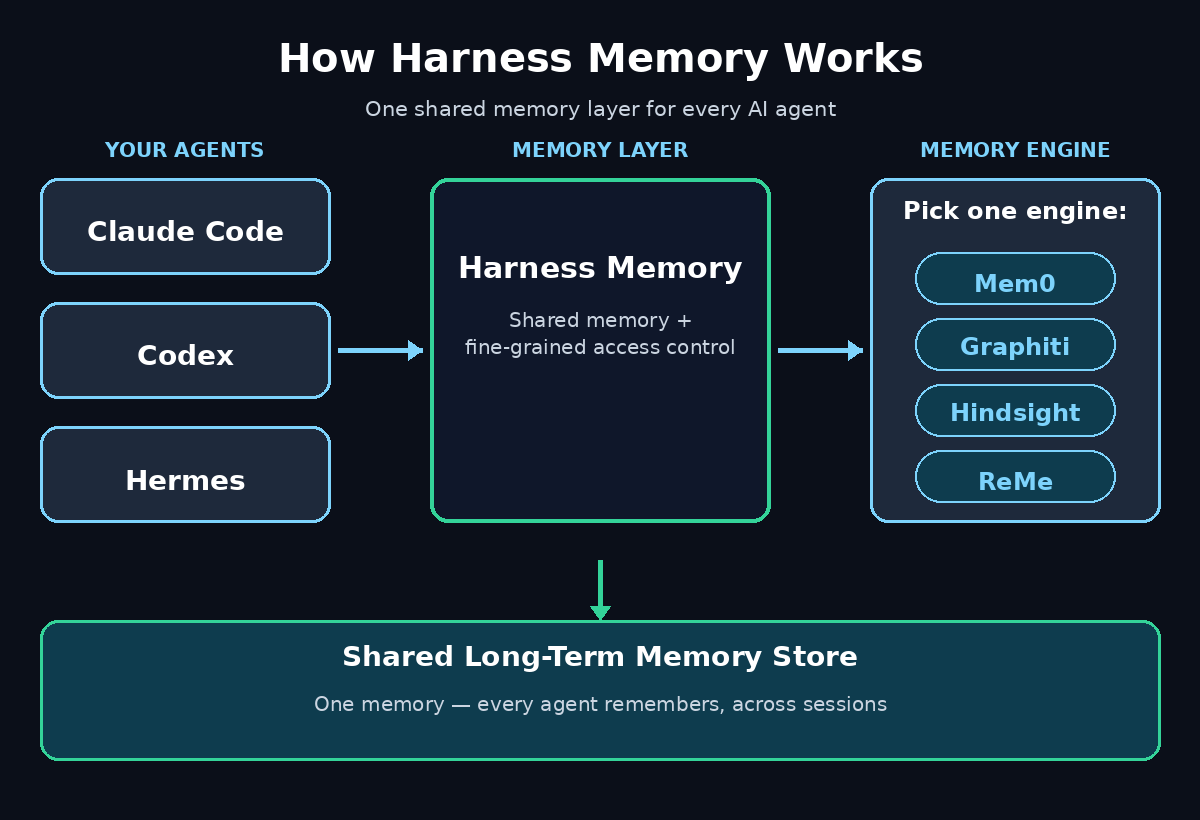
Launched on Product Hunt in November 2026, it finished as the #7 Product of the Day with 119 votes. Harness Memory is an open-source memory layer for AI agents. Instead of locking your agent’s memories inside one tool, it sits between your agents and a memory engine of your choice. Pick Mem0, Graphiti, Hindsight, ReMe, or one you build yourself. Then Claude Code, Codex, Hermes, and other harnesses share the same memories with fine-grained access control. In this beginner-friendly guide, you will learn what Harness Memory is, how to set it up for free, and how to use it so your agents actually remember what matters.
Step 1: Understand What Harness Memory Actually Does
Think of Harness Memory as a shared notebook for your AI agents. Normally, each agent keeps its own notes — or more often, keeps no notes at all. When a session ends, the context window is wiped and everything your agent learned disappears with it. Harness Memory changes the architecture. Memories live in a separate layer, outside any single model or tool. Every connected agent can read from and write to that layer.
That separation is the whole point. Because the memory is not owned by one harness, you can start a task in Claude Code. Continue it in Codex, and finish it in Hermes — without re-explaining anything. The memory engine underneath does the hard work — storing facts, linking related ideas, and retrieving the right memory at the right moment. Harness Memory is the connector that makes different engines and different harnesses speak the same language.
- Long-term memory: facts, preferences, and decisions persist between sessions.
- Cross-harness sharing: one memory store serves Claude Code, Codex, Hermes, and more.
- Your choice of engine: pick Mem0 or another engine, or plug in your own.
- Access control: decide exactly which agent can read or write which memories.
- Open source: the Community Edition is free, and you can host it yourself.
Step 2: Decide If You Need Long-Term Agent Memory
Not every AI user needs a memory layer. If you only ask a chatbot the occasional question, your chat history is enough. Harness Memory earns its place when your agents do ongoing work. That means coding projects that span weeks, client work with standing rules, or research that builds on itself day after day.
You probably need it if any of these sound familiar. Your coding agent keeps re-asking the same questions about your project setup. You paste the same background context into every new session. Different agents on your team give contradictory answers because each one only knows part of the story. Or you manage several client projects and your agent keeps mixing up their rules. If two or more of those apply, a shared memory layer will save you real time within the first week.
Small teams and solo builders benefit most, because the cost of re-explaining context falls on one person. A digital agency juggling multiple client code projects, for example, can store each client’s coding standards once and let every agent on the team reuse them — instead of every developer re-teaching every agent from scratch.
Step 3: Choose Your Memory Engine
Harness Memory does not force one way of remembering. You choose the memory engine that fits how your agents work, and you can change engines later without rebuilding your setup. Each engine stores and retrieves memories differently, so the choice matters more than beginners expect.
- Mem0: a general-purpose memory layer that extracts facts from conversations and retrieves them by relevance. A solid default if you are unsure where to start.
- Graphiti: a knowledge-graph engine that links memories as connected entities and relationships. Best when your work is full of people, projects, and dependencies that relate to each other.
- Hindsight: an engine option for teams that want memory tuned to agent workflows and past decisions.
- ReMe: another engine choice inside the Harness Memory ecosystem.
- Your own engine: if you already run a custom memory system, you can plug it in instead of adopting a new one.
For your first setup, pick Mem0. It is the simplest mental model — facts go in, relevant facts come out — and you can switch to a graph-based engine later once you know which memories your agents actually reuse. The important decision is to start with one engine and real data, not to spend a week comparing engines in theory.
Step 4: Set Up the Community Edition or HarnessRouter Cloud
Harness Memory ships in two forms, and both are beginner-friendly. The Community Edition is open source. You can run it yourself at no cost and keep your memories on your own infrastructure. HarnessRouter Cloud is the hosted option for people who would rather skip server setup and start using memory within minutes.
If you are comfortable running open-source software, start with the Community Edition. Self-hosting keeps sensitive project details under your own control. That includes client names, internal decisions, and private code patterns. It matters the moment your agents start remembering real work. If you just want to try the idea quickly, the cloud option removes every setup step and lets you evaluate the workflow first.
Either way, the setup follows the same shape. Create your account or instance, choose your memory engine from Step 3, and confirm the service is running before you connect any agent. Do not connect three harnesses at once on day one. Get one working end to end first, because a single clean connection teaches you more than three half-configured ones.
Step 5: Connect Your First Harness
A “harness” is simply the agent tool your AI runs inside — Claude Code, Codex, Hermes, and similar coding-agent environments. Connecting one is the moment Harness Memory stops being an idea and starts being useful. Take this step slowly and verify each part.
- Pick your main harness: connect the agent you use most often first, usually Claude Code or Codex.
- Point it at your memory service: give the harness the connection details for your Harness Memory instance or cloud account.
- Confirm the handshake: run a tiny test — ask the agent to remember one fact, end the session, start a new one, and ask for it back.
- Watch for errors early: a failed connection here is almost always a wrong address or a missing permission, and it is far easier to fix now than after a week of use.
That three-minute recall test is the most important check in this whole guide. If the agent remembers your test fact in a fresh session, the plumbing works. If it does not, stop and fix the connection before you store anything real — memories written to a broken connection are memories lost.
Step 6: Create Your First Shared Memory
Once one harness is connected, create a small set of starter memories by hand instead of letting the agent auto-save everything. Hand-written memories teach you what good memory looks like, and they give the system a clean foundation to build on.
Start with the facts you repeat most often. These include your preferred programming language and framework, your code style rules, and the name and purpose of your current project. Add any hard constraints, such as “never use that library” or “always write tests first”. Keep each memory short — one fact per entry — and write it the way you would explain it to a new team member. Short, specific memories are retrieved far more reliably than long paragraphs that mix five ideas together.
Then connect a second harness and ask it the same question you asked the first. When Codex answers with a fact you originally told Claude Code, you have just seen the core promise of Harness Memory AI working: one memory, shared across agents. That single moment is worth more than any feature list.
Step 7: Set Fine-Grained Access Control
Shared memory is powerful, and power needs boundaries. Harness Memory includes fine-grained access control, which means you decide which agent — or which person on your team — can read or write each group of memories. Do not skip this step, even as a solo user, because the habit you build now protects you when your setup grows.
- Separate by project: keep each client’s memories in their own space so facts never leak across projects.
- Separate by sensitivity: credentials, private decisions, and personal notes belong in a restricted group, not the general pool.
- Limit write access: let trusted agents save memories, but keep auto-saving off for experimental or one-off agents.
- Review who can see what: once a month, check the access list the same way you would review who has keys to an office.
For teams, this is also where Harness Memory earns its keep in a professional setting. A team building agentic AI workflows can share project knowledge across every agent. Each client’s private context stays sealed off — the same memory store, with different doors for different people.
Step 8: Teach Your Agent to Save What Matters
An agent using Harness Memory AI is only as good as what it chooses to remember. Left alone, agents tend to save everything — every passing comment, every temporary decision — until the memory store is so noisy that retrieval returns junk. Your job is to set the rules for what deserves to be saved.
Tell your agent to save lasting facts and decisions: architecture choices, client preferences, coding standards, and lessons learned from bugs. Tell it not to save temporary details: one-off file paths, debugging output, dates that will change tomorrow, or anything you would not want it to repeat next month. A simple rule works well — if you would put it in a project README, it belongs in memory; if you would put it in a chat message, it probably does not.
Also teach your agent to update memories instead of stacking duplicates. When a decision changes, the old memory should be corrected or replaced, not left beside the new one to confuse future retrieval. A short monthly prompt — “review my saved memories and flag anything outdated or contradictory” — keeps the store honest with almost no effort.
Step 9: Test Recall Before You Trust It
Never trust a memory system you have not tested. Before you rely on Harness Memory AI for real work, run a deliberate recall test across the exact situations you care about. This is the step most beginners skip, and it is the step that prevents the most embarrassing failures.
- Cross-session test: save a fact on Monday, ask for it in a fresh session on Tuesday.
- Cross-harness test: save a fact in one agent, retrieve it from a different one.
- Contradiction test: save two conflicting facts on purpose and see which one the agent returns — then fix the old one.
- Noise test: ask a vague question and check whether the retrieved memories are actually relevant or just loosely related.
If recall is wrong or noisy, the fix is usually in your memories, not in the tool. Shorten long entries, split entries that mix topics, and delete anything stale. Retrieval quality follows memory quality almost exactly — garbage in, garbage out, just faster.
Step 10: Keep Memory Clean With Regular Reviews
Memory is a garden, not a vault: it needs regular tending. Set a simple recurring habit — ten minutes once a week — to review what your agents have saved, delete what is outdated, and correct what is wrong. Without this habit, even the best memory layer slowly fills with stale facts that mislead your agents at the worst possible moment.
During each review, ask your agent to list its newest memories and its oldest ones. Delete anything tied to finished projects, update decisions that changed, and merge duplicates into one clear entry. If you run a digital agency with several active clients, do this per client space so one project’s cleanup never touches a different project’s memories. Ten minutes a week is all it takes to keep Harness Memory AI trustworthy for years.
Harness Memory vs Other Ways Agents Remember
Before Harness Memory, agents had only awkward ways to remember things. The table below shows why a dedicated shared memory layer is a step change, not just a small upgrade.
| Approach | Remembers Across Sessions | Works Across Agents | Access Control | Setup Effort |
|---|---|---|---|---|
| Harness Memory AI | Yes — persistent memory layer | Yes — Claude Code, Codex, Hermes and more | Yes — fine-grained | Low — one setup, many agents |
| Built-in chat history | Partly — inside one tool only | No — locked to one harness | No | None |
| Copy-paste context | No — manual every session | Only by hand | No | High — repeated daily |
| Project README files | Yes — but static text | Yes — if agents read them | Basic file permissions | Medium — manual upkeep |
The pattern is clear: chat history and copy-paste are free but forgetful, README files remember but cannot reason about what they hold, and only a memory layer like Harness Memory gives you persistence, sharing, and control in one place.
Frequently Asked Questions
Is Harness Memory AI free to use?
Yes — the Community Edition is open source and free to run yourself, so you can self-host it at no software cost. HarnessRouter Cloud is the hosted option for users who prefer a managed service instead of running their own instance.
Which AI agents work with Harness Memory?
It is designed to work across agent harnesses including Claude Code, Codex, and Hermes. Because memory lives in a shared layer rather than inside one tool, any connected harness can read and write the same memories.
Do I need to know how to code to use Harness Memory?
You do not need to be a developer to understand it, but the setup is aimed at people who already use coding agents such as Claude Code or Codex. If you can run an agent harness, you can follow the setup — connect the service, pick an engine, and test recall with one fact.
What is the difference between Harness Memory and Mem0?
Mem0 is one memory engine; Harness Memory is the layer that lets you plug in Mem0 — or another engine, or your own engine — and share the resulting memories across different agent harnesses with access control. Think of Mem0 as an engine and Harness Memory as the car that can take different engines.
Is my data private with Harness Memory?
With the open-source Community Edition, your memories live on infrastructure you control, which is the strongest privacy position available. On any hosted service, check its data policy before storing sensitive client or personal information, and use the built-in access controls to restrict who can read what.
Can Harness Memory share memories between my whole team?
Yes — that is one of its main strengths. Memory can be shared across agent harnesses and across team members, with fine-grained access control deciding who sees which memories. Teams should still separate memories by project and sensitivity, as described in Step 7.
Final Thoughts
Harness Memory AI solves a problem every serious AI agent user has felt: the daily amnesia of starting over in every session. By moving memory out of individual tools and into a shared, open-source layer, it lets Claude Code, Codex, Hermes, and future harnesses build on the same knowledge. You keep your choice of engine and your rules about who can see what. Start small: one engine, one harness, one test fact. Prove the recall works, then grow from there. Your future self — the one who never has to re-explain the project setup again — will thank you.
Explore More Free AI Tools
Want to sharpen your AI workflow even further? Try the free tools at AIToolSteps. The AI Title Generator, Meta Description Generator, AI Rewriter, and Keyword Density Checker help you write, polish, and optimize content in minutes. And if you want to stay current on the agent ecosystem, keep an eye on agentic AI news and analysis — memory layers like this one are evolving fast, and the teams that learn them first will have the biggest head start.