

Phone calls are one of the last things AI could not do for you. Your assistant could write emails, draft documents and search the web, but the moment a task needed a real phone call — booking a table, asking for a quote, moving an appointment — you had to pick up the phone yourself. CALL-E AI changes that. It gives your AI assistant a phone line, so ChatGPT or Claude can make real calls on your behalf while you stay in control of every dial.
CALL-E, described as “the phone line for AI agents”, hit number one on Product Hunt on 11 November 2026. In this beginner guide, you will learn exactly how to use CALL-E AI, from claiming your 100 free credits to reviewing the transcript after your first call. No technical background is needed, and you can start for free.
Step 1: Understand What CALL-E AI Does
Before you set anything up, it helps to understand what CALL-E actually is. CALL-E is a phone line built for AI agents. It connects to the assistant you already use — ChatGPT, Claude, or another AI assistant — and lets that assistant make and receive real phone calls to real US and Canadian numbers.
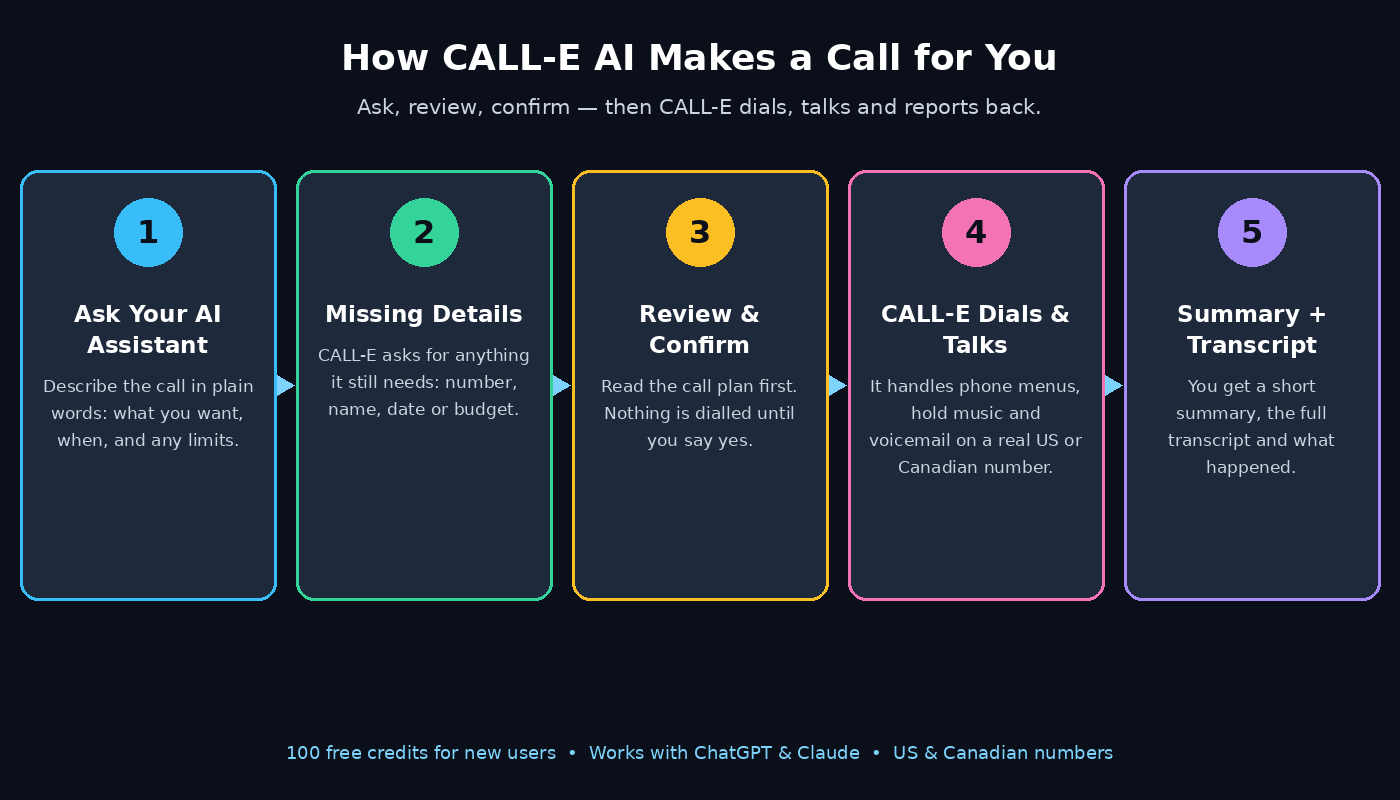
Here is the simple version: you ask your assistant to handle something that needs a call. CALL-E checks whether it has everything it needs, shows you the plan, and only dials after you confirm. During the call, it talks to the person or business on the other end, works its way through phone menus, waits through hold music and handles voicemail when nobody picks up. When the call ends, it comes back to you with a summary, the full transcript and a clear record of what happened.
That last part matters most for beginners. You never have to wonder what was said on the call. You get the whole conversation in writing, so you can check the result before you act on it.
Step 2: Claim Your 100 Free Credits
New users get 100 free credits, and CALL-E is listed as free to start, so your first calls cost you nothing. This is the best way to learn the tool, because you can test it on low-stakes calls before you trust it with anything important.
- Head to the CALL-E page on Product Hunt to see the launch details and the link to get started.
- Create your account and claim the 100 free credits offered to new users.
- Do not rush into a real booking on your first day. Use the free credits to run a practice call first, such as asking a local business about its opening hours or checking whether an item is in stock.
- Keep an eye on your credit balance inside your account so you always know how many calls you have left.
Starting free also means there is no risk in exploring. If the tool is not for you, you have spent nothing but a few minutes.
Step 3: Connect CALL-E to ChatGPT or Claude
Learning how to use CALL-E AI starts with connecting it to the assistant you already talk to every day. CALL-E works with popular assistants including ChatGPT and Claude, so you do not need to learn a new chatbot to use it.
For builders and developers, setup is deliberately simple: one prompt installs CALL-E in Claude Code, Codex, Cursor or OpenClaw. If you prefer to build with it, CALL-E also works over MCP, through TypeScript and Python SDKs, or directly through its API. Full use cases are listed at usecases.heycall-e.com, and the documentation lives at docs.heycall-e.com/regions.
For everyone else, the connection is just a few clicks:
- Open your CALL-E account settings and choose the assistant you want to connect.
- Follow the on-screen steps to link your ChatGPT or Claude account.
- Grant only the permissions the setup asks for, and check that the connection shows as active.
- Send a quick test message to your assistant mentioning a call, and confirm CALL-E responds with the call flow instead of a plain text answer.
Once the connection is live, your assistant has a phone. From here on, you simply talk to it the way you already do.
Step 4: Tell Your Assistant What to Call About
Now comes the fun part. Just describe the outcome you want in plain language, exactly as you would explain it to a helpful colleague. You do not need special commands or a script.
Good requests are specific about the result:
- “Book a table for two at an Italian restaurant near downtown for Friday at 7 pm.”
- “Call my dentist and move my Tuesday appointment to Thursday morning.”
- “Get a quote for fixing a leaking kitchen tap from three local plumbers.”
- “Check whether the bike shop on Main Street has a medium hybrid bike in stock.”
The more detail you give up front, the fewer follow-up questions CALL-E needs to ask. Include names, dates, times, addresses and any limits, such as a budget or a preferred time window. If you are flexible, say so — “any time after 6 pm works” gives the caller room to find a slot instead of failing on one exact time.
A useful habit is to state the goal and the deal-breakers in one message: what you want, when you want it, and what is not acceptable. That single message is usually enough for CALL-E to build a plan.
Step 5: Fill In the Missing Details
CALL-E will not guess. If your request is missing something it needs — a phone number, a date, a name for the booking — it asks you before doing anything. This is a feature, not a flaw, because a wrong guess on a phone call is much harder to undo than a wrong guess in a text chat.
Expect questions like these:
- “Which restaurant should I call, or should I find one near you?”
- “What name should the booking be under?”
- “What is the phone number for the business?”
- “Is there a budget limit for the quote?”
Answer in the same chat thread, in plain words. You can also add context the caller will need, such as “mention that we need a high chair for our toddler” or “ask if they have wheelchair access”. CALL-E folds these details into the call plan, so nothing gets lost between you and the person on the phone.
If you are working with a digital agency or an AI automation service that already handles parts of your workflow, this is a good moment to align the details. Teams at a digital agency like D365A often manage bookings and client calls as part of a wider automation setup, and the same clear-briefing habit — goal, date, limits — is what makes those handoffs work smoothly.
Step 6: Review the Call Plan and Confirm
This is the step that makes CALL-E safe to trust. Before anything is dialled, CALL-E shows you the plan: who it will call, what it will say, and what outcome it is aiming for. Nothing happens until you confirm.
Read the plan carefully, even when it looks right at first glance:
- Check the business name and phone number are correct.
- Check the date, time and party size match what you asked for.
- Check any price limit or special request is included.
- If something is wrong, correct it in the chat and ask CALL-E to show you the updated plan.
Only tap confirm when the plan matches your request exactly. This human checkpoint is what separates CALL-E from a fully automatic dialler. You stay in charge, and the AI only acts with your explicit go-ahead. If you change your mind, you can cancel before confirmation with no call made and no credits wasted.
Step 7: Let CALL-E Handle Menus, Hold Music and Voicemail
Once you confirm, CALL-E dials a real US or Canadian number and does the call for you. This is where it earns its keep, because real phone calls are messy in ways a text chat never is.
CALL-E can:
- Navigate automated phone menus by listening to the options and pressing the right keys.
- Wait through hold music patiently instead of hanging up after thirty seconds.
- Leave a clear voicemail if nobody answers, with your details and the reason for the call.
- Ask follow-up questions when the person on the other end needs clarification, staying within the limits you set in the plan.
You do not need to sit and listen live. You can close the chat and get on with your day. CALL-E works in the background and reports back when the call is done, which is exactly why busy people love it: the twenty minutes you would have spent on hold becomes twenty minutes you keep.
Calls currently work on US and Canadian numbers, with more regions listed in the documentation at docs.heycall-e.com/regions, so check there if your call is outside those countries.
Step 8: Read the Summary and Transcript
When the call ends, CALL-E returns three things: a short summary, the full transcript, and a record of what happened. Start with the summary — it tells you the outcome in a few lines, such as “Table booked for two on Friday at 7 pm under Muhammad, confirmation reference 4821.”
Then check the transcript when the details matter:
- Did the business confirm the exact time you wanted, or suggest a different one?
- Was a deposit or card required, and was anything charged?
- Did the caller agree to anything you did not authorise?
- Is there a confirmation number, reference code or name to quote later?
Save anything important — confirmation numbers, quoted prices, names of the people spoken to — in your notes or calendar straight away. The transcript is your proof of what was agreed, and it is far more reliable than trying to remember a phone conversation afterwards.
If the outcome is not what you wanted, the transcript shows you exactly where it went off track, so you can fix the request and try again instead of guessing.
Step 9: Use RingBack for Busy Waiting Lists
One of CALL-E’s most useful features is called RingBack, and it solves a problem anyone who has tried to book a popular restaurant, clinic or salon will recognise: the place is fully booked, and you are stuck on a waiting list with no idea when a slot will open.
Here is how RingBack works:
- You join the business’s waiting list through CALL-E as normal.
- When a slot opens, RingBack works through the waiting list, calling people in order until someone takes the open slot.
- Once the slot is taken, the appointment book is updated automatically, so there is no double-booking and no confusion.
For a small business, this is a quiet superpower: no more empty tables because a cancellation went unnoticed, and no more staff time spent phoning down a list. For you as a customer, it means you stop missing out on slots just because you were not staring at your phone when one opened.
If you run a business that lives on appointments, pairing a tool like this with a broader AI agent strategy is worth exploring. The team behind Agentic Affairs writes about AI agents handling exactly this kind of operational work, and it is a good place to see how appointment automation fits into a bigger picture.
Step 10: Try the Builder Setup with MCP, SDKs or the API
If you build software, or you work with someone who does, CALL-E is not just a consumer tool — it is a platform you can build on. This final step is optional for most beginners, but it shows how far the tool goes.
- Install CALL-E in your coding assistant with a single prompt: Claude Code, Codex, Cursor and OpenClaw are all supported.
- Connect through MCP if your agent framework already speaks that protocol.
- Use the TypeScript or Python SDKs to add calling to your own app, or call the API directly for full control.
- Browse the published use cases at usecases.heycall-e.com for ideas — from lead follow-up to appointment reminders — before you write a line of code.
Even if you never touch the API, knowing it exists tells you something important: CALL-E is built to be part of a workflow, not a one-off trick. The same phone line your assistant uses today can power your business’s calls tomorrow.
CALL-E vs Doing It Yourself vs a Virtual Receptionist
| Option | Cost to start | Your time per call | Handles hold music | Gives you a transcript |
|---|---|---|---|---|
| CALL-E AI | Free (100 free credits) | A minute to approve the plan | Yes | Yes, with a summary |
| Calling yourself | Free | The full call, including hold time | You wait yourself | Only what you remember |
| Virtual receptionist service | Usually a monthly fee | A minute to brief them | Yes | Depends on the service |
The table makes the trade-off clear. Calling yourself costs no money but costs your time and attention. A receptionist service saves time but usually charges a monthly fee. CALL-E sits in the middle: free to start, minutes of your time per call, and a written record of everything that happened.
Frequently Asked Questions
Is CALL-E AI really free to start?
Yes. New users get 100 free credits, and CALL-E is listed as free to start. You can make real calls with those credits before you ever pay anything. Check the official site or Product Hunt page for the current credit and pricing details, since offers can change after launch.
Which AI assistants work with CALL-E?
CALL-E works with popular assistants including ChatGPT and Claude, and builders can install it in Claude Code, Codex, Cursor or OpenClaw with a single prompt. It also works over MCP, through TypeScript and Python SDKs, or through the API.
Which countries can CALL-E call?
Calls work on US and Canadian numbers. More regions are listed in the documentation at docs.heycall-e.com/regions, so check there if the number you need to call is outside the US or Canada.
Does CALL-E call without my permission?
No. CALL-E shows you the call plan first and only dials after you confirm it. You can review the business, the number, the message and the goal, correct anything that is wrong, or cancel before any call is made.
What happens if nobody answers the phone?
CALL-E handles it the way a careful human would: it can leave a voicemail with your details and the reason for the call, and it reports back with a summary and transcript of what happened, so you know exactly where things stand.
Final Thoughts
Learning how to use CALL-E AI takes less time than a single phone call used to. Connect it to the assistant you already use, describe what you want in plain words, check the plan, confirm, and let it handle the menus, the hold music and the voicemail while you get on with your day. The summary and transcript waiting for you afterwards mean you never lose track of what was agreed.
Start with the 100 free credits and a low-stakes call — checking stock, asking about opening hours, or getting a simple quote. Once you see the transcript of a call you did not have to make, you will start spotting jobs for it everywhere: the restaurant booking, the appointment you keep putting off, the quote you need before Friday. The phone was the last thing your AI assistant could not do. Now it can.
Explore More Free AI Tools
If you liked this guide, try the other free tools on AIToolSteps. The AI Title Generator helps you write headlines that get clicks, the Meta Description Generator writes search snippets in seconds, the AI Rewriter refreshes old content in your own voice, and the Keyword Density Checker keeps your pages on topic without stuffing. All four are free at AIToolSteps.