

Every developer has shipped a bug they were sure did not exist. A checkout button that works on your laptop but fails on a real phone. A sign-up form that breaks the moment a user types an unusual name. Traditional testing catches some of these problems, but writing and maintaining test suites takes so long that most small teams simply skip it. Momentic Mo AI changes that deal completely: it is an autonomous AI QA engineer that explores your web or mobile app, finds real bugs, reproduces them, and hands you a report with video proof — and you never have to write a single test.
In this beginner-friendly guide, you will learn exactly how to use Momentic Mo AI for free. We will cover what Mo is, how its memory-free testing loop works, how to point it at your app for the first time, how to read its bug reports, how to turn its findings into permanent plain-English tests, and how to stretch the free $50 of monthly usage as far as it will go. No QA background is needed, and no credit card is required to start.
Step 1: What Momentic Mo AI Is and Why It Matters
Momentic is an agentic quality platform built by a Y Combinator Winter 2024 startup, and Mo is its autonomous AI QA engineer. Instead of asking you to write test scripts, Mo works the way a human QA engineer would: you give it a URL or a build of your mobile app, tell it what to test, and it does the rest.
Here is what makes Mo different from a normal test runner:
- No test suite to write or maintain. You describe an objective in plain English, and Mo explores the app itself. There is no brittle selector code that breaks every time a designer moves a button.
- It explores like a curious user. Mo launches hundreds of agents that work through your user flows, try thousands of permutations and edge cases, and record every interaction along the way.
- Every bug is reproduced before it is reported. A separate agent replays each suspected bug to confirm it is real, so your report is not full of false alarms.
- Every finding comes with video evidence. You get the bug, the reproduction steps, Mo’s reasoning, and a recording of exactly what happened on screen.
- It works on web and mobile. Mo tests web apps in hosted browsers and mobile apps on hosted iOS simulators and Android emulators.
Mo came out of beta and became generally available on November 2, 2026. According to Momentic, Mo has run more than 1,100 bug bashes and caught over 3,500 verified bugs. On the company’s own QA Bench, Mo found about 269 labeled bugs against about 86 for the next best agent — a vendor benchmark, so treat it as a signal rather than gospel, but the direction is clear: autonomous testing has stopped being a demo and started being a tool.
How to use Momentic Mo AI without a QA team
For solo developers and small teams without a dedicated QA hire, this matters enormously. A digital agency that ships client websites every week, for example, can run Mo over each release instead of hoping a client finds the bug first — the same kind of always-on quality thinking a good digital agency builds into its delivery process. And if your product roadmap touches autonomous systems more broadly, the team at agentic affairs covers how AI agents are reshaping software work, which is exactly the shift Mo represents.
Step 2: How Mo Actually Works Under the Hood
Before you click anything, it helps to understand the loop Mo runs on every session. Knowing this makes the reports far easier to read, and it stops you from treating Mo like a magic box.
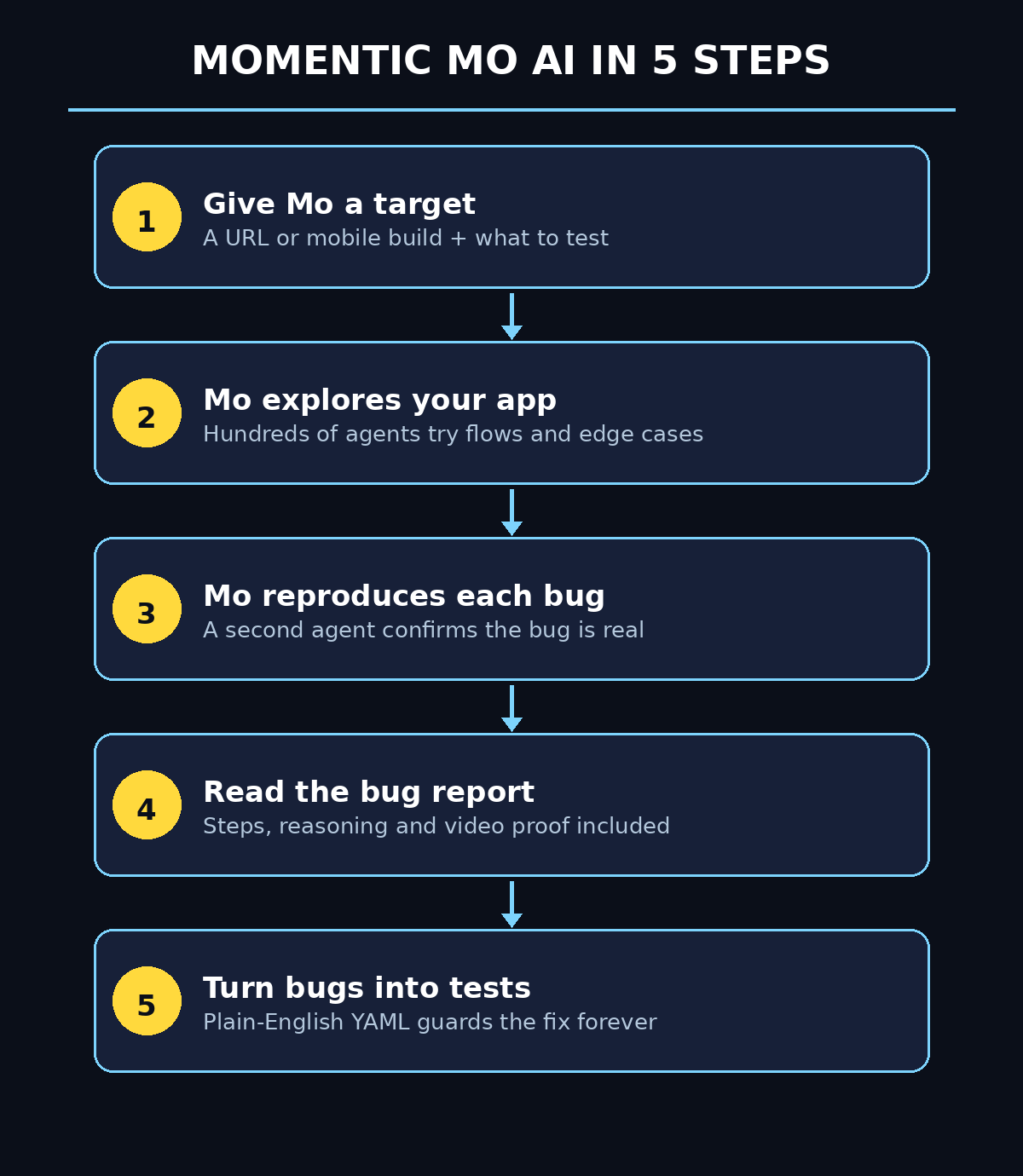
First, you give Mo a target and an objective. That can be a staging URL, a production URL, or a mobile build. You can also attach extra context — a product requirements document, a Linear ticket, or a Confluence page — so Mo understands what the app is supposed to do.
Second, Mo explores. Hundreds of agents fan out across the app, clicking through flows, filling in forms, trying edge cases, and recording every interaction. This is the part that would take a human QA team days.
Third, Mo reproduces. When an agent suspects a bug, a separate agent replays the exact steps to confirm it. Only verified bugs make it into your report.
Fourth, you get the report. For each bug you see what was tested, what failed, step-by-step reproduction instructions, and a video of the failure. From there you can hand the report to your coding agent, fix the bug yourself, or — with regression tests enabled — let Mo write a plain-English Momentic test for each bug and open it as a draft pull request.
How to use Momentic Mo AI tests alongside Mo
The same loop powers Momentic’s plain-English tests. You describe a flow and its expected result in everyday language, Momentic stores it as a YAML file in your repository, and its AI runs it in a real browser. When the UI changes, self-healing locators find the moved element again and propose a fix for you to review, instead of the whole suite going red overnight.
Step 3: Create Your Free Momentic Account
Getting started takes only a few minutes, and the free tier needs no credit card.
- Open momentic.ai and choose “Try for free.” Sign up with your email or a Google account. The free plan includes $50 of usage each month, and Mo draws from that same dollar balance at $1 per $1 of Mo spend.
- Pick your workspace. Give your project a name that matches your repository, so reports stay easy to find later.
- Choose what to test first. A staging environment is ideal for your first run, because Mo will click everything — including buttons that send emails or place orders. If you only have production, make sure you know which flows are safe to exercise.
- Check your usage balance. The dashboard shows your remaining monthly usage. Test steps in the editor are free; hosted browser, device, and voice minutes are billed against the balance, at $0.0125 per test step.
That free $50 covers roughly 4,000 test steps a month, which is enough for a small team to cover sign-up and checkout before every merge. There are no per-seat charges, and Momentic is SOC 2 Type 2 certified on every plan, including Free — useful if you ever need to show a client that your testing tooling meets a security bar.
Step 4: Point Mo at Your App for the First Time
Your first Mo session is the most important one, because it teaches you how to use Momentic Mo AI with a good objective. Keep it small and specific.
- Start with one flow, not the whole app. “Test the checkout flow: add two items to the basket, apply a discount code, and complete the purchase” will give you a far better report than “test everything.”
- Give Mo the context it needs. Attach your PRD or a Linear ticket if the flow has rules Mo cannot guess — for example, which discount codes are valid, or which payment method to use in staging.
- Tell Mo what matters most. If a broken checkout costs you money but a misaligned footer does not, say so in the objective. Mo prioritizes what you flag.
- Let it run. Mo launches its agents and works through the flow. A first session can take a while, because it is exploring permutations a human would never think to try.
While it runs, resist the urge to keep checking every minute. When the session finishes, you will have a report — and that report is where the real learning happens.
Step 5: Read Your First Bug Report Like a Pro
A Mo bug report has four parts, and each one answers a different question.
What was tested. The report lists the flows Mo covered, so you can see at a glance whether it actually reached the screens you care about. If it never reached checkout, your objective or your staging setup needs work.
What failed. Each verified bug gets a plain-language title and a severity sense. Start with the bugs that block a user from completing a task, and ignore cosmetic items until the blockers are fixed.
Reproduction steps. Mo gives you the exact clicks and inputs that trigger the bug, in order. Follow them yourself once. If you can reproduce it in thirty seconds, the bug is real and your developer can fix it without a long back-and-forth.
Video evidence and reasoning. Watch the recording. It shows exactly what Mo saw, including the moment the app misbehaved, and Mo’s reasoning explains why it flagged the behavior. This is the part that turns a vague “something is broken” into a fixable ticket.
Once you know how to use Momentic Mo AI reports, triage becomes a quick daily habit: read every report the same day it arrives. Bugs found by an agent are cheapest to fix while the code is still fresh in your mind, and a report that sits unread for two weeks is just an expensive to-do list.
Step 6: Turn Mo’s Findings Into Plain-English Tests
Finding a bug once is useful. Making sure it never comes back is the real win, and this is where Momentic’s plain-English tests earn their keep.
How to use Momentic Mo AI regression tests
With regression tests enabled for your repository, Mo can write a Momentic test for each bug it finds and open it as a draft pull request. Knowing how to use Momentic Mo AI this way is what turns a one-time bug hunt into permanent coverage. The test is a YAML file that lives in your repo next to the code it verifies, written in sentences a non-developer can read. A checkout test looks something like this in spirit: sign in as the standard user, add two items to the basket, check that the total is correct.
- Review the draft PR before merging. The test should describe the user’s intent, not the exact pixels on screen. If it reads like a robot wrote it, ask Mo to simplify it.
- Keep tests in version control. Because tests are YAML files in your repo, they get reviewed like code, and your coding agent can write or update them through Momentic’s MCP server.
- Let the AI heal broken locators. When a button moves or a label changes, Momentic’s self-healing finds the control again and proposes a fix. Accept the sensible fixes, and reject any that change what the test actually checks.
- Build a small, honest suite. Ten tests that cover sign-up, login, checkout, and payment are worth more than a hundred tests nobody trusts. Add a test every time Mo finds a real bug, and your suite grows exactly where your app is weakest.
Step 7: Run Tests in CI on Every Pull Request
Tests that only run when someone remembers to click a button will be forgotten, which is why learning how to use Momentic Mo AI inside your CI pipeline matters so much. The fix is to wire Momentic into your continuous integration pipeline so tests run automatically.
- Install the CLI in your project. Running npx momentic init creates a Momentic project and connects it to your repository.
- Add the run to your CI job. Momentic connects natively to GitHub Actions, CircleCI, and GitLab Pipelines. Add the test run as a step that executes on every pull request.
- Use the exit code as a gate. The CLI’s exit code can act as a required check before merge or deploy: if a test fails, the pull request cannot merge until someone looks at it.
- Start with a warning, then enforce. For the first week, let failures show up as comments without blocking merges. Once the suite is stable and trusted, make it a required check.
- Watch the usage. Free-plan runs pause at zero balance with no overage, so a runaway suite cannot surprise you with a bill — but it can surprise you by stopping. Check the dashboard weekly until you know your normal burn rate.
For teams that ship with AI coding agents, this step closes the loop beautifully: your agent writes the code, Mo tests the change, and the pull request only merges when both agree the app still works.
Step 8: Connect Mo to Claude Code and Cursor via MCP
Momentic ships an MCP server, which means your coding agent can call Mo directly instead of you copy-pasting reports between tools.
- Connect the MCP server in your agent. Momentic’s MCP server works with Claude Code, Cursor, and other MCP-compatible agents. Once connected, your agent can ask Mo to test a change it just made.
- Let the agent write tests from a diff. After a code change, the agent can generate a Momentic test from the diff, run it, and report the result — all inside the same session where the code was written.
- Hand Mo’s report straight to the agent. Instead of reading a bug report and translating it into a fix ticket, paste the report into your agent session and ask it to fix the bug and re-run the test.
- Keep a human in the loop. The agent can write and run tests, but you should still review new tests and approve any change to what a test asserts. Automation that nobody reviews eventually asserts the wrong thing.
This is also where Mo fits the bigger picture of agentic development: the testers, the coders, and the reviewers are all agents now, and the human’s job shifts from doing the work to directing it and checking it. Teams exploring that shift will find useful context on agentic affairs, and if you need help wiring this kind of automation into a client project, a specialist digital agency can set up the pipeline for you.
Step 9: Stretch the Free $50 Monthly Usage Further
Once you know how to use Momentic Mo AI on the free tier, the $50 goes a long way — but only if you spend it on the tests that matter. A few habits keep the balance healthy all month.
- Test in the editor first — it is free. Steps you run in the web editor cost nothing, so draft and debug your plain-English tests there before spending hosted-run minutes on them.
- Scope Mo sessions tightly. A session aimed at one flow costs far less than a session told to “test everything,” and its report is easier to act on.
- Run the full suite on pull requests, not on every commit. Trigger CI runs on pull requests and on a nightly schedule, rather than on every push to a feature branch.
- Reuse tests instead of re-exploring. Once a flow is covered by a plain-English test, let the test guard it. Save Mo’s autonomous exploration for new features and releases, where the unknowns live.
- Delete or pause stale tests. A test for a feature you removed still burns steps every run. Prune the suite monthly, the same way you prune dead code.
- Remember the caps. Free allows 5 concurrent browsers and 2 Android and 2 iOS sessions, with mobile sessions capped at 15 minutes below Enterprise and results kept for 30 days. Plan long mobile sessions accordingly.
Step 10: Common Mistakes Beginners Make With Mo
Most disappointing first runs come from the same handful of mistakes, and learning how to use Momentic Mo AI the right way means avoiding them from day one. Avoid them and your first report will be dramatically better.
- Vague objectives. “Test my app” gives Mo no priorities. Name the flow, the happy path, and the one or two things that must never break.
- Testing production with live side effects. Mo clicks real buttons. If your production checkout sends real emails or charges real cards, point Mo at staging first.
- Treating every finding as equal. A typo in a footer and a broken payment flow are not the same bug. Triage by user impact, not by the order in the report.
- Never turning findings into tests. If you read Mo’s report, fix the bug, and move on without saving a regression test, the same bug will quietly return in a month.
- Skipping the video. The reproduction steps tell you what happened; the video shows you why it matters. Watch at least the first few seconds of each real bug.
- Expecting Mo to test everything. Mo is built for UI and end-to-end browser testing. It is not a fit for complex backend API logic, database integrity checks, or load testing — use the right tool for those jobs.
Momentic Mo AI vs Traditional Testing Tools
How does Mo compare with the testing approaches most teams already know? The table below lays out the practical differences.
| Approach | Writing tests | Maintenance when UI changes | Bug discovery | Best for |
|---|---|---|---|---|
| Momentic Mo AI | None — plain-English objectives | Self-healing locators propose fixes | Autonomous exploration finds unknown bugs | Small teams with no QA hire |
| Playwright / Selenium | Code in JavaScript, Python, or similar | Manual — selectors break often | Only what you scripted | Teams with test engineers |
| Manual QA testing | Test cases written by hand | Re-written by hand each release | Human intuition, but slow | Exploratory and usability checks |
| Record-and-playback tools | Record clicks in a browser | Re-record when flows change | Only recorded flows | Quick regression of stable flows |
Mo does not replace every other approach — a mature team will still keep scripted tests for critical paths and humans for usability judgment. What Mo replaces is the empty space where testing was supposed to happen but never did, because nobody had time to write the suite.
Frequently Asked Questions
Is Momentic Mo AI really free?
Yes, to start. The free plan costs $0 per month and includes $50 of usage each month with no credit card required. Mo draws from that same balance, and the Scale plan costs $500 per month with $500 of usage if you outgrow the free tier. Free stops at $50 with no top-ups and no overage, so you cannot accidentally run up a bill.
Do I need to know how to code to use Mo?
No. You describe what to test in plain English, and Mo explores the app itself. The plain-English tests it creates are YAML files you can read without coding knowledge. Developers will get more from the CLI, CI, and MCP integrations, but that is the whole point of learning how to use Momentic Mo AI: the core loop — point, test, read the report — needs no code at all.
What kinds of apps can Mo test?
Web apps in hosted browsers, and mobile apps on hosted iOS simulators and Android emulators. You can give Mo a URL or a mobile build, plus extra context like a PRD or a Linear ticket. Mo is strongest on user-facing flows such as sign-up, checkout, and onboarding.
How is Mo different from Momentic’s plain-English tests?
They are two sides of the same platform. Plain-English tests are flows you define and keep as a regression suite. Mo is the autonomous engineer that explores without a script, finds bugs you did not know to look for, and can turn each bug into a plain-English test so it never comes back.
Can Mo test my app if it needs a login?
Yes. Provide test credentials in your objective or setup, and point Mo at a staging environment with a test account. Never give Mo real user credentials or production admin access, and prefer a dedicated test account with realistic but disposable data.
Will Mo replace my QA team?
No — it replaces the testing that was not happening at all. Mo is excellent at broad exploration and regression, but humans are still better at judging whether a flow feels right, whether copy is confusing, and whether a design change helps real users. The best setup is Mo for coverage plus humans for judgment.
Final Thoughts
Momentic Mo AI is one of those tools that quietly removes an excuse. For years, small teams skipped end-to-end testing because writing and maintaining a suite cost more time than the bugs it caught. Mo flips that equation: you describe what matters in plain English, Mo explores your app like a tireless QA engineer, reproduces every bug it finds, and hands you video proof. The free $50 of monthly usage is enough to cover the flows that matter most, and every bug Mo finds can become a permanent plain-English test that guards your app forever.
If you have just learned how to use Momentic Mo AI, start small: pick your most important flow — sign-up or checkout — point Mo at staging, and read the first report the same day it lands. Fix the blockers, save the regression tests, and wire the suite into CI. Within a week you will have testing coverage you never had time to build, and within a month you will wonder how you shipped without it.
Explore More Free AI Tools
Want more free AI tools that save you hours every week? Try the AI Title Generator to craft clickable headlines in seconds, the Meta Description Generator for search-ready snippets, the AI Rewriter to polish rough drafts, and the Keyword Density Checker to keep your pages SEO-friendly. Every tool is free, and every guide on AIToolSteps shows you exactly how to use it.