

How to Use OrgSync AI for Beginners
Every team using AI today has the same quiet problem. One person asks ChatGPT for a marketing plan, another asks Claude to write a product update, and a developer asks Codex to refactor a feature — and all three AIs answer from different memories. Nobody is wrong, but nobody agrees either. Decisions drift, work gets redone, and the team slowly loses trust in its own AI tools. OrgSync AI exists to fix exactly this. Launched on Product Hunt on November 4, 2026, it is a shared “company brain” that gives every teammate’s AI — Claude, ChatGPT, and Codex — the same approved company context, so everyone works from one source of truth.
In this beginner-friendly guide on how to use OrgSync AI, you will learn what OrgSync AI is, how to set it up in under an hour, how to connect it to your favourite AI tools, and how to run your first team review with it. You do not need any coding experience, and you can try it with a free week at orgsync.co. By the end, your whole team will be briefing its AI from the same page — literally.
Step 1: Understand What OrgSync AI Actually Does
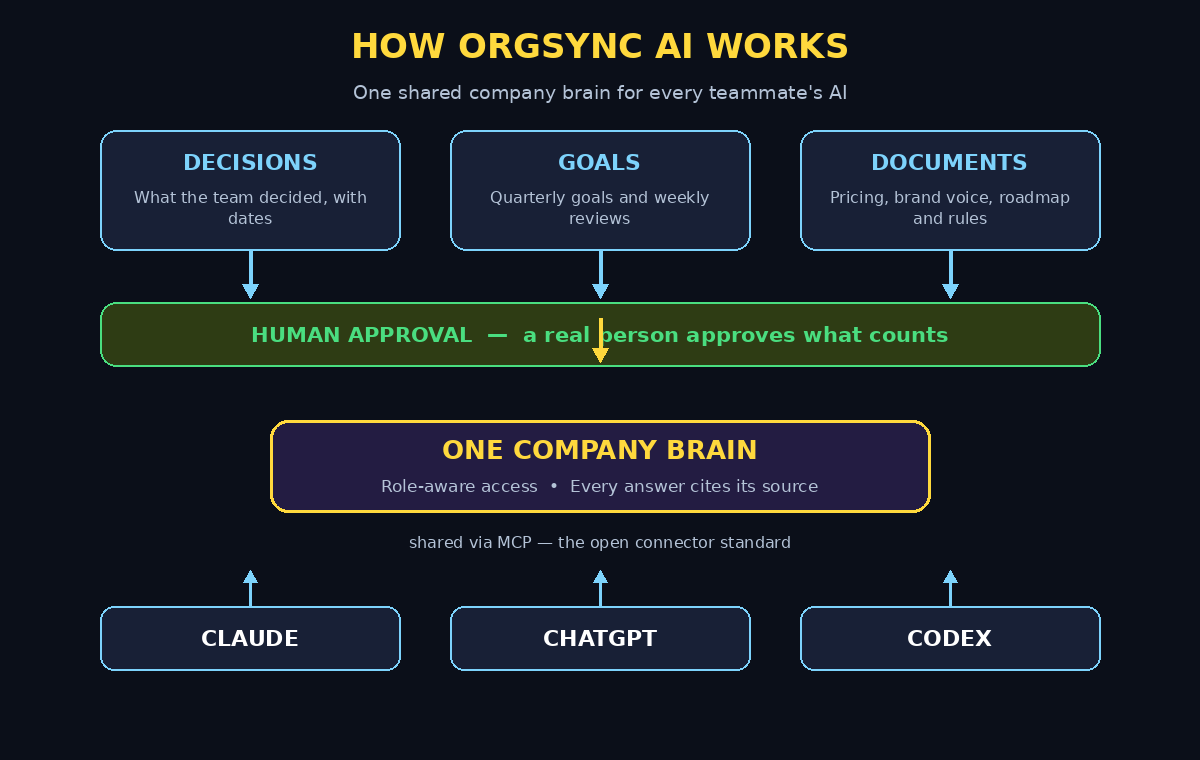
OrgSync is not another chatbot. It is a shared memory layer that sits between your team and your AI tools. Your decisions, goals, and documents go into one place, a real person approves what counts as official, and then every teammate’s AI reads from that approved brain. When anyone asks their AI a question, the answer is grounded in the same facts your whole company agreed on.
Three ideas make it different from a shared Google Doc or a wiki:
- One brain, many AIs: Claude, ChatGPT, and Codex all read the same company context through the MCP standard, so switching tools never means losing context.
- Human approval: AI drafts, a person approves. Nothing becomes “official company knowledge” until a human says so.
- Role-aware access: It only shows people what their role allows. A junior marketer and the finance lead do not see the same slices of the brain — and neither does their AI.
Every answer also comes with citations, so you can trace any AI claim back to the decision or document it came from. That single feature turns AI from a confident guesser into a accountable teammate. If you run a small business or a startup, this is the closest thing to giving every employee the same briefing document — and making sure their AI actually read it. Teams that already work with a digital agency for their AI setup will find OrgSync fits naturally into that stack, because it organises the knowledge those tools consume.
Step 2: Sign Up for the Free Week at orgsync.co — How to Use OrgSync AI
Getting started takes about five minutes. Open your browser and go to orgsync.co, the official OrgSync website linked from its Product Hunt launch page. Click the sign-up button and create your account with your work email — using your company email (not a personal one) matters, because your teammates will join the same workspace later.
OrgSync offers a free week to try the product, which is plenty of time to test the full setup described in this guide. You do not need a credit card to start the trial, and the maker — Kaustubh, a solo builder with 11 years across startups, government, and a Fortune 500 company — is actively asking early users for honest feedback, so expect a product that is still evolving fast.
Once you are inside, you will see a mostly empty workspace. That is normal. The brain starts empty on purpose: you decide what goes in, and nothing is scraped from your tools without your say-so.
Step 3: Add Your First Decisions, Goals, and Documents
Think of the brain as three drawers: decisions, goals, and documents. Start small — five to ten entries is enough for a first test.
- Decisions: Write down real calls your team has made. Example: “We target small e-commerce stores first, not enterprises.” Add the date and who made the call.
- Goals: Add your current quarterly goals in plain language. Example: “Grow the email list to 5,000 subscribers by December.”
- Documents: Upload or paste the handful of docs your team actually quotes — pricing rules, brand voice notes, the product roadmap, or the refund policy.
Keep every entry short and specific. A brain full of vague statements (“we value quality”) helps nobody; a brain full of concrete facts (“refunds are approved within 14 days, no questions asked”) makes every AI answer sharper. This is also the moment to agree, as a team, on who approves new entries — one curator is enough for a small team. Many growing companies pair this kind of shared memory with professional AI automation services when they want the whole workflow, from knowledge capture to agent deployment, handled consistently.
Step 4: Set Roles and Permissions Before Inviting Anyone
Before you invite your team, set up roles. OrgSync’s access control is role-based, which means a person’s role decides what their AI can see — never the model itself. Create the roles that match your team: founder, manager, marketing, sales, developer, support.
For each role, decide which drawers it can read. Marketing probably needs brand voice and pricing, but not salary decisions. Developers need the roadmap and technical decisions, but not the sales pipeline notes. Getting this right early prevents the classic mistake of sharing everything with everyone and then wondering why the AI quoted a confidential decision in a customer email.
Write the roles down in a simple table inside OrgSync itself, so the rules are part of the brain and visible to everyone. Transparency about access builds trust faster than any security page ever will.
Step 5: Invite Your Team and Connect Their AI Tools — How to Use OrgSync AI
Now invite your teammates from the workspace settings. Each person joins with their work email and gets the role you assigned. Then comes the key step: connecting their AI tools to the brain.
OrgSync connects through MCP, the Model Context Protocol — the open standard that Claude, ChatGPT, and Codex all support for custom connectors. In practice, that means each teammate adds OrgSync as a connector inside the AI tool they already use. They do not switch apps, learn a new interface, or copy-paste context into every chat. Once connected, their AI sessions start with the company brain already loaded.
- Claude users: add OrgSync as an MCP connector in Claude’s settings, then confirm the brain appears in the available tools.
- ChatGPT users: connect OrgSync as a custom connector so company knowledge becomes one of its sources.
- Codex users: connect the same MCP server so coding agents read product and strategy context before writing code.
Ask each teammate to test the connection with one question they already know the answer to — for example, “What is our refund policy?” If the AI answers correctly and cites the brain, the connection works.
Step 6: Ask Your First Questions and Check the Citations
With the team connected, start using the brain for real work. Good first questions are the ones your team asks every week: “What did we decide about pricing for annual plans?”, “What is our brand voice for social posts?”, or “What are this quarter’s top three goals?”
Every answer should cite its source — a specific decision, goal, or document in the brain. Click the citation and confirm it points to the right entry. If an answer has no citation, treat it as an ordinary AI guess and do not act on it. If an answer cites the wrong entry, fix the entry, not the AI: the brain is only as good as what you approved.
Keep a short list of questions that returned weak answers during the first week. Those questions are your best clue about which entries are missing, vague, or outdated — and they tell you exactly what to add next.
Step 7: Build the Approve-First Habit Into Your Weekly Routine
The feature that separates OrgSync from a wiki is the approval step, and it only works if it becomes a habit. Set aside 15 minutes each week — Friday afternoon works well — for a short brain review. In that session, the curator (or the team) looks at three things:
- New drafts: anything the AI proposed or a teammate added that is waiting for approval. Approve, edit, or reject each one.
- Outdated entries: decisions that changed. Update the entry and add the new date, so the old version stops being quoted.
- Weekly goals review: OrgSync keeps goals and weekly reviews in the brain, so use the session to check progress against the goals you set in Step 3.
Fifteen minutes a week is enough for a team of five to ten people. Skip the review for a month and the brain quietly goes stale — and a stale brain is worse than no brain, because the AI will quote old decisions with total confidence.
Step 8: Use the Brain for Real Team Workflows — How to Use OrgSync AI
Once the basics are solid, put the brain to work on the jobs that currently eat your team’s time. Three workflows show the value fastest:
- Onboarding: a new hire’s AI already knows the product, the rules, and the goals on day one, instead of the new person spending a week asking colleagues the same questions.
- Drafting with guardrails: ask Claude to draft a customer reply or a proposal, and it follows your pricing rules and brand voice automatically, because those rules are in the brain.
- Decision checks: before a big call, ask ChatGPT to summarise what the company has already decided on the topic. You get the history in seconds, with citations, instead of digging through chat logs.
Pick one workflow, run it for two weeks, and measure something simple: how many times did someone have to ask a colleague for a fact the brain already had? If that number falls, the brain is working.
Step 9: Compare OrgSync With the Alternatives Before You Commit
OrgSync is not the only way to give your AI team memory. Before your free week ends, compare it honestly with the options your team already has, so the decision to keep it (or not) is based on evidence, not enthusiasm.
| Option | Shared across AI tools | Human approval | Role-aware access | Best for |
|---|---|---|---|---|
| OrgSync AI | Yes — Claude, ChatGPT, Codex via MCP | Yes — built in | Yes — by role | Small teams wanting one governed brain |
| Shared docs / wiki | No — AI cannot read it automatically | Manual | Basic folder sharing | Teams happy to copy-paste context |
| ChatGPT company knowledge | ChatGPT only | Partial | Yes | Teams that only use ChatGPT |
| Claude Projects | Claude only | Manual | Project members | Single-project Claude teams |
| Personal AI memory | No — per person | No | No | Solo users, not teams |
OrgSync’s edge is the combination: cross-tool sharing plus approval plus roles in one place. Its weakness is youth — it launched in November 2026, it is built by one person, and some polish and integrations are still coming. If your team lives inside a single AI tool, that tool’s built-in memory may be enough. If your team mixes Claude, ChatGPT, and Codex, OrgSync is the simplest way to keep them all honest.
Step 10: Keep the Brain Fresh and Measure the Payoff
A company brain is a living thing. After the first month, check three numbers once a month: how many approved entries the brain holds, how many questions the team asked it, and how many times an answer was corrected. Growing entries and questions with falling corrections means the brain is getting smarter and more trusted.
Also watch for the failure modes. If two teammates get different answers to the same question, one of their AIs is not connected, or an entry is ambiguous. If the AI keeps quoting an old decision, the review habit slipped. If people stop asking the brain questions, ask them why — usually the answer is that the entry they needed was missing, and adding it takes two minutes.
Finally, remember that OrgSync handles memory, not judgement. It makes sure every AI starts from the same facts; it does not make the decision for you. The approval step, the weekly review, and the citations are what keep the human in charge — and that is exactly the point.
Frequently Asked Questions About OrgSync AI
Is OrgSync AI free?
OrgSync offers a free week to try the product, listed at $0 on its Product Hunt launch page. That trial is enough to set up the brain, connect Claude, ChatGPT, and Codex, and run a full weekly review cycle. Check orgsync.co for current pricing after the trial, because pricing for a young product can change as features are added.
Do I need coding skills to use OrgSync AI?
No. Setting up OrgSync is a no-code process: sign up, add decisions and goals in plain language, assign roles, invite your team, and connect each AI tool as an MCP connector from its settings screen. If you can use ChatGPT, you can set up OrgSync.
Which AI tools work with OrgSync?
OrgSync is built for Claude, ChatGPT, and Codex, connecting to each through the MCP standard. Any other AI client that supports MCP connectors can read the brain too, so you are not locked into one vendor’s ecosystem.
Is my company data safe in OrgSync?
OrgSync uses role-aware access, so each person — and their AI — only sees what their role allows, and every AI answer cites its source. As with any young tool, keep highly sensitive data (passwords, financial details) out of the brain until you have reviewed its security and privacy terms yourself, and start with the decisions and docs your team already shares internally.
What happens if the AI gives a wrong answer from the brain?
Check the citation first. A wrong answer almost always traces back to a missing, vague, or outdated entry — fix the entry, and every AI that reads the brain improves at once. That is the advantage of one shared brain over ten personal memories: you fix the fact once, everywhere.
Can OrgSync replace our wiki or Google Docs?
Not entirely. OrgSync is a memory layer for AI, not a document editor. Keep your long documents where they are, and put the distilled facts — decisions, goals, rules — into the brain. The two work together: docs hold the detail, the brain holds the answers your AI needs in seconds.
Final Thoughts
AI made every individual on your team faster, but it did not make the company faster — because every person’s AI was working from a different memory. OrgSync AI fixes the source of that problem: one shared, human-approved, role-aware company brain that Claude, ChatGPT, and Codex all read from. Set it up in an afternoon, run one weekly review, and watch the small frictions — repeated questions, conflicting drafts, decisions nobody remembers — start to disappear. Try the free week at orgsync.co, start with five decisions and three goals, and let your team’s AI finally work from the same page you do.
Explore More Free AI Tools
Want more beginner-friendly AI guides? Try the AI Title Generator, Meta Description Generator, AI Rewriter, and Keyword Density Checker — all free at aitoolsteps.com. And if you want more step-by-step AI tool tutorials like this one, explore the rest of the AI How-To Guides on AI Tool Steps.