

One AI model will agree with almost anything you say. Ask it to check its own plan and it mostly nods along, because a single model has one set of blind spots and no real reason to argue with itself. That is exactly the problem Pressure AI solves. Launched on Product Hunt on November 4, 2026, Pressure puts two AI models from different labs in one room and makes them argue your question out — then hands you a pinned summary with the positions, the concessions, the conclusion, and what is still unresolved.
The idea is simple and surprisingly powerful: the second opinion worth having comes from a model trained by a different lab, with different blind spots. On the web you can watch Gemini and Grok debate a topic with no account at all — just type a question at pressure.dev and the debate starts. The free plan includes 50 rooms a month, which is more than enough for daily decisions, and a Pro plan at $14.99 a month unlocks every hosted model.
This beginner-friendly guide shows you how to use Pressure AI step by step: how to start your first debate in under a minute, how to pick the right room type for decisions, spec reviews, and research, how to write questions that produce genuinely useful arguments, and how to bring Pressure into Claude Code, Codex, or Claude as a connector. By the end, you will know how to use Pressure AI to pressure-test any idea before you commit to it.
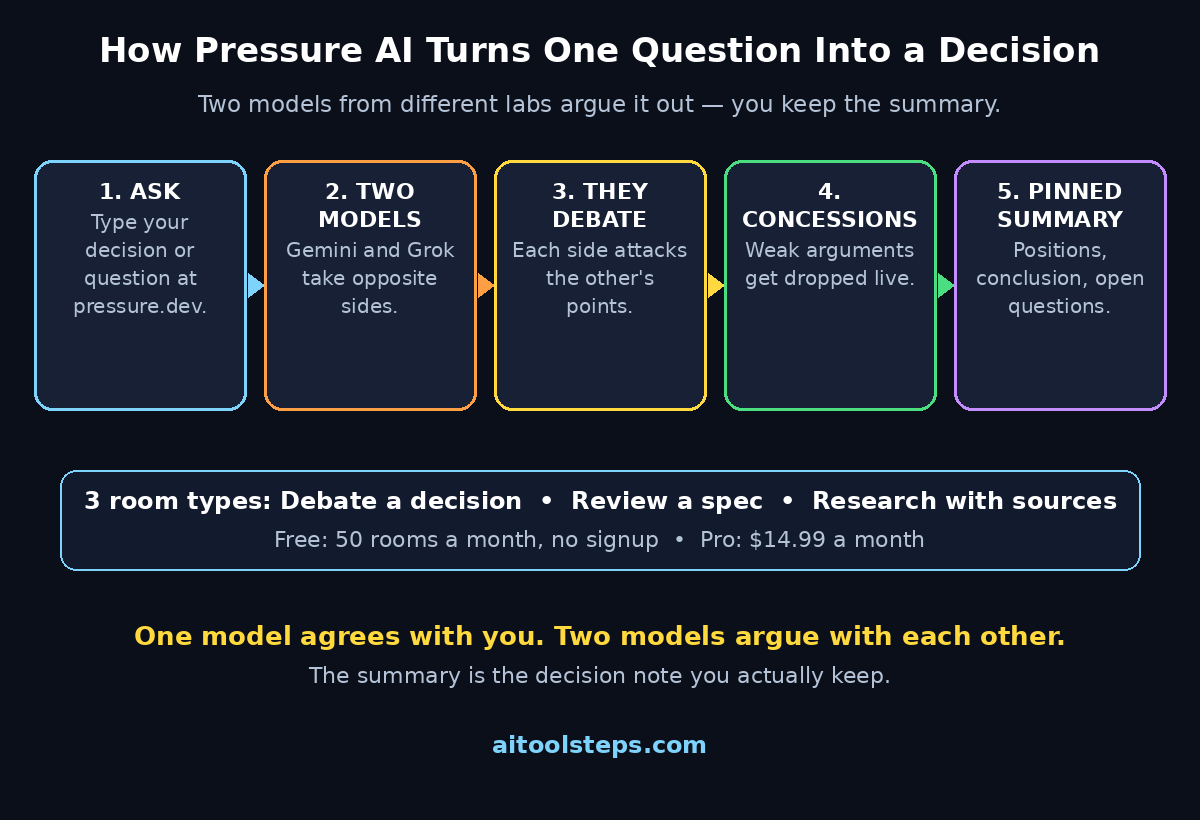
Step 1: Open Pressure AI and Start a Room With No Signup
The fastest way to learn how to use Pressure AI is to skip the account entirely. Open your browser and go to pressure.dev. There is no download, no install, and no signup form standing between you and your first debate.
- Type your question in the box on the homepage. It can be a decision, a claim, or a rough idea — for example, “Should my small business switch from spreadsheets to a CRM?”
- Press enter and Pressure creates a room. Two models — by default Gemini and Grok — take opposite sides and start arguing.
- Watch the exchange live. Each model reads the other side’s points, pushes back, and adjusts its position when the other side lands a good argument.
- When the debate ends, scroll to the pinned summary at the end of the room. This is the part you actually keep: the positions each side took, what each side conceded, the conclusion they reached, and the questions that are still open.
That is the whole first-run experience. You do not need to understand anything about agents, APIs, or model configuration to get value from Pressure AI in your first minute.
Step 2: Pick the Right Room Type for Your Goal — How to Use Pressure AI
Pressure offers three room types, and choosing the right one matters more than writing a clever question. Each room type changes what the two models do with your input.
- Debate: Two models argue a decision and land on a call, along with the conditions that would change it. Use this when you are torn between two options and want a real argument, not a polite list of pros and cons.
- Review: An adversarial reviewer works through your spec or PRD until it holds up. Use this when you have a plan, a document, or a product requirements document and want someone to attack it before your users do.
- Research: Two agents search the web on their own, compare sources, and agree on an answer. Use this when you need a cited, checked answer instead of one model’s confident guess.
If you are not sure which to pick, start with Debate. It is the most general room type, and it teaches you how the two-model dynamic works. Once you have seen a debate, the Review and Research rooms will feel obvious.
Step 3: Write a Question Both Sides Can Actually Argue
A debate is only as good as the question that starts it. Vague questions produce vague debates, while a well-framed question forces both models to commit to real positions.
- Name the decision, not the topic. “Should I launch my online course on Teachable or Gumroad?” beats “Tell me about online course platforms” every time.
- Add your constraints. Mention your budget, your audience, and your timeline. “I have $200 a month and 5 hours a week” changes the answer completely.
- Give both sides something to defend. A question with an obvious answer produces a boring debate. Frame it so a smart person could reasonably disagree.
- Include the stakes. Tell the models what happens if you choose wrong. Higher stakes produce sharper arguments and more honest concessions.
Here is a good example: “I run a small digital agency with three people. Should we spend $500 a month on paid ads or invest the same money in publishing two SEO articles a week? Our goal is 10 new clients in six months.” That question has a real decision, real constraints, and real stakes — exactly what Pressure is built for.
Step 4: Let Gemini and Grok Argue It Out
Once your question is in, the two models take over. By default, the web experience pairs Gemini with Grok, two models from different labs with genuinely different training and tendencies. That difference is the whole point: when one model leans on a fashionable answer, the other is likely to push back.
- Watch for the turns, not just the verdict. The most useful moments in a Pressure debate are the concessions — the points where one model admits the other side has a case.
- Notice what each side ignores. If one model never answers the other side’s strongest point, that silence is information too.
- Do not interrupt the debate. Let both models finish their rounds. A debate cut short in round one usually ends with both sides repeating their opening lines.
- Compare the reasoning, not the confidence. Both models will sound confident. The pinned summary at the end is where the real reasoning is distilled.
Think of the debate like a meeting between two consultants who genuinely disagree. You would not hire the one who agrees with you fastest — you would hire the one whose argument survives contact with the other side.
Step 5: Read the Pinned Summary and Act on It — How to Use Pressure AI
Every Pressure room ends with a pinned summary, and this is the feature that turns an entertaining debate into a usable work product. The summary captures four things:
- The positions: what each side argued, in plain language.
- The concessions: what each side gave up during the debate.
- The conclusion: the call the room landed on, if it landed on one.
- What is still unresolved: the open questions the debate could not settle.
Use the summary as your decision note. Copy it into your notes, share it with your team, or paste it into the document where the decision lives. If the summary says the question is still unresolved, that is a useful answer in itself — it tells you what evidence you still need before deciding.
For teams, this is where Pressure earns its keep. A decision reviewed by a digital agency such as D365A often goes through the same kind of adversarial check: one person defends the plan, another attacks it, and the surviving plan is stronger. Pressure gives a solo founder or a small team that same dynamic on demand, without booking a meeting.
Step 6: Use Debate Mode for Big Decisions
Debate mode is Pressure’s home turf. It shines on the decisions that keep you up at night: pricing changes, platform switches, hiring, and strategy bets.
- Pricing decisions: “Should I raise my freelance rate from $50 to $80 an hour?” Let the models argue about client loss, positioning, and perceived value.
- Platform decisions: “Should I move my store from Etsy to Shopify?” The debate will surface migration costs, fees, and control trade-offs you had not priced in.
- Strategy decisions: “Should our startup chase enterprise clients or stay with small businesses?” Two models arguing this will expose the hidden assumptions in your plan.
- Personal decisions: “Should I learn Python or JavaScript first for AI automation?” Even career questions get a sharper answer when two models disagree about it.
The best Debate questions end with a condition: the conclusion should name what would change the call. “Choose option A, unless your budget drops below X” is a far more useful output than a flat recommendation.
Step 7: Use Review Mode to Pressure-Test a Spec or PRD
Review mode is the most underrated room type in Pressure AI. Instead of debating a question, you paste in a spec, a PRD, or a plan, and an adversarial reviewer works through it until it holds up.
- Paste your spec or PRD into the room. The reviewer will attack unclear requirements, missing edge cases, and assumptions you never wrote down.
- Ask it to find the holes. A good prompt is: “Review this spec like a senior engineer who has to build it. List every ambiguity, contradiction, and missing requirement.”
- Iterate on the feedback. Fix the issues the reviewer found, paste the revised spec back, and run the review again. Two or three rounds usually catch most of the problems.
- Use it before you hand work to anyone. A reviewed spec saves more time than a reviewed debate. Developers, designers, and AI automation services such as Agentic Affairs all work faster when the spec they receive has already survived an adversarial review.
If you write product specs, marketing plans, or project proposals, Review mode alone is worth the free 50 rooms a month. It is like having a ruthless editor who never gets tired and never worries about hurting your feelings.
Step 8: Use Research Mode for Answers With Cited Sources — How to Use Pressure AI
Single-model research has a known weakness: the model can sound certain about a fact it invented. Research mode attacks that weakness directly, because two agents search the web independently, compare the sources they found, and have to agree on an answer.
- Ask for facts, not opinions. Research mode is best for questions with verifiable answers: pricing, launch dates, feature comparisons, and regulations.
- Demand sources in your prompt. Ask the agents to cite where each fact came from, so you can click through and check.
- Watch for source disagreements. When the two agents find different sources that disagree, the summary will flag it — and that disagreement is often the most important thing in the room.
- Use it for competitor research. “What are the current prices and free-plan limits of the top five AI video generators?” is a perfect Research room, because the answer changes monthly and a single model will happily quote last year’s prices.
Research mode will not replace your own judgment, but it is a much stronger starting point than a single chatbot answer, because every claim has survived at least one challenge from a second agent.
Step 9: Bring Pressure Into Claude Code, Codex, or Claude
The web experience is the easy on-ramp, but Pressure is built to live inside your coding tools too. If you already work in Claude Code or Codex, you can add Pressure with a single command.
- Claude Code or Codex install: Run
curl -fsSL https://pressure.dev/install.sh | shin your terminal. That one line installs Pressure so your agent can call a debate or a review from inside your workflow. - Claude as a connector: On claude.ai, add Pressure as a connector, and Claude plays one side of the debate. This is useful when you want your main assistant to defend a plan while a second model attacks it.
- Use it from your agent’s workflow: Once installed, your coding agent can spin up a review room on a spec or a debate room on an architecture decision without you leaving the terminal.
- Keep the free tier in mind: The free plan includes 50 rooms a month. If your agent starts debates automatically, check your usage so a busy week of automated reviews does not eat the whole allowance.
For beginners, the web version is enough. Move to the CLI install only when you find yourself copying Pressure summaries into your coding workflow every day — that is the sign the integration will actually save you time.
Step 10: Understand the Free Plan, Pro, and Pay-Per-Room Options
Pressure’s pricing is refreshingly simple, and the free tier is genuinely usable rather than a demo.
- Free: 50 rooms a month, no account needed on the web, with the hosted models Pressure provides. For most beginners, this is all you will ever need.
- Pro: $14.99 a month, unlocking every hosted model. Upgrade only when you want to pick specific models for each side of the debate — for example, pitting Claude against GPT on a question where the model choice matters.
- Pay per room (MPP): Your agent can pay for debates on its own — $1 in USDC or OUSD per room, from its own wallet, with no Pressure account needed. This is designed for autonomous agents that need a second opinion mid-task.
- Start free, upgrade on evidence: Use the free 50 rooms for a month. If you hit the limit before the month ends, that is your signal to go Pro. If you never hit it, you have lost nothing.
The no-signup free tier is the smartest thing about Pressure. Most AI tools ask for your email before showing you anything useful. Pressure lets you watch two frontier models argue your question first, and only then asks whether you want more.
Pressure AI vs a Single Chatbot: A Quick Comparison
| Feature | Pressure AI | A Single Chatbot | Asking a Colleague |
|---|---|---|---|
| Second opinion | Built in — two models from different labs | No — one model checks itself | Yes, if they disagree with you |
| Adversarial review | Dedicated Review rooms for specs and PRDs | Only if you prompt it to argue | Depends on their honesty |
| Cited research | Two agents compare sources | Single search, single source set | Rarely cites anything |
| Cost to start | Free, no signup, 50 rooms a month | Free with an account | Free, but costs their time |
| Written summary | Pinned summary with positions and concessions | You must write your own notes | You must write your own notes |
| Available at 2 a.m. | Yes, always | Yes, always | Unlikely |
| Best for | Decisions, spec reviews, checked research | Quick answers and drafting | Office politics and context |
The comparison makes the trade-off clear. A single chatbot is faster for simple questions, and a colleague understands your context better. But for a decision where being wrong is expensive, Pressure’s two-model debate is the strongest cheap check available to a beginner.
Frequently Asked Questions About Pressure AI
Is Pressure AI really free?
Yes. The free plan includes 50 rooms a month, and you can try it on the web at pressure.dev with no account and no credit card. The Pro plan costs $14.99 a month and unlocks every hosted model. There is also a pay-per-room option where an agent pays $1 in USDC or OUSD per room from its own wallet.
Do I need an account to use Pressure AI?
No. The web experience works with no signup — just type a question at pressure.dev and Gemini and Grok start debating. You will need an account only if you want to keep a history of your rooms or use the Pro plan.
Which AI models debate in Pressure?
On the web, the default pairing is Gemini and Grok — two models from different labs, which is the point. The Pro plan unlocks every hosted model, so you can choose which models argue each side. With the CLI install, your agent can also bring Pressure into Claude Code or Codex.
Can Pressure AI review my product spec or PRD?
Yes, that is what Review mode is for. Paste your spec or PRD into a Review room and the adversarial reviewer will work through it, flagging ambiguities, contradictions, and missing requirements until the document holds up. Run two or three rounds for the best results.
Is my data private in Pressure AI?
Pressure is a hosted web service, so anything you type into a room is sent to Pressure’s servers and to the models debating it. Do not paste passwords, private customer data, or confidential business information into a debate. For sensitive decisions, describe the situation in general terms instead of pasting the raw documents.
Can I use Pressure AI inside Claude Code?
Yes. Install it with one command — curl -fsSL https://pressure.dev/install.sh | sh — and your Claude Code or Codex agent can open debate and review rooms from the terminal. On claude.ai, you can also add Pressure as a connector so Claude plays one side of the debate.
Final Thoughts
Pressure AI fixes a real weakness in how most of us use AI: we ask one model a question, it answers confidently, and we move on. That workflow is fast, but it has no immune system. A single model cannot catch its own blind spots, and asking it to double-check its own work mostly produces a polite agreement with itself.
Pressure adds the missing piece by putting two models from different labs in the same room and making them argue. The debate is entertaining, but the pinned summary is the real product — a short, honest record of what each side argued, what each side conceded, and what is still open. For big decisions, spec reviews, and research that needs checking, that summary is worth more than a dozen confident single-model answers.
Start with the free tier. Open pressure.dev, type one real decision you are facing this week, and watch Gemini and Grok argue it out. If the summary changes your mind — or sharpens a decision you were already going to make — you will understand in one room why a second opinion from a different lab is worth having.
Explore More Free AI Tools
Want to keep exploring? Try our free tools on AIToolSteps: the AI Title Generator for headlines that earn clicks, the Meta Description Generator for search snippets that get opened, the AI Rewriter for polishing rough drafts, and the Keyword Density Checker to keep your SEO on target — all free, right here on aitoolsteps.com.