

Google is no longer the only place people find answers. Millions of people now ask ChatGPT, Gemini and Perplexity first — and those AI systems answer with a short list of brands they trust, often without ever showing a link to your website. If your brand never appears in those answers, you are invisible to a growing share of your audience, even if your Google ranking is fine. That is the problem Rankfender AI is built to solve. Rankfender v3.0, launched on Product Hunt on November 5, 2026, calls itself “the SEO/GEO operating system, built for people and AI agents” — one dashboard that tracks how often AI systems mention your brand, explains what to fix, and helps you create content those systems actually want to cite. In this beginner guide, you will learn how to use Rankfender AI from your first free trial to your first citation report, with no technical skills and no credit card.
Step 1: What Is Rankfender AI and What Is GEO?
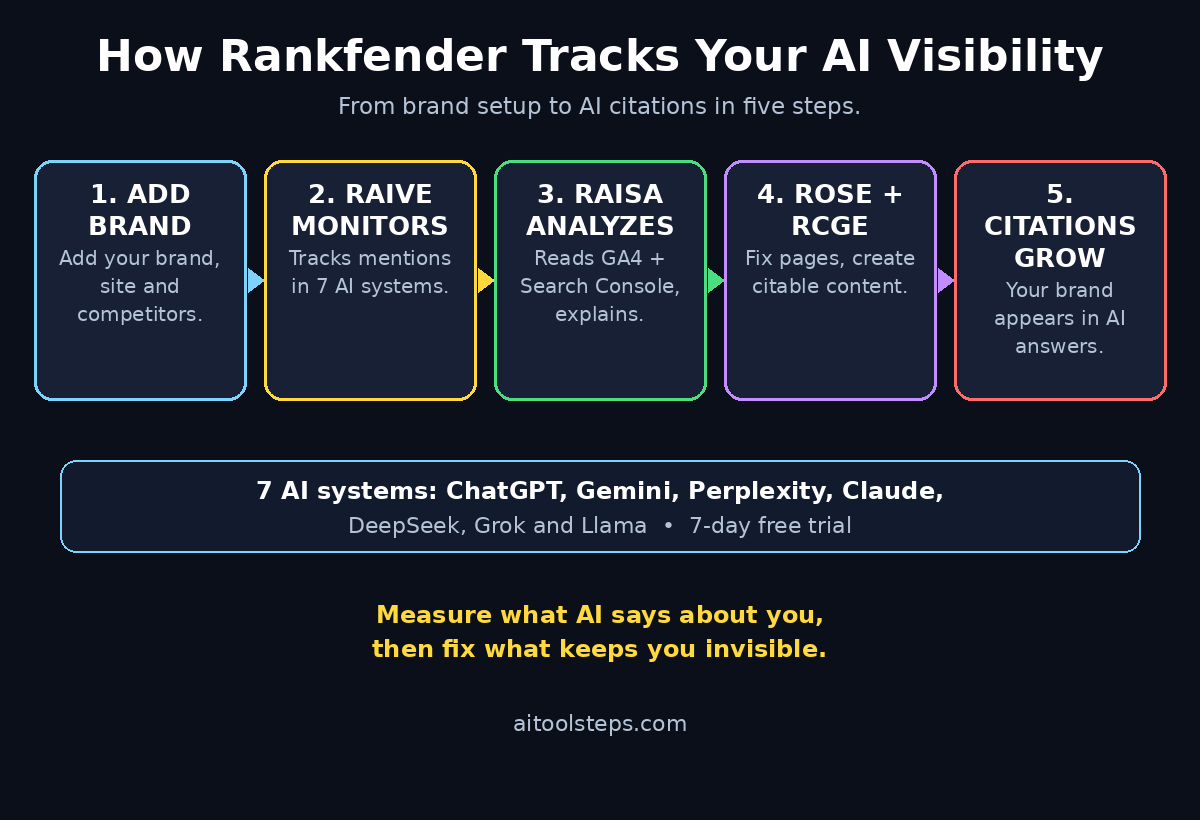
Rankfender is an AI visibility platform founded in France in 2024. Its job is simple to describe: it watches what AI systems say about your brand. Its core engine, called RAIVE (Rankfender AI Visibility Engine), tracks your brand’s mentions and citations across seven AI systems — ChatGPT, Gemini, Perplexity, Claude, DeepSeek, Grok and Llama — and turns that into a visibility score you can follow over time.
The idea behind it has a name: GEO, or Generative Engine Optimization. Traditional SEO helps you rank on Google. GEO helps you get cited inside AI-generated answers. The two are related but not identical. Google itself said in May 2026 that GEO is “still SEO” — good content, good structure, good authority — while Bing took the opposite view, adding GEO to its official guidelines and building a dashboard inside Bing Webmaster Tools to track Copilot citations. Both search engines agree on one thing: AI answers are now a real source of traffic and trust.
Rankfender is built around five tools that work together. RAIVE monitors your AI citations. RAISA is an AI agent that connects to your Google Analytics 4 and Google Search Console, reads your data constantly and tells you what to do next. ROSE fixes on-page content and metadata. RCGE generates content designed to earn citations. RASE optimizes your app store presence, and Ranklink (Backlinks Intelligence) shows which of your backlinks actually drive AI citations. You do not need to use all five on day one — this guide starts with the two that matter most to a beginner: RAIVE and RAISA.
Step 2: Create Your Free Rankfender Account
Rankfender offers a 7-day free trial with full access to all features, and no credit card is required to start. That makes it a genuinely free way to test whether AI visibility tracking is useful for your site before you spend anything. Paid plans start at $89 per month per user, so the trial is the right place to learn the tool.
Here is how to sign up:
- Go to rankfender.com and click the sign-up or start-free-trial button.
- Create your account with your work email. Use the same email you use for your website or business so your reports stay easy to find later.
- Confirm your email if Rankfender sends a verification message, then sign in to the dashboard.
Your first screen will look empty — that is normal. Rankfender has nothing to track until you tell it which brand and website to watch, which is exactly what the next step does. Take a minute to look around the dashboard first: find the visibility score panel, the AI systems list and the content section, so you know where everything lives before your data arrives.
Step 3: Add Your Brand and Website
This is the most important setup step, because everything Rankfender reports depends on it. Add your brand the way customers actually talk about it, not just your legal company name.
- In the dashboard, add a new brand or project and type your brand name exactly as people search for it. If your site is aitoolsteps.com, add “AI Tool Steps” as the brand name.
- Add your website URL and, if asked, your main competitors. Rankfender compares your visibility against theirs, so pick two or three sites your audience would genuinely compare you with.
- Add the products, services or topics you want to be known for. For a blog, these are your main categories — for example, “AI image generators”, “AI writing tools” and “free AI tools”.
Be specific here. A brand tracked as “AI tools” will drown in noise; a brand tracked with its real name plus its real topics gives you clean, usable data. Rankfender will now start asking the seven AI systems about your brand across a set of prompts, and your first visibility report usually appears within a few hours.
Step 4: Read Your First AI Visibility Score
Your AI visibility score is the single number to watch. It summarizes how often, and how prominently, AI systems mention or recommend your brand when people ask questions related to your topics.
When your first report lands, do three things:
- Check the overall score first, then the breakdown by AI system. You will often find that ChatGPT mentions you while Perplexity does not, or the other way around. That gap is useful — it tells you where to focus.
- Look at the share-of-voice view, which shows your visibility next to your competitors. If a competitor appears in twice as many AI answers as you, open their most-cited pages and note what they do differently.
- Read the actual answers Rankfender captured. Do not just look at the number — read the sentences where your brand appears. Are you mentioned as a recommendation, a passing example, or not at all? The wording matters more than the count.
Treat this first score as your baseline, not a verdict. A low score on day one is normal for a small site. What matters is the direction it moves over the next few weeks as you apply the fixes in the steps below.
Step 5: Check Where ChatGPT, Gemini and Perplexity Mention You
RAIVE tracks seven AI systems, but for most beginners three do the heavy lifting: ChatGPT, Gemini and Perplexity. Each one behaves differently, and Rankfender shows you the difference.
- ChatGPT answers are conversational and often name a short list of recommended tools. If you appear here, you are usually named as a suggestion, which is high-value visibility.
- Gemini is closely tied to Google, so your Google ranking and your Gemini visibility often move together. Improving one tends to help the other.
- Perplexity cites sources directly, with links. A Perplexity citation is the closest thing to a classic search click in the AI world, because readers can follow the link to your site.
In the Rankfender dashboard, filter your citation report by AI system and by topic. Note which topics already earn you citations and which ones never mention you. The topics where you are absent are your content gaps — and they become your writing list for the next month. If you run a small business site, this same check shows you whether AI systems recommend your competitors for the exact services you offer, which is the kind of insight that used to cost an agency fee. A digital agency that tracks these mentions can spot the gap in an afternoon and plan content around it, instead of guessing for months.
Step 6: Connect Google Analytics and Search Console
This is where Rankfender stops being a tracker and starts acting like an assistant. RAISA, Rankfender’s AI agent, connects to your Google Analytics 4 and Google Search Console accounts and reads your data constantly. It then explains what the numbers mean and suggests what to do next.
Connect both accounts from the integrations or settings area of the dashboard. The connection is read-only — Rankfender reads your traffic and search data, it does not change anything on your site. Once connected, give it a day to pull your history, then look for three things:
- Pages that already get impressions in Google but few clicks. These are your quickest wins: small title and description fixes can turn them into real traffic.
- Queries where you rank on page two. AI systems lean on pages Google already trusts, so a page-two result is often one good update away from being cited.
- Topics where you get traffic but zero AI citations. These pages need the citation-friendly structure covered in Step 8.
If you do not have Google Analytics or Search Console set up yet, set those up first — they are free, and every serious SEO or GEO tool, Rankfender included, depends on them. This is also the step where many beginners realize their best content is not the content AI systems cite, and that mismatch is exactly what the next two steps fix.
Step 7: Fix On-Page Issues with ROSE
ROSE is Rankfender’s on-page optimizer. It scans your site and checks whether each page is structured in a way AI systems can easily read and quote. AI models prefer pages with clear headings, direct answers, short paragraphs and clean metadata — the same things that help human readers, but stricter.
Run a ROSE scan on your most important pages and work through its fixes in this order:
- Missing or weak meta titles and descriptions. Every page needs a unique title under 60 characters and a description under 160 characters that says what the page actually does.
- Unclear headings. Each page should answer its main question in the first two paragraphs, with headings that read like questions a real person would ask.
- Thin or unfocused content. A page that tries to cover five topics will be cited for none of them. Split it or sharpen it to one clear topic per page.
- Missing FAQ sections. AI systems love question-and-answer formats, because their users ask questions. A short FAQ at the end of a guide is one of the easiest citation wins there is.
Fix one batch of pages, then wait a week and check your visibility score again. On-page fixes are the cheapest improvements in GEO, and they compound: a page that is easier to read is easier to cite, and a cited page earns more authority for the next one.
Step 8: Generate Citation-Friendly Content with RCGE
RCGE is Rankfender’s content generator, and it is built for a specific job: creating articles and FAQ content that AI systems want to cite. It uses an eight-stage pipeline that drafts, structures and optimizes content for both Google rankings and AI citations, and it can publish directly to WordPress, Shopify and Wix.
You do not have to let it write everything for you. The beginner-friendly way to use it is as a drafting partner:
- Pick one content gap from Step 5 — a topic where competitors get cited and you do not.
- Let RCGE draft the structure: the headings, the key questions and the FAQ block.
- Rewrite the draft in your own voice, add your own examples, screenshots and experience, and check every fact before publishing. AI-generated content that you have genuinely improved beats untouched AI output every time, for readers and for citations.
- Publish the finished article on your site and tell Rankfender to track it, so you can see whether it earns citations over the next few weeks.
One honest warning: up to 90% of new web content is now AI-generated, according to Rankfender’s own research, so generic AI text no longer stands out. The articles that earn citations are the ones with real detail — exact steps, real numbers, honest comparisons. Use RCGE to move faster, not to think less. For a small team, pairing a tool like this with professional AI automation services can turn a one-person blog into a publishing operation that still sounds human.
Step 9: Build Backlinks That Actually Drive AI Citations
Backlinks are not dead — they changed. A Semrush study of 1,000 domains found that authority score correlated with AI mentions at a Pearson value of 0.65, which is a strong relationship. But the old game of collecting as many links as possible is over. What matters now is whether a link comes from a site AI systems consider reliable, and whether it sits in a listicle or brand mention that AI answers actually quote.
Rankfender’s Backlinks Intelligence connects your link profile directly to your AI citation data, so you can see which links actually move the needle instead of guessing. Use it this way:
- Open the backlinks report and sort by citation impact, not by domain authority alone.
- Note which kinds of links correlate with citations for you: listicle placements, brand mentions, guest posts, directory listings.
- Put your outreach effort into more of what works. One mention in a respected “best AI tools” listicle is worth more than ten low-quality directory links.
- Check your competitors’ citation-driving links too. If a listicle cites them and not you, that is a concrete outreach target.
This step is slow, and that is fine. Two or three strong, citation-driving links per month will do more for your AI visibility than a hundred weak ones, and Rankfender will show you the proof in your own data.
Step 10: Track Progress Week by Week and Know When to Upgrade
GEO is a weekly habit, not a one-time setup. Your 7-day free trial is long enough to learn the tool, but real movement takes three to four weeks of fixes and new content, so plan your routine now.
- Every Monday, open your visibility score and note the number, the share of voice and any new citations.
- Every week, fix one batch of ROSE issues and publish or update one citation-friendly article.
- Every month, review which AI systems mention you most, which topics are still gaps, and which backlinks drove citations.
When the trial ends, decide with data, not feelings. Upgrade to the paid plan, which starts at $89 per month per user, if your score is moving up, if you can point to pages that improved after ROSE fixes, or if you run a business where being recommended by ChatGPT is worth real money. Stay on the free trial’s lessons and revisit later if your site is still tiny and your score has not moved — the fixes in this guide work whether or not you keep paying for the tracker. Either way, keep measuring: what gets measured gets improved, and in 2026 the thing worth measuring is not just your Google rank, but what AI systems say about you when you are not in the room.
Rankfender AI vs Traditional SEO Tools
| Feature | Rankfender AI | Traditional SEO tools (Semrush, Ahrefs) | Manual checking |
|---|---|---|---|
| AI citation tracking | Yes — 7 AI systems | Limited or none | Ask each chatbot yourself |
| Google ranking data | Yes, via Search Console | Yes, deep keyword data | Search Console only |
| AI agent that explains data | Yes — RAISA | Mostly raw reports | None |
| Citation-ready content generation | Yes — RCGE | Some AI writing add-ons | You write everything |
| Backlink-to-citation link | Yes — Backlinks Intelligence | Backlink counts only | None |
| Free trial | 7 days, no credit card | Usually 7–14 days, card often required | Free but very slow |
| Best for | Brands that want AI visibility | Deep keyword and competitor research | Tiny sites on zero budget |
Frequently Asked Questions
Is Rankfender AI free?
Rankfender offers a 7-day free trial with full access to every feature, and no credit card is required to start. After the trial, paid plans start at $89 per month per user. The trial is genuinely useful — you can connect your site, see your first visibility score and run your first ROSE scan without paying anything.
What is GEO and how is it different from SEO?
GEO stands for Generative Engine Optimization. SEO helps you rank in Google’s list of links. GEO helps you get cited inside answers generated by ChatGPT, Gemini, Perplexity and other AI systems. The foundations overlap — good content, clear structure and real authority help both — but GEO adds a new measurement: how often AI systems mention your brand at all.
How is Rankfender different from Semrush or Ahrefs?
Semrush and Ahrefs are deeper for classic keyword research and backlink analysis. Rankfender’s difference is that it tracks AI citations across seven AI systems, connects those citations to your backlinks, and uses an AI agent (RAISA) to explain your data and suggest actions. Many teams use both: a traditional tool for keywords and Rankfender for AI visibility.
Do I need technical skills to use Rankfender?
No. Signing up, adding your brand and connecting Google Analytics and Search Console are all guided clicks — no code, no developer needed. The dashboard explains its scores in plain language, and RAISA’s job is to translate your data into simple next steps.
Does Rankfender work for small blogs and new websites?
Yes, and small sites often benefit most, because the first report shows exactly where the gaps are. A new site will start with a low visibility score, which is normal. The value is in watching the score climb as you fix on-page issues and publish citation-friendly content. If your site is brand new, focus on Steps 7 and 8 first and let the tracking catch up.
Can Rankfender improve my Google ranking too?
Indirectly, yes. The same fixes that help AI citations — clear titles, direct answers, FAQ sections, strong backlinks — are also good for Google. Rankfender reads your Search Console data, so improvements in either channel show up in the same dashboard, and you can see which pages benefit in both places at once.
Final Thoughts
AI answers are now a front door to your brand, and you cannot improve what you do not measure. Rankfender v3.0 gives beginners a practical way to see that front door: a free trial, a visibility score across seven AI systems, an agent that explains your own data, and tools that fix your pages and draft citation-friendly content. Start with the trial, add your brand, read your baseline score, and spend the next month fixing on-page issues and publishing one strong article per gap. Small sites will not top the visibility charts overnight, but a score that climbs a little every week is the most honest signal in modern SEO — it means real people, asking real questions, are finally hearing your name from the AI systems they trust.
Explore More Free AI Tools
Want to keep building your AI toolkit? Try these free tools on AIToolSteps: the AI Title Generator for headlines that earn clicks, the Meta Description Generator for search snippets under 160 characters, the AI Rewriter for polishing rough drafts, and the Keyword Density Checker for keeping your focus keyphrase at the right level. Each one is free, takes less than a minute, and pairs perfectly with the Rankfender workflow in this guide — generate the title, check the density, then publish and watch your AI visibility score move.