

Most AI assistants work alone with one person. You ask a question, you get an answer, and the conversation ends there. Teamily AI is built on a different idea: what if your AI agent could work side by side with your real team, in the same chat, with the same shared memory?
Teamily AI launched on Product Hunt on November 3, 2026, where it quickly climbed to the number 2 product of the day. It describes itself as “your personal agent, agent teams and people in one messenger” — an AI-native messenger where humans and always-on AI agents get work done together. It is free to get started, and you do not need any technical skills to use it.
This beginner-friendly guide walks you through everything: creating your free account, meeting your personal agent, connecting your docs and calendar, building your first agent team, and automating the office work that eats your day. By the end, you will know exactly how Teamily AI works and whether it fits the way you and your team actually work.
What Is Teamily AI?
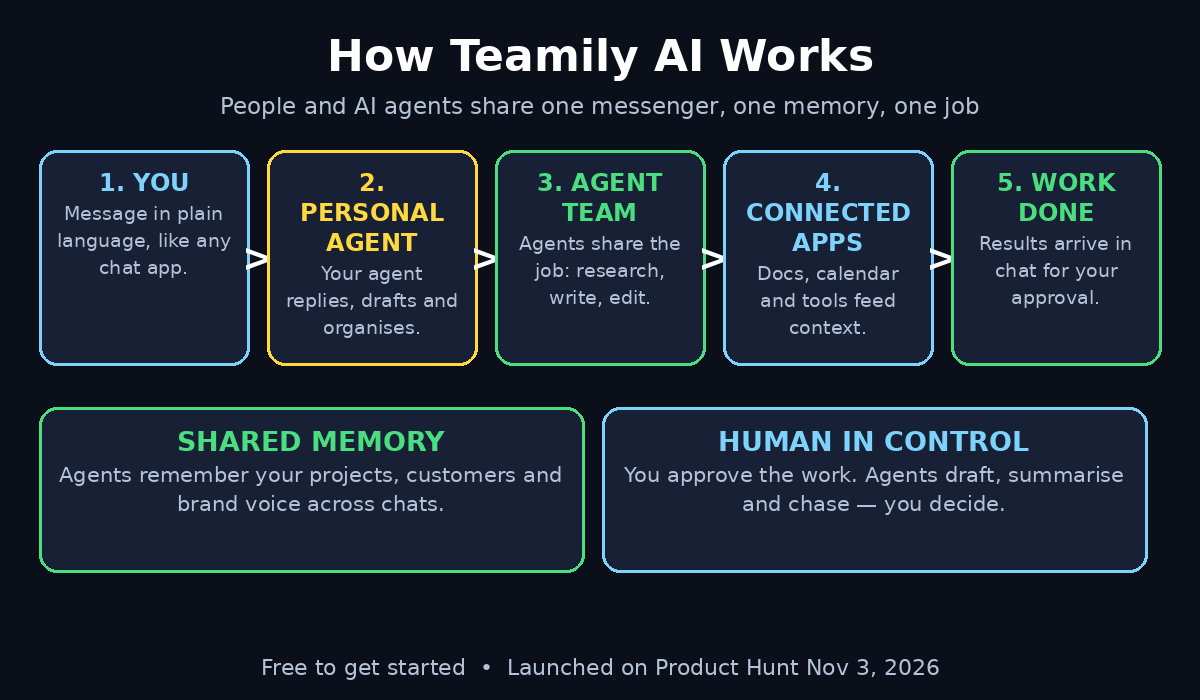
Teamily AI is a human-agent platform built on an AI-native messenger. Think of it as a chat app — like WhatsApp, Slack or Telegram — where some of the people in the conversation are AI agents. Your personal agent lives in the same messenger as your teammates, your customers and your documents.
Unlike a single-user personal agent that only talks to you, Teamily AI is built for multi-user, multi-agent teamwork. Several people and several agents can share one conversation, one set of files and one memory of what has already been decided. The agents have persistent memory, so they remember your projects, your preferences and your past decisions instead of starting from zero every time.
Teamily AI connects people, agents, docs, meetings, calls, workflows and business systems in one unified, context-aware space. The platform says its agents become real teammates: they keep working in the background, they improve on their own over time, and they can even help create content for your team.
In short, Teamily AI turns a chat window into a workplace where humans and AI agents share the load.
Step 1: Create Your Free Teamily AI Account
Getting started takes a few minutes. Open the Teamily AI page on Product Hunt and follow the launch link to the official website, or search for “Teamily AI” in your browser and open the official site from the results.
Create your account with your email address. The product is listed as free to get started, so you can begin without a credit card. Choose a strong password, confirm your email if asked, and you will land in the Teamily AI messenger — a clean chat interface that will feel familiar if you have ever used Slack, Teams or WhatsApp.
Take a minute to complete your profile. Add your name, your role and, if you use Teamily AI for work, your company or team name. This is not just decoration: your personal agent uses this information as the starting point for its memory of you, so the more accurate it is, the more useful the agent becomes.
Step 2: Meet Your Personal Agent
Every Teamily AI account comes with a personal agent. You will find it in your chat list, ready to talk, just like a contact in any messenger.
Open the chat with your personal agent and introduce yourself. Tell it what you do, what your current projects are and what kind of help you want most. For example, you might say: “I run a small online store. I need help drafting replies to customers, summarising my inbox every morning and keeping track of my weekly tasks.”
The agent will respond, ask a few follow-up questions and start building its picture of you. This first conversation matters because Teamily AI agents learn from context. The clearer you are about your goals, the better the agent’s first drafts, summaries and reminders will be.
Try a few simple requests in this first chat: ask it to summarise a long email you paste in, draft a short reply, or turn a messy list of ideas into a tidy to-do list. Small wins in the first ten minutes will show you what the agent is good at before you trust it with bigger work.
Step 3: How to Use Teamily AI for Your First Real Task
The beauty of Teamily AI is that you work the way you already chat. You do not open a separate dashboard or learn a new tool — you just message your agent.
Pick one real, small task and do it entirely in the messenger. A good first task is a morning briefing: paste in your calendar for the day and ask your agent to turn it into a short plan with the three most important things first. Or forward a long document and ask for a five-bullet summary with the deadlines highlighted.
Watch how the agent replies. A good result will be short, specific and ready to use. If the answer is vague, reply in the same chat and say what you actually needed: “Make it shorter”, “Add the deadline dates”, or “Write it in a friendly tone for a customer”. Teamily AI agents improve from this kind of feedback, and correcting them in plain language is part of the workflow, not a failure.
Once you are happy with the result, ask the agent to save what it learned — your tone, your priorities, your formatting — so the next task starts from a smarter place.
Step 4: Connect Your Docs, Calendar and Apps
An agent that only sees your chat messages can only do so much. Teamily AI becomes genuinely useful when you connect the tools you already use.
Open the integrations or connections area in your workspace and link the apps that matter most to you. Start with your calendar and your documents, because those two unlock the most common automations: meeting preparation, daily briefings and summaries of shared files. Then add the business systems your team depends on, such as your CRM, your helpdesk or your project tracker.
Give the agent access gradually. Connect one app, try a task that uses it, and check the result before adding the next one. This keeps you in control and lets you see exactly what the agent can see. If you work with sensitive customer data, check the permissions on each connection and only share what the agent genuinely needs for its job.
With your apps connected, try a connected task: ask your agent to prepare you for your next meeting by pulling the attendee list from your calendar and the latest notes from your shared docs. That single request shows you the real difference between a chatbot and a teammate.
Step 5: How to Build Your First Teamily AI Agent Team
This is the step that makes Teamily AI different from every single-user assistant you have tried. In Teamily AI, you can put several agents in one chat and give each of them a role.
Start with a small team of two or three agents. For example, a content team could have a researcher agent that gathers facts, a writer agent that drafts posts and an editor agent that checks tone and accuracy. A sales team could have a lead agent that qualifies new enquiries, a follow-up agent that chases replies and a reporting agent that summarises the pipeline every Friday.
Create a group chat, add your teammates and add the agents you need. Give each agent a clear job in plain language: “You research competitor prices every Monday” is a better instruction than “You help with research”. Clear roles stop agents from duplicating each other’s work or stepping on each other’s answers.
Then give the team one real job and watch how they work together. The agents share the same conversation and the same memory, so the researcher can hand its findings straight to the writer without you copying anything between chats. You stay in the group as the human in charge, able to correct, redirect or approve at any point.
Step 6: Give Your Teamily AI Agents Shared Memory That Lasts
Teamily AI agents have persistent memory — they remember across conversations, not just within one chat. That memory is what turns a clever demo into a dependable teammate.
Help the memory along by telling your agents the facts that matter: your company name and what it sells, your brand voice, your regular customers, your pricing, your deadlines and your red lines. You can share this in conversation, or upload the documents where those facts already live, such as a brand guide or a product sheet.
Check the memory regularly in the first weeks. Ask your agent a question it should know the answer to — “What is our refund policy?” or “Who is our biggest client?” — and correct it if the answer is wrong or out of date. A shared memory that is wrong is worse than no memory at all, so treat corrections as maintenance, not as a chore.
The payoff is real: once the memory is solid, you stop repeating yourself. You can say “draft the usual follow-up for the new lead” and the agent already knows what “usual” means for your team.
Step 7: Automate Office Work with Teamily AI Workflows
Once your agents know your work, you can turn repeating jobs into workflows that run on their own. Teamily AI connects people, agents, docs, meetings, calls and workflows, so the automation lives inside the same messenger where you already talk.
Pick one repetitive job to automate first. Good candidates are the weekly report, the daily stand-up summary, the inbox triage every morning, or the follow-up message sent to every new enquiry. Describe the job to your agent in plain language: what triggers it, what the agent should do, what good looks like and when a human should step in.
Test the workflow while you watch it. Let it run once with you in the loop, check every output, and fix the instructions where the result was wrong. Only when the output is reliably good should you let it run on its own — and even then, set a simple rule: the agent flags anything unusual and waits for your approval instead of guessing.
Small businesses get the most from this step. If you run a small agency and want help turning AI tools into real client workflows, a digital agency like D365A can help you design the process before you automate it, so the agent speeds up good work instead of speeding up a mess.
Step 8: Use Teamily AI for Customer Service
Teamily AI is also built for customer service, and this is where the messenger format shines. Customers already expect fast, chatty replies — and an agent team can give them without keeping a human glued to the inbox.
Set up a customer service space in Teamily AI and connect it to the channels your customers use. Give the service agents your product facts, your policies and your tone of voice, and let them handle the common questions first: order status, pricing, delivery times and returns.
Keep a human in the loop for anything emotional, unusual or high-value. A good rule is simple: the agent answers, the human reviews, and any complaint or refund request goes straight to a person. That keeps response times fast without letting an agent make a promise your business cannot keep.
Review the agent’s conversations every week at first. Read a sample of replies, fix the answers that were wrong, and add the missing facts to the shared memory. Customer service agents improve fastest when a human corrects them quickly and kindly — exactly like a new human hire.
Step 9: Create Content with Your Teamily AI Agent Team
Teamily AI’s agents also help with content creation, and the agent-team setup makes this more powerful than a single chatbot. Instead of one generic draft, you get a small production line.
Try a simple content workflow: ask the researcher agent to gather three facts and one example for your topic, ask the writer agent to turn them into a short post in your brand voice, and ask the editor agent to check it for errors and cut anything boring. Each agent does one job well, and you approve the final version before it goes anywhere.
This works for social media posts, email newsletters, product descriptions and short guides. The key is the same as everywhere else in Teamily AI: give each agent a clear role, share the memory that holds your brand voice, and keep the human approval step in place.
For a wider view of where multi-agent teamwork is heading — the frameworks, the patterns and the tools behind it — Agentic Affairs covers the agentic AI world in depth, and it is a useful read once you have your first Teamily AI team running.
Step 10: Review, Improve and Stay in Control of Teamily AI
Teamily AI agents are designed to keep improving on their own, but they still need a human who checks the work. Build a short weekly review into your routine.
Once a week, spend fifteen minutes asking three questions. First, what did the agents do well this week — which tasks can you now trust them with completely? Second, where did they go wrong, and what instruction or fact would have prevented it? Third, what new job could you hand over next week?
Fix the instructions, update the memory and add one new task at a time. Teams that improve steadily like this get far more from AI agents than teams that set everything up once and never look at it again.
Stay in control of the big decisions. Let agents draft, summarise, chase and organise. Keep approvals, refunds, promises to customers and anything irreversible with a human. Teamily AI works best as a team of tireless helpers with a human captain — not as an autopilot.
Teamily AI vs Other AI Assistants
| Tool | Best for | Teamwork | Shared memory | Free start |
|---|---|---|---|---|
| Teamily AI | People + agent teams in one messenger | Yes, multi-user and multi-agent | Yes, persistent | Yes |
| Single-user AI chatbots | Quick questions for one person | No | Limited to one chat | Yes |
| Traditional team chat apps | Human-to-human messaging | Yes, humans only | No AI memory | Varies |
| Agent Inbox AI | Giving agents email, Slack and Telegram handles | Yes, via messaging channels | Agent-level | Yes, $0 listed |
Teamily AI’s advantage is the combination: a messenger your team already understands, agents that remember, and teams of agents that share one context. If you only need quick answers for yourself, a single-user chatbot is simpler. If you need people and agents working together, Teamily AI is built for exactly that.
Frequently Asked Questions About Teamily AI
Is Teamily AI free?
Teamily AI is free to get started, according to its Product Hunt launch listing. You can create an account and begin using your personal agent without a credit card. As with any new launch, free limits and paid plans can change, so check the pricing inside your account before you build a workflow your business depends on.
Do I need coding skills to use Teamily AI?
No. Teamily AI is designed for beginners. You create agents, give them jobs and correct them in plain language inside a chat window. If you can use a messenger app, you can use Teamily AI. The more technical setup — connecting business systems — is optional and can come later.
How is Teamily AI different from ChatGPT or Claude?
Single-user chatbots answer one person’s questions. Teamily AI puts people and several AI agents in the same messenger, with shared memory and shared context, so a whole team — humans and agents together — can work on the same job. It is a workplace, not just a question-and-answer box.
Is my data safe in Teamily AI?
Teamily AI connects to your docs, calendar and business systems, so you should check its privacy and security pages before connecting anything sensitive, and only grant the access each agent genuinely needs. For customer data and confidential files, connect one app at a time and review what the agent can see.
When did Teamily AI launch?
Teamily AI launched on Product Hunt on November 3, 2026, where it reached the number 2 product of the day. It is a very new product, so expect the interface, features and pricing to keep changing in the first weeks, and treat the official site and the Product Hunt listing as the source of truth.
Final Thoughts
Teamily AI is an early look at where AI assistants are heading: not a smarter chatbot for one person, but a shared workspace where people and AI agents work as one team. The messenger format makes it easy to start, the persistent memory makes it useful over time, and the agent-team setup makes it powerful for real work.
Start small. Create your free account, meet your personal agent, automate one boring job, and build your first two-agent team. Correct the agents when they are wrong, keep the human approval step, and let the shared memory grow. If you do that, Teamily AI can quietly take over the repetitive half of your working day — and leave you the interesting half.
Explore More Free AI Tools
Want to keep exploring? Try our free tools at AI Tool Steps: AI Title Generator, Meta Description Generator, AI Rewriter and Keyword Density Checker — all free at https://aitoolsteps.com/. And if you liked this guide, read our beginner guide to Agent Inbox AI, which gives your AI agents their own email, Slack and Telegram handles, or our guide to AI CodeOps for browser-based AI coding agents with a release gate.