

Most small business owners have a story worth telling — a new shop opening, a first product launch, a local award, a service nobody else in town offers — but they never tell it to the press. Hiring a PR agency costs money they do not have, and writing a press release from scratch feels like homework for a job they never applied for. That is the gap iwoca toro was built to close. Toro is a free AI press release tool for small businesses, built by iwoca, the small business lender, and opened to the public in late October 2026. You answer a few simple questions about what you need, and it helps you turn your news into a proper, journalist-ready press release.
Toro was built by Mark Di-Toro, iwoca's Director of Strategic Communications. When it opened on October 27, 2026, it went straight to a simple "What do you need today?" screen — no price page, no plan picker, no trial countdown. iwoca makes its money from business loans, so the tool itself carries no charge that has been announced, and you do not need to borrow anything to use it. That makes it one of the most beginner-friendly PR tools a small business has ever had: free to try, plain in language, and built for people who have never written a press release before.
In this beginner guide, you will learn how to use Toro AI from scratch: what it is and what it is not, how to prepare your story before you open the tool, how to answer its questions so your draft sounds like you, how to check every fact before you send anything, and how to get your release in front of real journalists. You do not need PR experience, a marketing budget, or any technical skill. If you can explain your news in two or three plain sentences, you can use Toro.
Step 1: Understand What Toro AI Actually Does
Toro is an AI assistant for one specific job: helping a small business write and share a press release. A press release is a short, factual announcement written for journalists — it tells them what happened, why it matters, who is involved, and who to contact for more. Journalists use releases to decide whether a story is worth covering, and they often quote them directly.
Toro's pitch is built on a simple observation about how people discover businesses today. iwoca points to research from Muck Rack finding that 84% of the sources AI tools cite are "earned" coverage — journalism, encyclopaedias, academic sources and third-party articles — rather than paid adverts or a brand's own website. In other words, being written about by someone else still matters, even in the age of AI search. At the same time, Press Gazette analysis cited by iwoca shows there are far fewer regional journalists than there were in 2007, which means local reporters are stretched thin. A ready-made, accurate story makes their job easier — and makes your business more likely to be covered.
That is what Toro is for. It does not replace a journalist, and it does not guarantee coverage. It takes your raw news and shapes it into the format journalists expect, so a busy reporter can understand your story in under a minute and decide to follow up.
Step 2: Know What Toro Is Not Before You Start
Beginners get into trouble when they expect an AI tool to do everything. Toro will not invent news for you, it will not make a dull announcement exciting on its own, and it will not force a journalist to publish your story. If your "news" is simply that your business exists, no tool can turn that into a story — you need a genuine hook first.
Good hooks for a small business include a new opening, a new product or service, a milestone such as a 10th anniversary or 1,000th customer, a local award, a charity partnership, a hiring announcement, or a genuinely unusual offer. If you are not sure whether your news is newsworthy, ask one question: would a local reader find this interesting, or only you? If the answer is only you, wait until you have a stronger angle.
Toro also cannot check facts it cannot see. If you tell it a wrong date, a wrong price, or a claim you cannot prove, it may repeat that claim in polished language. Polished and wrong is worse than rough and right, because journalists check. Everything in this guide therefore comes back to one rule: you supply true facts, Toro supplies the structure, and you check the result before anyone else sees it.
Step 3: Gather Your Story Facts Before You Open Toro
Five minutes of preparation makes your first draft dramatically better. Before you open the tool, write down the answers to these questions in plain language:
- What happened, in one sentence? (For example: "We are opening a second bakery in town on November 15.")
- Why does it matter to local customers? (New jobs, a new service, lower prices, longer hours.)
- When and where is it happening, exactly? (Dates, times, addresses — no guessing.)
- Who is involved? (Your name, your business name, any partners or staff worth naming.)
- What should readers do next? (Visit, book, call, order, attend.)
- Who can journalists contact? (A name, an email address, and a phone number you actually answer.)
Keep your notes short and honest. Do not inflate numbers, invent awards, or round up "almost 100 customers" to "over 100 customers." Journalists notice, and one exaggerated claim can sink an otherwise good story. If you are unsure about a detail, leave it out until you can confirm it.
If you already work with a marketing team, it can help to compare notes with how a professional digital agency structures a launch announcement, so your facts arrive in the order a reader expects. The same discipline applies whether you write the release yourself or with help: facts first, flourish second.
Step 4: Open Toro and Answer "What Do You Need Today?"
Opening Toro is deliberately simple. Search for iwoca toro, open the official tool page, and you land on the "What do you need today?" screen that greeted its first users on October 27, 2026. There is no complicated dashboard to learn and no credit card step standing between you and your first draft.
Answer the tool's questions in the same plain language you used in your notes. Short, specific answers beat long, vague ones every time. "We are a family-run plumbing firm in Manchester, and we are launching a same-day emergency repair service on Monday" gives the AI far more to work with than "We are an innovative, customer-focused business delivering excellence." The first sentence contains facts; the second contains only adjectives, and adjectives are not news.
If Toro offers you options about the kind of announcement you are making — an opening, a launch, an event, a milestone — pick the closest match rather than the most impressive-sounding one. The right category helps the tool use the right structure: an event release needs a date, time and venue front and centre, while a product launch needs to explain what is new and who it is for.
Step 5: Shape Your First Draft Around the Journalist's Questions
A good press release answers six questions in its first few paragraphs: who, what, when, where, why, and how. Toro's draft should do this automatically if your answers were specific, but check it yourself. Read the opening paragraph and ask: could a stranger understand the whole story from these three or four sentences alone? If not, the lead needs work.
A typical structure looks like this:
- Headline: the news in under 15 words, with no jargon and no puns that hide the point.
- First paragraph: the full story in miniature — who did what, when, and where.
- Second paragraph: why it matters, with one concrete detail (jobs created, money raised, customers served).
- Quote: one or two sentences from you, in words you would actually say out loud.
- Details: opening hours, prices, booking information, background on the business.
- Contact block: who journalists should call or email, and by when if there is a deadline.
If Toro's draft buries the news in the fourth paragraph, move it up. Journalists skim, and a release that hides its own point is a release that gets deleted. Your most newsworthy sentence belongs at the top, not at the bottom.
Step 6: Make the Quote Sound Like a Human Being
The quote is where most AI-written press releases give themselves away. A line like "We are delighted to announce this exciting new chapter in our journey of excellence" sounds like nobody who has ever run a shop. Journalists skip quotes like that, and readers do not believe them.
Rewrite your quote in your own voice before you send anything. Say why you actually did this thing, in the words you would use to a customer across the counter. "We kept getting calls from people on the other side of town, so we decided to open there rather than make them travel" is a quote a journalist can use. "We are thrilled to leverage synergies" is not.
One strong quote beats three forgettable ones. If Toro gives you several, keep the best, delete the rest, and read the survivor out loud. If you would feel embarrassed saying it to a neighbour, rewrite it until you would not.
Step 7: Fact-Check Every Line Before It Leaves Your Hands
This is the most important step in the whole guide, so do not skip it. Read Toro's draft slowly, line by line, and check each claim against your notes from Step 3. AI tools are excellent at structure and terrible at knowing what is true about your business — only you can do this check.
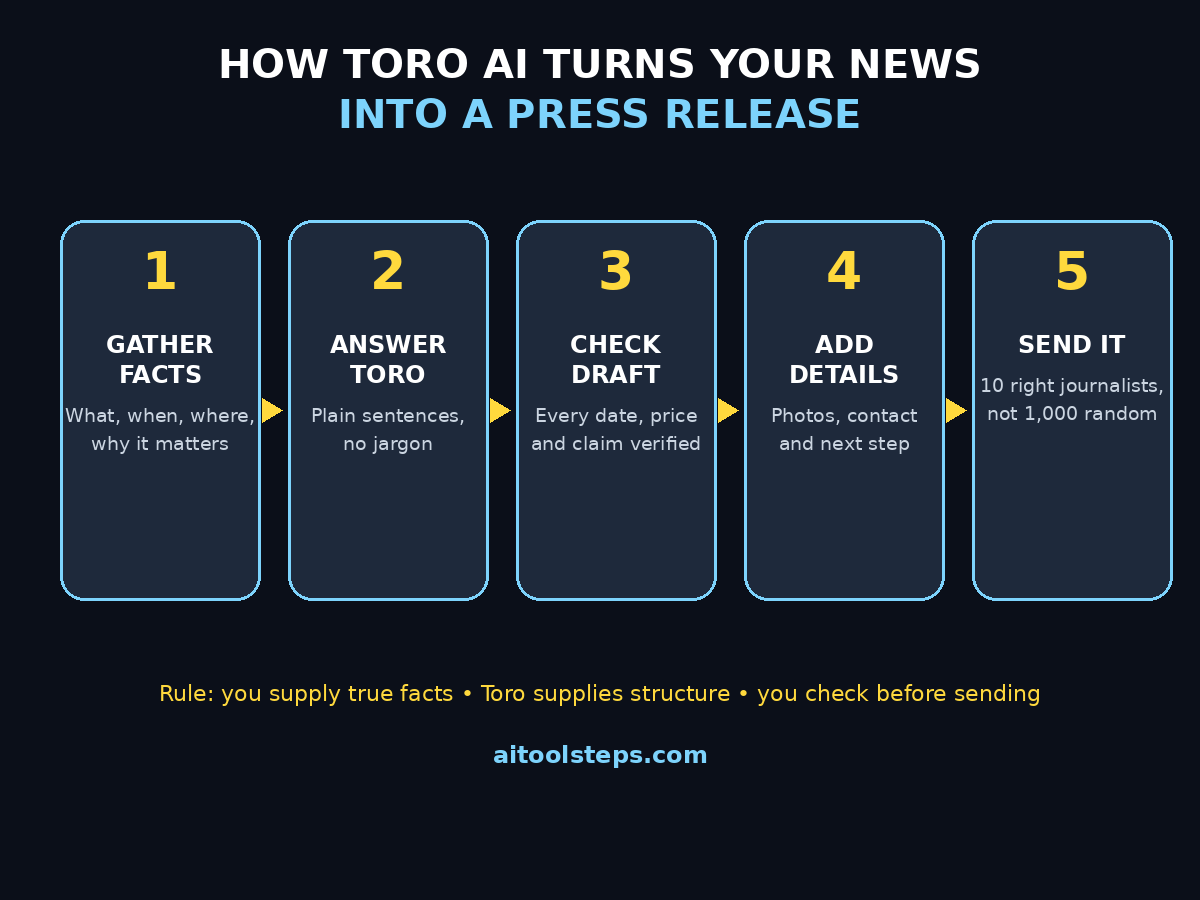
Check these things carefully:
- Business name, spelling of names, dates, times, and addresses are exactly right
- Prices, opening hours, and contact details match what you actually offer
- Numbers (jobs, customers, amounts raised) are ones you can prove
- No awards, ratings, partnerships, or endorsements appear that you have not actually earned
- The quote is something you genuinely said and would stand behind
- Nothing promises a service, discount, or date you cannot deliver
If anything looks wrong, fix it in the draft before you share it anywhere. A small business lives on trust, and a press release is a public document: once a journalist quotes a wrong fact, correcting it is far harder than getting it right the first time. The same "prove it or leave it out" discipline is worth building into all your AI-assisted content, and it is a habit that growing AI automation services increasingly build into their own publishing workflows.
Step 8: Add the Details Journalists Actually Need
A release without supporting details forces a journalist to chase you for basics, and busy reporters often will not bother. Before you send your release, make sure it includes, or is accompanied by, the following:
- A clear contact name, email, and phone number, with the hours you can be reached
- One or two good photos of the business, the product, or the people involved (real photos, not stock images)
- Your website address and, if relevant, your social media pages
- Any embargo or deadline, stated plainly — for example, "for immediate release" or "embargoed until 9am Monday"
- Background in two or three sentences: what your business does, how long it has been running, and where it is based
Photos deserve a special note. A sharp, well-lit photo of your actual shop, team, or product does more for a local story than any paragraph. If you do not have good photos yet, take them on your phone in daylight before you send the release — it takes ten minutes and it doubles your chances of being picked up.
Step 9: Send It to the Right People, Not to Everyone
A press release sent to a thousand random addresses is spam. A press release sent to ten right journalists is PR. Toro helps you write the release; choosing who receives it is still your job, and it is where beginners should spend real effort.
Start local and relevant. Local newspapers, local radio, community blogs, and trade publications covering your industry are far more likely to cover a small business than national outlets. Look for the journalist who already writes about businesses like yours, and address them by name. A short, personal covering note — two sentences about why this story fits their readers — beats a generic blast every time.
Follow up once, politely, a few days later, if you hear nothing. Do not follow up five times, and do not call a newsroom demanding coverage. Journalists remember polite senders and difficult ones, and your next release will be judged partly on how you behaved with this one.
Step 10: Track What Happens and Reuse What Works
After you send your release, keep a simple record: who you sent it to, when, what the headline was, and what happened next. Did anyone reply? Did anyone publish? Did your website visits or calls rise that week? You do not need fancy software — a single spreadsheet page is enough.
This record is how you get better. If local papers covered your opening but ignored your price change, that tells you something about what counts as news for your audience. If one journalist replied warmly, they go to the top of your list next time. If a particular headline got replies, reuse its shape — clear news first, no jargon — for your next announcement.
Then reuse the release itself. The same facts can become a post on your website, a social media announcement, and a short item in an email to customers — each rewritten slightly for its audience, never just copied and pasted. One good story, told well in several places, is worth far more than five rushed announcements nobody remembers.
Toro AI vs Other Ways to Get Press Coverage
| Option | Cost | Speed | Best for |
|---|---|---|---|
| Toro AI | Free (no announced charge) | Minutes to a first draft | Small businesses writing their first release |
| Hiring a PR agency | Hundreds to thousands per month | Days to weeks | Larger campaigns and ongoing media relations |
| Writing it yourself from scratch | Free, but slow | Hours, especially the first time | Owners who already know press release format |
| Asking a general AI chatbot | Free or subscription | Minutes | A rough draft you must heavily rewrite and check |
Toro's advantage is focus: it is built for this one job, for people who have never done it before, and it costs nothing to try. Its limit is the same as any AI tool — it cannot supply your news, your facts, or your judgement. Use it for structure and speed, and keep the facts and the final decision yourself.
Common Toro AI Mistakes Beginners Should Avoid
- Sending the first draft without reading it — always fact-check every line first.
- Writing for yourself instead of for readers — lead with what matters to them, not to you.
- Stuffing the release with adjectives — one real fact beats ten superlatives.
- Forgetting the contact details — a journalist who cannot reach you cannot cover you.
- Blasting it to everyone — ten relevant journalists beat a thousand random addresses.
- Claiming things you cannot prove — one invented award can end a relationship with a newsroom.
Frequently Asked Questions
Is Toro AI really free?
As of its public opening on October 27, 2026, iwoca describes toro as a free PR tool, and no price, plan, or trial was shown on its pages. iwoca earns from business loans, not from the tool. Pricing could change in future, so check the tool page before you rely on it for a big campaign — but right now, trying it costs nothing.
Do I need PR experience to use Toro AI?
No. Toro is built for small business owners, not PR professionals. If you can explain your news in plain sentences, the tool handles the press release format. This guide's steps — prepare facts, answer plainly, check the draft — are the whole skill set.
Will Toro AI guarantee my business gets in the news?
No tool can guarantee coverage. Toro improves your chances by giving journalists a clear, correctly formatted, factual story, and by helping you avoid the formatting mistakes that get releases deleted. Coverage still depends on whether your news is genuinely interesting to that journalist's readers.
Is Toro AI only for UK small businesses?
Toro was built by UK lender iwoca and its launch coverage focuses on UK small firms, but the press release skills in this guide — a clear headline, a factual lead, a human quote, correct contact details — work anywhere. If you are outside the UK, check the tool's availability for your region when you open it.
Can Toro AI write about any kind of business news?
It is best for straightforward announcements: openings, launches, milestones, events, awards, and partnerships. It cannot make a non-story sound like news, and it cannot verify your facts. Bring a genuine hook and true details, and the tool will do its best work.
Should I still hire a PR agency if I use Toro AI?
For a single local announcement, Toro plus this guide is usually enough. For an ongoing campaign, a crisis, or a national launch, an experienced agency's relationships and judgement are still worth paying for. Many small businesses start with Toro and hire help later, once they know which stories actually get covered.
Final Thoughts
Toro AI will not make your business famous overnight, and no honest guide should promise that it will. What it does is remove the two excuses that stop most small businesses from ever trying PR: "I don't know how to write a press release" and "I can't afford an agency." The format, the structure, and the first draft are now free. The news, the facts, and the judgement are still yours — and they were always the most important parts.
Start small. Pick one real piece of news, gather your facts, answer Toro's questions plainly, check every line, and send it to ten journalists who actually cover businesses like yours. Then track what happens and do it better next time. Press coverage compounds: one local story makes the second easier, and a business that journalists already know is a business they call back.
Explore More Free AI Tools
If you found this guide useful, explore more free tools on AIToolSteps: try the AI Title Generator for headlines that get opened, the Meta Description Generator for search snippets that get clicked, the AI Rewriter for polishing rough drafts, and the Keyword Density Checker to keep your pages search-friendly. Each one is free, beginner-friendly, and built to save a small business time.