

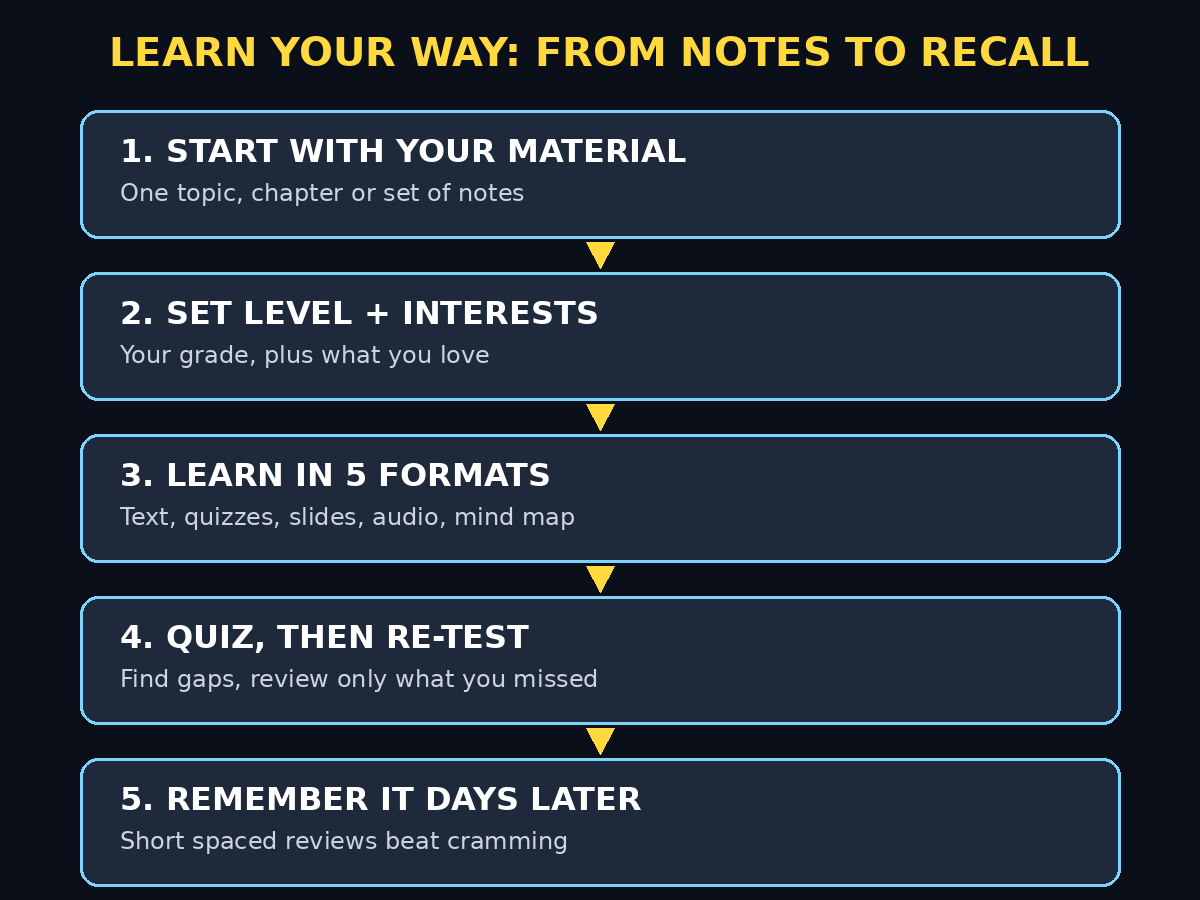
Most students do not fail because they are lazy. They fail because they re-read the same chapter five times, highlight everything, and still cannot remember it in the exam hall. Reading feels like learning, but it is often just recognition: the words look familiar on the page, yet they vanish when you have to produce the answer yourself. Google Learn Your Way AI was built to break that trap. It is a free Google Labs learning experiment that turns ordinary study material into a personalised study experience, with immersive reading, quizzes, narrated slides, audio lessons, and mind maps, all shaped around your level and your interests.
In simple terms, Learn Your Way does not just give you a textbook. It asks who you are as a learner, what level you are studying at, and what you care about, and then it rebuilds the same material in several formats so the ideas stick. A student in grade eleven who loves basketball, for example, might learn Newton’s laws through basketball examples, basketball quiz questions, and a basketball image that shows the physics in action. That personal touch is not a gimmick. Google’s own early study of 60 students aged 15 to 18 found that the Learn Your Way group scored 78 percent on a retention test three to five days later, compared with 67 percent for students using a standard digital reader, an 11-point difference. That is a promising signal, not a guarantee, but it explains why this tool is worth trying.
This beginner guide walks you through Learn Your Way from scratch. You will learn what it is, how to open it, how to set your level and interests, how to use each of its five learning formats, and how to build a study routine that actually improves recall. You do not need any technical skill, any paid subscription, or any teaching experience. If you can open a browser and read a chapter, you can use this tool.
One honest caveat first, because it matters with every experimental Google tool. Learn Your Way is a Labs research experiment, not a finished education platform. Features, availability, and access can change while it develops, and access may vary by account and region. If a screen in front of you looks slightly different from this guide, trust the screen. The method in this guide still works, because it is built around good learning habits, not around one button that might move.
Step 1: Understand What Google Learn Your Way AI Actually Is
Google Learn Your Way is a Google Labs experiment built on Google’s learning-science and LearnLM research. Instead of treating every learner the same, it generates multiple representations of the same content and personalises them to fit the learner’s needs. Google describes this as resting on two pillars: giving you several ways to engage with the material, and adapting the material to your level and interests.
Research behind the idea is simple and well established. When you meet an idea in more than one form, for example as text, as a picture, as a quiz question, and as a spoken explanation, you build stronger connections to it than when you only read it once. Psychologists call this dual coding: linking words with images and examples makes recall easier. Learn Your Way also supports the spacing effect, the principle that short, repeated review sessions spread over days beat one long cramming session.
It is important to understand what Learn Your Way is not. It is not a general chatbot that answers any question from the open internet, and it is not a replacement for your teacher, textbook, or syllabus. It is a study companion for material you are already supposed to learn. You bring the topic, the chapter, or the notes. It turns that material into a guided, personalised lesson. Used that way, it is powerful. Used as a shortcut to avoid studying, it will not help, because the tool is designed to make you practise recall, not to hand you answers to copy.
Step 2: Open Google Learn Your Way AI and Sign In With Your Google Account
Getting started takes only a few minutes. Learn Your Way is currently offered as a Google Labs research experiment, and Google provides an interactive Learn Your Way experience through its Labs pages. Availability can vary, so if you do not see it immediately, check Google Labs or the Gemini experience on your account and look for Learn Your Way by name.
Here is the simple way to open it:
- Open a normal desktop or laptop browser and sign in to your Google account.
- Search for Google Learn Your Way in Google Labs and open the official experience.
- If you see a sign-in button, sign in with your usual Google account. There is no separate paid subscription to buy for the experiment itself.
- If you see a waitlist form or a message that it is not available for your account or region yet, join the waitlist if offered and try again later. Do not pay anyone selling access, and do not download unofficial apps claiming to be Learn Your Way.
Once you are in, take one minute to look at the first screen before you start studying. Notice where the lesson material appears, where the quiz and format options live, and where you can change your level or interests. That one-minute look saves you ten minutes of confusion later, because you will know where everything is before you are deep into a lesson.
For younger learners, a parent or teacher should be involved in the sign-in step. A Google account, a school account, or a family setup may have different rules, and it is always better to use the account your school or family already approves for learning.
Step 3: Set Your Grade Level and Interests Honestly in Google Learn Your Way AI
This is the step most beginners rush, and it is the step that makes the whole tool work. When you start a lesson, Learn Your Way asks about your grade level and your interests. Answer honestly, even if the honest answer feels basic.
Your grade level controls how the material is explained. A grade eight explanation uses simpler words, shorter sentences, and more everyday examples. A grade twelve explanation can use technical terms and assume you already know the basics. If you set your level too high, the lesson will feel confusing and you will blame the tool. If you set it too low, the lesson will feel boring and you will stop using it. Pick the level you are actually studying at right now, not the level you wish you were at.
Your interests control the examples. This is where the basketball example comes from. If you love football, cooking, music, gaming, or cricket, say so. The tool will then explain new ideas through those interests where it makes sense, and it will use them in quiz questions and visuals. That is not decoration. An example you already care about is far easier to remember than an abstract example you have never thought about.
You can change these settings later. If a lesson feels too easy or too hard, go back and adjust your level. If the examples stop feeling relevant, update your interests. Personalisation is not a one-time form. It is a setting you tune as you learn, just like you would adjust the difficulty in a game.
Step 4: Choose Your Study Material and Start Your First Lesson in Google Learn Your Way AI
Now choose what you want to learn. For your first lesson, pick something small and familiar, not your hardest chapter. A single topic you half-understand is perfect, because you will be able to tell whether the tool is actually helping you understand it better.
Good first lessons include:
- One science topic, such as photosynthesis, Newton’s laws, or the water cycle.
- One history topic, such as a single event or period you have to revise.
- One set of notes from a class you attended this week.
- One chapter you need to revise for a test in the next two weeks.
Avoid starting with an entire textbook. A whole book is too much for a first session, and you will not finish it, which feels like failure. Start with one lesson, finish it properly, and build from there. Small wins are what create a study habit.
When you start the lesson, read the first immersive text section slowly. This is not the old wall of text. Learn Your Way breaks the material into digestible sections, adds generated images, and embeds questions inside the reading. When a question appears, stop and try to answer it before you move on. That pause is the learning. If you just scroll past the questions, you are back to passive reading, and the tool cannot help you.
Step 5: Use the Immersive Text Format the Right Way in Google Learn Your Way AI
The immersive text format is the backbone of Learn Your Way. It presents the lesson as readable sections, each short enough to finish without losing focus, with images that illustrate the idea and questions that check your understanding as you go.
Use it like this. Read one section. Close your eyes for five seconds and say the main idea in your own words. Then answer the embedded question. If you get it right, move on. If you get it wrong, re-read that section once, slowly, and try again. Do not move on while you are still confused, because the next section usually builds on this one.
Watch out for one common trap. Generated images are helpful, but they are illustrations, not proof. If an image shows something that looks surprising or contradicts your textbook, trust your textbook and your teacher. AI-generated visuals can simplify or stylise a concept. Use them to remember the shape of the idea, and use the text and your class notes for the exact facts, numbers, and definitions you will be tested on.
A good first session in this format takes 15 to 20 minutes. That is enough. You are building a habit, not trying to finish a syllabus in one evening.
Step 6: Test Yourself With Section-Level Quizzes in Google Learn Your Way AI
Quizzes are where Learn Your Way earns its keep. After each section, you get section-level quizzes designed to find your knowledge gaps, not just to give you a score. A gap is useful information. It tells you exactly what to re-study, instead of making you re-read everything.
Treat every quiz as practice, not as a test of your worth. A low score on a first attempt is normal and helpful. It means the tool has found something you do not know yet, while there is still time to learn it. Follow this simple loop:
- Take the quiz without looking at your notes first, if you can. That first attempt shows your real recall.
- Read the feedback carefully, especially for questions you got wrong. Feedback is teaching, not just correction.
- Revisit only the sections linked to your wrong answers. Do not re-read the whole lesson.
- Retake the quiz or try the next set of questions. Your second score should be higher, and that improvement is real learning.
If you find yourself guessing, slow down. Guessing gives you a score, but it does not give you learning. Try to explain why each wrong option is wrong, not just which option is right. That habit, called elimination with reasoning, is one of the most reliable exam techniques, and it works just as well inside Learn Your Way as it does on paper.
Over time, the quizzes also help with spacing. Return to a lesson after two or three days and take the quiz again. If you still remember it, you have truly learned it. If you have forgotten parts, you now know exactly what to review, and that short review session is far more valuable than re-reading the whole chapter again.
Step 7: Listen to the Audio Lesson and Narrated Slides in Google Learn Your Way AI
Some ideas are easier to hear than to read. Learn Your Way offers two spoken formats: slides with narration that mimic a lecture, and an audio lesson that simulates a conversation between an AI teacher and a student. Use them when reading alone is not working, or when you want to revise while doing something else.
The narrated slides are best for a first pass through a new topic. You see the key points on screen while a voice explains them, which combines words and visuals. Sit somewhere quiet, follow the slides, and pause whenever a slide introduces a term you do not know. Write that term down. A short list of new terms after a narrated lesson is a perfect revision sheet.
The audio lesson is best for review. Listen while walking, travelling, or doing chores, and treat it like a podcast lesson. When the AI teacher asks a question in the conversation, pause and answer out loud before you continue. Speaking an answer, even quietly to yourself, forces recall in a way that silent listening does not. If you just let the audio play in the background while you scroll on your phone, you will remember almost nothing, so give it your attention for at least the key sections.
For students who struggle with reading long texts, these audio formats can be a genuine equaliser. They do not replace reading entirely, because exams are usually written, but they help you understand the ideas first, which makes the later reading much easier. If you run a small tutoring setup or a learning centre, a structured approach like this pairs well with the way a professional digital agency organises learning content for different audiences, because the same material reaches learners in the format each learner absorbs best.
Step 8: See the Whole Lesson With the Mind Map in Google Learn Your Way AI
After you have read, quizzed, and listened, open the mind map. This is the format that shows you the entire lesson at a glance: the main topic in the centre, the big ideas branching out from it, and the details hanging off each branch. It is the single best tool in Learn Your Way for revision the night before a test.
Use the mind map in three ways. First, look at it without any labels if the tool allows it, and try to recall what belongs on each branch. That is a powerful self-test. Second, use it to spot connections. Two branches that looked separate in the text often turn out to be linked, and that link is exactly the kind of understanding that earns marks in longer exam questions. Third, use it to plan an essay or a long answer. The branches give you a natural structure: one paragraph per major branch, with details from the smaller branches as your evidence.
You can also use the mind map to explain the topic to someone else. Teaching is the strongest form of learning. Open the map, cover the details, and explain each branch to a friend, a sibling, or even to yourself in the mirror. Wherever you stumble, you have found a gap. Go back to that section, learn it properly, and try explaining it again. Students who can explain a mind map without looking at the text are usually ready for the exam.
Step 9: Build a Simple Weekly Study Routine Around Learn Your Way
A tool only helps if you use it regularly. The best routine is short, repeatable, and tied to your real timetable, not an ideal timetable you will abandon in three days. Here is a beginner routine that works for most students:
- Day 1, 20 minutes: Start a new lesson. Read the immersive text, answer the embedded questions, and take the section quizzes.
- Day 2, 15 minutes: Listen to the audio lesson or narrated slides for the same topic. Note any terms or ideas that are still unclear.
- Day 3, 10 minutes: Take the quizzes again. Review only the sections you got wrong.
- Day 4, 10 minutes: Open the mind map and explain the topic out loud. Fill any gaps you find.
- Day 7, 10 minutes: Quick quiz retest before the next week’s lesson. This spaced review is what turns short-term memory into lasting knowledge.
That is about an hour spread across a week for one topic, and it beats three hours of re-reading the night before a test. If you have a test coming up, work backwards. Start the lesson at least seven days before the test so you have time for the spaced reviews. Starting the night before wastes the tool’s biggest strength, which is spaced practice over days.
Keep a simple study log. For each lesson, write the topic, the date, your first quiz score, and your retest score a few days later. Over a month, that log shows you something powerful: which topics are solid, which need more work, and whether your scores are genuinely improving. If you are building study systems for a team or a business audience, the same habit of tracking improvement over time is what good AI automation services recommend for any workflow, because you cannot improve what you never measure.
Step 10: Use Learn Your Way Safely, Honestly, and Alongside Your Teacher
Learn Your Way is a study aid, not a source of truth for your exam. Use it with the same common sense you would use for any AI tool. Always check important facts, dates, formulas, and definitions against your textbook, your class notes, or your teacher. If Learn Your Way says something different from your teacher, ask your teacher. Teachers mark exams, and their version is the one that counts.
Do not use it to cheat. Copying AI-generated answers into homework or an exam, or presenting AI-written work as your own, can lead to serious school consequences and, worse, it leaves you unprepared for the real test. The honest way to use the tool is the effective way: let it quiz you, let it find your gaps, and let it help you practise, but do the thinking yourself. The learning happens in your brain when you recall an answer, not on the screen when the tool displays one.
Protect your privacy too. Do not paste personal information, passwords, private photos, or other people’s work into any AI learning tool. Use only your own study material. If you are studying with a school account, follow your school’s rules about AI tools. And remember the experimental caveat: because Learn Your Way is still developing, a feature you love today could change tomorrow. Keep your own notes and quiz summaries outside the tool, so your learning never depends on one experiment staying exactly the same.
Google Learn Your Way AI vs the Alternatives
Learn Your Way is not the only way to study. This comparison helps you choose the right tool for each job, instead of forcing one tool to do everything.
| Tool or method | Price to start | Personalised formats | Best for |
| Google Learn Your Way AI | Free experiment | Text, quizzes, slides, audio, mind maps | Personalised revision of one topic with spaced practice |
| Google NotebookLM | Free | Source-grounded answers, audio overviews | Studying from your own documents with citations |
| Standard chatbot | Free tier | Text answers, custom prompts | Quick explanations when you are stuck on one question |
| Flashcards by hand | Free | Cards only | Fast drilling of definitions and vocabulary |
| Re-reading notes | Free | Reading only | Almost nothing, unless you add self-testing |
The honest takeaway is this. Learn Your Way wins when you want one topic taught in several formats with built-in quizzing and personalisation. NotebookLM wins when your material is a stack of documents and you need answers grounded in those exact sources. A chatbot wins for a single quick question. Handmade flashcards win for pure vocabulary drilling. Re-reading alone loses to all of them, because it feels productive without testing recall. Use Learn Your Way for your main revision, and use the others as helpers around it.
Common Beginner Mistakes to Avoid
Most Learn Your Way mistakes are habits, not technical errors. Avoid these five and you will get far more from the tool than most users.
- Skipping the quizzes. Reading without quizzing feels faster, but it does not build recall. Always take the quiz, even when you feel confident.
- Setting the wrong level. A level that is too high causes confusion, and a level that is too low causes boredom. Adjust it until the lesson feels challenging but doable.
- Starting with a whole textbook. Start with one lesson. Finish it well. Small finished lessons build a habit, while huge unfinished plans build guilt.
- Treating AI output as exam truth. Always verify facts, formulas, and dates against your textbook or teacher before you memorise them.
- Cramming in one night. Learn Your Way is built for spaced practice over days. One long night cannot replace a week of short reviews.
Frequently Asked Questions
Is Google Learn Your Way AI free?
Learn Your Way is currently offered as a free Google Labs research experiment, not as a conventional paid education product. There is no paid subscription to buy for the experiment itself, but availability can vary by account and region, and features can change while the experiment develops. Always check the screen in front of you for the current access terms.
What does Learn Your Way actually do?
It turns study material into a personalised learning experience. You set your grade level and interests, and it presents the material as immersive text with embedded questions, section-level quizzes, narrated slides, an audio lesson, and a mind map. The goal is deeper understanding and better retention, not just faster reading.
Do I need to upload my own notes to use Learn Your Way?
No, you do not have to upload anything to start. You can begin with a topic or available lesson material inside the experience. If you have your own notes or a chapter you need to revise, use those as your study focus, and keep your personal material private. Do not paste sensitive personal information into any AI tool.
Is Learn Your Way better than just re-reading my textbook?
For most learners, yes, because it adds what re-reading lacks: self-testing, multiple formats, and spaced review. Google’s early study of 60 students aged 15 to 18 found an 11-point retention advantage for the Learn Your Way group over a standard digital reader. That is an early research result, not a promise for every student, but the learning methods behind it are well supported.
Can Learn Your Way help with exam preparation?
Yes, when you use it the right way. Start at least a week before the test, work through the text and quizzes, listen to the audio review, use the mind map to explain the topic out loud, and retest after a few days. That spaced routine is far stronger than re-reading notes the night before. Always verify exam facts against your textbook and teacher.
Will Learn Your Way stay available in its current form?
Not necessarily. As a Google Labs experiment, it can change, move, or graduate into another Google product over time. Keep your own notes, quiz summaries, and mind-map sketches outside the tool, so your revision does not depend on one experiment staying unchanged.
Final Thoughts
Google Learn Your Way AI is a genuinely useful idea, executed in a way that respects how learning actually works. It does not just show you information faster. It makes you practise recalling it, see it in several formats, and revisit it over days, which is exactly what turns short-term familiarity into lasting knowledge. For a student, a self-learner, or a professional studying for a certification, that is a meaningful upgrade over re-reading a chapter and hoping for the best.
Start today with the simplest version of this guide. Open Learn Your Way, set your level and interests honestly, and pick one small topic. Read it, quiz yourself, listen to the audio version, and explain the mind map out loud. Then come back in three days and quiz yourself again. If your second score is higher, and you can explain the topic without looking, the tool has done its job, and you have done yours.
No AI tool can replace your teacher, your textbook, or your own effort. What Learn Your Way can do is make that effort far more effective, by turning passive reading into active, personalised practice. Use it that way, check its facts against trusted sources, and let your retest scores, not your reading time, tell you whether you are really learning.
Explore More Free AI Tools
Want to keep learning? Explore our free tools and guides at AIToolSteps, including the AI Title Generator, Meta Description Generator, AI Rewriter, and Keyword Density Checker at https://aitoolsteps.com/. Each one is designed to help beginners create clearer titles, descriptions, and content without paying for expensive software. Pair a clearer study plan with a sharper title, and your next guide, assignment, or revision sheet will be easier for both readers and search engines to understand.