

Search has changed. Today, many customers never click a blue link at all. They ask ChatGPT, Google AI Overviews, or another AI assistant a question, read the short answer, and move on. If your website is not the kind of source those answers can read, understand, and trust, you can be invisible even when your business is excellent. That is the exact problem MorBizAI was built to solve, and it is why this beginner guide exists.
MorBizAI, from Morbiz LLC, came out of stealth on October 26, 2026, with a free audit that promises to score your website’s AI search visibility in about 15 seconds. The audit sits alongside checks for SEO, page speed, accessibility, and privacy, so you get one clear starting point instead of five confusing reports. In this guide, you will learn how to use MorBizAI from scratch: how to run the free audit, how to read the score without getting overwhelmed, how to fix the most important issues first, and how to use its publishing tools to stay visible week after week. You do not need any coding experience, any SEO training, or any paid software to follow along.
If you run a small business, a local shop, a freelance service, or a new blog, this tool is made for you. Big companies have SEO teams. Small businesses usually have one busy owner doing everything. A 15-second audit that tells you, in plain language, what to fix next is genuinely useful. Just remember one honest caveat that applies to every new AI tool: features, limits, and pricing can change after launch, so always check the screen in front of you before you pay for anything or share sensitive data.
Step 1: Understand What MorBizAI Actually Is
MorBizAI is an AI marketing tool for small businesses. Its first step is an audit. You enter your website address, and it checks whether your site is ready to be read and cited in AI answers from tools like ChatGPT and Google AI Overviews. At the same time, it looks at traditional SEO basics, how fast your pages load, whether your site is accessible to more visitors, and whether basic privacy practices are in place.
Think of it this way. Old SEO asked one question: can Google find and rank my page? AI search asks a harder question: can an AI assistant understand my page, trust it, and quote it accurately in an answer? A page can rank reasonably well in classic search and still fail the second test if its facts are buried, its headings are vague, or its key information is hidden inside images, scripts, or confusing layouts. MorBizAI tries to close that gap.
After the audit, MorBizAI is designed to help you stay visible, not just get one score. According to its launch announcement, it can help you find “striking distance” keywords in Google Search Console, publish consistently in your own voice, and turn long videos into short captioned clips for social media. For a beginner, the smart approach is simple: start with the free audit, fix the top issues, and only explore the publishing features once the audit makes sense to you.
Step 2: Prepare Your Website Before You Run the Audit
Before you open MorBizAI, take two minutes to prepare. This small step makes the result far more useful, because you will know what you are looking at instead of guessing.
- Pick one page to test first. Start with your homepage. It is the page most AI answers and visitors will meet first. You can test inner pages later.
- Write down your main service in one sentence. For example: “We repair washing machines in Sialkot.” This sentence is your test. After the audit, ask yourself whether a stranger reading your homepage would understand that sentence in five seconds.
- Check that your site loads on your phone. Open it in your mobile browser. If it is slow, broken, or hard to read, note that now. Speed and mobile experience are part of the audit, and they affect real customers too.
- Have your Google Search Console access ready, if you have it. You do not need it for the first free audit, but the keyword feature later uses Search Console data, so knowing whether you have an account saves time.
If you do not have a website yet, do not worry. You can still learn the workflow in this guide, run the audit on a friend’s site with their permission, or build a simple site first and return to MorBizAI when it is live. An audit needs a live, public URL to check.
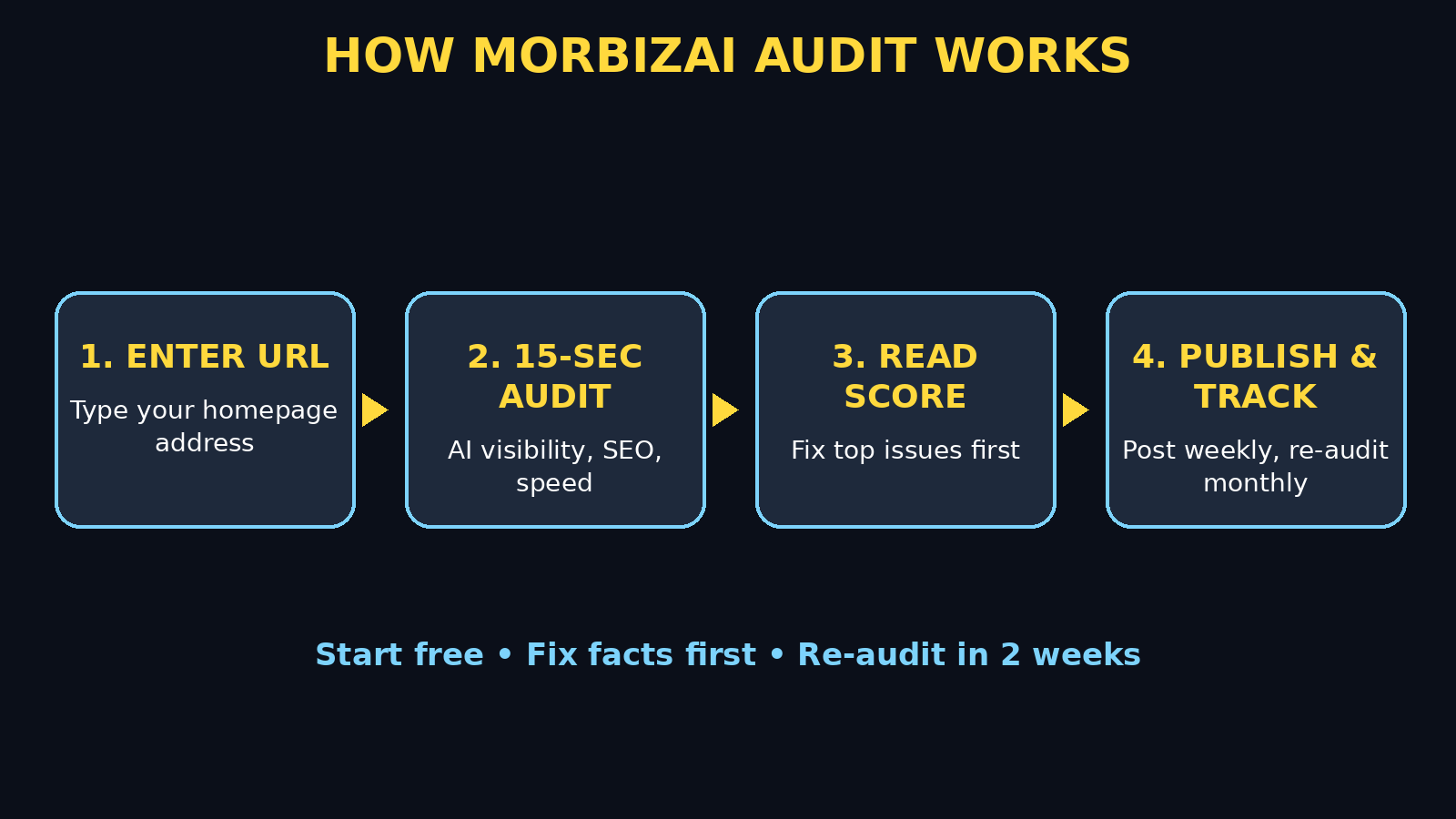
Step 3: Run the Free Audit in About 15 Seconds
Now run the audit. Open the MorBizAI website in your browser and look for the free audit or site audit option on the homepage. The launch announcement describes the audit as free and fast, taking about 15 seconds. Do not enter payment details for a free audit. If any screen asks for a card before showing a result, stop, read the screen carefully, and only continue if you understand exactly what you are signing up for.
Enter your full website address carefully, including whether it starts with www or not, and submit it. Wait for the result. Fifteen seconds is the advertised time, but slower sites or busy servers can take a little longer. Do not refresh repeatedly. If the audit fails, check that you typed the address correctly, that the site is live, and that it is not blocked by a password or a “coming soon” page. A private or password-protected site cannot be audited properly.
When the result appears, save it. Take a screenshot, or copy the score and the main findings into a notes app with today’s date. This is your baseline. In two weeks, after you fix things, you will run the audit again and compare. Without a baseline, you will never know whether your work actually helped.
Step 4: Read Your Score the Right Way
Beginners often make the same mistake with audit tools: they chase a perfect score. Do not do that. A score is a guide, not a grade for your business. A small bakery with a score of 70 and clear opening hours, prices, and location can win more customers than a polished site with a score of 95 that never says what it sells.
Read the report in this order. First, look at the AI search visibility section. This is MorBizAI’s headline idea. Ask: does the report say AI tools can easily read, understand, and cite my pages? Second, look at SEO basics: titles, headings, and descriptions. Third, look at speed. Fourth, look at accessibility and privacy. If the report groups findings by severity, fix the high-priority items first and ignore the low-priority polish until later.
Pay special attention to anything about missing, vague, or duplicated information. AI answers love clear facts: what you do, where you do it, how much it costs or how to get a quote, and how to contact you. If those facts are missing from your homepage, no amount of technical tweaking will make an AI assistant recommend you confidently. Write the facts in plain sentences on the page itself, not only inside an image or a video.
Step 5: Fix the AI Visibility Issues First
Now work through the AI visibility findings one by one. Start with the fixes that help both humans and AI assistants, because those always pay off.
- Make your homepage answer the obvious questions. Add one clear sentence near the top stating what you do, who you serve, and where. Follow it with your location, contact method, and main service list.
- Use clear headings that match real questions. Instead of a vague heading like “Welcome” or “Solutions”, use headings like “Washing Machine Repair in Sialkot” or “What Does Our Cleaning Service Include?” AI tools and readers both prefer headings that mean something on their own.
- Put key facts in text, not only in images. Prices, hours, service areas, and contact details should be real text on the page. Text inside a picture cannot be read reliably by every tool.
- Remove contradictions. If your homepage says you are open until 8 pm and another page says 6 pm, fix it. Conflicting facts make AI assistants less likely to trust and cite you.
- Add a short FAQ section. Answer the five questions customers actually ask, in two or three sentences each. This is one of the easiest ways to become quotable in AI answers.
Work in small batches. Fix three to five items, save your changes, and move on. Trying to fix fifty findings in one sitting leads to mistakes and burnout. Small businesses grow by steady fixes, not by one heroic weekend.
Step 6: Fix Speed, SEO Basics, and Accessibility Next
After the AI visibility items, turn to speed and basics. These fixes help every visitor, whether they arrive from Google, an AI answer, or a friend’s recommendation.
For speed, start with images. Large, uncompressed photos are the most common reason small business sites load slowly. Resize images before uploading them, use a sensible file size, and avoid uploading ten huge photos to a single page. If your site builder offers image compression or lazy loading, turn it on. Next, remove plugins, widgets, or pop-ups you do not actually use. Every extra script slows the page a little, and together they add up.
For SEO basics, check that every important page has a unique, descriptive title and a short description that a human would want to click. Avoid stuffing the same keyword into every sentence. Write for the customer first, and let the keyword appear naturally where it belongs. If you need help with this part, a trusted digital agency can review your titles and structure, but most beginners can handle the basics themselves by writing clear, honest page titles.
For accessibility, check the simple things: text that is easy to read against its background, buttons that are large enough to tap on a phone, and images that have descriptive alternative text. Accessibility is not just a checklist item. It is how you welcome customers who use screen readers, older phones, or slow connections. It also helps AI tools understand your images and pages better.
Step 7: Use the Striking Distance Keyword Idea
One of MorBizAI’s most useful ideas for beginners is the “striking distance” keyword. According to its launch announcement, it uses Google Search Console to find keywords where your site already ranks between positions 4 and 20. Those pages are close to page one. A small improvement can move them up, while a keyword ranked at position 90 would need far more work.
Here is how to use the idea without getting lost in data. Connect Search Console if the tool asks for it, and only connect the property you own. Look for the list of near-miss keywords. Pick one page and one keyword that matches a real service you offer. Then improve that page specifically: sharpen the heading, add the missing facts customers ask about, answer one related question, and make sure the page loads quickly. Do not rewrite the whole site for one keyword.
Repeat this for one page per week. Over a month, you will have improved four pages that were already close to ranking. That is a far better return than writing ten new pages nobody asked for. If a keyword looks irrelevant, commercial, or misleading, skip it. Chasing traffic that will never buy from you wastes the one resource a small business cannot buy back: time.
Step 8: Publish Consistently in Your Own Voice
An audit is a snapshot. Visibility is a habit. MorBizAI is built around publishing consistently, and its launch announcement says it builds a separate voice profile for each platform from your existing published posts. In plain terms, it tries to help you sound like yourself on your blog, on Bluesky, X, LinkedIn, Threads, Facebook, and YouTube, rather than sounding like a generic robot everywhere.
As a beginner, keep your publishing system boring and repeatable. Choose one main channel, usually your blog, and one social channel where your customers actually spend time. Publish one useful post per week: answer a customer question, explain a service, show a before-and-after result with permission, or share a simple tip. Link back to the full guide on your website so AI tools and readers can find the complete, citable version.
Before you publish anything automatically, read it. Automation is helpful, but your name is on the post. Check names, prices, dates, and claims. If a draft invents a review, a rating, an award, or a guarantee you do not have, delete that claim before publishing. Trust is the asset MorBizAI is trying to build for you, and one invented claim can damage it faster than any audit score can repair it. If you want help turning a steady publishing routine into real growth, look at how AI automation services structure content workflows, then adapt only the parts that fit a small team.
Step 9: Turn One Video Into Short Clips the Smart Way
MorBizAI also offers auto-clipping: turning one long video into captioned vertical short clips for social media. This is attractive for beginners because video feels hard, and short clips feel doable. Use the feature with a simple rule: one long video, three short clips, one clear message each.
Start with a short, honest video. Answer one question, show one process, or explain one service in under two minutes. Then use the clipping tool to cut the strongest moments, check that the captions are accurate, and confirm that the clip makes sense without sound. Many people watch with sound off, so captions are not optional. If a clip cuts off mid-sentence, mislabels your service, or adds a claim you did not make, fix it or do not post it.
Post the clips where your customers are, not everywhere at once. At launch, Instagram and TikTok were described as in platform review, while blog, Bluesky, X, LinkedIn, Threads, Facebook, and YouTube publishing were listed. Check the current platform list inside the tool before you plan a campaign around a channel that is not available yet. Quality on two channels beats rushed, broken posts on eight.
Step 10: Re-Run the Audit and Track Real Results
After two weeks of fixes and at least two new posts, run the audit again on the same homepage. Compare it with your baseline screenshot. Did the AI visibility section improve? Did speed improve? Which findings are gone, and which are new? Write down the three biggest changes. This short note becomes your progress record, and it stops you from guessing about what worked.
More importantly, track results that matter to your business, not just scores. Did more people call, message, or fill in your contact form? Did a customer mention finding you through an AI answer? Did a page that was at position 12 move closer to page one? A higher audit score that brings no enquiries is a vanity metric. A modest score improvement that brings three real customers is a win.
Set a simple rhythm: audit once, fix for two weeks, audit again. Monthly is enough for most small businesses. Auditing every day will not make your site better. Fixing, publishing, and serving customers will.
MorBizAI vs the Alternatives
MorBizAI is not the only way to check your site. This comparison helps you decide when it is the right tool and when a simpler or deeper tool fits better.
| Tool or method | Price to start | AI search visibility check | Best for |
|---|---|---|---|
| MorBizAI free audit | Free audit | Yes, headline feature | Small businesses wanting one fast, plain-language starting point |
| Google Search Console | Free | No direct AI score | Seeing real search queries, clicks, and ranking positions for your own site |
| Manual self-check | Free | Partial, by reading your pages | Owners who want to check facts, headings, and contact details by hand |
| Paid SEO suite | Monthly subscription | Varies by product | Larger teams needing deep audits, tracking, and competitor research |
The honest takeaway is this: MorBizAI wins on speed and simplicity for beginners. Google Search Console wins on real data about your own site. A manual check wins on judgement, because only you know whether your prices, hours, and claims are true. A paid suite wins on depth, but it is overkill until you have fixed the basics. Use MorBizAI to find the work, Search Console to verify the traffic, and your own judgement to decide what is true and worth publishing.
Common Beginner Mistakes to Avoid
Most MorBizAI mistakes are not technical. They are habits. Avoid these five and you will get far more value from the free audit than most users.
- Chasing the score instead of customers. Fix facts, speed, and clarity first. The score should follow the business, not lead it.
- Publishing invented claims. Never let an automated draft add reviews, ratings, awards, or guarantees you cannot prove. Delete invented claims before posting.
- Connecting accounts you do not own. Only connect Search Console properties and social accounts that belong to your business. Never test on a client’s site without permission.
- Fixing everything at once. Work in small batches, save often, and re-check after each batch. Big rushed edits create new errors.
- Forgetting the human check. Read every AI-written post, caption, and clip before it goes live. Your reputation travels with every post.
Frequently Asked Questions
Is MorBizAI really free?
The launch announcement describes the site audit as free, taking about 15 seconds. That is the starting point for beginners. Broader publishing and marketing features may have their own plans or limits, so always read the pricing and limits screen inside the tool before you commit to anything beyond the free audit.
What does the MorBizAI audit actually check?
It scores AI search visibility for small businesses alongside SEO, page speed, accessibility, and privacy. In other words, it checks whether AI answers can read and cite your site, and whether the basics that help every visitor are in good shape.
Do I need Google Search Console to use MorBizAI?
No, not for the first free audit. Search Console becomes useful later, when you want to find striking-distance keywords ranked between positions 4 and 20 and improve the pages that are already close to page one.
Can MorBizAI publish to Instagram and TikTok?
At launch, publishing was listed for the company blog, Bluesky, X, LinkedIn, Threads, Facebook, and YouTube, with Instagram and TikTok described as in platform review. Check the current platform list inside MorBizAI before planning posts for those channels.
Will a higher MorBizAI score guarantee AI recommendations?
No tool can guarantee that. A better score means your site is easier to read, trust, and cite, which improves your chances. Real recommendations also depend on accurate facts, genuine reviews, useful content, and mentions from other trusted sources over time.
How often should I run the MorBizAI audit?
Once a month is enough for most small businesses, or once every two weeks while you are actively fixing issues. Audit, fix, publish, then audit again. Auditing daily without fixing anything will not help.
Final Thoughts
AI search is not a future trend for small businesses. It is already deciding which businesses get mentioned when a customer asks a question. MorBizAI gives beginners a fast, free way to see that new reality clearly: a 15-second audit, a readable score, and a prioritised list of fixes that help both AI assistants and human customers.
Start today with the simplest version of this guide. Run the free audit on your homepage. Save the result. Fix three things: one clear sentence about what you do, one set of accurate facts, and one slow or confusing element. Publish one useful post this week, check it before it goes live, and re-run the audit in two weeks. That steady loop, repeated month after month, is how a small business becomes visible in AI answers without hiring a team or buying expensive software.
MorBizAI will not rescue a business with wrong facts, hidden prices, or no useful content. No audit tool can. What it can do is show you, quickly and plainly, where to start. Use it that way, keep your claims honest, and let real customers, not just a score, tell you whether the work is paying off.
Explore More Free AI Tools
Want to keep learning? Explore our free tools and guides at AIToolSteps, including the AI Title Generator, Meta Description Generator, AI Rewriter, and Keyword Density Checker at https://aitoolsteps.com/. Each one is designed to help beginners create clearer titles, descriptions, and content without paying for expensive software. Pair a clearer title with a MorBizAI audit, and your next page will be easier for both search engines and AI assistants to understand.