
Imagine typing a single sentence — “make me a Flappy Bird game with a butterfly” — and getting a playable game you can share with a link a minute later. That is exactly what Bluesky Attie does. It is a free AI tool from Bluesky that turns plain-text descriptions into small working social apps: games, polls, quizzes, dashboards, and even simple social pages.
The tool made waves in October 2026 when Bluesky CEO Toni Schneider showed it off on stage at TechCrunch Disrupt, expanding Attie from its original purpose — an AI tool for creating custom Bluesky feeds — into a full “social vibe coding” platform. In other words, vibe coding for your community. You describe what you want, the AI builds it, and every app gets its own shareable link.
This guide is the complete bluesky attie ai for beginners walkthrough: you will learn exactly how to use Bluesky Attie AI — what it can build, how to write prompts that get great results, how to refine and share your creations, and how it compares to traditional no-code tools. No coding experience required — if you can write a sentence, you can build an app with Attie.

Step 1: Understand What Attie Is
Attie is an AI app builder created by Bluesky. The whole idea is simple: instead of learning to code or wrestling with a complicated app builder, you just describe the app you want in everyday language, and Attie generates a working version of it for you.
Here is what makes Attie different from most AI tools you may have tried:
- It builds standalone apps, not just text or images. The output is something people can actually use — a playable game, a voting poll, a quiz, or a small interactive page.
- Every app gets its own link. Each creation lives at its own custom address on the attie.site domain, so sharing is as easy as copying and pasting a URL.
- Every app shows attribution. Your apps display who created them, so your work is credited to you.
- It started with Bluesky feeds. Attie originally helped users create custom algorithmic feeds for Bluesky. The October 2026 expansion turned it into a general-purpose builder for small social apps and pages.
Think of it as a creative sandbox: lightweight, fast, and social by design. Attie apps are meant to be shared, played with, and remixed — not to replace full-scale software. For deeper AI automation and agentic workflows, Agentic Affairs covers how AI agents work behind the scenes in tools like these, which is a great next read once you are comfortable with prompt-based building.
Step 2: Know What You Can Build with Attie
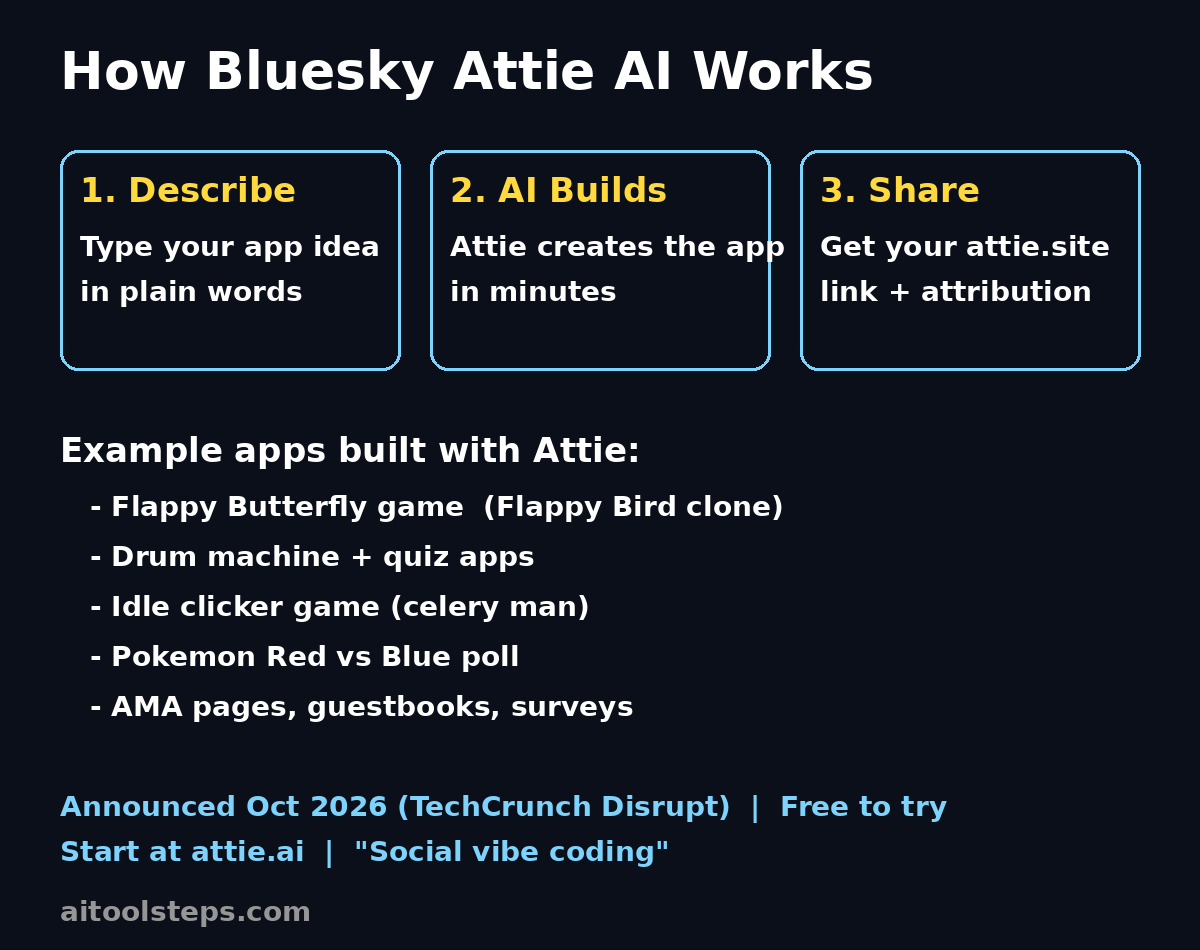
Before you write your first prompt, it helps to know what kinds of projects Attie handles well. Bluesky’s own team has shown off several official examples:
- Flappy Butterfly — a Flappy Bird clone game featuring a butterfly. A perfect example of turning a famous game concept into a playable app with one prompt.
- A drum machine — an interactive music toy you can tap to make beats.
- A quiz — a simple question-and-answer game on any topic you choose.
- An idle clicker game centered on a celery man — yes, really. Idle clicker games are a great fit because their rules are simple: click, earn points, unlock upgrades.
- A simple poll — for example, Pokémon Red vs Pokémon Blue, letting visitors vote for their favorite.
Beyond games and polls, Attie now includes an Attie site builder for small social pages. The official Bluesky Attie account announced this on October 15, 2026, pointing users to attie.ai. With the site builder you can create pages like:
- An AMA (Ask Me Anything) page — let visitors submit questions for you to answer.
- A guestbook — a page where friends and followers can leave messages.
- A survey — collect answers to a few questions from your community.
The pattern is clear: Attie shines at small, social, interactive things. If your idea fits in one screen and is meant to be shared, it is probably a great Attie project. You will find more free AI tool guides like this one at aitoolsteps.com, where we regularly cover beginner-friendly AI tools.
Step 3: Write Your First Prompt
The prompt is the single most important part of the whole process. Your prompt is the description you type that tells Attie what to build. Think of it as giving instructions to a very fast, very literal assistant: the clearer you are, the better the result.
The workflow always follows the same three stages:
- Prompt: You type a description of the app you want in plain language.
- AI builds the app: Attie generates a working app from your description, usually within minutes.
- Share via link: You get a custom attie.site link with your attribution, ready to send to anyone.
Here are a few prompt formulas that work well for beginners:
- For a game: “Make a simple game where [player does X] to [achieve Y]. The theme is [theme]. Keep the controls to one tap or click.”
Example: “Make a simple game where a butterfly flaps through gaps between pipes to score points. One tap makes it flap. Game over screen shows the score and a restart button.” - For a poll: “Make a poll asking [question] with [options]. Show the live vote count and percentages after someone votes.”
Example: “Make a poll asking ‘Pokémon Red or Pokémon Blue?’ with two voting buttons. Show vote totals and percentages after voting.” - For a quiz: “Make a 5-question quiz about [topic] with 4 multiple-choice answers each. Show the final score at the end.”
- For a social page: “Make an AMA page for [your name/topic] where visitors can submit questions through a form, and display submitted questions in a list.”
The golden rule: say what it is, what it does, and what it looks like. Three short sentences beat one vague one every time.
Step 4: Open attie.ai and Create Your App
When you are ready to build, head to attie.ai — this is the official entry point Bluesky’s Attie account has been pointing users to. The exact layout of the site may evolve as the tool grows, so treat these as general steps rather than button-by-button instructions:
- Open the tool in your browser and look for the main creation area — typically a large text box where you type your prompt.
- Paste or type your prompt using one of the formulas from Step 3. Be specific about what the app should do.
- Submit it and give the AI a little time. Attie usually generates the app in minutes, so you do not need to wait long.
- Look for a preview of your generated app so you can see what visitors will see.
Do not worry if your first result is not perfect — that is completely normal, and the next steps show you how to fix it. This iterate-quickly style is the whole point of vibe coding: fast attempts, fast improvements.
Step 5: Preview and Test Your App
Before sharing anything, spend a few minutes actually using your app the way a visitor would. This is the step beginners skip most often, and it makes the biggest difference in quality.
- Click every button. In a game, play at least one full round. In a poll, cast a vote and check that the results display correctly. In a quiz, answer all questions and confirm the score screen works.
- Check it on your phone. Most people will open your attie.site link on mobile, so make sure everything is readable and tappable on a small screen.
- Look for anything confusing. If a button’s purpose is not obvious, or the page feels empty, note it down — you will fix these with follow-up prompts next.
- Try breaking it. Type unexpected input, click rapidly, leave fields blank. Simple apps are usually sturdy, but it is better to find problems before your friends do.
Keep a short list of what you want changed. One clear list of fixes is much easier for the AI to act on than a vague feeling that “something is off.”
Step 6: Refine with Follow-Up Prompts
Here is where Attie really feels like magic. You do not start over when something is wrong — you just describe the change in another prompt, and the AI updates the app. This back-and-forth is the core skill of vibe coding.
Effective follow-up prompts are specific and small. Compare:
- Weak: “Make it better.”
- Strong: “Make the flap button bigger and add a score counter at the top of the screen.”
- Strong: “Change the background to a sunset gradient and add a ‘Play Again’ button on the game-over screen.”
- Strong: “Add a third poll option called ‘Pokémon Yellow’ and show the total number of votes.”
A few practical tips for the refinement loop:
- Change one or two things at a time. Small iterations are easier to evaluate than sweeping rewrites.
- Preview after every change. Catch regressions early, while you remember what you asked for.
- Keep the prompts conversational. You can say things like “now add…” or “change the X to Y” — the AI understands iterative instructions.
- Stop when it is fun, not when it is perfect. Attie apps are lightweight by design. Polish the core experience, then ship it.
Step 7: Publish and Get Your attie.site Link
Once you are happy with your app, it is time to make it live. Look for the publish or share button in the Attie interface — the exact label may change as the product evolves, but the concept stays the same: you finalize the app and receive its public address.
That address is a custom link on the attie.site domain, unique to your app. It also carries attribution showing you as the creator, so anyone who visits knows who built it. Copy the link and keep it somewhere safe — this is the URL you will share everywhere.
Quick pre-publish checklist:
- The app works end-to-end on both desktop and mobile.
- The title and any text on the page are spelled correctly.
- You are happy with the attribution shown as the creator.
- You have tested the link itself in a fresh browser tab.
Step 8: Share Your App and Grow an Audience
An Attie app is only as good as the people who use it, and Attie was built for sharing. Because every app lives at a simple attie.site link, you can drop it anywhere links work:
- Post it on Bluesky. This is the natural home — Attie is a Bluesky product, and the community there loves trying new creations. A short post with your link and one sentence about what it is works best.
- Share it in group chats and communities. Polls and quizzes spread fast in Discord servers, WhatsApp groups, and forums when the topic matches the group’s interests.
- Embed the idea in your content. If you make videos or write posts, link your Attie app as an interactive bonus — “try the quiz I built” is a strong call to action.
- Ask for remixes. Because vibe coding is so accessible, challenge your followers to build their own version and share it back. Community participation is the whole spirit of “vibe coding for your community.”
Watch which apps get the most clicks and votes. That feedback tells you what to build next — double down on the formats your audience actually enjoys.
Step 9: Try These Ready-Made Prompt Ideas
Stuck on what to build first? Here are beginner-friendly ideas, each with a starter prompt you can copy, tweak, and paste into Attie:
- Decision spinner: “Make a fun decision spinner. The user types in 2 to 6 options, presses a big SPIN button, and the wheel animation lands on one random choice with confetti.”
- Flashcard quiz: “Make a flashcard quiz for learning Spanish greetings. Show one card at a time with the English word, tap to flip and reveal the Spanish translation, and track how many the user got right.”
- Mood poll: “Make a poll asking ‘How is your Monday going?’ with five emoji-style mood options from terrible to amazing. Show the percentage breakdown after voting.”
- Simple clicker game: “Make an idle clicker game about a celery man. Clicking earns celery points, and points can buy upgrades that earn points automatically. Show the points total at the top.” (A nod to one of Bluesky’s own official examples.)
- Mini dashboard: “Make a simple personal dashboard with a to-do checklist, a daily water-intake tracker with plus buttons, and a motivational quote that changes each day.”
- Guestbook page: “Make a guestbook page for my blog where visitors can leave their name and a short message, displayed in a scrollable list below the form.”
Each of these follows the same pattern from Step 3: what it is, what the user does, and what the result looks like. Master that pattern and you can build almost anything Attie supports.
Step 10: Avoid These Beginner Mistakes
- Being too vague. “Make a game” will get you something, but “make a one-tap jumping game where a robot dodges obstacles” gets you something you actually want. Specificity is free — use it.
- Expecting a full product. Attie builds lightweight apps, not the next Instagram. If your idea needs user accounts, payments, or a database, it has outgrown Attie. If you need professional help beyond DIY tools, a digital agency like D365A can turn a bigger idea into a full product.
- Skipping the preview. Always test before you share (see Step 5). A broken link shared publicly is hard to un-share.
- Over-editing in circles. If you have refined five times and the app is fun and functional, publish it. You can always make version two.
- Forgetting the audience. The best Attie apps are social: polls people want to vote in, games people want to beat each other’s scores at, pages that invite participation. Build for sharing from the start.
Attie vs Traditional No-Code Tools
How does Attie compare to established no-code platforms like Bubble or Glide? Here is an honest breakdown for beginners:
| Factor | Bluesky Attie | Traditional No-Code (Bubble, Glide) |
|---|---|---|
| Coding needed | None — plain-text prompts only | None, but you must learn a visual editor and its logic system |
| Cost | Free to build and share via attie.site links | Free tiers exist, but publishing and custom features usually need paid plans |
| Build time | Minutes from prompt to shareable app | Hours to days to design, wire up, and test an app |
| Sharing | Instant custom attie.site link with creator attribution | Publish to a subdomain or custom domain; setup required |
| App types | Lightweight social apps: games, polls, quizzes, dashboards, small pages | Full-featured apps: marketplaces, SaaS products, internal tools with databases |
| Best for | Fun, fast, shareable experiments and community engagement | Serious products that need user accounts, payments, and data storage |
The takeaway: Attie is not trying to replace no-code platforms — it is a different category entirely. Use Attie when you want something delightful and shareable today; reach for heavier tools when you are building a real business product. For more comparisons of free AI tools, browse the guides at aitoolsteps.com.
Frequently Asked Questions About Bluesky Attie AI for Beginners
Is Bluesky Attie free to use?
Yes — Attie is presented as a free AI tool from Bluesky. You describe your app in a prompt, and the AI builds it for you at no cost, giving you a shareable attie.site link. As with any new product, it is wise to check attie.ai for the latest terms, since features and policies can evolve after launch.
Do I need a Bluesky account to use Attie?
Attie is a Bluesky product, and the official announcements direct users to attie.ai. The exact sign-in requirements are not fully documented in the launch coverage, so the safest approach is to visit attie.ai and follow whatever sign-in or onboarding flow it shows you. Having a Bluesky account is a reasonable expectation since your creations carry creator attribution.
What kinds of apps can Attie actually build?
Attie focuses on lightweight social apps: simple games (like the official Flappy Butterfly example), interactive toys (like the drum machine), quizzes, polls (like Pokémon Red vs Pokémon Blue), idle clicker games, mini dashboards, and small social pages such as AMA pages, guestbooks, and surveys through the Attie site builder. It is not designed for complex apps needing databases, payments, or user accounts.
Where do my Attie apps live, and who owns the link?
Each app you create gets its own custom link on the attie.site domain, and the app page shows attribution for who created it — you. That link is what you share on social media, in chats, or anywhere else. Keep a personal list of your links so you can find and share your creations later.
Can I edit an app after it is created?
Yes — that is the whole idea behind vibe coding. Instead of starting over, you send follow-up prompts describing what to change (“make the button bigger,” “add a third poll option”), and Attie updates the app. Work in small iterations and preview after each change, as described in Step 6.
Is Attie a replacement for learning to code or using no-code platforms?
No, and it is not trying to be. Attie is best thought of as “social vibe coding” — a fast, fun way to turn ideas into shareable mini-apps. If you outgrow it and need databases, logins, or payments, graduate to a no-code platform like Bubble or Glide, or learn to code. Many creators use Attie to prototype an idea in minutes before investing in a bigger build.
Final Thoughts
Bluesky Attie is one of the most beginner-friendly AI tools to appear in 2026. It removes every traditional barrier between an idea and a working app: no code, no complex editors, no hosting setup — just a sentence describing what you want, and a shareable link a few minutes later.
The skill that matters most is prompting well: say what the app is, what users do with it, and what it should look like. Start with the official-style examples — a poll, a quiz, a tiny game — then refine with follow-up prompts until it feels right. Share your attie.site link with your community, watch what people enjoy, and build more of that.
Social vibe coding is still new, and Attie is evolving fast after its TechCrunch Disrupt debut. The creators who experiment now will understand the medium before everyone else catches up. So open attie.ai, type your first prompt, and build something fun today — your bluesky attie ai for beginners journey starts with a single sentence.
Explore More Free AI Tools
Want to keep building your AI toolkit? Try these free tools next:
- AI Title Generator — generate catchy, SEO-friendly titles for your blog posts, videos, and Attie app pages in seconds.
- Meta Description Generator — write click-worthy meta descriptions that help your pages rank and get clicked.
- AI Rewriter — rewrite and polish your prompts, posts, and articles for better clarity and engagement.
- Keyword Density Checker — check your keyword usage and keep your content SEO-optimized without overstuffing.