

Using AI for Web Development can make many website-building tasks faster and easier. AI can help explain code, create starter HTML and CSS, troubleshoot errors, organize website structure, improve accessibility, generate test data, and explain technical concepts in beginner-friendly language.
However, AI-generated code should not automatically be copied into a live website. Code can contain mistakes, security problems, outdated approaches, or functionality that does not match your requirements.
The best approach is to use AI as a development assistant while keeping testing, security, accessibility, and final decisions under human control.
This beginner-friendly guide explains how to use AI for web development responsibly and effectively.
What Is AI for Web Development?
AI for web development means using artificial intelligence tools to assist with tasks involved in creating, maintaining, and troubleshooting websites.
AI can potentially help with:
- HTML and CSS
- JavaScript explanations
- WordPress troubleshooting
- Code debugging
- Website planning
- Responsive design ideas
- JSON data
- SEO-related technical concepts
- Accessibility checks
- Documentation
- Testing ideas
You do not need to be an experienced developer to benefit from these capabilities.
For beginners, one of AI’s biggest advantages is its ability to explain unfamiliar technical concepts in simpler language.
Why Use AI for Web Development?
Traditional web development often requires searching through documentation, tutorials, forums, and code examples.
Those resources remain important, but AI can make the learning process more interactive.
For example, instead of searching separately for explanations of CSS Flexbox properties, you could ask:
“Explain CSS Flexbox to a beginner and show a simple three-card responsive layout.”
You can then ask follow-up questions about parts you do not understand.
AI can therefore function as a learning and productivity assistant rather than simply a code generator.
Step 1: Define What You Want to Build
Before asking AI for code, clearly define the task.
A vague prompt such as:
“Make a website.”
provides very little useful direction.
A better prompt might be:
“Create a simple responsive three-card section using semantic HTML and CSS. Each card should contain a heading, short description, and button.”
Clear requirements help AI generate more relevant output.
Include important details such as:
- Page purpose
- Required functionality
- Technology
- Layout
- Responsive behavior
- Accessibility requirements
You can refine the result afterward.
Step 2: Use AI to Understand HTML
HTML provides the structure of a webpage.
Beginners can use AI to understand elements such as:
- Headings
- Paragraphs
- Links
- Images
- Forms
- Buttons
- Lists
- Sections
Instead of simply requesting finished code, ask AI to explain what each important element does.
For example:
“Create a simple contact form in HTML and explain each element in beginner-friendly language.”
Understanding the code makes future editing and troubleshooting much easier.
Step 3: Use AI to Learn CSS
CSS controls the visual presentation of webpages.
AI can explain:
- Colors
- Typography
- Padding
- Margins
- Borders
- Flexbox
- Grid
- Responsive layouts
- Media queries
For example:
“Explain the difference between padding and margin with a simple visual example.”
AI can also help identify why a layout is not behaving as expected.
However, always test generated CSS at multiple screen sizes.
Step 4: Use AI to Understand JavaScript
JavaScript adds interactivity to websites.
It can be used for tasks such as:
- Button interactions
- Form validation
- Calculators
- Dynamic content
- User interface behavior
Beginners can ask AI to break complicated JavaScript into smaller pieces.
For example:
“Explain this JavaScript function line by line and tell me what happens when the button is clicked.”
This approach is generally more useful for learning than blindly copying large blocks of code.
Step 5: Debug Code With AI
Debugging is one of the most useful applications of AI for Web Development.
If code is not working, provide:
- The relevant code
- The error message
- Expected behavior
- Actual behavior
For example:
“This JavaScript should calculate a percentage when the button is clicked, but nothing happens. Explain the likely problem and show the smallest correction.”
Specific debugging prompts usually produce better results than simply saying:
“My code does not work.”
Test every proposed correction before using it on a production website.
Step 6: Format and Validate JSON
JSON is commonly used for structured data and communication between applications.
Small formatting mistakes can make JSON invalid.
A JSON Formatter & Validator can help:
- Format compact JSON
- Identify invalid syntax
- Improve readability
- Validate basic JSON structure
AI can then explain what the data represents.
For example, you might use a validator to confirm that the JSON syntax is valid and then ask AI to explain unfamiliar fields.
For sensitive data, remove private information before sharing it with any external service.
Step 7: Understand Robots.txt
A robots.txt file provides crawling instructions for compliant web crawlers.
It can indicate which areas of a website crawlers may or may not access.
A Robots.txt Generator can make creating basic directives easier.
However, robots.txt should not be treated as a security mechanism.
Blocking a URL in robots.txt does not make sensitive content private.
Confidential pages require appropriate access controls.
Also be careful when changing crawling directives because incorrect rules can affect how search engines access parts of a website.
For search-engine-specific implementation details, review Google Search Central’s robots.txt documentation.
Step 8: Create QR Codes for Website Content
QR codes can provide a convenient bridge between physical and digital content.
A QR Code Generator can create a code for:
- Website URLs
- Landing pages
- Contact pages
- Product pages
- Event pages
- Online forms
Before publishing or printing a QR code, scan it with multiple devices to confirm that it points to the intended destination.
If the destination URL changes later, a static QR code containing the old URL will still point to that old address.
Step 9: Use AI for Responsive Design
A website should work across desktop, tablet, and mobile devices.
You can ask AI to review CSS and suggest responsive improvements.
For example:
“Review this three-column card layout and explain how to make it one column on small mobile screens.”
AI may suggest media queries, Flexbox adjustments, or CSS Grid changes.
Do not assume the generated solution works on every device.
Preview and test the page at different viewport sizes.
Step 10: Use AI for Accessibility
Accessibility helps make websites usable by more people, including users with disabilities.
AI can help explain concepts such as:
- Semantic HTML
- Keyboard navigation
- Form labels
- Heading structure
- ALT text
- Focus states
- Color contrast
For example:
“Review this HTML form and identify potential accessibility problems.”
Treat AI suggestions as an initial review rather than a complete accessibility audit.
Automated tools and human testing remain important.
Developers can also review the W3C Web Accessibility Initiative for authoritative accessibility guidance.
Step 11: Use AI to Explain Error Messages
Technical error messages can be difficult for beginners.
Instead of immediately changing random settings, provide AI with the exact error and relevant context.
For example:
“I receive this JavaScript console error when submitting my form. Explain what it means before suggesting changes.”
This encourages a troubleshooting process based on understanding rather than guesswork.
Do not include passwords, API keys, database credentials, or other secrets when sharing logs or error messages.
Step 12: Protect API Keys and Credentials
When using AI for Web Development, security must remain a priority.
Never expose secret credentials in public front-end code when they are intended to remain private.
Sensitive information can include:
- API keys
- Database passwords
- Authentication tokens
- OAuth secrets
- Private access keys
For services requiring secret credentials, requests are commonly handled on a secure server-side environment.
If a secret is accidentally exposed publicly, simply deleting it from visible code may not be sufficient. Depending on the service, the credential may need to be revoked or regenerated.
Step 13: Review AI-Generated Code
AI-generated code can look professional while still containing problems.
Before using it, review:
- Input validation
- Error handling
- Security
- Accessibility
- Browser compatibility
- Performance
- Dependencies
- Responsive behavior
Also check whether external libraries suggested by AI are still maintained and appropriate for the project.
Generated code should be treated like code received from any other unverified source: inspect and test it first.
Step 14: Test Before Publishing
Do not make major AI-generated code changes directly on an important live website without testing.
Depending on your setup, you may use:
- Local development
- Staging environments
- Backups
- Version control
- Browser developer tools
Test the specific feature first.
Then check whether the change affected anything else.
A fix for one component can sometimes introduce a problem elsewhere.
Step 15: Use AI to Improve Website Performance
AI can help explain performance reports and suggest areas worth investigating.
For example, you could provide a non-sensitive performance recommendation and ask:
“Explain what this performance warning means and what I should check first.”
Potential areas include:
- Large images
- Excessive scripts
- Unused CSS
- Font loading
- Caching
- Third-party resources
Do not implement every generated optimization automatically.
Performance changes should be tested because some aggressive optimizations can break functionality or visual design.
Step 16: Verify Technical Information
AI systems can generate outdated or incorrect technical information.
Web technologies change over time.
Browser support changes.
WordPress changes.
APIs change.
Libraries release new versions.
Whenever a technical decision matters, compare the AI response with current official documentation.
For web standards, authoritative documentation and standards resources can provide valuable confirmation.
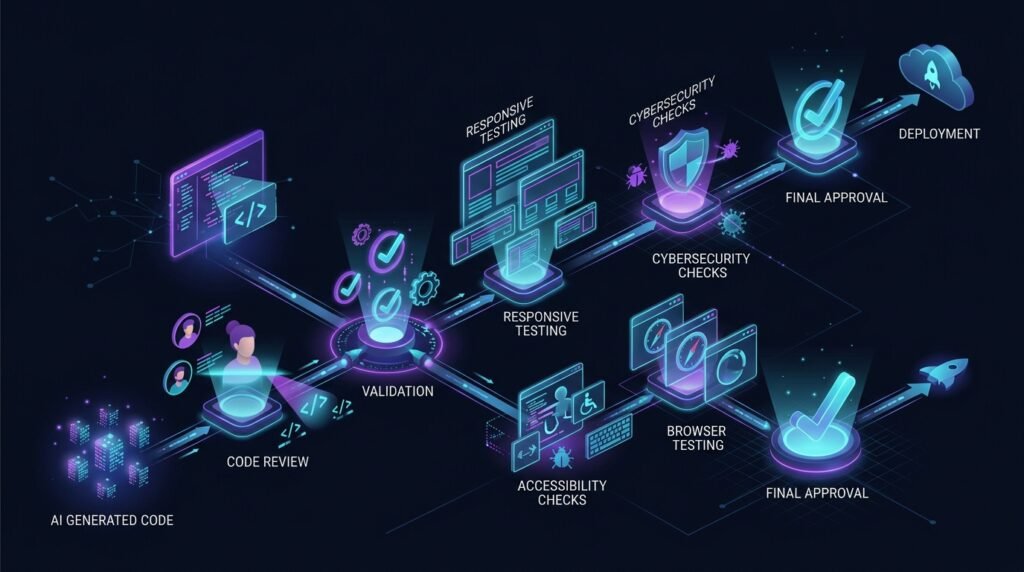
AI for Web Development: A Simple Workflow
A practical workflow is:
Define Task → Ask AI → Understand the Code → Validate → Test → Check Security → Check Accessibility → Test Responsive Design → Review → Publish
The important step is not simply generating code.
It is understanding and validating what the code does before placing it on a live website.
This approach makes AI useful without giving it uncontrolled responsibility for your website.
AI Coding vs Dedicated Developer Tools
AI and dedicated tools serve different purposes.
For example:
A JSON Formatter & Validator is ideal for checking JSON syntax.
A Robots.txt Generator can help create basic crawler directives.
A QR Code Generator performs a specific QR-generation task.
AI is more useful when you need an explanation, debugging assistance, planning, or help understanding how different components work together.
Using the simplest appropriate tool often produces a faster and more predictable workflow.
Common AI Web Development Mistakes
Common mistakes include:
- Copying code without understanding it
- Publishing untested code
- Exposing API keys
- Ignoring error handling
- Ignoring mobile layouts
- Assuming generated code is secure
- Installing unnecessary libraries
- Making changes without backups
- Using outdated technical information
- Treating robots.txt as security
- Ignoring accessibility
AI can accelerate development, but it can also accelerate mistakes if every suggestion is accepted automatically.
Frequently Asked Questions
Can beginners use AI for web development?
Yes. AI can explain HTML, CSS, JavaScript, errors, and web-development concepts in beginner-friendly language. Generated code should still be understood and tested before publication.
Can AI build an entire website?
AI can assist with many components of a website, but a production website still requires decisions about design, functionality, security, accessibility, hosting, testing, maintenance, and content.
Is AI-generated code safe?
Not automatically. AI-generated code can contain vulnerabilities, mistakes, outdated techniques, or inappropriate dependencies. Review and test it before deployment.
Should I share API keys when asking AI for coding help?
Avoid providing real secret credentials. Use placeholders such as YOUR_API_KEY when demonstrating code unless a specific secure workflow genuinely requires otherwise.
Final Thoughts
Using AI for Web Development can make coding and website management much easier for beginners.
AI can explain unfamiliar concepts, help debug code, suggest responsive layouts, organize development tasks, and assist with technical learning.
Dedicated tools can handle predictable tasks such as JSON validation, QR code generation, and basic robots.txt creation.
The best workflow combines both.
Use AI for assistance and explanation, use specialized tools when they are more appropriate, protect credentials, test every important change, and verify technical information before deploying it.