

Using AI for productivity can help you organize tasks, plan your day, summarize information, brainstorm ideas, create checklists, improve communication, and reduce time spent on repetitive work. The goal is not to automate every part of your life but to use AI where it genuinely makes everyday tasks easier.
AI tools are particularly useful when you already know what you want to accomplish but need help organizing the process.
However, AI can make mistakes, misunderstand instructions, or provide outdated information. Important results should therefore be reviewed before you act on them.
In this beginner-friendly guide, you’ll learn practical ways to use AI for productivity while keeping yourself in control of the final decisions.
What Is AI for Productivity?
AI for productivity means using artificial intelligence to complete or assist with everyday tasks more efficiently.
These tasks can include:
- Planning your day
- Creating to-do lists
- Summarizing documents
- Brainstorming ideas
- Drafting emails
- Organizing notes
- Creating checklists
- Breaking large projects into smaller tasks
- Rewriting text
- Performing basic calculations
- Learning unfamiliar concepts
- Preparing meeting notes
AI works best when you give it a specific task and enough context to understand what you need.
Why Use AI for Everyday Tasks?
Many small tasks take only a few minutes individually but consume significant time when repeated throughout the week.
For example, you might spend time organizing notes after a meeting, creating a weekly task list, rewriting an email, or turning a large project into manageable steps.
AI can accelerate the first draft of these tasks.
Instead of starting with an empty page, you receive a structure that you can review and customize.
This allows you to spend more time on decisions that actually require your attention.
Step 1: Start With a Clear Goal
Before using AI, decide exactly what you want to accomplish.
A vague request such as:
“Make me productive.”
does not provide enough useful context.
A better request would be:
“Help me organize five work tasks into a realistic plan for today. Separate urgent tasks from tasks that can wait.”
The second prompt gives AI a clear objective.
Whenever possible, describe the desired outcome rather than simply naming the general topic.
Step 2: Turn Large Projects Into Smaller Tasks
Large projects often feel difficult because they contain many separate activities.
AI can help break a project into manageable steps.
For example:
“Break the process of launching a small business website into clear tasks. Group them into planning, design, content, testing, and launch.”
You can then review the list and remove anything that does not apply.
This approach can be useful for website projects, content campaigns, research assignments, events, personal projects, and many other activities.
Step 3: Create a Daily Task List
AI can organize a collection of tasks into a clearer daily plan.
Provide the tasks, available time, and any important deadlines.
For example:
“I have six hours available today. Help me organize these seven tasks into a realistic schedule. Prioritize the two tasks due today and include short breaks.”
Review the schedule before following it.
AI does not automatically know how long every task will take you personally, so adjust unrealistic estimates.
Step 4: Prioritize Tasks
When everything appears important, AI can help you evaluate tasks using criteria you define.
You could ask:
“Organize these tasks by urgency and impact. Explain why each task is placed in its category.”
This is more useful than asking AI to decide what matters without context.
You remain responsible for priorities because you understand deadlines, clients, responsibilities, and consequences better than the AI does.
Step 5: Create Useful Checklists
Checklists can make repetitive processes easier to manage.
AI can generate a starting checklist for tasks such as:
- Publishing a blog post
- Reviewing a webpage
- Preparing for a meeting
- Packing for a trip
- Checking a document
- Launching an online tool
- Preparing a presentation
For example:
“Create a pre-publishing checklist for a blog article covering proofreading, links, images, SEO basics, mobile review, and final testing.”
Review the checklist and customize it for your actual workflow.
Once refined, the same checklist can be reused.
Step 6: Summarize Long Information
AI can help turn lengthy material into a shorter overview.
You might ask it to summarize:
- Meeting notes
- Reports
- Articles you have permission to provide
- Research notes
- Instructions
- Your own documents
A useful prompt could be:
“Summarize these notes into five key points and create a separate list of actions that need to be completed.”
This can make large amounts of information easier to review.
However, important details can disappear during summarization, so check the original material when accuracy matters.
Step 7: Draft Everyday Emails
AI can help create first drafts of routine emails.
For example:
“Write a concise professional email asking a client to confirm whether the latest website design is approved. Keep the tone polite and direct.”
You can then personalize the draft before sending it.
AI is particularly useful when you know what you want to say but are unsure how to structure it.
Always verify names, dates, amounts, attachments, and other important details before sending a generated email.
Step 8: Organize Notes
Unstructured notes can become difficult to use later.
AI can help organize them into categories, summaries, action items, or questions.
For example:
“Organize these project notes into decisions, pending tasks, questions, and future ideas.”
This can turn a messy collection of information into something easier to review.
When notes contain private or confidential information, consider what you are sharing before entering them into an AI service.
Step 9: Brainstorm Ideas Faster
Brainstorming is one of the simplest ways to use AI for productivity.
You can ask for ideas related to:
- Blog topics
- Business names
- Marketing campaigns
- Social media posts
- Video topics
- Project improvements
- Presentation themes
- Questions to research
The first ideas may not be the strongest ones.
Ask AI to generate alternatives or approach the topic from different perspectives.
Use the suggestions as inspiration rather than assuming every idea is worth pursuing.
Step 10: Use AI Productivity Tools Only When Needed
Not every productivity task requires artificial intelligence.
Sometimes a dedicated calculator is faster and more predictable.
For example, a Percentage Calculator can quickly calculate percentage increases, decreases, or portions without requiring a conversational AI prompt.
The same principle applies throughout a productive workflow.
Use AI when reasoning, language, organization, or brainstorming is helpful. Use a simple deterministic tool when you only need a straightforward calculation.
Choosing the right tool can be more productive than using AI for everything.
Step 11: Calculate Age From a Date of Birth
Age calculations can become slightly inconvenient when you need an exact result based on a date of birth and a specific date.
An Age Calculator can perform this calculation quickly.
This can be useful for forms, records, planning, eligibility checks, or general informational purposes.
However, official age-based eligibility requirements should always be checked with the relevant institution or authority.
A calculator can determine an age; it cannot decide whether someone satisfies a particular legal or organizational rule.
Step 12: Generate Strong Random Passwords
Password security is another area where a specialized tool can be more appropriate than asking a conversational AI to invent a password.
A Random Password Generator can create passwords using randomized characters according to selected settings.
For important accounts, use unique passwords rather than reusing the same password across multiple services.
A reputable password manager can also help generate and securely store unique credentials.
Never paste existing passwords, authentication codes, recovery codes, or other login secrets into an AI conversation unnecessarily.
For additional password security guidance, you can review CISA’s recommendations for creating and managing strong passwords.
Step 13: Use AI to Prepare for Meetings
AI can help organize a meeting before it happens.
For example:
“Create a 30-minute meeting agenda for reviewing a website project. Include progress, unresolved problems, next priorities, responsibilities, and deadlines.”
After the meeting, AI can also help organize your own notes into actions.
A useful structure might include:
Decision → Responsible Person → Deadline → Next Action
This makes it easier to understand what should happen after the conversation ends.
Step 14: Create Reusable Templates
If you perform the same task regularly, AI can help turn the process into a reusable template.
Examples include:
- Client onboarding checklist
- Article brief
- Weekly planning template
- Meeting agenda
- Project review checklist
- Content calendar structure
- Quality-control checklist
Once the template is good, save it rather than asking AI to recreate it every time.
Reusable systems can save more time over the long term than repeatedly generating new versions.
Step 15: Improve Your Prompts
AI becomes more useful when your instructions are specific.
Instead of:
“Plan my work.”
try:
“Organize these eight tasks into a four-hour work session. Put the two deadline-sensitive tasks first, group similar activities together, and leave 20 minutes at the end for review.”
Useful prompt details can include:
- Goal
- Context
- Available time
- Priority
- Desired format
- Audience
- Constraints
Clear prompts reduce unnecessary back-and-forth and make generated results easier to use.
Step 16: Review AI Output Before Acting
Productivity is not simply about completing tasks faster.
Completing the wrong task faster does not help.
Before acting on AI-generated output, check whether:
- The information is accurate
- The priorities make sense
- Important tasks are missing
- Deadlines are correct
- The plan is realistic
- Sensitive information is protected
- The result actually supports your goal
A short review can prevent wasted time later.
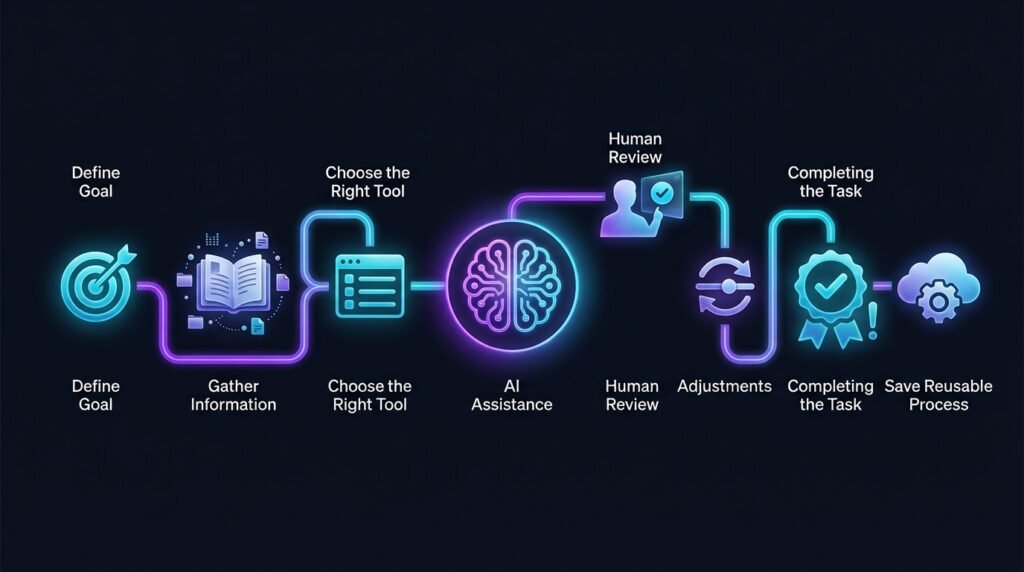
AI for Productivity: A Simple Workflow
A practical workflow can look like this:
Goal → Gather Information → Choose the Right Tool → AI Assistance → Review → Adjust → Complete the Task → Save Reusable Processes
Start with the result you want.
Next, decide whether the task actually needs AI or whether a dedicated tool can handle it more efficiently.
Use AI for planning, language, organization, and brainstorming.
Review the output, make necessary adjustments, and complete the task.
If the process is likely to happen again, turn it into a reusable checklist or template.
AI Tools vs Traditional Productivity Tools
AI tools and traditional productivity tools are not competitors in every situation.
A calendar is better suited to storing appointments.
A calculator is better suited to predictable arithmetic.
A password manager is designed to securely manage credentials.
A spreadsheet is useful for structured data.
AI becomes particularly valuable when you need help understanding, organizing, drafting, summarizing, or brainstorming information.
A productive workflow uses each tool for the job it handles best.
Protect Your Privacy When Using AI
Productivity tasks can involve sensitive information.
Avoid unnecessarily entering:
- Passwords
- API keys
- Authentication codes
- Bank details
- Private customer information
- Confidential business information
- Sensitive personal documents
When possible, anonymize examples.
Instead of providing real customer details, use placeholders such as “Client A” when the identity is not necessary for the task.
Efficiency should not come at the expense of privacy.
Common AI Productivity Mistakes
One mistake is using AI for tasks that would be faster with a simple calculator or conventional tool.
Another is spending more time refining prompts than the original task would have taken.
Users may also create extremely detailed schedules that are impossible to follow.
Other common problems include trusting summaries without checking important details, sharing unnecessary sensitive information, and allowing AI to decide priorities without sufficient context.
AI should simplify work, not create another layer of unnecessary work.
Frequently Asked Questions
Can AI improve productivity?
AI can make certain tasks faster, particularly planning, summarizing, brainstorming, drafting, and organizing information. Its usefulness depends on the task and how effectively it is used.
Can AI create daily schedules?
Yes. AI can organize tasks into a suggested schedule based on the information you provide. You should adjust the plan according to realistic task durations and changing priorities.
Should I use AI for every productivity task?
No. Simple calculators, calendars, spreadsheets, password managers, and other specialized tools may be better suited to specific tasks.
Is it safe to give AI my passwords?
You should avoid sharing passwords, authentication codes, API keys, recovery codes, or similar secrets unnecessarily. Use appropriate secure tools for managing credentials.
Final Thoughts
Using AI for productivity is most effective when it helps you spend less time on repetitive work and more time on meaningful decisions.
AI can organize tasks, summarize information, draft routine communication, create checklists, brainstorm ideas, and help turn large projects into manageable steps.
At the same time, simple dedicated tools may be better for calculations, dates, passwords, and other predictable tasks.
Choose the right tool, protect sensitive information, review important results, and save successful processes for future use.
That creates a practical productivity system in which AI assists your work instead of unnecessarily complicating it.