

Using AI for social media content can make brainstorming, caption writing, hashtag research, content planning, and repurposing much faster. Instead of starting every post from a blank screen, AI can help you develop ideas and turn them into usable drafts.
However, successful social media content still requires human judgment. AI does not automatically understand your audience, brand personality, current trends, or business objectives unless you provide enough context.
In this beginner-friendly guide, you’ll learn how to use AI for social media content step by step while keeping your posts useful, relevant, and authentic.
What Does AI for Social Media Content Mean?
AI for social media content means using artificial intelligence tools to assist with different stages of creating and managing social posts.
AI can help you brainstorm topics, create caption drafts, generate hashtag ideas, develop video concepts, rewrite content for different platforms, and build simple content calendars.
For example, instead of spending time creating ten caption variations manually, you can provide your topic, audience, platform, and preferred tone to an AI tool and ask for several options.
You can then review the suggestions and select or edit the ones that best represent your message.
The important point is that AI should support your creative process rather than automatically control everything you publish.
Why Use AI for Social Media?
Creating content consistently can take a significant amount of time.
You need ideas, captions, visuals, videos, calls to action, and a publishing plan. If you manage several platforms, the workload can become even larger.
AI can help reduce some of this repetitive work.
For example, one detailed idea could be transformed into an Instagram caption, LinkedIn post, short-video concept, and several alternative hooks.
This gives you more time to focus on strategy, audience engagement, creative decisions, and reviewing what actually performs well.
Step 1: Define Your Social Media Goal
Before asking AI to create anything, decide what the post should accomplish.
Common goals include:
- Educating your audience
- Increasing engagement
- Promoting a product or service
- Sharing an announcement
- Driving visitors to a website
- Building brand awareness
- Starting a conversation
- Answering a common customer question
Your goal affects the type of content you should create.
A post designed to explain a difficult concept will be different from one announcing a new product.
Tell the AI what you want the post to achieve instead of simply asking it to “write a social media post.”
Step 2: Tell AI About Your Audience
Your audience is another important part of a useful prompt.
Imagine you want to create content about AI productivity tools.
Instead of asking:
“Write an Instagram caption about AI productivity.”
Try:
“Write three Instagram caption ideas introducing simple AI productivity tools to freelancers who are new to artificial intelligence. Keep the tone friendly and educational.”
The second prompt tells the AI who the content is for and how it should sound.
You can provide additional information such as the audience’s experience level, interests, problems, industry, or reason for following your account.
Step 3: Brainstorm Social Media Content Ideas
AI is particularly useful when you need fresh ideas.
For example:
“Give me 20 social media content ideas for a website that provides free AI, SEO, text, image, and productivity tools. Group the ideas into tutorials, tips, questions, demonstrations, and short videos.”
You do not need to publish every suggestion.
Review the list and choose ideas that fit your audience, platform, expertise, and current content strategy.
AI can also help you find new angles for topics you have already covered.
If you published a detailed blog article, for example, ask AI to identify several useful social media ideas based on the article.
Step 4: Generate Better Social Media Captions
Writing captions repeatedly can become time-consuming.
AI can create several variations from the same idea.
For example:
“Create five short social media captions promoting a free online image compressor. Target website owners and bloggers. Keep the tone helpful rather than overly promotional and include a simple call to action.”
You can then compare the versions and edit the best one.
An AI Caption Generator can also help you quickly brainstorm caption variations for different topics.
Always review generated captions before publishing. Make sure claims are accurate and the wording matches your actual brand voice.
Step 5: Generate Relevant Hashtag Ideas
Hashtags can help categorize content and may support discovery on platforms where hashtags are relevant.
AI can generate initial hashtag ideas based on a topic, niche, or audience.
For example:
“Suggest relevant hashtags for a beginner tutorial about using AI tools for content creation. Group them into broad, niche, and topic-specific hashtags.”
You can also use an AI Hashtag Generator to quickly create hashtag ideas from a topic.
Do not assume every generated hashtag is useful or currently popular.
Review the suggestions, remove irrelevant hashtags, and consider how hashtags are actually used on the platform where you plan to publish.
Step 6: Create Ideas for Short-Form Videos
Short videos are an important content format across many social platforms.
AI can help brainstorm concepts, hooks, talking points, and simple video structures.
For example:
“Give me 10 short-video ideas demonstrating useful free online tools for freelancers. Each video should be suitable for approximately 30 to 60 seconds.”
You could then select one idea and ask AI to develop a basic structure:
Hook → Problem → Demonstration → Result → Call to Action
The final video should still reflect your own presentation style and actual experience with the topic or tool.
Step 7: Generate YouTube Content Ideas
If YouTube is part of your content strategy, AI can also help when you are unsure what to create next.
You might ask:
“Suggest 15 beginner-friendly YouTube video ideas about practical AI tools for everyday work.”
A YouTube Video Idea Generator can provide another quick way to brainstorm topics.
Once you select an idea, research whether it is genuinely relevant to your audience before investing time in producing the video.
Step 8: Create Better YouTube Titles
A video title should clearly explain what the viewer can expect.
AI can generate multiple title variations based on your video topic.
For example:
“Create 10 clear YouTube title ideas for a beginner tutorial showing how to use an AI title generator. Avoid misleading or exaggerated claims.”
A YouTube Title Generator can also help you brainstorm alternatives.
Review the final title yourself. A strong title should create interest without promising something the video does not deliver.
Step 9: Draft YouTube Descriptions
AI can help create a starting description for a video.
Provide the video topic, important points, audience, and any links or calls to action you want included.
For example:
“Create a concise YouTube description for a beginner tutorial demonstrating how to compress images online. Summarize what viewers will learn and leave a natural space for the tool link.”
A YouTube Description Generator can also help create a structured first draft.
Check all generated information and links before publishing.
Step 10: Repurpose Existing Content
One of the most useful applications of AI for social media content is repurposing.
Suppose you have published a detailed 2,000-word blog article.
You could ask AI to turn the core information into:
- Five social media posts
- Three short-video ideas
- A LinkedIn post
- An Instagram caption
- Several FAQ posts
- A YouTube outline
- A short newsletter summary
This can extend the value of your original work.
However, each version should be adapted to its platform instead of copying the same text everywhere.
A detailed blog paragraph may need to become a short hook and three simple points for Instagram, while LinkedIn may allow a more detailed explanation.
Step 11: Build a Simple Content Calendar
AI can help organize ideas into a basic publishing schedule.
For example:
“Create a seven-day social media content plan for an AI tools website. Include one educational post, tutorial, question, tool demonstration, productivity tip, short-video idea, and weekly recap.”
Use the generated calendar as a starting point.
Adjust it based on your resources, audience behavior, current campaigns, and actual performance.
Publishing more frequently is not automatically better. A realistic schedule that you can maintain is usually more useful than an ambitious plan you abandon after a few weeks.
Step 12: Adapt Content for Different Platforms
The same message may need different formatting depending on where it is published.
A LinkedIn post may contain more professional context.
An Instagram caption may be shorter and more visual.
A short-video platform may require a strong opening hook and fast pacing.
AI can help adapt an original message.
For example:
“Rewrite this announcement for LinkedIn, Instagram, and a 30-second short-video script. Keep the core message consistent but adapt the format and tone for each platform.”
Review every version before publishing because platform audiences and conventions can differ.
Step 13: Maintain a Consistent Brand Voice
If every AI-generated post sounds completely different, your social presence may feel inconsistent.
Before generating content, define a few simple brand characteristics.
For example:
“Use a clear, helpful, beginner-friendly, and professional tone. Avoid exaggerated claims, excessive emojis, and complicated technical language.”
You can reuse these instructions when generating future drafts.
Providing examples of your preferred writing can also help the AI understand the style you want.
However, continue editing the output yourself. Brand voice is more than a prompt; it develops through consistent human decisions.
Step 14: Review Every AI-Generated Post
Never assume generated content is ready simply because it reads well.
Before publishing, check:
- Factual accuracy
- Product claims
- Dates
- Links
- Spelling and grammar
- Tone
- Relevance
- Calls to action
- Hashtags
- Platform suitability
Also check whether the post genuinely gives the audience something useful.
A polished caption that provides no meaningful information may still perform poorly or weaken audience trust.
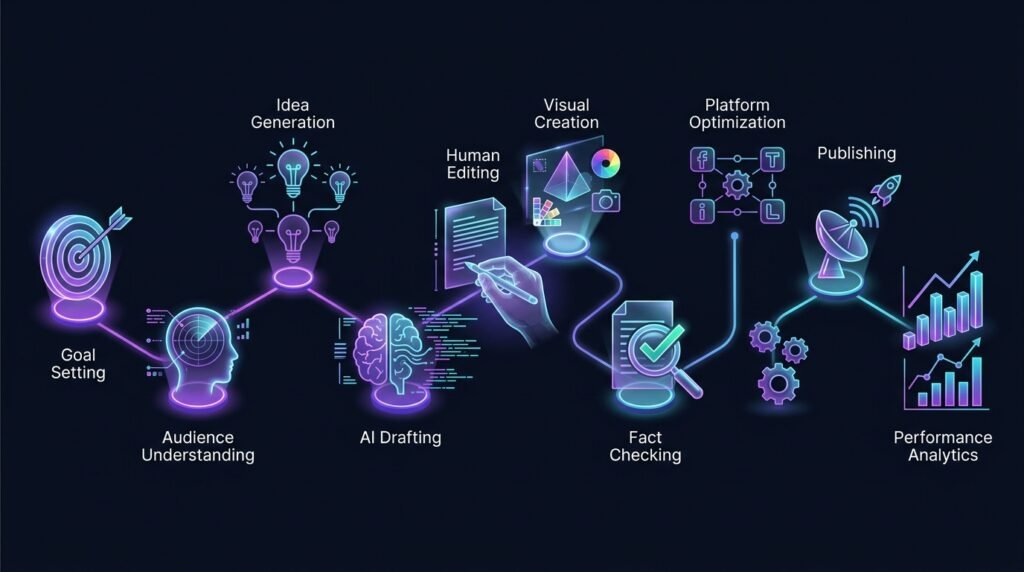
AI for Social Media Content: A Simple Workflow
A practical beginner workflow could be:
Goal → Audience → Idea → AI Draft → Human Editing → Visual → Fact-Check → Platform Optimization → Publish → Review Performance
Start by deciding what you want to achieve and who you want to reach.
Use AI to accelerate brainstorming and drafting.
Then apply human judgment to improve the message, check facts, and make sure the post reflects your brand.
After publishing, review actual performance instead of assuming the AI-generated approach was successful.
Engagement, clicks, watch time, comments, and other relevant metrics can help you understand what your audience prefers.
Common Mistakes When Using AI for Social Media
One mistake is publishing every AI-generated suggestion without editing it.
Another is using the same generic tone for every platform.
Excessive hashtags, unrealistic claims, repetitive captions, and constant promotional posts can also make social content less useful.
Avoid using AI to imitate another creator too closely or to generate misleading information.
It is also important not to share confidential business information, passwords, API keys, customer data, or other sensitive information unnecessarily when creating prompts.
AI should help improve your workflow without reducing the care you put into what your audience sees.
Does AI Replace Social Media Managers or Creators?
AI can automate or accelerate parts of social media work, but social media involves more than generating text.
Understanding audience reactions, responding to communities, developing creative campaigns, analyzing performance, handling sensitive situations, and making strategic decisions all require context and judgment.
AI is better viewed as another tool in the workflow.
A creator might use it to brainstorm 20 ideas in minutes, but a person still decides which idea is worth producing and how it should be presented.
How to Get Better Results From Social Media AI Tools
Clear prompts generally produce more useful results.
Include the platform, audience, objective, topic, tone, format, and important limitations when they matter.
Instead of:
“Write a caption about SEO.”
Try:
“Write three LinkedIn captions explaining why new website owners should check their page titles before publishing. Target beginners, keep the tone educational, and avoid exaggerated SEO promises.”
You can then ask for shorter, more conversational, or more detailed versions.
Learning how to write better prompts makes it easier to use AI across social media, writing, SEO, and other tasks.
For broader guidance on managing risks associated with artificial intelligence, the NIST AI Risk Management Framework provides a useful reference.
Frequently Asked Questions
Can I use AI to create social media posts?
Yes. AI can assist with ideas, captions, hashtags, content calendars, video concepts, and repurposing. Review and edit generated content before publishing.
Can AI create Instagram captions?
Yes. AI can generate caption ideas based on your topic, audience, objective, and preferred tone. You should customize the final caption to match your brand and actual post.
Can AI generate social media hashtags?
Yes. AI can suggest hashtags related to a topic, but you should review their relevance and suitability for the platform rather than automatically using every suggestion.
Should I publish AI-generated social media content without editing?
It is better to review generated content first. Check accuracy, tone, relevance, claims, links, hashtags, and whether the content genuinely fits your audience.
Final Thoughts
Using AI for social media content can reduce the time spent brainstorming, drafting captions, generating hashtag ideas, planning videos, and adapting content for different platforms.
The best results come from combining AI speed with human creativity and judgment.
Give the AI clear instructions, review what it produces, add your own perspective, and pay attention to how your audience actually responds.
Over time, AI can become a useful part of your social media workflow without taking control of the strategy or personality behind your content.